
×

Classes of IP Addresses

Classes of IP Addresses

There are following five classes of IP Addresses:

  • Class A – It is used for allocating an IP address.
  • Class B - It is used for allocating an IP address.
  • Class C – It is used for allocating an IP address.
  • Class D – It is used for multicasting.
  • Class E – It is reserved for experimental use.

Class A Network Addresses

In Class A network address, the one byte (8-bits) is assigned to the network address, and the remaining three bytes are used for host addresses.

The class A address format is as follows:

Network.Host.Host.Host

           0NNNNNNN.HHHHHHHH.HHHHHHHH.HHHHHHH

Where –

0 = Leading bit.

It is fixed and used to identify class A network.

N = Network Address

H = Host Address

Class A network address range:

00000000 = 0

01111111 = 127

  • Total number of addresses in class A is 231
  • Class A address has 1 byte (8-bits) for the network address, where 0 is fixed by default, and remaining 7 bits are used to represent network address.

Therefore, some unique network addresses in class A are 27 = 128.

  • Class A address has 3 bytes (24-bits) for the host address.

Therefore, the number of unique Host addresses in class A 224 = = (16777216).

  • Number of valid Networks addresses in class A =  27-2

                                                     = 128-2

                                                     = 126

Range of valid network addresses in class A are1.0.0.1 to 126.255.255.254.

  • Number of valid Host addresses in class A = 224-2

                                              = 16777216-2

                                              = 16777214

Range of valid host addresses in class A are 10.0.0.1 to 10.255.255.254.

Note: We have subtracted 2 because the first byte of network address (all 0s) is reserved for the default route, and last byte address (all 1s) is reserved for loopback and broadcast address. We cannot assign the first and last address to any user.

Class B Network Addresses

In Class B network address, the first 2 bytes (16-bits) are assigned to the network address, and the remaining 2 bytes (16-bits) are assigned to host address.

The class B address format is as follows:

      Network.Network.Host.Host

              10NNNNNN.NNNNNNNN.HHHHHHHH.HHHHHHHH

Where –

10 = Leading bit

It is fixed and used to identify the class B network.

 N = Network Address

 H = Host Address

Class B Address Range:

                      10000000 = 128

10111111 = 191

  • Total number of addresses in class B are 230
  • Class B address has 2 bytes (16-bits) for the network address, where 10 is fixed by default, and remaining bits used for the network address.
  • Therefore, the number of unique network addresses in class B are 214 = 16,384 .
  • Class B address has 2 bytes (16-bits) for the host address.
  • Therefore, the number of unique host addresses in class B are 216  = 65,536.
  • Number of valid Network addresses in class A = 214  -2

                           = 16,384-2

                  = 16,382

  • Range of valid network addresses in class B are 128.1.0.1 to 191.255.255.254.
  • Number of valid Host in class B= 224 -2

                                            = 65,536-2

                                             = 65,534

  • Range of valid host addresses in class B are 172.16.0.1 to 172.16.255.254.

Class C Network Addresses

In Class C network address, the first 3 bytes are assigned to the network address, and the remaining 1 byte is used for the host address.

The class C address format is as follows:

Network.Network.Network.Host

              110NNNNN.NNNNNNNN.NNNNNNNN.HHHHHHHH

Where –

110 = Leading bit

  N = Network Address

  H = Host Address

Class C Address Range

                  11000000 = 192

11011111 = 223

  • Total number of addresses in class C is 229
  • Class A address has 3 bytes (24-bits) for the network address, where 110 is fixed by default, and remaining bits used for the network address.

Therefore, the number of unique network addresses in class C is 221 = 2,097,152.

  • Class C address has 1 byte (8-bits) for the host address.

Therefore, the number of unique host addresses in class C is

 28= 256

  • Number of valid Networks in class C= 221 -2

                                                     = 16,384-2

                                                     = 16,382

  • Range of valid network addresses in class C are 192.0.1.1 to 223.255.254.254
  • Number of valid Host addresses in class C= 28-2

                                                           = 256-2

                                                           = 254

  • Range of valid host addressesin class C are 192.168.100.1 to 192.168.100.254

Class D Network Addresses

  • Class D network address begins with binary 1110, which is fixed for identifying the Class D network.
  • The range of Class D network is 224 to 239.
  • Class D address is used for multicast addresses.

Class E Network Address

  • Class E network address begins with binary 1111, which is fixed for identifying the Class E network.
  • The range of class E network is 240 to 255.
  • Class E network addresses are reserved for experimental use.

Reserved IP Addresses:

There are some reserved IP addresses, which are given below:

  • The network address of all 0s.
  • The network address of all 1s.
  • Network 127.0.0.1
  • Node address of all 0s.
  • Node address of all 1s.
  • Entire IP address set to all 0s, i.e. 0.0.0.0.
  • Entire IP address set to all 1s, i.e., 255.255.255.255.

We can summarize all the classes of IP addresses in the below table:
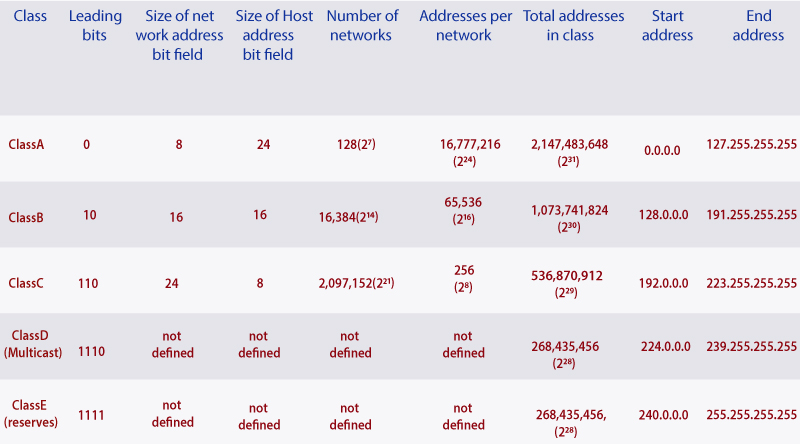
classes of ip address

Related Topics

Spanning Tree Protocol (STP)

Spanning Tree Protocol (STP) is a Data link layer (layer 2) protocol that is used to discover and maintain a valid loop-free path for the switched network. It is also used to analyze...

4 minutes read.

TCP/IP and DoD Model

Introduction to TCP/IP Model TCP/IP model was introduced in 1974. TCP/IP stands for Transmission Control Protocol/Internet Protocol. TCP/IP is an underlying communication protocol used by internet and commercial networks. The Transmission Control Protocol (TCP)...

10 minutes read.

Configuring OSPF

Consider the topology given below – The initial IP configuration table is given below: Devices Interface IP address Router1 ...

2 minutes read.

Open Shortest Path First (OSPF) Basics

Open Shortest Path First(OSPF) is a classless routing protocol. It uses a link-state routing protocol, which means that the routers exchange topology information with their nearest neighbors. The OSPF maintains three separate tables that...

3 minutes read.

Cisco IOS Overview

Cisco IOS Overview Cisco Internetwork Operating System (IOS) is a multitasking operating system which controls all functions of Cisco routers and switches. Willaim Yeager wrote the first IOS in 1986.It is used to allocate resources and manages...

2 minutes read.

Variable Length Subnet Masks (VLSMs)

Variable Length Subnet Masks (VLSMs) A VLSM is a process of allocating IP addresses to the subnets according to the user’s need.VLSM is introduced to avoid the wastage of IP addresses.It allows you to...

3 minutes read.

Saving, Erasing, and Verifying Configuration

Saving Configuration Cisco device store commands information into two configuration files: running configurationstartup configuration running configuration In the running configuration, you can manually save the data from RAM to NVRAM by typing the copy running-config startup-config command. When you...

3 minutes read.

CCNA Tutorial

What is CCNA? CCNA stands for Cisco Certified Network Associate. It is a certification course offered by Cisco. CCNA improves your understanding of the internet working and how different network topologies work...

3 minutes read.

Routing Information Protocol

Routing Information Protocol (RIP) Routing Information Protocol is a distance-vector routing protocol. It uses hop count to determine the best way for the remote network. By default, it has a maximum hop count 15. In...

5 minutes read.

VLAN Basics

VLAN stands for Virtual Local Area Network. It is a logical group of networking devices that allows a single extended LAN to be partitioned into several separate LANs. The important feature of...

4 minutes read.

Configuring Catalyst Switches

When you power on a new purchased Switch for the first time, it runs a series of Power-On Self Tests (POSTs) operations. A  POST is designed to verify the basic operations of the...

3 minutes read.

Subnetting

Subnetting is the process of dividing a big network into many small networks. Suppose there is a company which has four departments like Development, HR, Marketing, and Testing. We don't want that all...

5 minutes read.

Configure IP Routing

IP Routing stands for “Internet Protocol Routing.”It is the process of sending packets (data) from a source network to a destination network.In IP Routing, routers select the best route for a data packet from the...

2 minutes read.

EIGRP Basics

EIGRP stands for Enhanced Interior Gateway Routing Protocol. It is also called as the Hybrid routing protocol. It contains the features of both distance vector and link-state routing protocols. Characteristics of EIGRP There are the...

5 minutes read.

Routing Basics

Routing is the process of delivering a message across one or more networks by choosing the most appropriate path.It is performed by many kinds of networks like telephone network (Circuit Switching), electronic data networks...

2 minutes read.

Checking Network Connectivity and Troubleshooting

As a Network Engineer, you must know that how to check network connectivity and troubleshoot a network. There are following commands are used in the network to check and troubleshoot the network connectivity – 1)...

3 minutes read.

Power on a Cisco device

Power on a Cisco device When you power on a new purchased Cisco device for the first time, it performs a power-on-self-test (POST) operation to identify the hardware components and to verify that all...

1 minute read.

Configure Hostname

Configure a hostname on a router A hostname is a unique name given to a device (router or switch) on a network and is used to identify one device from another on a specific...

1 minute read.

IP Addressing

IP Addressing IP Addressing is designed to allow hosts on a network to communicate with another host on a different network. There are two types of IP address: IPv4 IPv4 addresses are 32-bits long. It allows...

2 minutes read.

Getting familiar with the IOS modes

  There are following primary modes of operation in IOS. Setup ModeUser Exec ModePrivileged Exec ModeGlobal Configuration ModeInterface Configuration ModeRommon Mode Setup Mode In router or switches, all configurations are saved in NVRAM.If there is no...

3 minutes read.