Routing Information Protocol
Routing Information Protocol (RIP)
Routing Information Protocol is a distance-vector routing protocol. It uses hop count to determine the best way for the remote network. By default, it has a maximum hop count 15.
In every 30 seconds, RIP sends the complete routing table to all active interfaces. It uses Administrative Distance (AD) value 120 and port number 540.
Features of RIP:
A list of features of RIP is given below:
- Network updates are exchanged periodically.
- Routing Information (updates) is always broadcast.
- distance-vector routing Protocol
- Supports authentication
- Uses hop count as a path selection metric
- Provides a different mechanism to avoid loops in the network.
RIP Modes
RIP routers are categorized in two modes –
- Active –In this mode, routers share their routing table information with other routers.
- Passive –In this mode, the router takes routing table information from other routers but do not share its own routing table information with any other routers.
Note: By default, RIP runs on the Active mode.
Routing Table Structure
The RIP routing table contains the following information:
- Destination address - In this field, the IP address of the destination network is defined.
- Next hop (Metric) – In this field, the next router’s IP address is defined to reach the destination.
- Hop count – Hop count is the number of hops from source router through which data must pass to reach the destination network. It is also called a metric field.
RIP Timers
RIP uses four different kinds of timers in its performance:
- Route update timer: Update timers are used to send updates periodically. In every 30 seconds, it sends a complete copy of its routing table to all routers.
- Route invalid timer: Router invalid timer is also called a Router timeout timer. It is used to determine that if there is no updates occur in the 180 seconds, then it is considered as an invalid timer and the router goes to holddown period.
- Holddown timer: Holddown timer contains the number of seconds that the router waits before it accepts any new updates.
- Flush Time: The flush timer is set to the 240 seconds, means if a router is 240 seconds old, it will be flushed from the routing table.
RIP Versions
There are mainly two types of RIP versions:
- RIPv1 (Routing Information Protocol version1)
- RIPv2 (Routing Information Protocol version2)
RIPv1 (Routing Information Protocol version1)
RIPv1 is also known as classful routing protocol because, in RIPv1, all devices in the network must use the same subnet mask. It does not send the subnet mask's information to its routing table.
Configure RIPv1 Routing
Consider the topology given below:
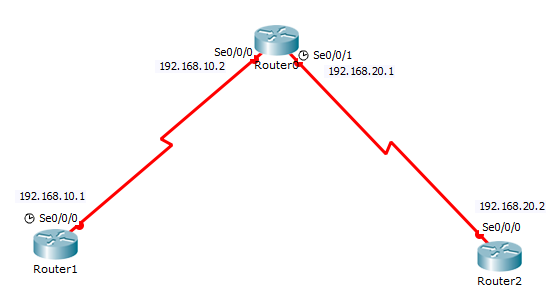
A summary of the IP address configured in the router’s interfaces are shown in the table given below:
| Device | Interface | IP Address | Subnet Mask |
| Router1 | Se0/0/0 | 192.168.10.1 | 255.255.255.0 |
| Router0 | Se0/0/0 | 192.168.10.2 | 255.255.255.0 |
| Router0 | Se0/0/1 | 192.168.20.1 | 255.255.255.0 |
| Router2 | Se0/0/0 | 192.168.20.2 | 255.255.255.0 |
Configure IP addresses to the Router’s interface:
Router>enable is used to enter the privileged exec mode.
Router#configure terminal is used to enter the global configuration mode.
Router(config)#hostname Router1 is used to identify the router in the whole network.
Router1(config)#interface s0/0/0 is used to enter the serial mode.
Router1(config-if)#ip address 192.168.10.1 255.255.255.0 is used to configure IP address to the interface.
Router1(config-if)#clock rate 640000 is used to control data flow.
Router1(config-if)#no shutdown is used to make interface always up.
Router1(config-if)#exit return the previous mode.
Router1
On Router1, give the following commands to configure an IP address.
Router>enable
Router#configure terminal
Router(config)#hostname
Router1   Router(config)#interface s0/0/0
Router(config-if)#ip address 192.168.10.1 255.255.255.0
Router(config-if)#no shutdown
Router(config-if)#exit
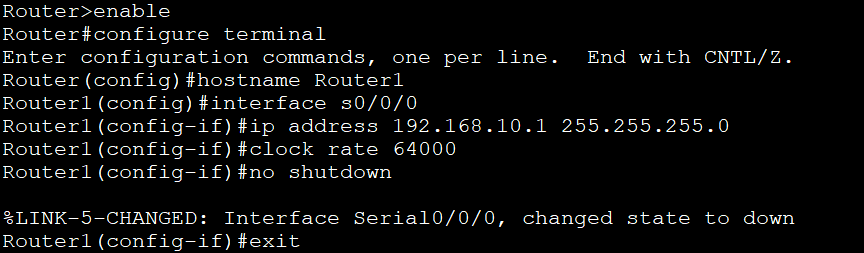
Router0
On Router0, give the following commands to configure the IP address.
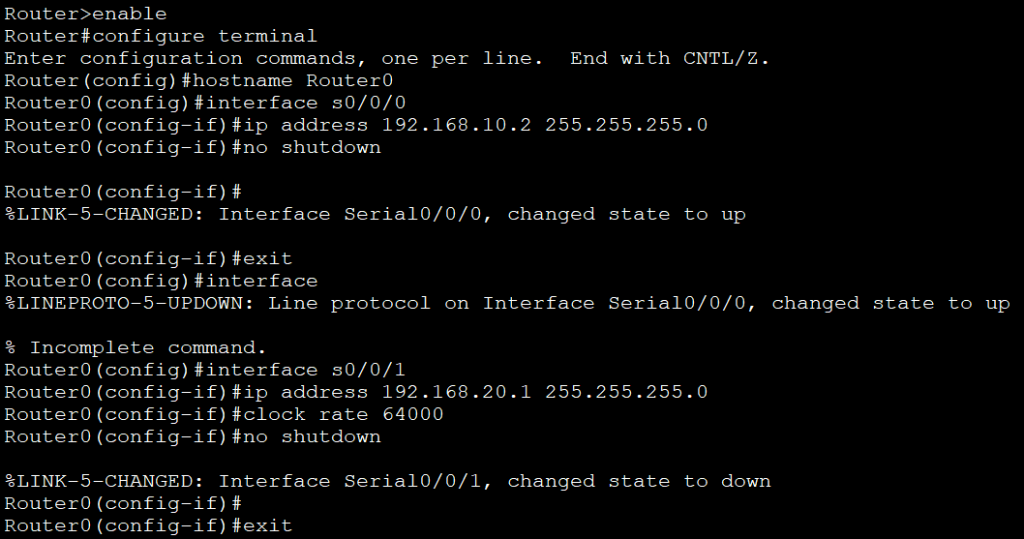
Router2
On Router0, give the following commands to configure an IP address.

To configure RIP give following commands:
Router1
On Router1, give the following commands to configure RIP.
Router1(config)#router rip
Router1(config-router)#network 192.168.10.0
Router1(config-router)#exit

Router0
On Router0, give the following commands to configure RIP.
Router0(config)#router rip
Router0(config-router)#network 192.168.10.0
Router0(config-router)#network 192.168.20.0
Router0(config-router)#exit

Router2
On Router2, give the following commands to configure RIP.
Router(config)#router rip
Router(config-router)#network 192.168.20.0
Router(config-router)#exit

Verifying RIP Routing
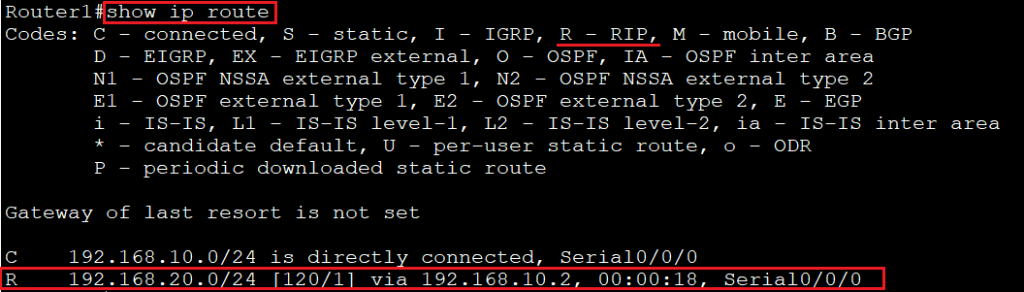
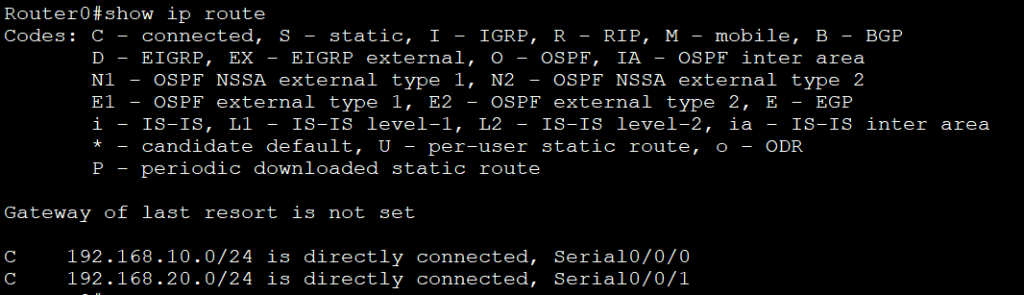
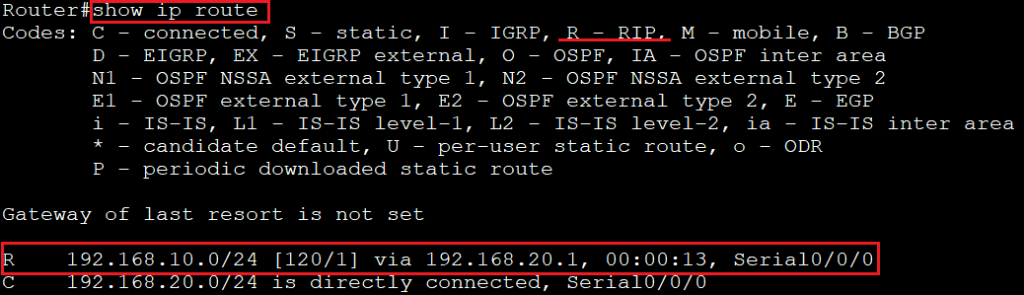
- We use “show ip route” command to see the RIP Routing table.
Router1
Router0
Router2
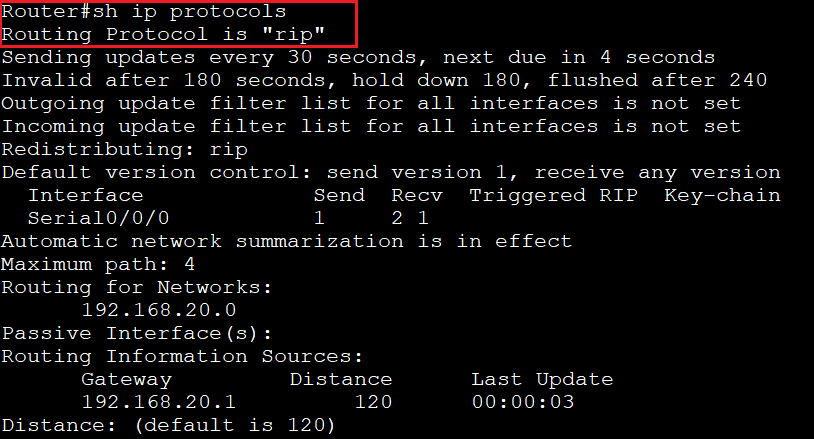
- We use “show ip protocols” command to verify which routing protocol is configured in the topology
Router#show ip protocols
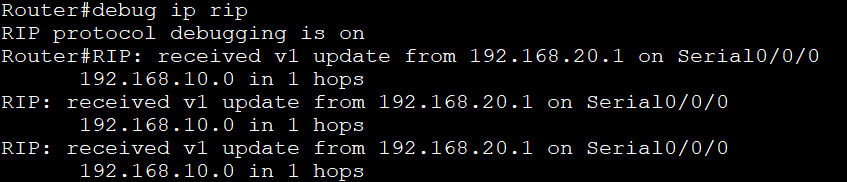
- We use “debug ip rip”command to view the RIP messages is being sent and received.
Router#debugip rip
- We use “undebug all”command to stop the debugging process.
Router#undebug all

RIPv2 (Routing Information Protocol version2)
RIPv2 is also known as classless routing protocol or prefix routing. It is used to send subnet mask information with the route updates.
To configure RIP version 2 give the following command on the Routers:
Router1
On Router1, give the following commands to configure RIPv2:
Router1(config)#router rip
Router1(config-router)#version 2
Router1(config-router)#network  192.168.10.0
Router1(config-router)#exit
Router0
On Router0, give the following commands to configure RIPv2:
 Router0(config)#router rip
Router0(config-router)#version2
Router0(config-router)#network  192.168.10.0
Router0(config-router)#network  192.168.20.0
Router0(config-router)#exit
Router2
On Router2, give the following commands to configure RIPv2:
Router(config)#router rip
Router(config-router)#version2
Router(config-router)#network   192.168.20.0
Router(config-router)#exit
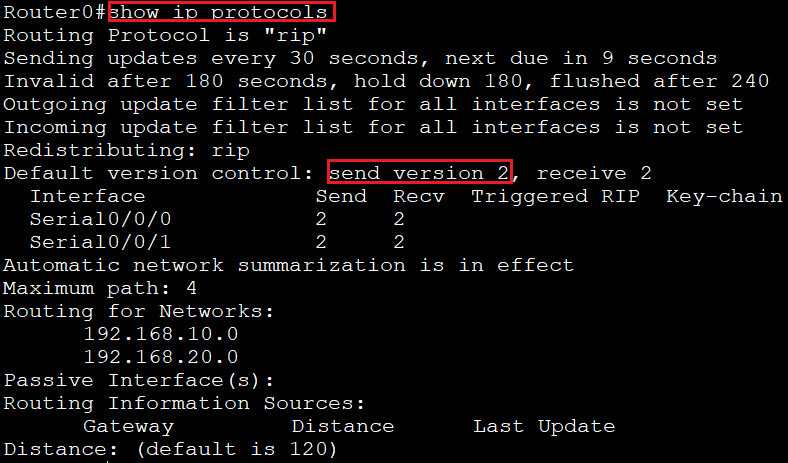
To show the RIP version 2, we use “show ip protocols” command:
Difference between RIPv1 and RIPv2:
| RIPv1 | RIPv2 |
| It sends an update as broadcast | It sends an update as multicast |
| It is a classful routing protocol | It is a classless routing protocol |
| It does not support authentication | It supports authentication |
| It does not support VLSM | It supports VLSM |
Removing RIP Routing Configuration
If you have added a wrong network, you can remove that network from the routing table.
To remove the network, we use the following commands on the routers:
Router1
On Router1, give following commands to remove RIP:
Router1(config)#router rip
Router1(config-router)#no network   192.168.10.0
Router1(config-router)#exit
Router0
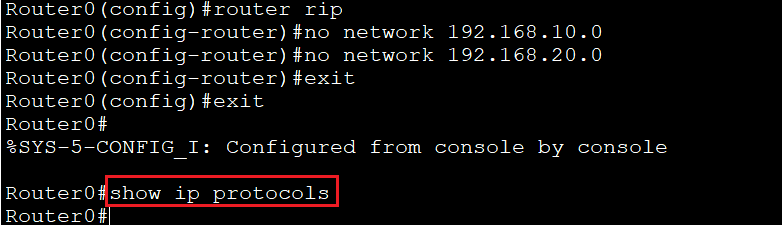
On Router0, give following commands to remove RIP:
Router0(config)#router rip
Router0(config-router)#no network   192.168.10.0
Router0(config-router)#no network   192.168.20.0
Router0(config-router)#exit
Router2
On Router2, give following commands to remove RIP:
Router(config)#router rip
Router(config-router)#no network   192.168.20.0
Router(config-router)#exit
We use “show ip protocols” command to verify if RIP configuration is removed or not. If show ip protocols command does not give any output means RIP configuration is removed.