
How to delete Gmail Account?

What is Gmail?

Gmail is a free mobile and web-based email service introduced by Google on April 1, 2004. Gmail is used for personal to business purposes. It allows users to send or receive emails, including attachments and links over the internet. The Gmail users are more than 1.8 Billion in worldwide. Gmail users can also store a large amount of data on Google Drive.
How to delete Gmail Account?

What are you lose with deleting your Google account?

Gmail Account deletion is permanent. If you delete your Gmail account, your emails, files, calendars, photos, and other data will also be erased. Once you delete the Google account, it cannot be used to send or receive emails, and this address will not be provided to anyone else to use in the future. You can’t be used your Google account by using that mail address. You can lose many things when you delete your account, some of them are given below:

  • You would not be able to use the Google services in which you sign in with that account, such as Gmail, Google Drive, Calendar, and play store.
  • You will lose subscription and online entertainment services which you bought with that account, such as YouTube, Google Play, apps, movies, games, music, and TV shows.

Now, you will learn how you can delete your Gmail account from Google.

How to delete Gmail Account?

You can use the following steps to delete your Google Account:

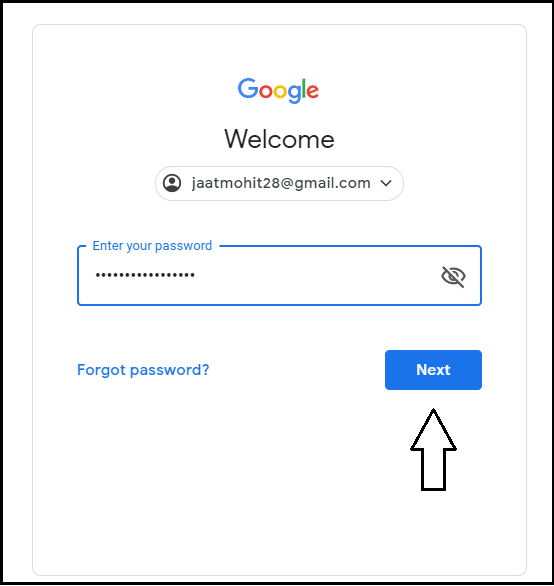
Step 1: Firstly, go to the myaccount.google.com page and enter your mail address and password to sign in. After that, click on the Next button.
delete Gmail Account

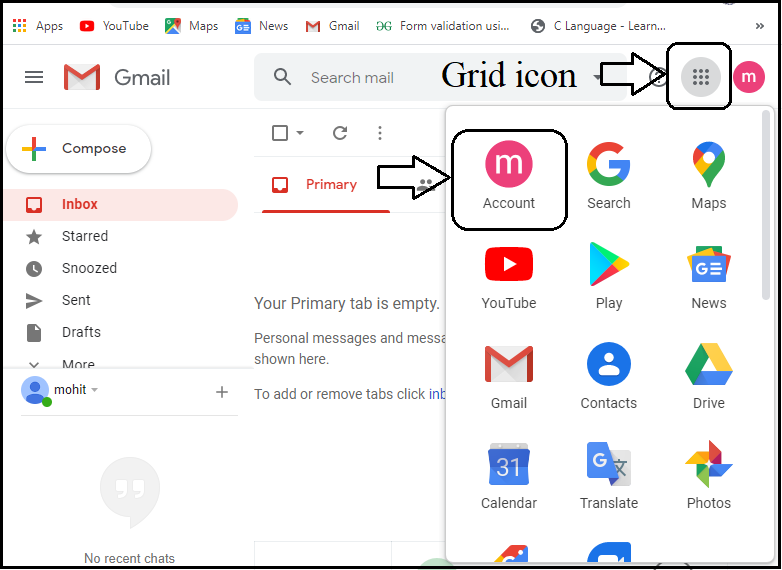
Step 2: Next, click on the grid icon displayed at the top right-hand corner and then click on the “Account” option.
delete Gmail Account

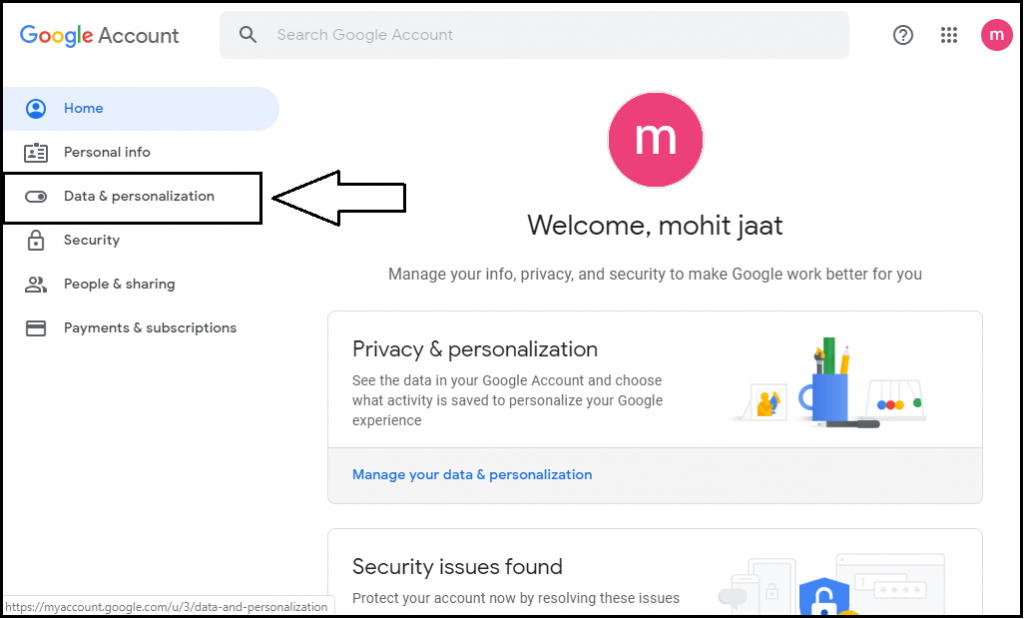
Step 3: Now, click on the “Data & personalization” option, which displayed on the left side.
delete Gmail Account

Step 4: After click on the “Data & personalization”, it shows many options. Now, scroll the web page, and go to the “Download, delete, or make a plan for your data” option.
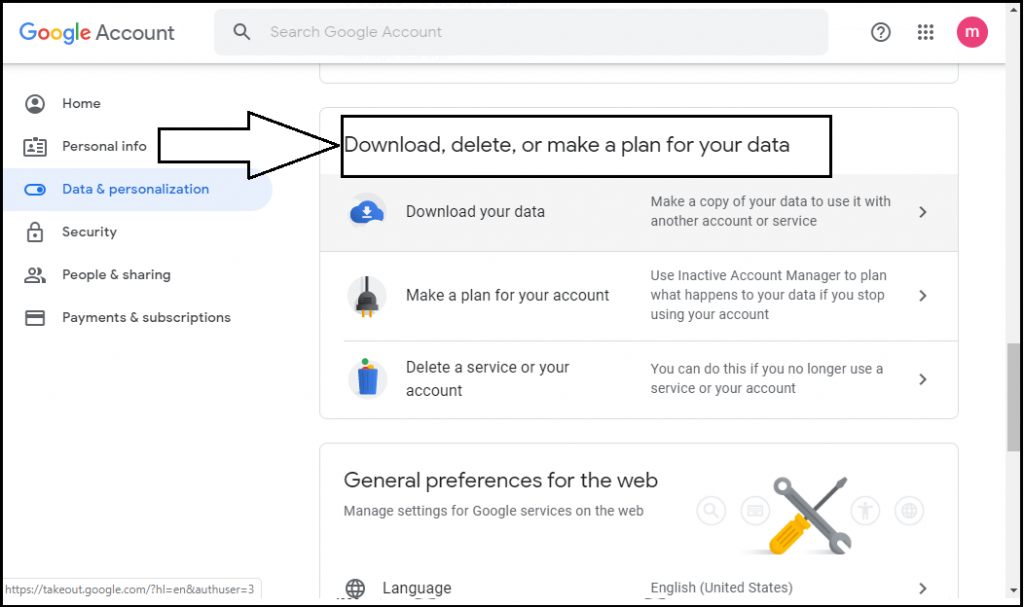
delete Gmail Account

Step 5: Click on the “delete a service on your account” option and go to the next step.
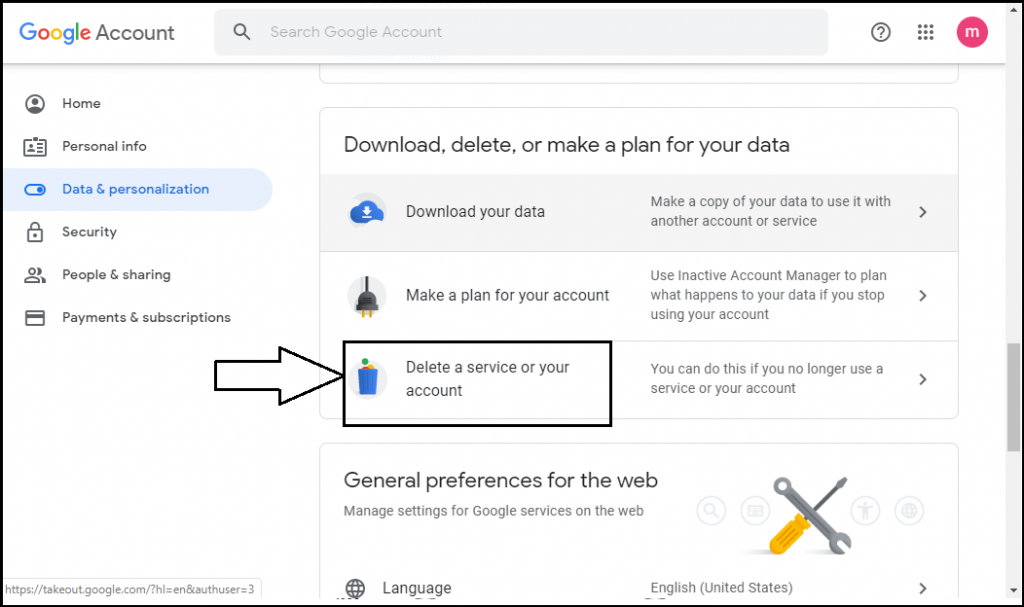
delete Gmail Account

Step 6: Now, go to the “Delete your Google Account” option and click on the “delete your account” option and go to the next step.
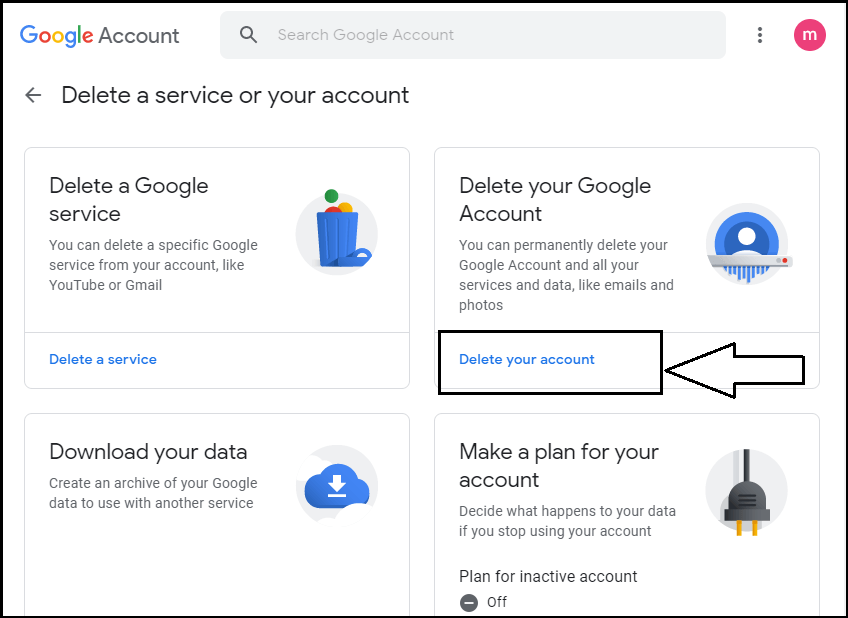
delete Gmail Account

Step 7: Now, click on the “delete your account” option and enter the password, then go to the next step.
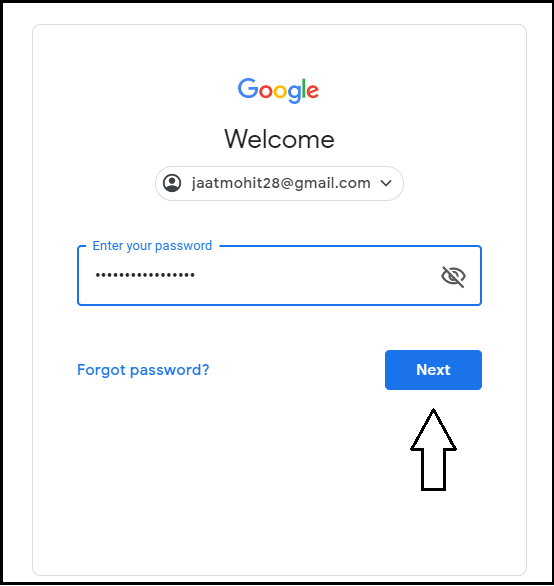
delete Gmail Account

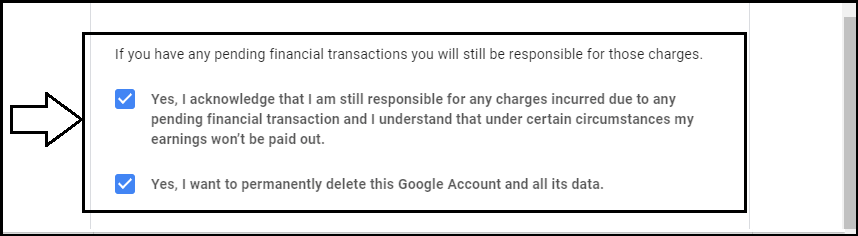
Step 8: After you enter the password, it shows some terms & conditions, and you need to select them.
delete Gmail Account

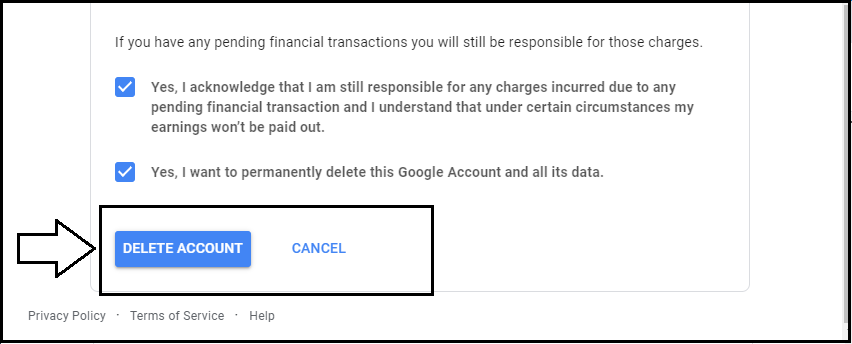
Step 9: Now, click on the “Delete Account” option to delete the Gmail Account.
delete Gmail Account

Now, your account is permanently deleted from Google. You can’t be login again by the same mail address.


Related Topics

How to block emails on Gmail?

How to block emails on Gmail? Email or electronic mail is shared on the internet, including content, website URL, signature and different forms of attachments (unlike images, mp4, mp3, Pdf, excel,...

7 minutes read.

How to Find Element in Rotated Sorted Array?

In this article, we are going to find the element in a rotated sorted array using the programs in different computer languages like Java and C++. We are going to...

3 minutes read.

How To Connect Air pods To Computer?

How To Connect Air pods To Computer Apple has put light on a statement and said that it believes the future is wireless. This technology is pacing up with the time,...

5 minutes read.

How to Multiply Fractions?

What is a Fraction? A fraction is a number that divides a whole number into equal parts. A fraction tells us how many parts we have from the whole part. We...

2 minutes read.

How to add Signature to your Mail

How to add Signature to your Mail Gmail has formed an inevitable aura around the business world. Gmail was launched in the year 2004 as an email service provider with very...

7 minutes read.

How to Check String is Alphanumeric or Not Using Regular Expression

If we have a string and want to know whether it is either alphanumeric or not, we can do it using Regular Expression(regex). What is Regular Expression? A Regular Expressionor regexis a...

3 minutes read.

How to compress jpeg file to 100kb?

Nowadays, everyone loves to share cool snapshots on social media handles. Before putting the images on any site, editing is an integral part. File compression is one of method by...

3 minutes read.

How to Create Folders in Gmail

How to Create Folders in Gmail Gmail is a leading email service provider and is used by 1.5 billion-plus active users worldwide. All Gmail professional users receive at least dozens of...

6 minutes read.

How to find your Computer’s specs?

How to find your computer’s specs The computer specs include the details for every single component in your computer, including your CPU, hard drive space, and even the little things like...

7 minutes read.

How to delete a page in Microsoft Word?

What is Microsoft Word? Microsoft word is a word processing program, which is developed by Microsoft. It was initially launched on 25 October 1983 and has since been modified many times. Generally, Microsoft Word...

2 minutes read.

How to schedule an email in Gmail?

How to schedule an email in Gmail Imagine scenarios where you send an important message to one of your international clients, and you know the time difference is significant. Earlier, you...

7 minutes read.

How to build a Computer?

How to build a computer Computing technology has evolved a lot in the last decade and has come a long way since then. For many years building computers was as tough...

17 minutes read.

How to send an email in Gmail?

How to send an email in Gmail Emails are extensively used to send or receive messages or documents online through computer or through Gmail app. In this tutorial, we will come...

6 minutes read.

How to snooze an email in Gmail

How to snooze an email in Gmail With the popularity of Gmail, today every deal is likely to be discussed in emails. And with so many things rushing in the Inbox,...

3 minutes read.

How to flip your Computer Screen

How to flip your computer screen The word flip refers to turn over or rotate something quickly. Computers provide the flip functionality, which facilitates the providers to rotate the screen in...

5 minutes read.

How to change Gmail Password?

How to change Gmail Password? Today Gmail account is linked to all your application and software unlike, Instagram, Facebook, and Skype, etc. You can log in to different platforms directly using...

6 minutes read.

How to Create a Group Email in Gmail

How to Create a Group Email in Gmail Every now and then, one needs to pass on or share a message to several people at the same time. To make this...

6 minutes read.

How to find archived emails in Gmail

How to find archived emails in Gmail Similar/Related Questions Where do Gmail archived emails go? How can Gmail users access archived emails? How to get to archived Gmail? In which folder does the archived Gmail...

4 minutes read.

What does RAM do on a computer?

What does RAM do on a computer? Many of us might have heard the word RAM in our daily life but do not know what it does except the fact that...

10 minutes read.

How to backup iPhone to Computer?

How to backup iPhone to computer iPhone or iPad is an electronic gadget useful to store all preferences, memories, personal or official data, unlike essential documents, emails, messages, photos, running apps,...

6 minutes read.