
×

Saving, Erasing, and Verifying Configuration

Saving Configuration

Cisco device store commands information into two configuration files:

  • running configuration
  • startup configuration

running configuration

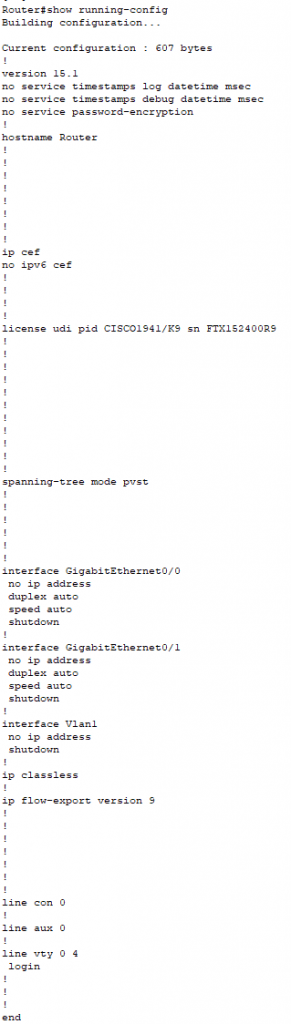
In the running configuration, you can manually save the data from RAM to NVRAM by typing the copy running-config startup-config command.

saving

When you see Destination filename [startup-config]?, just press Enter to copy the configuration wherever you want.

You can view all files by typing show running-config in privileged mode.
saving1

startup configuration

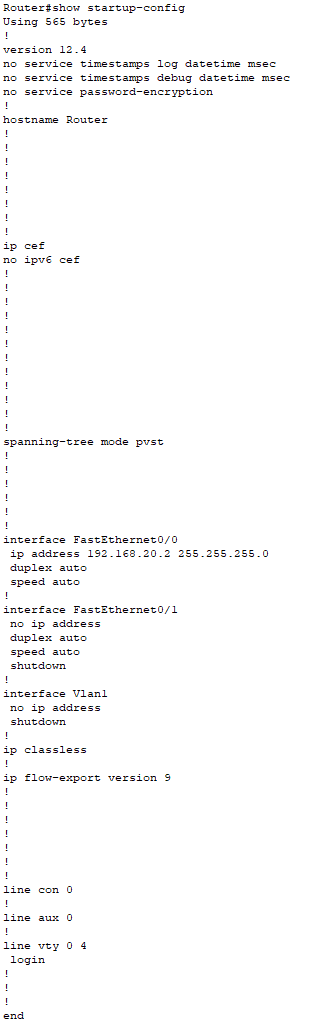
  • startup configuration tells us how much NVRAM is being used to store the startup-config file.
  • It is the best way to verify the configuration that will be used for the next time, whenever the router is reloaded.
saving2

Erasing the Configuration

You can erase the startup-config file by using the erase startup-config command:

saving3

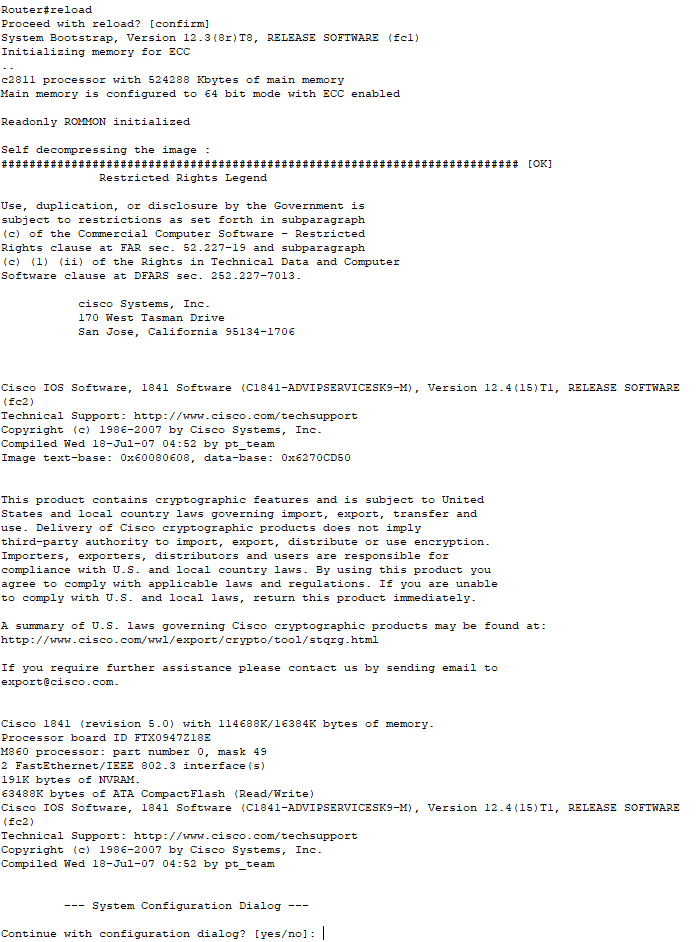
If you want to reload the router after using the erase startup-config command, then use reload command.
saving4

Verifying Configuration

There are following commands used to verify the configuration:

Verifying with the ping Command

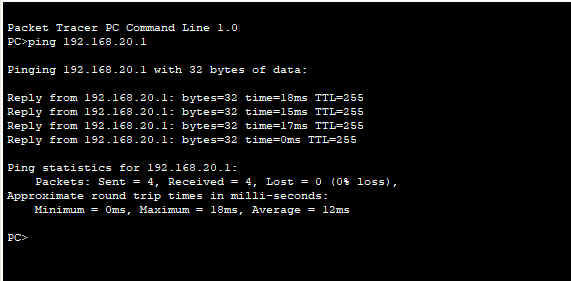
Ping is a starting point for troubleshooting an internetwork. It is a program that uses ICMP echo requests and replies. It sends a packet to a remote host, and if that host replies, that means the host is alive.
saving5

Verifying with the traceroute Command

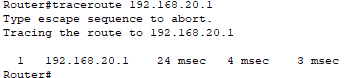
The traceroute command is used to discover the paths that packets follow to reach their destination. It is also useful while troubleshooting routing loops, or for when you determine where packets are getting lost.

saving6

The traceroute command, followed by the destination IP address is used to show the route that packets follow to reach the destination.
saving7

Verifying with the show interface Command

It is a way to verify your configuration by typing show interface command.

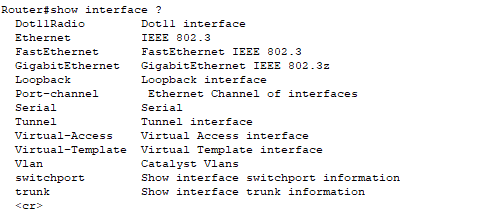
First, we use the show interface? command which is useful for verifying and troubleshooting the router and network issues.
saving8

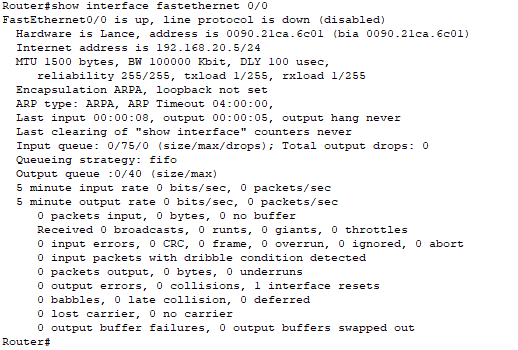
The next command we use is show interface FastEthernet 0/0. It gives information about the hardware address, logical address, and encapsulation method.
saving9

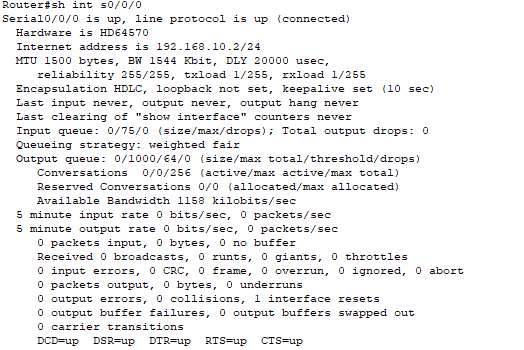
The other most important role of the show interface command is to give information about the output of the line and Data Link protocol status.

Examples based on the output of the line and Data Link protocols are given below:

  • If the output of FastEthernet 0/0 is up and the line protocol is up, then the interface is up and in the running mode.

saving17
  • If the output of Serial 0/0/0 is up and the line protocol is up, then the interface is up and in the running mode.
saving10
  • If the output of Serial 0/0/0 is administratively down and the line protocol is down. Then go to interface s0/0/0 in global configuration mode and give no shutdown Command to enable the interface.

saving11
  • If the output of Serial 0/0/0 is down and the line protocol is down. Then it is a cable or interfaces problem, to avoid this provide a valid interface and connect cables properly.

saving12

Verifying with the show ip interface Command

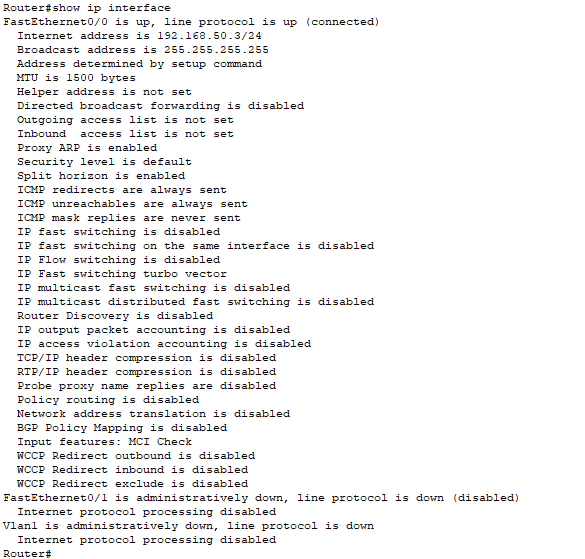
The show ip interface command provides information regarding the Network Layer (Layer 3) configurations of a router’s interfaces:

The command we use:

“Router#show ip interfaces”
saving13

Using the show ip interface brief command

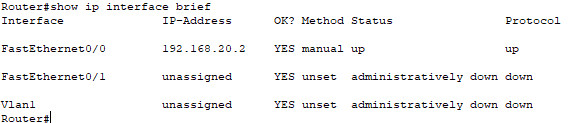
The show ip interface brief command provides a quick overview of the router’s interfaces, including the IP Address, Method, Status, and Protocol.

The command we use is “Router#show ip interface brief."
saving14

Verifying with the show protocols Commands

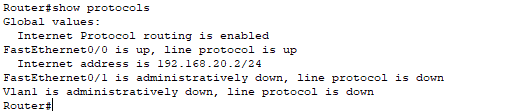
The show protocol command is used to quickly see the status of Physical and Data-Link layer interfaces as well as the IP addresses.

To see this, we use the command:

“Router#show protocols”
saving15

Using the show controllers Command

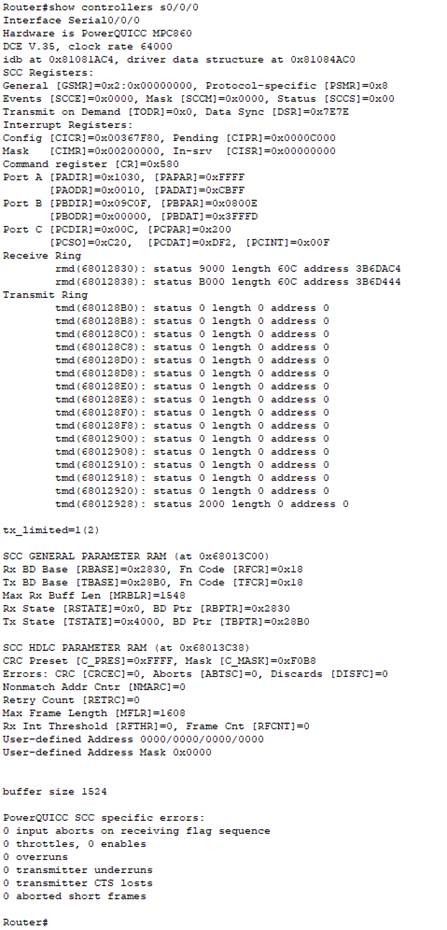
The show controllers command is used to displays information about the physical interface.
saving16

Related Topics

Open Shortest Path First (OSPF) Basics

Open Shortest Path First(OSPF) is a classless routing protocol. It uses a link-state routing protocol, which means that the routers exchange topology information with their nearest neighbors. The OSPF maintains three separate tables that...

3 minutes read.

EIGRP Basics

EIGRP stands for Enhanced Interior Gateway Routing Protocol. It is also called as the Hybrid routing protocol. It contains the features of both distance vector and link-state routing protocols. Characteristics of EIGRP There are the...

5 minutes read.

Subnetting

Subnetting is the process of dividing a big network into many small networks. Suppose there is a company which has four departments like Development, HR, Marketing, and Testing. We don't want that all...

5 minutes read.

Switching

A switch is a network device which is used to connect multiple devices (routers, computers) inside the LAN (Local Area Network). It operates at Data Link Layer (Layer 2) of the OSI reference...

3 minutes read.

Internetworking Basics

What is a Network? A network is a group of two or more devices connected by some transmission media, i.e., cables. The purpose of designing a network is to enable the sharing...

4 minutes read.

Banner config

Banner config The banner is a little pool which is used in Cisco systems and also in other systems like Unix, Linux and so no.It permits a text that is displayed when you log in a...

1 minute read.

Static Routing

Static Routing Static Routing is the process in which static routes are manually added to the routing table through the direct configuration. Static routing is configured in the global configuration mode using syntax: Router(config)#ip route...

3 minutes read.

Variable Length Subnet Masks (VLSMs)

Variable Length Subnet Masks (VLSMs) A VLSM is a process of allocating IP addresses to the subnets according to the user’s need.VLSM is introduced to avoid the wastage of IP addresses.It allows you to...

3 minutes read.

Verifying OSPF Configuration

There are several ways to verify OSPF configuration and operations, which are: show ip route commandshow ip ospf commandshow ip ospf database commandshow ip ospf interface commandshow ip protocol commandshow ip ospf neighbor commanddebugging ospf Consider the following topology –We...

2 minutes read.

Power on a Cisco device

Power on a Cisco device When you power on a new purchased Cisco device for the first time, it performs a power-on-self-test (POST) operation to identify the hardware components and to verify that all...

1 minute read.

Configure IP Routing

IP Routing stands for “Internet Protocol Routing.”It is the process of sending packets (data) from a source network to a destination network.In IP Routing, routers select the best route for a data packet from the...

2 minutes read.

Configuring EIGRP

Consider the topology given below – The initial IP configuration table is given below: Devices Interface IP address Router1 ...

2 minutes read.

Configure IP address to Router and PC in Packet Tracer

Configure IP address to Router and PC in Packet Tracer As a Network Engineer, it is compulsory to know how to configure an IP Address on networking devices like Router, Switch, PC, and Server.Assigning...

3 minutes read.

Classes of IP Addresses

Classes of IP Addresses There are following five classes of IP Addresses: Class A – It is used for allocating an IP address.Class B - It is used for allocating an IP address.Class C – It...

6 minutes read.

VLAN Basics

VLAN stands for Virtual Local Area Network. It is a logical group of networking devices that allows a single extended LAN to be partitioned into several separate LANs. The important feature of...

4 minutes read.

Data Encapsulation and De-Encapsulation

Data Encapsulation It is the process of adding headers and trailers to data. When a host transmits data to another device over a network, the data is encapsulated, with protocol information...

5 minutes read.

Spanning Tree Protocol (STP)

Spanning Tree Protocol (STP) is a Data link layer (layer 2) protocol that is used to discover and maintain a valid loop-free path for the switched network. It is also used to analyze...

4 minutes read.

Configuring OSPF

Consider the topology given below – The initial IP configuration table is given below: Devices Interface IP address Router1 ...

2 minutes read.

TCP/IP and DoD Model

Introduction to TCP/IP Model TCP/IP model was introduced in 1974. TCP/IP stands for Transmission Control Protocol/Internet Protocol. TCP/IP is an underlying communication protocol used by internet and commercial networks. The Transmission Control Protocol (TCP)...

10 minutes read.

Getting familiar with the IOS modes

  There are following primary modes of operation in IOS. Setup ModeUser Exec ModePrivileged Exec ModeGlobal Configuration ModeInterface Configuration ModeRommon Mode Setup Mode In router or switches, all configurations are saved in NVRAM.If there is no...

3 minutes read.