Subnetting
Subnetting is the process of dividing a big network into many small networks.
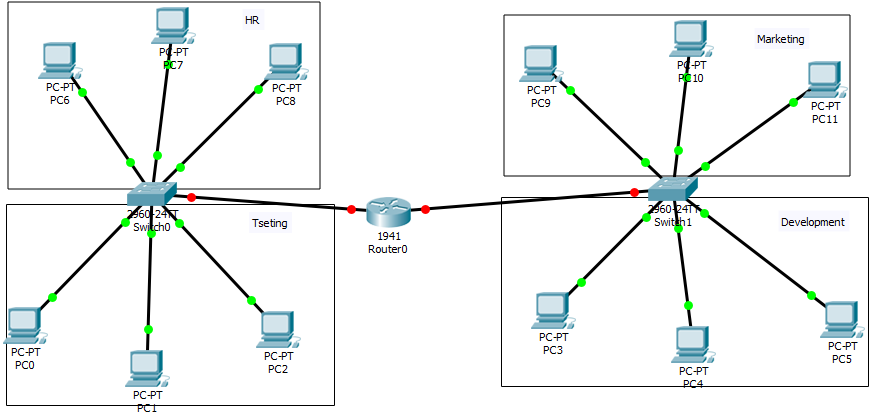
Suppose there is a company which has four departments like Development, HR, Marketing, and Testing. We don't want that all departments access a shared server. The development department has a server, and we want to protect this server from other departments. In this case, we can’t leave the network easily, other things that maintenance and security are also big issues in the large networks, so for this, we use the concept of subnetting.
Advantages of Subnetting
- Reduce Network traffic
- Optimized network performance
- Simplified management
- Better Security
- Smaller collision and broadcast domain
Subnet Masks
- Every host on a network has subnet mask and IP address.
- A subnet mask is a 32-bit binary string of 1’s followed by some numbers of 0’s. It defines a range of IP address available within a network.
- It is used to identify the network and host portion of the IP address.
- The subnet mask is made by setting network address bits to all 1s (11111111=255) and host address bits to all 0s (00000000=0)
- In any Network, two address is reserved for a special purpose, and cannot be assigned to the hosts. All 0s (0.0.0.0) are assigned to a network address and all "255" (255.255.255.255) are assigned to a broadcast address.
- The default subnet mask of class A, B, and C cannot be changed.
Default subnet mask
| Class | Format | Default Subnet Mask |
| A | network.host.host.host | 255.0.0.0 |
| B | network.network.host.host | 255.255.0.0 |
| C | network.network.network.host | 255.255.255.0 |
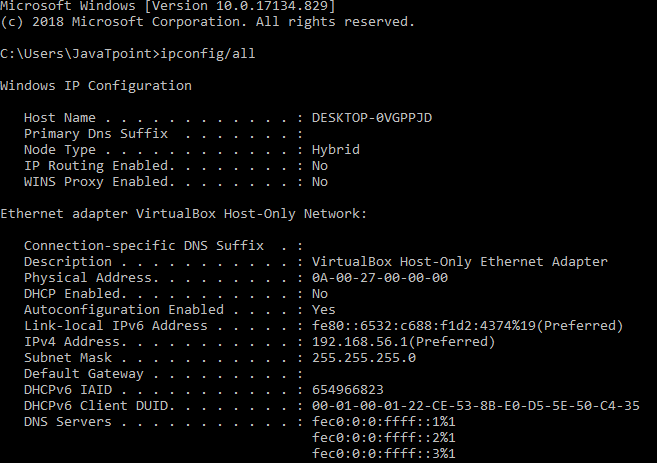
How to get your Computer’s IP address and Subnet mask?
- For Mac, you can open your terminal and, type “ipconfig-a” then hit Enter.
- For windows, you can start your windows command prompt
and, type command “ipconfig/all” then hit Enter.
Classless Inter-Domain Routing (CIDR)
- It is also called as supernetting.
- It is a method that ISPs (Internet Service Providers) use to allocate a number of addresses to a company, a home, and a customer.
- It uses a number of binary bits set 1 (or on), in a subnet mask, preceded by a slash.
For Example, a subnet mask of 255.255.255.192 can be represented as follows in binary:
11111111.11111111.11111111.11000000
In the above subnet mask, the first 26 bits are set to 1. The CIDR notation for this subnet mask would be /26.
Example 2:
A subnet mask of 255.255.192.0 can be represented as follows in binary:
11111111.11111111.11000000.00000000
In the above subnet mask, the first 26 bits are set to 1. The CIDR notation for this subnet mask would be /26.
CIDR values
| Subnet Mask | CIDR Value |
| 255.0.0.0 | /8 |
| 255.128.0.0 | /9 |
| 255.192.0.0 | /10 |
| 255.224.0.0 | /11 |
| 255.240.0.0 | /12 |
| 255.248.0.0 | /13 |
| 255.252.0.0 | /14 |
| 255.254.0.0 | /15 |
| 255.255.0.0 | /16 |
| 255.255.128.0 | /17 |
| 255.255.192.0 | /18 |
| 255.255.224.0 | /19 |
| 255.255.240.0 | /20 |
| 255.255.248.0 | /21 |
| 255.255.252.0 | /22 |
| 255.255.254.0 | /23 |
| 255.255.255.0 | /24 |
| 255.255.255.128 | /25 |
| 255.255.255.192 | /26 |
| 255.255.255.224 | /27 |
| 255.255.255.240 | /28 |
| 255.255.255.248 | /29 |
| 255.255.255.252 | /30 |
- /8 to /15 can only be used with Class A network addresses.
- /16 to /23 can be used by Class A and Class B network addresses.
- /24 to /30 can be used by Class A, B, and C network addresses.
How CIDR works?
CIDR assigns a numerical prefix [(/n), where n is the mask or number of bits to represent block/ network] to each IP address.
Example
An IP address using CIDR 177.67.5.44/13:
The prefix 13 indicates that the first 13 bits of IP address is used to identify the network, while the remaining 32-13 = 19 bits are used for identifying the host.
Some important formulas to create subnets
Block size = 256 – (a value from subnet mask)
No. of Subnets = 2n
Where,
N= number of ON bits, or the 1s.
No. of host = -2
No. of host = 2H-2
Where,
H = number of OFF bits, or the 0s.
Class C subnetting
Example:
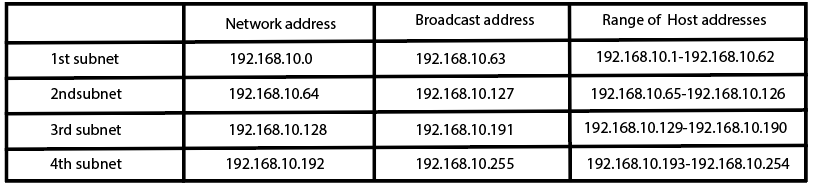
In given class A, Address: 192.168.10.0/26, find the following:
- How many subnets?
- How many hosts per subnet?
- What are the valid subnets?
- What’s the broadcast address for each subnet?
- What is the valid host?
Solution:
As we know, in class C
Network ID = 8
Host ID = 24
Network address = 192.168.10.0
CIDR = 26
Since, 26 ON bits, so the subnet mask will be 255.255.255.192.
In, 192 (11000000) Number of ON bits = 2
Number of OFF bits = 6
- No. of subnets = 22= 4
- No. of hosts per subnet = 26-2 = 64-2=62
- Valid subnets (Block size) = 256-192 = 64. We start at zero and count in our block size, so our subnets are 0, 64, 128, and 192.
- For zero subnet, the next subnet is 64, so the broadcast of 0 subnet is 63.
- Valid hosts are the numbers between the subnet and broadcast address.
Class B Subnetting
Example:
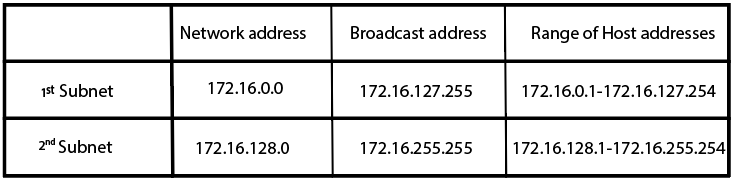
In a given class A Address: 172.16.0.0/17, find the following:
- How many subnets?
- How many hosts per subnet?
- What are the valid subnets?
- What’s the broadcast address for each subnet?
- What is the valid host?
Solution:
As we know
In class B, Network ID = 16
Host ID = 16
Network address = 172.16.0.0
CIDR = 17
Since, 17 ON bits, so the subnet mask will be 255.255.128.0.
In, 128 (10000000) Number of ON bits = 1
Number of OFF bits = 7
- No. of subnets = 21=2
- No. of hosts per subnet = 215-2 = 32,766
- Valid subnets (Block size) = 256-128 = 128.
- For zero subnet, the next subnet is 128, so the broadcast of 0 subnet is 127.
- Valid hosts are the numbers between the subnet and broadcast address.
Class ASubnetting
Example:
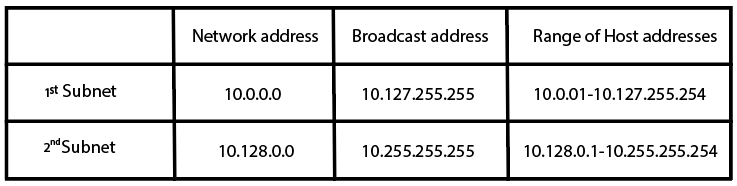
In a given class B Address: 10.0.0.0/9, find the following:
- How many subnets?
- How many hosts per subnet?
- What are the valid subnets?
- What’s the broadcast address for each subnet?
- What is the valid host?
Solution:
As we know, in class A
Network ID = 24
Host Id = 8
Network address = 10.0.0.0
CIDR = 9
Since, 9 ON bits, so the subnet mask will be 255.128.0.0.
In, 128 (10000000) Number of ON bits = 1
Number of OFF bits = 23
- No. of subnets = 21= 8
- No. of hosts per subnet = 223-2
- Valid subnets (Block size) = 256-128 =128.
- For zero subnet, the next subnet is 128, so the broadcast of 0 subnet is 127.
- Valid hosts are the numbers between the subnet and broadcast address.