
EIGRP Basics
EIGRP stands for Enhanced Interior Gateway Routing Protocol. It is also called as the Hybrid routing protocol. It contains the features of both distance vector and link-state routing protocols.
Characteristics of EIGRP
There are the following characteristics of EIGRP:
- EIGRP uses the Hello packets (multicast to 224.0.0.10) to establish and maintain neighbor relationships.
- EIGRP uses an Autonomous System (AS) to identify routers that belong to the same logical group.
- EIGRP router will send the update only when there is a change in the network.
- It supports VLSM and CIDR.
- It selects the best path using the Diffusing Update Algorithm (DUAL).
- It is suitable for very large networks.
- It supports load balancing.
- Routes which are generated within the local autonomous system uses the administrative distance 90.
- Routes which are coming from outside the local autonomous system uses the administrative distance 170.
- EIGRP uses the maximum hop count 224 (the default maximum hop count is set to 100).
The EIGRP maintains three separate tables that are:
- Routing table – A routing table contains the best route for each known networks.
Some routing table fields are given below:
- D – It indicates that the EIGRP route is found.
- via IP – It is the neighbour IP address who advertise the route.
- Topology table – A topology table contains a list of all known valid, loop-free routes within the network.
Some topology table fields are:
- P – It means Passive.
- FD – FD stands for Field Distance. It is a distance between the current router to the destination router.
Neighbor table – A neighbor table contains a list of all neighboring routers.
Some important neighbor table fields are:
- H Handle –The neighbor table is created in this field. For first router H handle value is 1, and for second router H Handle value is 2 and so on.
- Address – This field contains the neighbor router’s IP address.
- Interface -The interface is the field from which the neighbor device is connected.
- Hold Time – This field indicates that if hello packet is not received from the router, then how long it will be stored in the table.
- RTO – It is a retransmission timeout.
- Q Cnt – It is a Queue Count. This field tells how many packets are waiting to be transmitted.
- Seq Number – It is the sequence number of the last packet received from the neighbor.
Reliable Transport Protocol (RTP)
EIGRP uses Reliable Transport Protocol (RTP) to manage the communication of messages between the EIGRP-speaking routers. As the name suggests, reliability is a key concern of this protocol. It is mainly designed to enable the quick delivery of data updates.
EIGRP Packets
EIGRP uses five types of packets to maintain adjacency –
- Hello packets – multicast
- Updates packets –unicast or multicast
- Acknowledgement packets – unicast
- Query packets – multicast
- Reply packets – unicast
- Hello packet
The Hello is the first packet that is sent when EIGRP is configured. This packet is sent to discover the neighbors. It is usually sent in the intervals of 60 seconds for the slow links and at the intervals of 5 seconds on the links with minimum bandwidth of 1.544mbps.
Note: Hello packet is one of the best ways to troubleshoot the EIGRP issues.
- Update packet
The update packets are used to send the routing information to its neighbour routers. When there is a change in the network topology, the EIGRP update packets are either sent as a unicast to a single affected router or multicast to several affected routers in the routing domain.
- Acknowledgement packet
The Acknowledgement (ACK) packet only contains acknowledgement number, not data. The acknowledgement packet is used to verify that updates or other types of messages are received or not. It uses a Reliable Transport Protocol (RTP) to ensure that the ACK message is delivered reliably.
- Query packet
The query packet is sent when EIGRP loses the network and does not have any backup path. If it loses a successor route and no feasible successor is available in the topology table, then the packet is sent as multicast to address 224.0.0.10.
- Reply packet
The reply packet is used to response the Query packet.
Neighbor Discovery
In this process, we will understand what happens when we configure two routers using the EIGRP protocol –
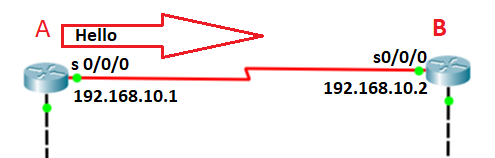
1. Hellos Sent: Once the RouterA and the RouerB configured with the EIGRP, hello is sent.
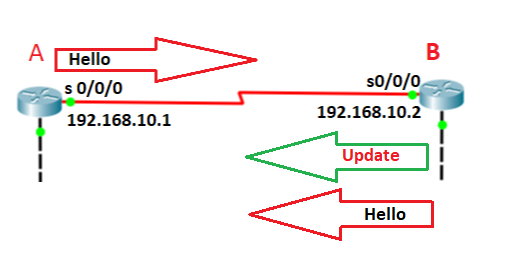
2. Update: Now the Router B sends a Hello and Update packet. The Update contains all the routing information.
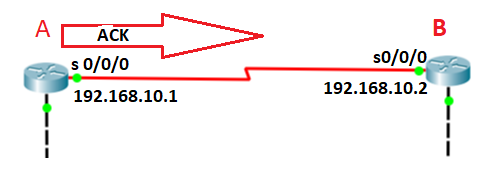
3. Acknowledgement: RouterA then acknowledge that the update is received from the RouterB
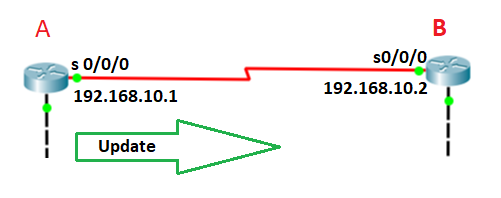
4. RouterA sends an update to RouterB
5. Now the RouterB will acknowledge that update is received from the RouterA.
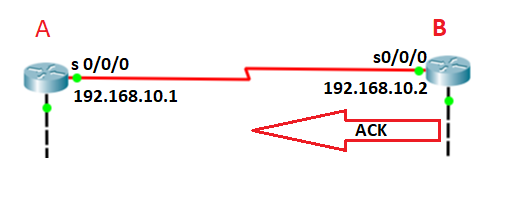
After forming the neighborship, EIGRP Routers send Hello packets to each other. The EIGRP is considered as a neighbor loss if it does not receive 3 hellos.
The default hello and hold timers are:
- For LAN and High-speed WAN (greater than T1), Hellos sent in every 5 seconds and Hold timer is 15 seconds (5 X 3=15).
- For the Slower WAN links (T1 speed or lesser), Hello packets sent in every 60 seconds and Hold timer is 180 seconds (60 X 3 = 180).
Diffusing Update Algorithm (DUAL)
EIGRP uses a Diffusing Update Algorithm (DUAL) for determining and maintaining the best path for each remote network.
The DUAL algorithm allows for the following:
- Support to VLSMs
- Dynamic route recoveries
- Send out queries for alternate routers if no feasible successor route can be found.
EIGRP contains all route’s advertised by all EIGRP neighbors. The metric of these routers is used by the DUAL to select the loop-free paths. If a route fails, and there is no feasible successor, DUAL chooses a replacement route. It takes a couple of seconds to choose the replacement route.
There are following requirements that must be met for the DUAL to work properly:
- The EIGRP neighbors must be discovered.
- All transmitted EIGRP messages should be received correctly.
- All the messages and changes should be processed in the same order from which they are received.
EIGRP Metrics
EIGRP uses the following metrics to determine the best route for the destination network –
1. Bandwidth(K1) – It is the slowest link in the route path, measured in kilobits. By default, the value of bandwidth is set to 1.
2. Load (K2) – The cumulative load of all outgoing in the path, given as a fraction of 225. By default, the value of the load is set to 0.
3. Delay of the Line (K3) – The cumulative delay of all outgoing interfaces in the path in tens of microseconds. By default, the value of delay is set to 1.
4. Reliability (K4) – The average reliability of all outgoing interfaces in the path, given as a fraction of 255. By default, the value of Reliability is set to 0.
5. MTU (K5) – MTU stands for Maximum Transmission Unit. The value of the MTU represents the smallest MTU value encountered along the path to the destination network. By default, the value of MTU is set to 0.
By default, EIGRP uses only bandwidth and delay of the line to determine the best path for a remote network.