×

Verifying OSPF Configuration

There are several ways to verify OSPF configuration and operations, which are:

  • show ip route command
  • show ip ospf command
  • show ip ospf database command
  • show ip ospf interface command
  • show ip protocol command
  • show ip ospf neighbor command
  • debugging ospf

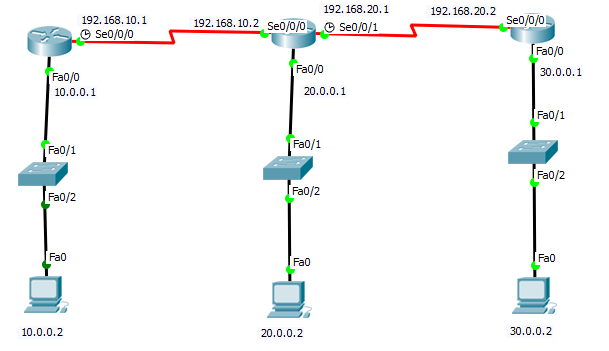
Consider the following topology –We have used the below topology to explain the above commands:
Verifying OSPF Configuration

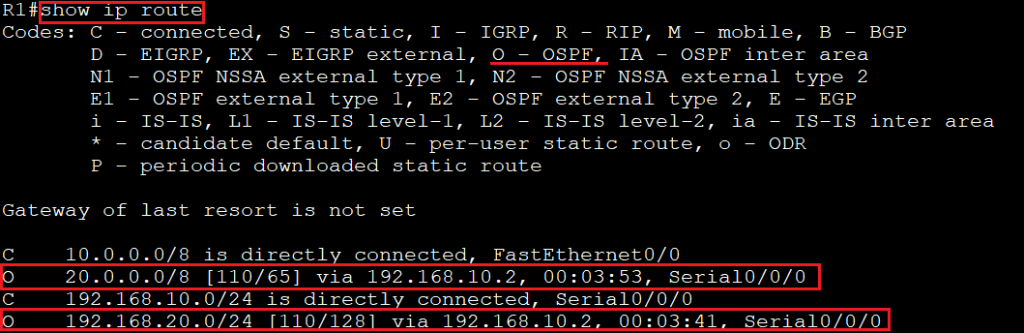
show ip route command

The “show ip route” command is used to show the routing table. In the routing table, if there is an entry of “O”, then it will indicate that OSPF is configured in the router. Consider the below image:
Verifying OSPF Configuration 1

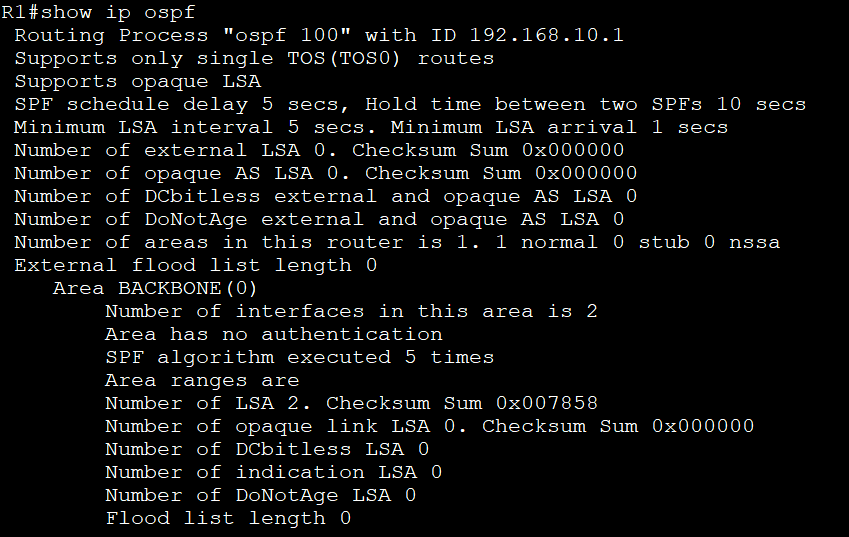
show ip ospf command

The show ip ospf is used to display the OSPF information like all processes which are running on the router, router ID, area information, Shortest Path First (STF) statistics, and LSA timers information.
Verifying OSPF Configuration 2

show ip ospf database command

The show ip ospf database displays the information about the number of routers in the network and the neighbor router IDs.

Verifying OSPF Configuration 3

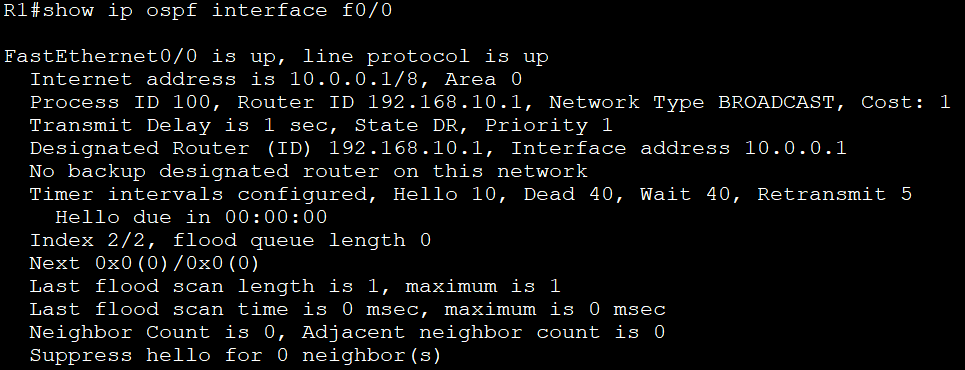
show ip ospf interface command

The show ip ospf interface displays the following information:

  • Area assignment
  • Interface IP address
  • Process ID
  • Router ID
  • Network type
  • Cost
  • Priority
  • DR/BDR election information and dead timer intervals
  • Adjacent neighbor information
Verifying OSPF Configuration 4

show ip protocol command

The show ip protocol is used to verify the type of protocols running on the router and the network. It displays the process ID, OSPF router ID, type of OSPF area, networks and area configured for OSPF neighboring router’s ID, etc.
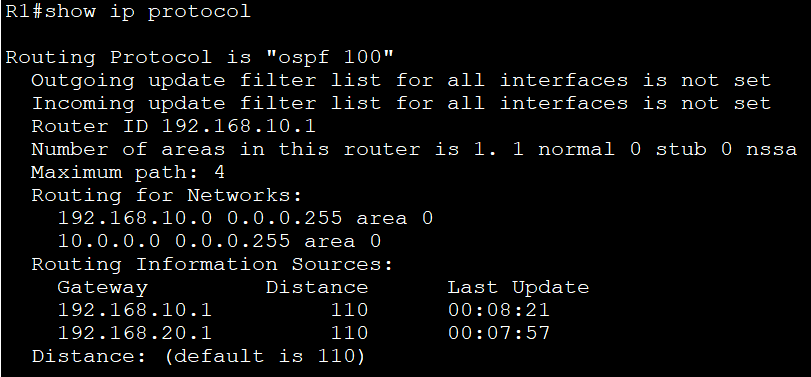
Verifying OSPF Configuration 5

show ip ospf neighbor command

The show ip ospf neighbor displays the summary of ospf information regarding the adjacency state. It is also used for the production network.

Verifying OSPF Configuration 6

debugging ospf

debugging command is divided into the following types –

  1. debug ip ospf packet: This command displays the hello packets being sent and received on the router.
  2. debug ip ospf hello: This command displays hello packets being sent and received on the router. It also displays more pieces of information than the debug ip ospf packet.
  3. The debug ip ospf adj: This command displays information about the OSPF adjacencies and authentication, including Designated Router (DR) and Backup Designated Router (BDR) elections.

Related Topics

Configure Password

Password configuration is an in-built feature of Cisco devices.Each Cisco device uses a password to authenticate users for accessing the device and also provides security to the Cisco devices. There are five types of the...

2 minutes read.

Configuring EIGRP

Consider the topology given below – The initial IP configuration table is given below: Devices Interface IP address Router1 ...

2 minutes read.

Power on a Cisco device

Power on a Cisco device When you power on a new purchased Cisco device for the first time, it performs a power-on-self-test (POST) operation to identify the hardware components and to verify that all...

1 minute read.

Getting familiar with the IOS modes

  There are following primary modes of operation in IOS. Setup ModeUser Exec ModePrivileged Exec ModeGlobal Configuration ModeInterface Configuration ModeRommon Mode Setup Mode In router or switches, all configurations are saved in NVRAM.If there is no...

3 minutes read.

Configure Hostname

Configure a hostname on a router A hostname is a unique name given to a device (router or switch) on a network and is used to identify one device from another on a specific...

1 minute read.

CCNA Tutorial

What is CCNA? CCNA stands for Cisco Certified Network Associate. It is a certification course offered by Cisco. CCNA improves your understanding of the internet working and how different network topologies work...

3 minutes read.

Ethernet Networks in Review

Ethernet Networks in Review Today, Ethernet is the most used technology for the LANs. It is described as IEEE 802.3 standard. Ethernet is a connection-based media access method i.e., Carrier Sense...

2 minutes read.

Saving, Erasing, and Verifying Configuration

Saving Configuration Cisco device store commands information into two configuration files: running configurationstartup configuration running configuration In the running configuration, you can manually save the data from RAM to NVRAM by typing the copy running-config startup-config command. When you...

3 minutes read.

Routing Information Protocol

Routing Information Protocol (RIP) Routing Information Protocol is a distance-vector routing protocol. It uses hop count to determine the best way for the remote network. By default, it has a maximum hop count 15. In...

5 minutes read.

Static Routing

Static Routing Static Routing is the process in which static routes are manually added to the routing table through the direct configuration. Static routing is configured in the global configuration mode using syntax: Router(config)#ip route...

3 minutes read.

Configure IP address to Router and PC in Packet Tracer

Configure IP address to Router and PC in Packet Tracer As a Network Engineer, it is compulsory to know how to configure an IP Address on networking devices like Router, Switch, PC, and Server.Assigning...

3 minutes read.

Configuring Catalyst Switches

When you power on a new purchased Switch for the first time, it runs a series of Power-On Self Tests (POSTs) operations. A  POST is designed to verify the basic operations of the...

3 minutes read.

Configure IP Routing

IP Routing stands for “Internet Protocol Routing.”It is the process of sending packets (data) from a source network to a destination network.In IP Routing, routers select the best route for a data packet from the...

2 minutes read.

Classes of IP Addresses

Classes of IP Addresses There are following five classes of IP Addresses: Class A – It is used for allocating an IP address.Class B - It is used for allocating an IP address.Class C – It...

6 minutes read.

Configuring IP Routing in Our Network

There are 3 types of IP routing that we can configure in our network. Default RoutingStatic RoutingDynamic Routing Default Routing Default Routing is used to configure unknown destination networks.It is used on stub networks. Stub networks are...

3 minutes read.

Cisco IOS Overview

Cisco IOS Overview Cisco Internetwork Operating System (IOS) is a multitasking operating system which controls all functions of Cisco routers and switches. Willaim Yeager wrote the first IOS in 1986.It is used to allocate resources and manages...

2 minutes read.

EIGRP Basics

EIGRP stands for Enhanced Interior Gateway Routing Protocol. It is also called as the Hybrid routing protocol. It contains the features of both distance vector and link-state routing protocols. Characteristics of EIGRP There are the...

5 minutes read.

Switching

A switch is a network device which is used to connect multiple devices (routers, computers) inside the LAN (Local Area Network). It operates at Data Link Layer (Layer 2) of the OSI reference...

3 minutes read.

Configuring OSPF

Consider the topology given below – The initial IP configuration table is given below: Devices Interface IP address Router1 ...

2 minutes read.

Open Shortest Path First (OSPF) Basics

Open Shortest Path First(OSPF) is a classless routing protocol. It uses a link-state routing protocol, which means that the routers exchange topology information with their nearest neighbors. The OSPF maintains three separate tables that...

3 minutes read.