
×

Spanning Tree Protocol (STP)

Spanning Tree Protocol (STP) is a Data link layer (layer 2) protocol that is used to discover and maintain a valid loop-free path for the switched network. It is also used to analyze the port speed in the topology and determine which port should be open and which port should be closed in order to provide a loop-free network.

Note: Switching loops are called as "bridging loops", even for those networks also that do not have a bridge.
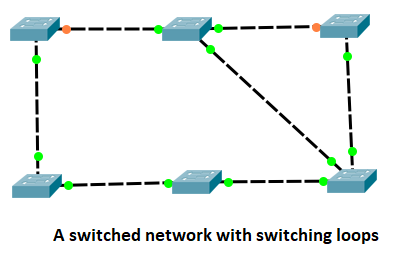
We need to avoid the loops because due to loops, MAC address table entries continuously change which results that some or all packets never reach to their intended destination. Loops also generate an unnecessary strain on our switched CPUs.

Note: In real-world networking, switching loops do not often occur, because for preventing the loops, STP uses Spanning-tree algorithm.

Spanning Tree Terms

There are the following spanning tree terms that we used within layer 2 switched networks:

Root Bridge

A Root Bridge is the starting point of the STP topology. To elect a Root Bridge from all switches of the network, STP uses two parameters:

  • A variable known as bridge priority
  • The MAC addresses of participating switches

A switch that has the lowest priority values is elected as the Root Bridge. If the priority values are the same in all switches, then the switch which has the lowest MAC address is elected as the Root Bridge.

Non-Root Bridge

Except Root Bridge, all switches in the network are known as the Non-Root Bridge. These Bridges receive updates from the Root Bridges.

BPDU

BPDU stands for Bridge Protocol Data Unit. It protects the port from receiving STP BPDUs.

Bridge ID (BID)

BID is used to identify each bridge/switch on the network.

Bridge ID = Bridge Priority (16-bits) + MAC Address (48-bits)

Nonroot bridges

Nonroot bridges are used for exchanging BPDUs with all bridges, updating the STP topology database on all switches, preventing loops, and providing a measure of defence against link failure.

Port cost

Port cost is used to determine the best path when multiple links are used between two switches. It is a local value and not advertised to upstream or downstream switches.

The following table shows the port cost value:

Bandwidth Old Cost Value New Cost Value
10 Gbps 1 2
1 Gbps 1 4
100 Mbps 10 19
10 Mbps 100 100

Root port

The Root port is directly connected to the Root Bridge. It has the lowest path cost. If more than one links are connected to the root bridge, then the port cost is determined by checking the bandwidth of each link.

Designated port

A designated port is used to the best (lowest) cost to the root bridge via its root port. The designated port will be marked as a forwarding port.

Nondesignated port

A Nondesignated port has a higher cost than a designated port.

Forwarding port

A forwarding port forward and receive frames, send and receive BPDUs, and continuously learn the MAC addresses.

Blocked port

A blocking port is a port in which no frame is forwarded, no frame is received, and therefore no dynamic learning of the MAC addresses. A blocked port will always accept BPDUs from neighboring switches.

Spanning Tree Operations

Spanning-Tree Port States

There are the following Spanning tree port states:

Blocking

A blocked port does not forward the frames. It only listens to the BPDUs. The main purpose of the blocking state is to prevent the use of looped paths. When we power ON the switch, all ports are in the blocking state by default.

Listening

A listening port is neither forwarding the frames nor learning the MAC addresses.

Learning

A learning port is not forwarding the frames, but it is learning the MAC addresses.

Forwarding

A forwarding port forward and receive frames, send and receive BPDUs, and continuously learn the MAC addresses.

Disable

A port is in the disable state if it does not participate in the frame forwarding or STP.

Convergence
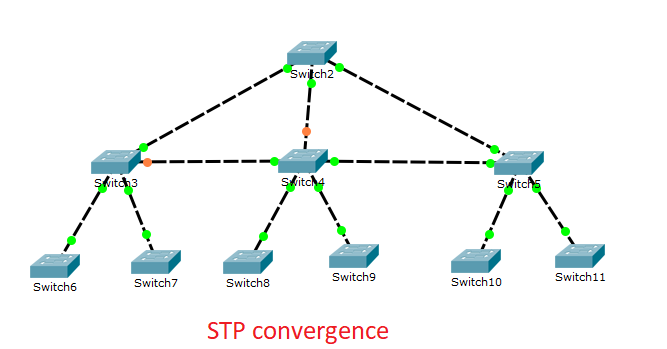
Spanning Tree PortFast

The Spanning Tree PortFast is introduced to avoid the network connectivity issues. Enabling the PortFast causes the switch or trunk port to enter the STP forwarding-state immediately.

Spanning Tree UplinkFast

UplinkFast is used to improve the convergence time of STP in case of a link failure. The spanning-tree UplinkFast feature is designed to run in a switched environment when the switch has at least one alternate backup root port.

It allows a switch to find alternate paths for the root bridge. If the primary link fails, the secondary link will come up more quickly.

Spanning Tree BackboneFast

Spanning tree BackboneFast is used for speeding up the convergence when a link is not directly connected to the switch. If a switch running in the BackboneFast receives an inferior BPDU from its designated bridge, it knows that a link on the path to the root has failed. BackboneFast is also beneficial because it starts the spanning tree configuration more quickly.


Related Topics

Configure DHCP

 DHCP DHCP stands for Dynamic Host Configuration Protocol.It is a client server-based architecture which involves DHCP client and DHCP server.It is a messaging system for the communication between the DHCP server and DHCP client.It...

3 minutes read.

Switching

A switch is a network device which is used to connect multiple devices (routers, computers) inside the LAN (Local Area Network). It operates at Data Link Layer (Layer 2) of the OSI reference...

3 minutes read.

Data Encapsulation and De-Encapsulation

Data Encapsulation It is the process of adding headers and trailers to data. When a host transmits data to another device over a network, the data is encapsulated, with protocol information...

5 minutes read.

Routing Basics

Routing is the process of delivering a message across one or more networks by choosing the most appropriate path.It is performed by many kinds of networks like telephone network (Circuit Switching), electronic data networks...

2 minutes read.

Checking Network Connectivity and Troubleshooting

As a Network Engineer, you must know that how to check network connectivity and troubleshoot a network. There are following commands are used in the network to check and troubleshoot the network connectivity – 1)...

3 minutes read.

Subnetting

Subnetting is the process of dividing a big network into many small networks. Suppose there is a company which has four departments like Development, HR, Marketing, and Testing. We don't want that all...

5 minutes read.

Configuring IP Routing in Our Network

There are 3 types of IP routing that we can configure in our network. Default RoutingStatic RoutingDynamic Routing Default Routing Default Routing is used to configure unknown destination networks.It is used on stub networks. Stub networks are...

3 minutes read.

Saving, Erasing, and Verifying Configuration

Saving Configuration Cisco device store commands information into two configuration files: running configurationstartup configuration running configuration In the running configuration, you can manually save the data from RAM to NVRAM by typing the copy running-config startup-config command. When you...

3 minutes read.

Variable Length Subnet Masks (VLSMs)

Variable Length Subnet Masks (VLSMs) A VLSM is a process of allocating IP addresses to the subnets according to the user’s need.VLSM is introduced to avoid the wastage of IP addresses.It allows you to...

3 minutes read.

Download and Install the Cisco Packet Tracer

Download and Install the Cisco Packet Tracer Step1: -Download Cisco Packet Tracer from the link given below: https://arief-jr.blogspot.com/2016/01/download-cisco-packet-tracer-62-for.html Here we will download Cisco packet tracer for Windows OS, so for Windows, go for...

1 minute read.

Configuring EIGRP

Consider the topology given below – The initial IP configuration table is given below: Devices Interface IP address Router1 ...

2 minutes read.

Getting familiar with the IOS modes

  There are following primary modes of operation in IOS. Setup ModeUser Exec ModePrivileged Exec ModeGlobal Configuration ModeInterface Configuration ModeRommon Mode Setup Mode In router or switches, all configurations are saved in NVRAM.If there is no...

3 minutes read.

Verifying OSPF Configuration

There are several ways to verify OSPF configuration and operations, which are: show ip route commandshow ip ospf commandshow ip ospf database commandshow ip ospf interface commandshow ip protocol commandshow ip ospf neighbor commanddebugging ospf Consider the following topology –We...

2 minutes read.

Configure IP address to Router and PC in Packet Tracer

Configure IP address to Router and PC in Packet Tracer As a Network Engineer, it is compulsory to know how to configure an IP Address on networking devices like Router, Switch, PC, and Server.Assigning...

3 minutes read.

Components of a Cisco Router

The Internal Components of a Cisco Router Before troubleshoot and configure Cisco devices, it is necessary to know the major components of the Cisco routers. The given table shows all the internal components of...

2 minutes read.

Power on a Cisco device

Power on a Cisco device When you power on a new purchased Cisco device for the first time, it performs a power-on-self-test (POST) operation to identify the hardware components and to verify that all...

1 minute read.

Configure Hostname

Configure a hostname on a router A hostname is a unique name given to a device (router or switch) on a network and is used to identify one device from another on a specific...

1 minute read.

Configuring OSPF

Consider the topology given below – The initial IP configuration table is given below: Devices Interface IP address Router1 ...

2 minutes read.

Configure Password

Password configuration is an in-built feature of Cisco devices.Each Cisco device uses a password to authenticate users for accessing the device and also provides security to the Cisco devices. There are five types of the...

2 minutes read.

Static Routing

Static Routing Static Routing is the process in which static routes are manually added to the routing table through the direct configuration. Static routing is configured in the global configuration mode using syntax: Router(config)#ip route...

3 minutes read.