
×

Configure Hostname

Configure a hostname on a router

  • A hostname is a unique name given to a device (router or switch) on a network and is used to identify one device from another on a specific network over the internet.
  • The system administrators also use a hostname for administrative purpose.
  • Hostnames may use all characters between a to z, A to Z, and 0-9.
  • The hostname does not contain white space.

Here are the steps to provide hostname to a router:

  • Login to IOS device and type enable to enter into privileged exec mode.
  • Enter the global configuration mode by typing configure terminal.
  • Once you enter the global configuration mode, type command hostname R1 to set hostname as R1 on the Router.
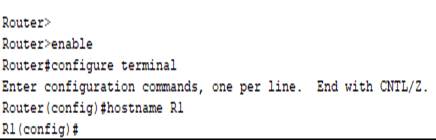
Configure hostname1

Change the hostname

To change the hostname, type hostname command followed by the name that you want to assign to a particular device in Global configuration mode.


Related Topics

Verifying OSPF Configuration

There are several ways to verify OSPF configuration and operations, which are: show ip route commandshow ip ospf commandshow ip ospf database commandshow ip ospf interface commandshow ip protocol commandshow ip ospf neighbor commanddebugging ospf Consider the following topology –We...

2 minutes read.

Variable Length Subnet Masks (VLSMs)

Variable Length Subnet Masks (VLSMs) A VLSM is a process of allocating IP addresses to the subnets according to the user’s need.VLSM is introduced to avoid the wastage of IP addresses.It allows you to...

3 minutes read.

Switching

A switch is a network device which is used to connect multiple devices (routers, computers) inside the LAN (Local Area Network). It operates at Data Link Layer (Layer 2) of the OSI reference...

3 minutes read.

Configuring IP Routing in Our Network

There are 3 types of IP routing that we can configure in our network. Default RoutingStatic RoutingDynamic Routing Default Routing Default Routing is used to configure unknown destination networks.It is used on stub networks. Stub networks are...

3 minutes read.

Static Routing

Static Routing Static Routing is the process in which static routes are manually added to the routing table through the direct configuration. Static routing is configured in the global configuration mode using syntax: Router(config)#ip route...

3 minutes read.

Configuring OSPF

Consider the topology given below – The initial IP configuration table is given below: Devices Interface IP address Router1 ...

2 minutes read.

Checking Network Connectivity and Troubleshooting

As a Network Engineer, you must know that how to check network connectivity and troubleshoot a network. There are following commands are used in the network to check and troubleshoot the network connectivity – 1)...

3 minutes read.

Components of a Cisco Router

The Internal Components of a Cisco Router Before troubleshoot and configure Cisco devices, it is necessary to know the major components of the Cisco routers. The given table shows all the internal components of...

2 minutes read.

Subnetting

Subnetting is the process of dividing a big network into many small networks. Suppose there is a company which has four departments like Development, HR, Marketing, and Testing. We don't want that all...

5 minutes read.

Configure IP Routing

IP Routing stands for “Internet Protocol Routing.”It is the process of sending packets (data) from a source network to a destination network.In IP Routing, routers select the best route for a data packet from the...

2 minutes read.

TCP/IP and DoD Model

Introduction to TCP/IP Model TCP/IP model was introduced in 1974. TCP/IP stands for Transmission Control Protocol/Internet Protocol. TCP/IP is an underlying communication protocol used by internet and commercial networks. The Transmission Control Protocol (TCP)...

10 minutes read.

Internetworking Basics

What is a Network? A network is a group of two or more devices connected by some transmission media, i.e., cables. The purpose of designing a network is to enable the sharing...

4 minutes read.

Configure Hostname

Configure a hostname on a router A hostname is a unique name given to a device (router or switch) on a network and is used to identify one device from another on a specific...

1 minute read.

The OSI Reference Model

OSI Reference Model OSI stands for Open System Interconnection. OSI provides a framework for creating and implementing networking standards, devices, and internetworking schemes. The following devices operate at the OSI model: Network...

6 minutes read.

Types of Spanning Tree Protocol

There are the following types of Spanning Tree Protocol – 1. Common Spanning Tree (802.1D) A Common Spanning Tree (802.1D) standard is developed by IEEE which elects only one Root Bridge for the...

2 minutes read.

Open Shortest Path First (OSPF) Basics

Open Shortest Path First(OSPF) is a classless routing protocol. It uses a link-state routing protocol, which means that the routers exchange topology information with their nearest neighbors. The OSPF maintains three separate tables that...

3 minutes read.

EIGRP Basics

EIGRP stands for Enhanced Interior Gateway Routing Protocol. It is also called as the Hybrid routing protocol. It contains the features of both distance vector and link-state routing protocols. Characteristics of EIGRP There are the...

5 minutes read.

Getting familiar with the IOS modes

  There are following primary modes of operation in IOS. Setup ModeUser Exec ModePrivileged Exec ModeGlobal Configuration ModeInterface Configuration ModeRommon Mode Setup Mode In router or switches, all configurations are saved in NVRAM.If there is no...

3 minutes read.

Download and Install the Cisco Packet Tracer

Download and Install the Cisco Packet Tracer Step1: -Download Cisco Packet Tracer from the link given below: https://arief-jr.blogspot.com/2016/01/download-cisco-packet-tracer-62-for.html Here we will download Cisco packet tracer for Windows OS, so for Windows, go for...

1 minute read.

Configure DHCP

 DHCP DHCP stands for Dynamic Host Configuration Protocol.It is a client server-based architecture which involves DHCP client and DHCP server.It is a messaging system for the communication between the DHCP server and DHCP client.It...

3 minutes read.