×

Getting familiar with the IOS modes

  There are following primary modes of operation in IOS.

  • Setup Mode
  • User Exec Mode
  • Privileged Exec Mode
  • Global Configuration Mode
  • Interface Configuration Mode
  • Rommon Mode

Setup Mode

  • In router or switches, all configurations are saved in NVRAM.
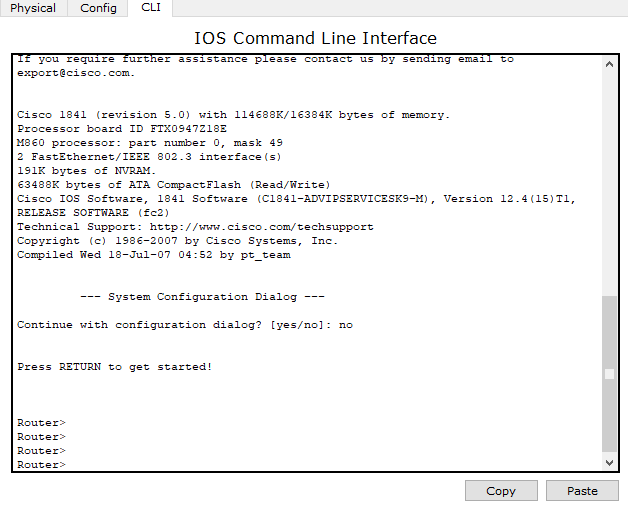
  • If there is no any router’s configuration saved in NVRAM means NVRAM is blank then it shows a message given below:

Continue with configuration dialog [yes/no]:

To enter in setup mode, type “y” for yes.
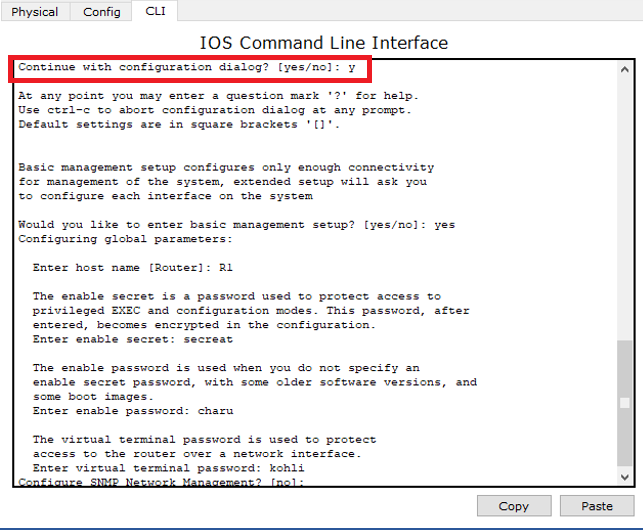
Getting familiar with the IOS modes 1

If initial configurations are saved in NVRAM, then you can’t enter in the setup mode.

User Exec Mode

  • It is the primary mode when you log in router or switch.
  • By default, you can access this mode directly (without password).
  • It consists of device hostname followed by greater than (>) sign.
  • For router default hostname is Router. For switch default hostname is Switch.
     Router>     
Switch>
Getting familiar with the IOS modes 2

To see list of commands available in User exec mode, type command “Router>?”
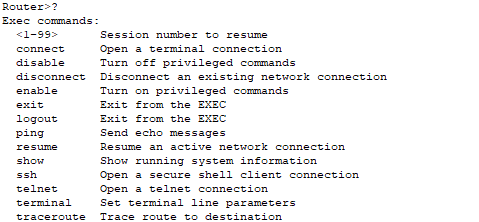
Getting familiar with the IOS modes 3

Privileged Exec Mode

  • It can be accessed by typing enable command at user exec mode.
  • By default, it consists of device hostname followed by “#” symbol.
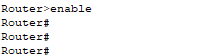
Getting familiar with the IOS modes 4
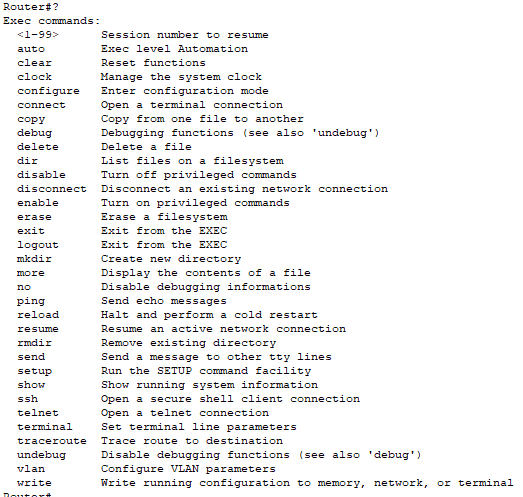
  • This mode allows you to execute all available exec commands.    
  • To see list of commands available in Privileged exec mode, use the command “Router#?”
Getting familiar with the IOS modes 5
  • If you want to move back to the user mode, type disables command.

Getting familiar with the IOS modes 6

Global Configuration Mode

  • It is used to configure the device globally.
  • Type configure terminal command at privilege mode to access global configuration mode.
  • It allows you to make changes in the running configuration.
  • By default, it consists device name followed by (config)#.

Getting familiar with the IOS modes 7
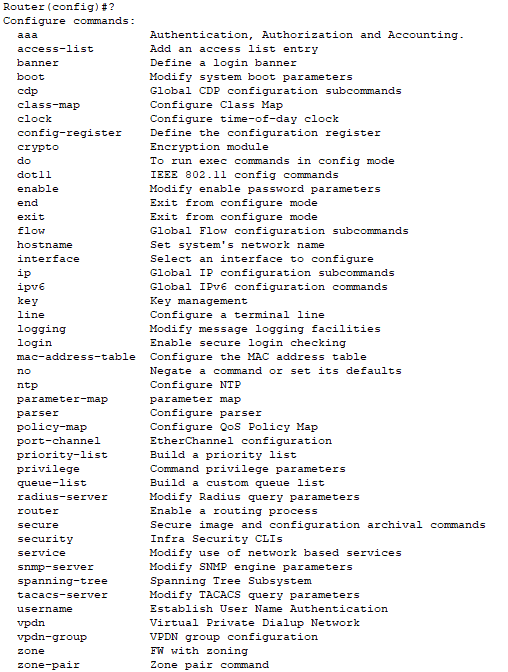
  • To see all commands used in global configuration mode, you can use “Router(config)?”
Getting familiar with the IOS modes 8
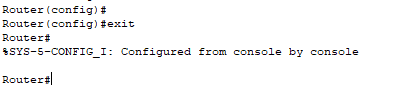
  • If you want to move back to privilege exec mode, use “exit” command.
Getting familiar with the IOS modes 9

Interface Configuration mode

  • This mode is used to configure interfaces like Serial interface port (s0/0/0, s0/0/1, so on), and Fast Ethernet interface port (f0/0, f0/1, so on).
  • We provide IP addresses to each interface through which the device is connected.

Getting familiar with the IOS modes 10
Getting familiar with the IOS modes 11
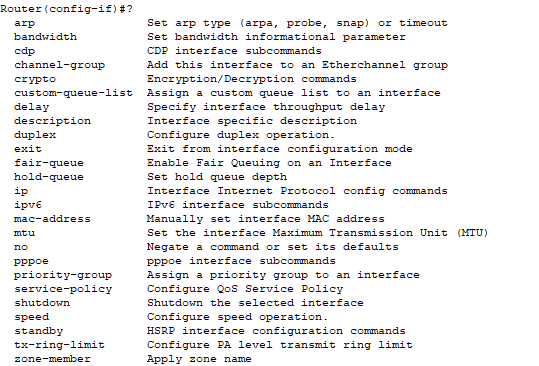
  • To see all commands used in interface configuration mode, you can use “Router(config-if)?”  Command.
Getting familiar with the IOS modes 12
  • If you want to move back to the Global configuration mode, use “exit” command.

Getting familiar with the IOS modes 13

Rommon Mode

  • This mode is used for diagnostic purpose.
  • By default, the router does not enter in rommon mode.
  •  To manually enter in this mode, type reload command at privileged exec mode and then press CTRL+C key to enter in rommon mode.
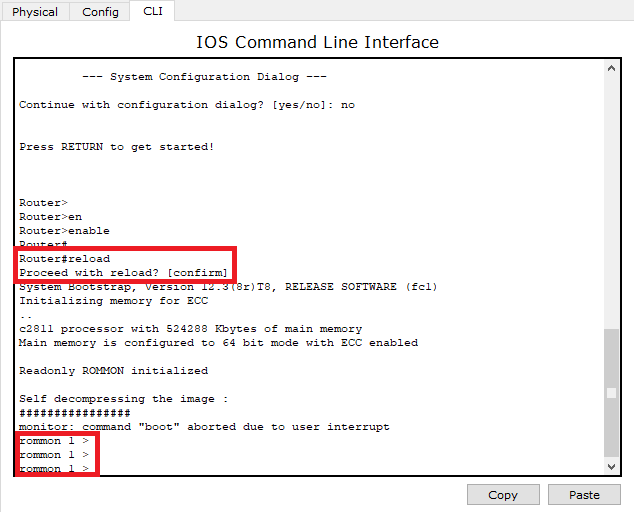
Getting familiar with the IOS modes 14

Cisco IOS mode Summary

Mode Purpose Prompt Command to enter Command  to exit
Setup Router use setup mode to create an initial configuration, if the running configuration is not present Parameter[Parameter: Value]: Router will automatically Insert in this mode if running Configuration is not present. Press Ctrl+C Command to exit.
User EXEC It allows you to connect remote devices, and allow authorized users to configure and manage the router or switches.   Router > Default mode after booting. Login with the password, if configured. Use exit command
Privileged EXEC It includes high-level testing and list of commands like show, copy, and debug. Router# Use enable command at user exec mode Use exit command
Global Configuration It allows users to modify the running system configuration. Router(config)# Use configure terminalcommand at privileged exec mode. Use exit command
Interface Configuration It allows users to modify the Operation of an interface. Router(config-if)# Use interface type number command at global configuration mode. Use the exit command to return in global configuration mode.
ROMMON It allows you to Perform low- Level Diagnostics. ROMMON> Enter reload command at Privileged exec Mode. Use exit Command.

Related Topics

IP Addressing

IP Addressing IP Addressing is designed to allow hosts on a network to communicate with another host on a different network. There are two types of IP address: IPv4 IPv4 addresses are 32-bits long. It allows...

2 minutes read.

Verifying OSPF Configuration

There are several ways to verify OSPF configuration and operations, which are: show ip route commandshow ip ospf commandshow ip ospf database commandshow ip ospf interface commandshow ip protocol commandshow ip ospf neighbor commanddebugging ospf Consider the following topology –We...

2 minutes read.

Configure Password

Password configuration is an in-built feature of Cisco devices.Each Cisco device uses a password to authenticate users for accessing the device and also provides security to the Cisco devices. There are five types of the...

2 minutes read.

Configuring IP Routing in Our Network

There are 3 types of IP routing that we can configure in our network. Default RoutingStatic RoutingDynamic Routing Default Routing Default Routing is used to configure unknown destination networks.It is used on stub networks. Stub networks are...

3 minutes read.

The OSI Reference Model

OSI Reference Model OSI stands for Open System Interconnection. OSI provides a framework for creating and implementing networking standards, devices, and internetworking schemes. The following devices operate at the OSI model: Network...

6 minutes read.

Banner config

Banner config The banner is a little pool which is used in Cisco systems and also in other systems like Unix, Linux and so no.It permits a text that is displayed when you log in a...

1 minute read.

Configure Hostname

Configure a hostname on a router A hostname is a unique name given to a device (router or switch) on a network and is used to identify one device from another on a specific...

1 minute read.

Ethernet Networks in Review

Ethernet Networks in Review Today, Ethernet is the most used technology for the LANs. It is described as IEEE 802.3 standard. Ethernet is a connection-based media access method i.e., Carrier Sense...

2 minutes read.

Subnetting

Subnetting is the process of dividing a big network into many small networks. Suppose there is a company which has four departments like Development, HR, Marketing, and Testing. We don't want that all...

5 minutes read.

Cisco IOS Overview

Cisco IOS Overview Cisco Internetwork Operating System (IOS) is a multitasking operating system which controls all functions of Cisco routers and switches. Willaim Yeager wrote the first IOS in 1986.It is used to allocate resources and manages...

2 minutes read.

Open Shortest Path First (OSPF) Basics

Open Shortest Path First(OSPF) is a classless routing protocol. It uses a link-state routing protocol, which means that the routers exchange topology information with their nearest neighbors. The OSPF maintains three separate tables that...

3 minutes read.

Data Encapsulation and De-Encapsulation

Data Encapsulation It is the process of adding headers and trailers to data. When a host transmits data to another device over a network, the data is encapsulated, with protocol information...

5 minutes read.

Checking Network Connectivity and Troubleshooting

As a Network Engineer, you must know that how to check network connectivity and troubleshoot a network. There are following commands are used in the network to check and troubleshoot the network connectivity – 1)...

3 minutes read.

Configure DHCP

 DHCP DHCP stands for Dynamic Host Configuration Protocol.It is a client server-based architecture which involves DHCP client and DHCP server.It is a messaging system for the communication between the DHCP server and DHCP client.It...

3 minutes read.

Configure IP Routing

IP Routing stands for “Internet Protocol Routing.”It is the process of sending packets (data) from a source network to a destination network.In IP Routing, routers select the best route for a data packet from the...

2 minutes read.

Configuring EIGRP

Consider the topology given below – The initial IP configuration table is given below: Devices Interface IP address Router1 ...

2 minutes read.

VLAN Basics

VLAN stands for Virtual Local Area Network. It is a logical group of networking devices that allows a single extended LAN to be partitioned into several separate LANs. The important feature of...

4 minutes read.

Types of Spanning Tree Protocol

There are the following types of Spanning Tree Protocol – 1. Common Spanning Tree (802.1D) A Common Spanning Tree (802.1D) standard is developed by IEEE which elects only one Root Bridge for the...

2 minutes read.

Components of a Cisco Router

The Internal Components of a Cisco Router Before troubleshoot and configure Cisco devices, it is necessary to know the major components of the Cisco routers. The given table shows all the internal components of...

2 minutes read.

EIGRP Basics

EIGRP stands for Enhanced Interior Gateway Routing Protocol. It is also called as the Hybrid routing protocol. It contains the features of both distance vector and link-state routing protocols. Characteristics of EIGRP There are the...

5 minutes read.