
×

Excel VBA User-Defined Functions

User-Defined Functions

One of the advantages of VBA is that you can create your own functions using macros. These functions can be called and used as other functions in excel and use them. You can create your own functions in VBA and then use them just like you use Excel’s built-in functions, such as IF, AVERAGE. Once the custom or user-defined function is created, one needs to know only the function name and its arguments.

Few practices which are followed in UDF are as follows:

• Giving data types of arguments is not always necessary, but it is considered a good practice
• You can look for the functions you have created by going to ‘User Defined Functions’ in the ‘Formula’ toolbar and change their description so that whenever you open this particular excel file, they are readily available for your use.


Steps to declare the Syntax

Function  Name (arguments,….)
Name= Functionality
End Function 


• Declaring a custom function starts with the keyword ‘Function’ and ends with ‘End Function’
• Following keyword Function, we write the name of the function – in our case we have named the function as Name
• Now, the functions will have some arguments which will be declared in the brackets. It is optional.

• In the next line, we show how to perform the calculation or the functionality of the function.

Sharing UDFs

The extension or location where you store a User Defined Function affects the sharing capability of the file. The commonly used storage extensions are as follows:

  • Personal.xlsb— Onestores a UDF in Personal.xlsb if it is just for their use and won’t be used in a workbook opened on another system.
  • Workbook— One stores a UDF in the workbook if it needs to be distributed to many people.
  • Add-in— Onedistributes a UDF via an add-in if the workbook is to be shared among a select group of people.
  • Template— One store a UDF in a template if it needs to be used to create several workbooks, and the workbooks are distributed to many people.

Example 1: Let’s suppose you want to calculate the area of a circle – now area of a circle is ?r2 where the value of ? is 3.14 and r is the radius of the circle –

• Click on ‘Visual Basics’ and then click on ‘Module’
• In the program editor, you will write –

'function name is Area
 'Here we just have one argument which is radius - double
 'if you may recall is one of the data types we 'have in VBA - so we are telling VBA that this value can be too large
 Function Area(Radius As Double)
     ' the area is going to be calculated by  ? r2 where the value of  ? is 3.14 and r is radius which we want     the end-user to fill in 
     Area = 3.14 * Radius * Radius
 End Function 

Output

Now go back to excel and call the function as you normally call any other function i.e., by using equal to the operator and the name of the function = AREA (Cell containing radius or value of radius can be entered manually).
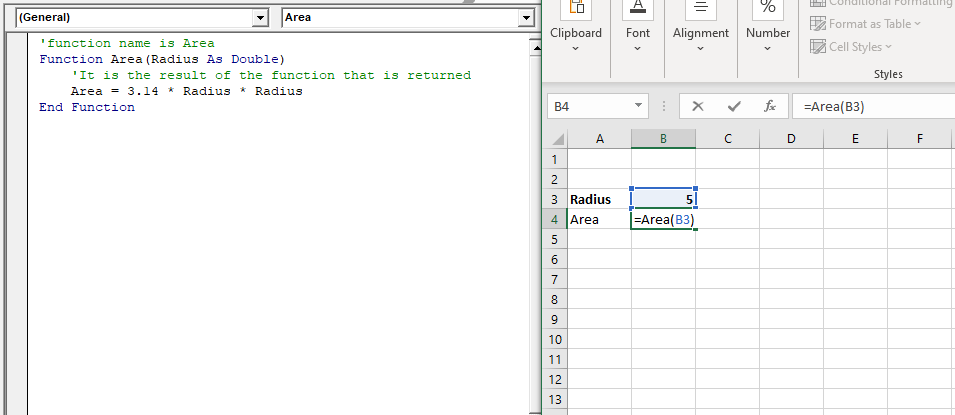
Area of Circle

Click on enter. You will notice, as per the function, the area has been calculated.
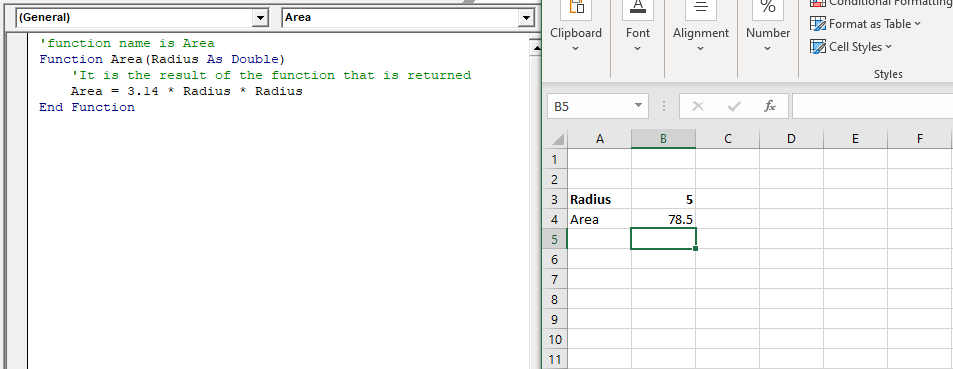
Area of Circle

Example 2: Write a macro to define a UDF for adding two numbers in Excel.

• Click on ‘Visual Basics’ and then click on ‘Module’.
• In the program editor, you will write –

'function name is ADD .
 'Arguments are placed in parentheses after the name of the function. This example has two arguments: Number1
 'and Number2 .
 'Integer defines the variable type of the result as a whole number
 Function Add(Number1 As Integer, Number2 As Integer) As Integer
     'ADD = Number1 + Number2 is the result of the function that is returned
     Add = Number1 + Number2 
 End Function 

Output

In the Excel Sheet, call the function by using equal to the operator and the name of the function = ADD (Cell containing number 1 value that can be entered manually as well, Cell containing number 1 value).
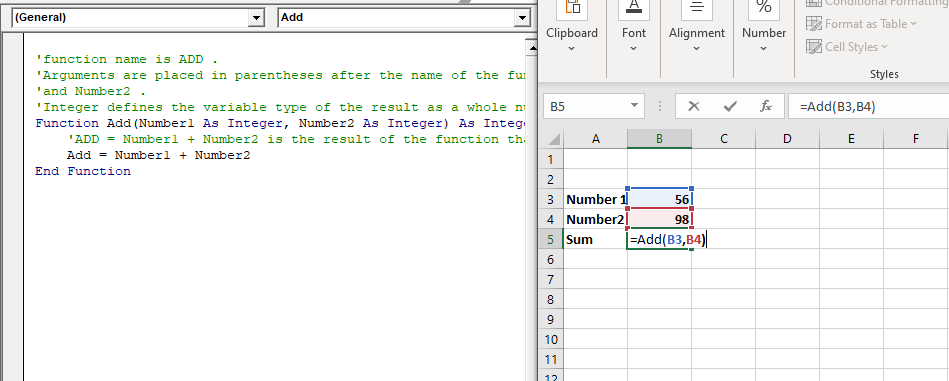
Click on Enter, and you will get the sum of two numbers. This will work similarly, unlike Excel built-in SUM function.
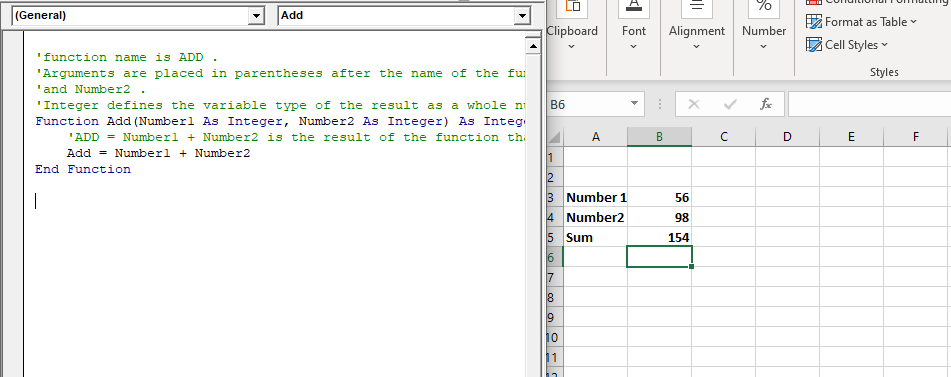
sum of two numbers

Example 3: Write a macro using UDF to set the Current Workbook’s Name and File Path in a Cell

'No arguments are used in this function
 Function FullName() As String
     FullName = ThisWorkbook.FullName
 End Function 

Output
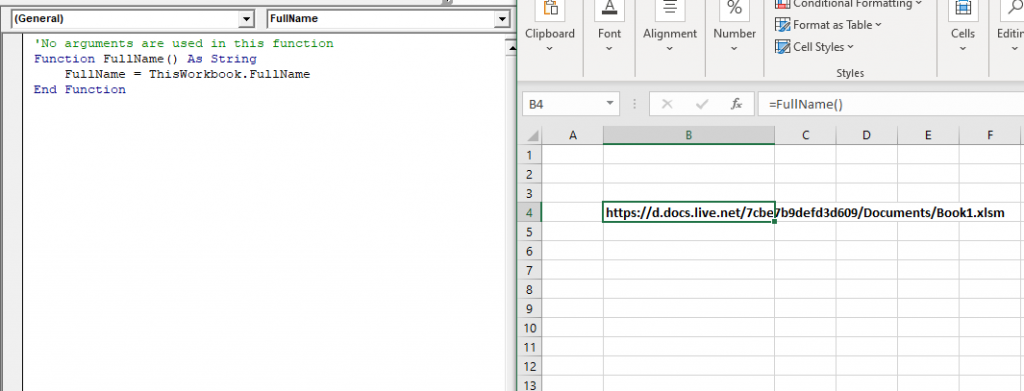
set the Current Workbook’s Name

Related Topics

Excel VBA DateSerial Function

The DateSerial function in VBA returns a Date from a supplied year, month, and day number. Syntax DateSerial (Year, Month, Day) Parameter Year (required) – This parameter represents an integer signifying the year. Month (required) – This parameter...

2 minutes read.

Steps to Create a Pivot Table

Steps to Create a Pivot Table: Pivot Tables can be easily automated through VBA coding. To create a Pivot Table in VBA, follow the below step by step procedure to...

4 minutes read.

Miscellaneous Exercise of conditional statements and Loop

We have the already worked with syntax and examples of conditional statements and loops in the previous tutorials. In this tutorial, we will learn how to work with both together.  We will explain...

3 minutes read.

Finding Last Row or Column in Excel VBA

Finding Last Row or Column in VBA Finding the last used row, column, or cell is one very commonly used task when we write macros and VBA applications.  Like other codes...

5 minutes read.

VBA Subscript out of Range

What is Subscript out of Range? The VBA Subscript out of Range error (which is also called as Run-Time Error 9) mostly triggers when the user selects any cell, sheet, or workbook which does...

5 minutes read.

Excel VBA Array Function

VBA Array Function: The Array function in VBA generates an array containing the given set of values. Syntax Array (Arglist) Parameter Arglist (required) – This parameter the list of values that you want to make...

2 minutes read.

Excel VBA Atn Function

VBA Atn Function: The Atn function in VBA returns the arctangent between quadrant -?/2 and +?/2 for the specified number, in radians. Syntax Atn (Number) Parameter Number (required) – This parameter represents the number that...

1 minute read.

Excel VBA Chr Function

VBA Chr Function: The Chr function in VBA returns the character equivalent to a supplied character code between 0 and 255. Syntax Chr (CharCode) Parameter CharCode (required) – This parameter represents the character code for...

1 minute read.

Excel VBA WeekdayName Function

Excel VBA WeekdayName Function: The WeekdayName function in VBA returns a string containing the weekday name, for the specified integer representation of a weekday. Syntax WeekdayName (Weekday, [Abbreviate], [FirstDayOfWeek]) Parameter Weekday (required) – This parameter represents...

2 minutes read.

Excel VBA DateValue Function

The DateValue function in VBA returns a VBA Date from the given String representation of a date wherein the time information is ignored. It is unable to interpret dates that include the...

1 minute read.

Looping in VBA

Looping in VBA There are many situations where a programmer needs to execute a block of the repetitive code number of times. Writing the same statement will make the program tedious and monotonous....

3 minutes read.

Debugging in Excel VBA

Debugging in VBA: Debugging is a technique used to fix errors in programming languages. In Excel VBA, we have different ways by which you can identify the error in the...

2 minutes read.

VBA Charts Basic Operations

VBA Charts- Basic Operations The Chart Object in Excel VBA represents the collection of all the charts sheet present in a workbook. A chart can be either an embedded chart or a separate chart sheet. The...

6 minutes read.

Userform Events

What are Events? Anything you do in to trigger an excel file is an event (an action). Example: If you want a greeting message ‘Good Day’ whenever an excel file is...

7 minutes read.

Excel VBA Hour Function

The hour function in VBA returns the hour element for the specified time. Syntax Hour (Time) Parameter Time (required) – This parameter represents the time. Return This function returns the hour element for the specified time. Example 1 Sub HourFunction_Example1() ...

1 minute read.

Introduction to Visual Basic Editor Window

How to enable the Developer Ribbon Tab? In order to work with VBA, users need to make a small change in Excel to display a new tab (Developer) at the top of the...

5 minutes read.

VBA ActiveCell Property

What is the ActiveCell Property? The active cell signifies the active selected cell in the current worksheet. The Active property acts as a reference point and is used to move the cell cursor...

5 minutes read.

Excel VBA CStr Function

VBA CStr Function: The CStr function in VBA converts an expression into a string data type. Syntax CStr (Expression) Parameter Expression (required) – This parameter represents the expression that you want to convert to a...

1 minute read.

VBA VBScript Regex Methods Regex

VBA VBScript Regex Methods Regex The VBA Regex supports 3 methods which are as follows: ExecuteReplaceText Execute The execute method is used to extract a match from the given based on the defined matching...

3 minutes read.

Excel VBA Val Function

VBA Val Function: The Val function in VBA converts the given string into a numeric value. This function ignores spaces and continues to read the characters after space(s). It stops...

1 minute read.