
×

Excel VBA UBound Function

Excel VBA UBound Function: The UBound function in VBA returns the highest subscript for the specified dimension in the given array.

Syntax

UBound (ArrayName, [Dimension])

Parameter

ArrayName (required) – This parameter represents an array for which you want to find the highest subscript.

Dimension (optional) – This parameter specifies the dimension of the array, for which you require the highest subscript. By default, this parameter is set to 1.

Return

This function returns the highest subscript for the specified dimension in the given array.

Example 1

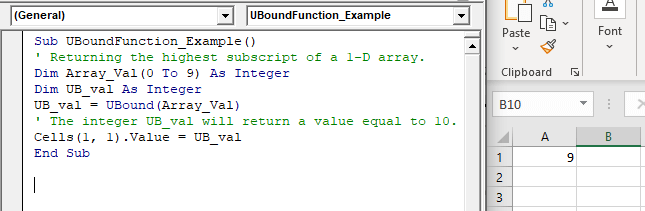
Sub UBoundFunction_Example() ' Returning the highest subscript for a 1-D array.
 Dim Array_Val(0 To 9) As Integer
 Dim UB_val As Integer
 UB_val = UBound(Array_Val)
 ' The integer UB_val will return a value equal to 10. 
 Cells(1, 1).Value = UB_val
 End Sub 

Output

9
VBA UBound Function

Example 2

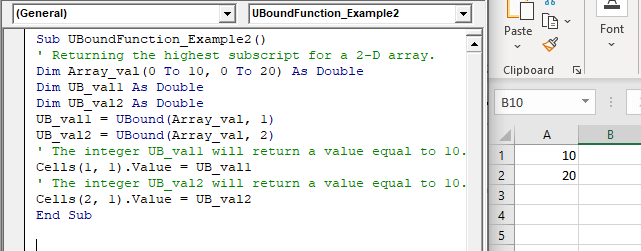
Sub UBoundFunction_Example2()
 ' Returning the highest subscript for a 2-D array.
 Dim Array_val(0 To 10, 0 To 20) As Double
 Dim UB_val1 As Double
 Dim UB_val2 As Double
 UB_val1 = UBound(Array_val, 1)
 UB_val2 = UBound(Array_val, 2)
 ' The integer UB_val1 will return a value equal to 10. 
 Cells(1, 1).Value = UB_val1
 ' The integer UB_val2 will return a value equal to 10.
 Cells(2, 1).Value = UB_val2
 End Sub 

Output

10

20
VBA UBound Function

Related Topics

Excel VBA IsNull Function

VBA IsNull Function: The IsNull function in VBA returns a Boolean, indicating whether a supplied expression is Null. Syntax IsNull (Expression) Parameter Expression (required)- This parameter represents the name of the argument that you want...

1 minute read.

Procedures in VBA

Procedures in VBA A procedure is a block of statements or units of computer code that performs some action. It is enclosed with a declaration statement, and its primary purpose is to carry out...

3 minutes read.

Excel VBA StrComp Function

VBA StrComp Function: The StrComp function in VBA compares two strings and returns an integer value displaying the result of the comparison. Syntax StrComp (String1, String2, [Compare]) Parameter String1 (required)- This parameter represents the first string to...

2 minutes read.

Excel VBA RTrim Function

VBA RTrim Function: The Rtrim function in VBA removes the leading spaces from the text in the specified string. Syntax RTrim (String) Parameter String (required) – This parameter represents the string from which you want...

1 minute read.

Excel VBA Rnd Function

VBA Rnd Function: The Rnd function in VBA returns a random number that is greater than or equal to (>=) 0 and is less than (<) 1. Syntax Rnd ([Number]) Parameter Number (optional) –This...

1 minute read.

Excel VBA CVErr Function

VBA CVErr Function: The CVErr function in VBA returns an Error data type, involving with a user-specified error code. Syntax CVErr (Expression) Parameter Expression (required)- This parameter represents the required error code. Return This function returns an...

1 minute read.

Excel VBA Hour Function

The hour function in VBA returns the hour element for the specified time. Syntax Hour (Time) Parameter Time (required) – This parameter represents the time. Return This function returns the hour element for the specified time. Example 1 Sub HourFunction_Example1() ...

1 minute read.

Excel VBA DateAdd Function

The DateAdd function in VBA adds a time interval to a supplied date and/or time and returns the resultant date/time. Syntax Dateadd (Interval, Number, Date) Parameter Interval (required) – This parameter a string specifying the interval to be...

1 minute read.

Excel VBA Val Function

VBA Val Function: The Val function in VBA converts the given string into a numeric value. This function ignores spaces and continues to read the characters after space(s). It stops...

1 minute read.

Excel VBA Minute Function

The Minute function in VBA returns the minute component for the specified time. Syntax Minute (Time) Parameter Time (required) – This parameter represents the time. Return This function returns the minute component for the specified time. Example 1 Sub MinteFunction_Example1() ...

1 minute read.

Excel VBA Mid Function

VBA Mid Function: The Mid function in VBA returns a substring from within a supplied string. Syntax Mid (Str, Start, [Length]) Parameter Str (required) -This parameter represents a string from which you want to extract the substring. Start...

1 minute read.

Excel VBA CCur Function

The CCur function in VBA is used to convert an expression into a Currency data type. It can take a maximum of 15 digits to the left of the decimal place and...

1 minute read.

Excel VBA Tan Function

VBA Tan Function: The Tan function in VBA returns the tangent for the specified angle in radians. Syntax Tan (Number) Parameter Number (required) – This parameter represents the angle supplied in radiant that you want...

1 minute read.

Excel VBA CVar Function

VBA CVar Function: The CVar function in VBA converts an expression into a Variant data type. Syntax CVar (Expression) Parameter Expression (required) – This parameter represents the expression that that you want to convert...

1 minute read.

VBA runtime error 1004

What is 1004 error?  VBA 1004 Error, also known as object-defined or application-defined, is a runtime error in VBA, usually, if the specified range does not exist in the worksheet or if the Application...

6 minutes read.

VBA Not Equal Operator

What is VBA Not Equal Operator? VBA Not Equal binary operator (“<>”) is a logical function that is used to check if the specified values are not equal or not. This...

5 minutes read.

VBA Updating Pivot Table

VBA- Updating Pivot Table The pivot table is an important feature to explore, summarize, and interpret the bulk amount of data. It helps data evaluating, reviewing, as well as making useful...

3 minutes read.

Excel VBA CLng Function

VBA CLng Function: The CLng function in VBA converts an expression into a Long data type. It returns a long value ranging between -2,147,483,648 and 2,147,483,647. Syntax CLng (Expression) Parameter Expression (required) – This...

1 minute read.

Excel VBA: Select … Case Statement

Select … Case Statement When a group of statements is executed, depending upon the value of an Expression, then Switch Case is used.  If you have several conditions to check, then the If condition...

4 minutes read.

ActiveX Controls

ActiveX Controls are one of the most used Excel Controls to automate applications with Excel VBA. It has the same controls, unlike Form Controls (Command Button, combo box, checkbox, etc.), but it...

3 minutes read.