×

Dynamic components in Angular 8

Dynamic components in Angular 8

The dynamic component is one of the versatile and core concept introduced in Angular, Component template is not fixed. An application needs to load new elements at runtime in various scenarios.

The dynamic component is the component which is created dynamically at the runtime. Angular has its API for loading components dynamically.
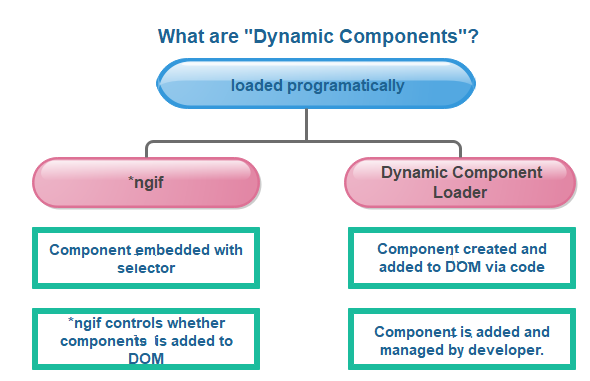
Dynamic component loading

In the given example, we can see how to build a dynamic ad-banner.

The hero agency is planning an ad-campaign with several different ads cycling through the banner, where new ad components are added often by different teams. We need to load a new component without a fixed reference to the component in the ad banner's template.

Angular comes with its API for loading components dynamically.

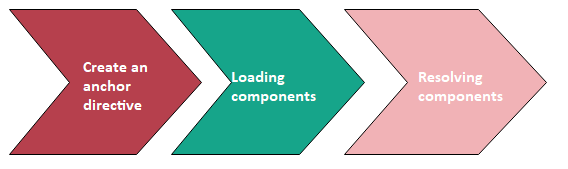
Steps required to create Dynamic Component in Angular 8

  1. Create an anchor directive
  2. Loading components
  3. Resolving components
create Dynamic Component in Angular 8

Create an Anchor Directive

We should know where to include this anchor point into components. Create helper directive called NewsFeedDirective to create the anchor to insert anywhere to the component. The ad banner uses a directive called AdDirective to make a valid insertion point in the template bar.

src/app/ad.directive.ts

import { Directive, ViewContainerRef } from '@angular/core';
@Directive({
selector: '[ad-host]',
})
export class AdDirective {
constructor(public viewContainerRef: ViewContainerRef) { }
} 

AdDirective injects ViewContainerRef to access to the view container of the element that host the dynamic added component.

In the @Directive decorator, observe the selector name, ad-host; that is, we use to apply the directive in the element.

Loading Components

Most of the ad banner implemented in ad-banner.component.ts. To keep things simple in the example, the HTML is in the @Component decorator’s template properly as a template string.

The element is where we apply the directive we just made. To ask the AdDirective, recall the selector from ad.directive.ts and ad-host. Apply the without the square brackets.

src/app/ad-banner.component.ts(template)

template: `
  

Advertisements

`

The element is good choice for dynamic component because it doesn't render any additional output.

Resolving components

In Resolving component, AdBannerComponent takes an array of AdItem objects as input, which finally comes from the AdService. AdItem objects generate the type of component to load and any data to bind in the component.AdService returns the actual ad making up the ad campaign.

Passing an array of a component to AdbannerComponent allows for a dynamic list of ads without static element in the template.

src/app/ad-banner.component.ts(excerpt)

export class AdBannerComponent implements OnInit, OnDestroy {
@Input() ads: AdItem[];
currentAdIndex = -1;
@ViewChild(AdDirective, {static: true}) 
adHost: AdDirective;
interval: any;
constructor (privatecomponentFactoryResolver: ComponentFactoryResolver)
{}
ngOnInit() {
this.loadComponent();
this.getAds(); 
}
ngOnDestroy(){
clearInterval(this.interval);
}
loadComponent(){ 
this.currentAdIndex=
(this.currentAdIndex + 1) % this.ads.length;
const adItem = this.ads[this.currentAdIndex];
const componentFactory = this.componentFactoryResolver.resolveComponentFactory(adItem.component);
const viewContainerRef = this.adHost.viewContainerRef;
viewContainerRef.clear();
const componentRef = viewContainerRef.createComponent(componentFactory);
(componentRef.instance).data = adItem.data;
}
getAds() { 
this.interval = setInterval(() => {
this.loadComponent();
}, 3000);
}
} 

After loadComponent() select an ad, it uses ComponentFactoryResolver to resolve a ComponentFactory for each particular component. The ComponentFactory creates an instance of each component.

Next, we are targeting the viewContainerRef that exists on this specific instance of the component. Because it’s referring to adHost is the directive we set up earlier to tell Angular that where to insert dynamic components.

As we may recall, AdDirective injects ViewContainerRef into its constructor. The directive accesses the element that we want to use to host the dynamic component.

To add the component in the template, we can call createComponent() on the ViewContainerRef.

The createComponent () method returns a reference into the loaded component. Use the reference to interact with the component by assigning to its properties or calling its methods.

Selector References

The Angular compiler generates a ComponentFactory for a  component referenced in a template. There are no selector references in a template. There are no selector references in the template for dynamically loaded components since they are load at the runtime.

To ensure that the compiler quiet generates a factory, add dynamically loaded components into the NgModule’s entryComponents array:

entryComponents: [ HeroJobAdComponent,HeroProfileComponent],

The AdComponent interface

In the ad-banner, all components implement a common AdComponent interface to standardize the API for passing data to the component.

hero-job-ad.component.ts

import { Component, Input } from '@angular/core';
import { AdComponent }from './ad.component';
@Component({
template: `

{{data.headline}}

{{data.body}}
  ` }) export class HeroJobAdComponent implements AdComponent { @Input() data: any; }

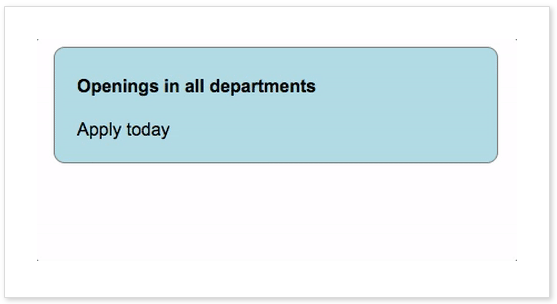
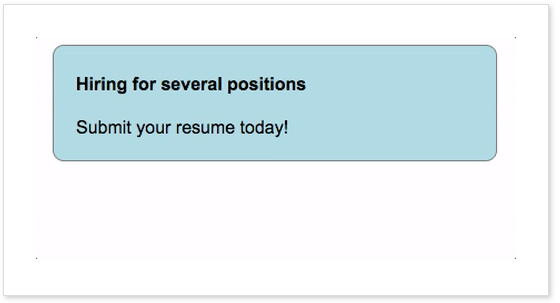
Output Final ad banner

It is changing in per 5 seconds so that I put all the screenshot here serially. All the screenshot came one by one like an ad-banner.
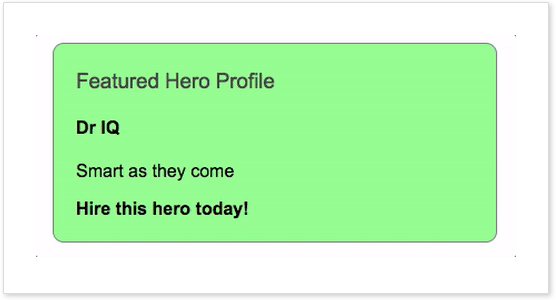
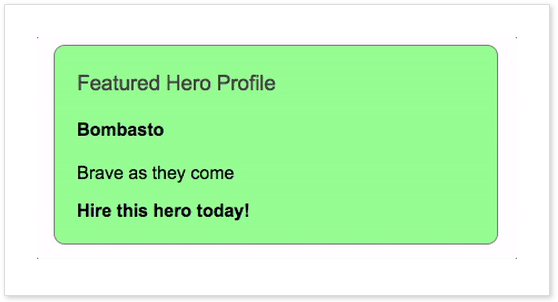
Featured hero profile
Brave as they come
Opening in all departments
Hiring for Several position

Related Topics

Angular 8 Pipes

Angular 8 Pipes Pipes are a useful feature in Angular. These are the simple way to transform values in an Angular template. It takes the integers, strings, array, and dates as input separated with...

3 minutes read.

Dependency Injection in Angular 8

Dependency injection (DI), is an essential application design pattern. Angular 8 has its own DI framework, which used in the design of Angular application to increase efficiency and portability. Dependencies are the services that...

7 minutes read.

ngSwitch Directive in Angular 8

Angular 8 ng-Switch Directive The ng-Switch Directive hides and shows the HTML elements depending on an expression. Child elements with the ng-switch-when directive will be displayed if it gets a match; otherwise, the component and...

2 minutes read.

Angular 8 Error Fixing

We can get errors in Angular because of many causes. Let's see an example to see some specific types of errors. We have to create an app with the name "testing-app." In this app,...

4 minutes read.

Angular 8 Components

Angular is used for building mobile and desktop web applications. The component is the basic building block of Angular. It has a selector, template, style, and other properties, and it...

4 minutes read.

Angular 8 *ngFor Directive

Angular 8ngFor Directive The *ngFor directive is used to repeat to repeat a portion of HTML template once per each item from an iterable list (collection). The ngFor is an Angular...

2 minutes read.

Angular 8 Observables

Observables provide support for passing messages between publisher and subscription in our application. The observables can deliver the multiple values of any type like literal, messages, depending on the content. It is an...

6 minutes read.

Creating form in Angular 8

The angular reactive form is used to handle the user's input. We can use Angular form in the application to authorize the user to log in, to update profile, to enter information,...

2 minutes read.

Angular 8 Architecture

Architecture of Angular 8 Angular 8 is a platform and framework which is used to create clients applications in HTML and Typescript. Angular 8 is written in Typescript. Typescript is a...

5 minutes read.

Angular 8 with Bootstrap

How to install Bootstrap for Angular? Run the following Command in Command prompt. npm install–save bootstrap@3= > The @3 is essential! After that, when we use a project created with Angular CLI 6+, we will...

1 minute read.

Routing in Angular 8

Routing Angular Router is a powerful JavaScript router is built and maintained by the Angular core team that can install from the package @angular/router. Routing provides a complete routing library with the possibility of multiple...

4 minutes read.

Angular 8 Unit Testing

What is unit testing? Unit testing is a type of software testing where individual components of the software are tested. It is done during the development of any application. A unit may be...

6 minutes read.

Angular 8 App Loading

How an Angular 8 app loaded and started When we create an Angular app and run it by using ng serve command, it looks like the below screenshot. It is a simple...

3 minutes read.

Angular 8 Module

Angular 8 Module It is a collection of services, directives, controllers, filters, and configuration information. angular.module is used to configure the $injector. The module is a container of the different parts of an application....

6 minutes read.

Express.js app.get() Request Function

Express.js Express is a flexible online application framework for Node.js that offers a strong set of functionality for both web and mobile applications. While preserving the familiar and adored Node.js features,...

4 minutes read.

$timeout service in AngularJS

The discipline of web development is expanding quickly. A technology that is released today will inevitably become obsolete in a few months. The webpages were static in the past and...

4 minutes read.

Angular CLI Commands

All CLI commands of Angular Angular CLI is a command-line interface which is used to initialize, develop, and maintain Angular applications. We can use these Command on command prompt or consequentially by an associated...

8 minutes read.

Property binding in Angular 8

Property binding is the primary way to binding data in Angular.  To bind data to a property of any element, we use square braces[ ]. It is also a one-way data-binding...

2 minutes read.

Difference between Angular and React

Difference between Angular and React Parameters AngularReactType Angular is a complete framework. React is a JavaScript library, and much older compared...

2 minutes read.

Creating first APP in Angular 8

Firstly, we have to open Git Bash and, then we have to write the following command in it. ng new my -app The project has been created now so that now we have to go...

2 minutes read.