
×

Excel VBA Hex Function

VBA Hex Function: The Hex function in VBA converts the given number into hexadecimal notation and returns the result as a string.

Syntax

Hex (Number)

Parameter

Number (required) – This parameter represents the numeric value that you want to convert to hexadecimal.

Return

This function returns a string value after converting the specified number into hexadecimal notation. If the number is a decimal, it will round it to the nearest integer before converting it to hexadecimal.

Example 1

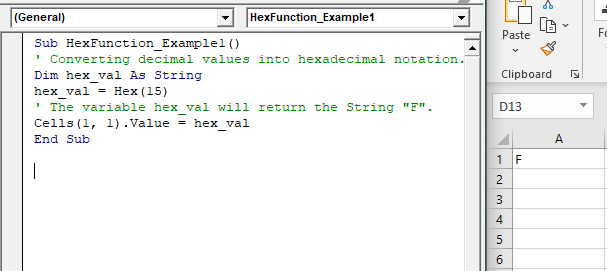
Sub HexFunction_Example1()
 ' Converting decimal values into hexadecimal notation.
 Dim hex_val As String
 hex_val = Hex(15)
 ' The variable hex_val will return the String "F".
 Cells(1, 1).Value = hex_val
 End Sub 

Output

F
VBA Hex Function

Example 2

Sub HexFunction_Example2()
 ' Converting decimal values into hexadecimal notation.
 Dim hex_val As String
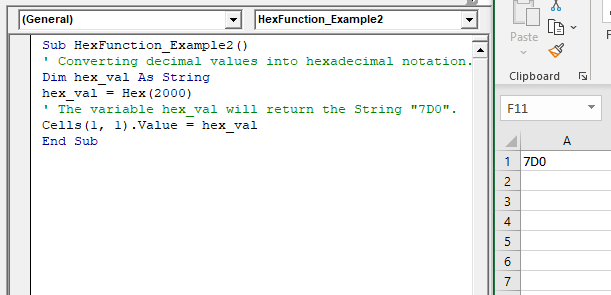
 hex_val = Hex(2000)
 ' The variable hex_val will return the String "7D0".
 Cells(1, 1).Value = hex_val
 End Sub 

Output

7D0
VBA Hex Function

Example 3

Sub HexFunction_Example3()
 ' Converting octal into hexadecimal notation.
 Dim hex_val As String
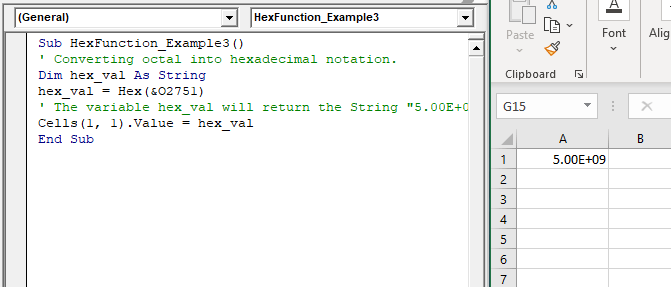
 hex_val = Hex(&O2751)
 ' The variable hex_val will return the String "5.00E+09".
 Cells(1, 1).Value = hex_val
 End Sub 

Output

5.00E+09
VBA Hex Function

Related Topics

Excel VBA Conditional Statement

Conditional Statement in VBA Excel Conditional Statements in Excel VBA are one of the most powerful and useful features in programming, this will give you to perform comparisons to decide or...

2 minutes read.

Excel VBA Error Function

VBA Error Function: The Error function in VBA returns the error message corresponding to a supplied error code. Syntax Error ([ErrorNumber]) Parameter ErrorNumber (optional) – This parameter represents the required error number. By default, the...

1 minute read.

Excel VBA IsNull Function

VBA IsNull Function: The IsNull function in VBA returns a Boolean, indicating whether a supplied expression is Null. Syntax IsNull (Expression) Parameter Expression (required)- This parameter represents the name of the argument that you want...

1 minute read.

ActiveX Controls

ActiveX Controls are one of the most used Excel Controls to automate applications with Excel VBA. It has the same controls, unlike Form Controls (Command Button, combo box, checkbox, etc.), but it...

3 minutes read.

If ElseIf ElseIf Statement or Nested If statement in VBA

VBA Excel: If … ElseIf … ElseIf Statement or Nested If statement This function enables you to check multiple conditions and, based on that, then run one of the statement blocks present. If...

2 minutes read.

Excel VBA RTrim Function

VBA RTrim Function: The Rtrim function in VBA removes the leading spaces from the text in the specified string. Syntax RTrim (String) Parameter String (required) – This parameter represents the string from which you want...

1 minute read.

Excel VBA UCase Function

The UCase function in VBA converts a String into upper case text. Syntax UCase (String) Parameter String (required) – This parameter represents the string that you want to convert to upper case. Return This function returns a string...

1 minute read.

Basics of Userform

A User Form is a built-in customized dialog box that fetches data from the user through a user-friendly dialog box or window that makes up part of an application's user interface. It...

9 minutes read.

VBA VBScript Regex Methods Regex

VBA VBScript Regex Methods Regex The VBA Regex supports 3 methods which are as follows: ExecuteReplaceText Execute The execute method is used to extract a match from the given based on the defined matching...

3 minutes read.

VBA UBound

VBA UBound  The UBound or Upper Bound function in VBA is used to specify the length of an array and returns the highest subscript for a dimension for the specified array. It is...

3 minutes read.

VBA runtime error 1004

What is 1004 error?  VBA 1004 Error, also known as object-defined or application-defined, is a runtime error in VBA, usually, if the specified range does not exist in the worksheet or if the Application...

6 minutes read.

Excel VBA Filter Function

VBA Filter Function: The Filter function in VBA returns a subset for the given string array, based on specified criteria. Syntax Filter (SourceArray, Match, [Include], [Compare]) Parameter SourceArray (required) – This parameter the array of Strings that you...

2 minutes read.

Excel VBA Weekday Function

Excel VBA Weekday Function: The TimeValue function in VBA returns an integer (1 to 7), signifying the day of the week for the specified date. Syntax Weekday (Date, [FirstDayOfWeek]) Parameter Date (required) – This parameter...

2 minutes read.

UserForm and its Properties Excel VBA

UserForm and its Properties Userform has certain properties that can be viewed as category wise (based on appearance, behavior, font) or in an alphabetic manner. The property window is used to set or...

11 minutes read.

Excel VBA Error Handling

What is Errors and Types of Error? Errors are conditions that resist the flow of the program or enables a problem while running any programming. There are three types of errors in VBA...

5 minutes read.

Excel VBA Cos Function

VBA Cos Function: The Cos function in VBA returns the cosine value for a supplied angle. Syntax Cos (Number) Parameter Number (required) –This parameter represents the number that you want the absolute value of. Return This function...

1 minute read.

VBA Cell

What is VBA cell? Cells is one of the elements (workbook, worksheet, range) in Excel VBA, which refers to cells of the Excel worksheet.  In VBA, the cell is also a property...

5 minutes read.

Excel VBA IsMissing Function

VBA IsMissing Function: The IsMissing function in VBA checks if any parameter to a procedure is missing or not. It returns a Boolean value True if the specified parameter has not been...

1 minute read.

Excel VBA For Each Loop

A For Each loop executes a statement or a group of statements for each element in an array or collection. It repeats the statement/condition/code for each element in a collection. For Each Loops loop through every...

4 minutes read.

VBA Regex Pattern Validation

VBA Regex Pattern Validation The key purpose of using Regex in VBA was to validate the data and extract the same category of data. There are certain formats that are standard...

6 minutes read.