×

For Next loop in VBA

For Next Loop

The ”For Next” loop is used for a fixed number of times. It works by implementing the loop for the specified number of times. In this, the user specifies how many times they want the loop to run and need to define what they want the macro to do each time the for next loop is run.

Syntax

For counter = start To end [ Step step ]
[ statements ]
,
Next [ counter ]

Parameter

counter (required) – This parameter represents the loop to counter the variable.

start (required)- It represents the starting or first value for the counter.

end (required)- It represents the ending or last value for the counter.

step (optional)- This parameter represents the value that ‘counter’ is incremented where each value passes through the loop. It can be either a positive or a negative number. If the step parameter is not specified, it will default to an increment of 1 so that each pass through the loop increases counter by 1.

statement (required)- It represents the statements of code to execute each pass through the loop.

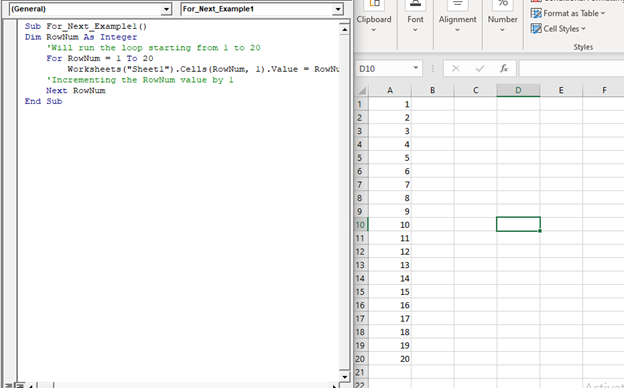
Example 1: Write a macro using For Next loop in VBA to print a number from 1 to 20.

Sub For_Next_Example1()

‘In the below code, rownum is a variable, and it will run 20 times till value 20 is reached increasing by 1 each time.

Dim RowNum As Integer
    'Will run the loop starting from 1 to 20
    For RowNum = 1 To 20
        Worksheets("Sheet1").Cells(RowNum, 1).Value = RowNum
    'Incrementing the RowNum value by 1
    Next RowNum
End Sub

Output

1
2
3
4
5
6
7
8
9
10
11
12
13
14
15
16
17
18
19
20
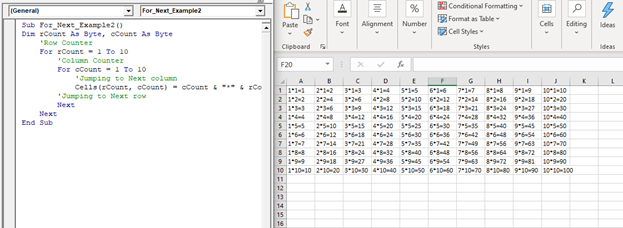
Example 2: Write a Macro using For Next loop in VBA to print the tables from 1 to 10

Sub For_Next_Example2()
Dim rCount As Byte, cCount As Byte
    'Row Counter
    For rCount = 1 To 10
        'Column Counter
        For cCount = 1 To 10
            'Jumping to Next column
            Cells(rCount, cCount) = cCount & "*" & rCount & "=" & rCount * cCount
        'Jumping to Next row
        Next
    Next
End Sub

Output

1*1=12*1=23*1=34*1=45*1=56*1=67*1=78*1=89*1=910*1=10
1*2=22*2=43*2=64*2=85*2=106*2=127*2=148*2=169*2=1810*2=20
1*3=32*3=63*3=94*3=125*3=156*3=187*3=218*3=249*3=2710*3=30
1*4=42*4=83*4=124*4=165*4=206*4=247*4=288*4=329*4=3610*4=40
1*5=52*5=103*5=154*5=205*5=256*5=307*5=358*5=409*5=4510*5=50
1*6=62*6=123*6=184*6=245*6=306*6=367*6=428*6=489*6=5410*6=60
1*7=72*7=143*7=214*7=285*7=356*7=427*7=498*7=569*7=6310*7=70
1*8=82*8=163*8=244*8=325*8=406*8=487*8=568*8=649*8=7210*8=80
1*9=92*9=183*9=274*9=365*9=456*9=547*9=638*9=729*9=8110*9=90
1*10=102*10=203*10=304*10=405*10=506*10=607*10=708*10=809*10=9010*10=100

For Next Double Loop: In this we use one for next inside the other.

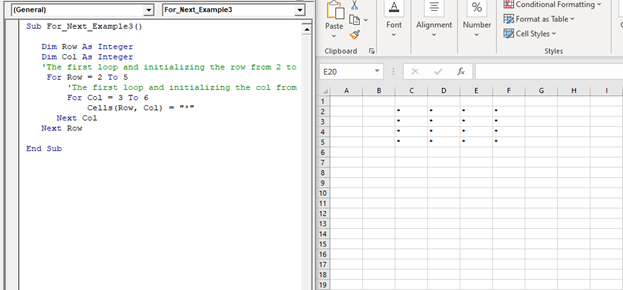
Example 3: Write a macro using for next double loop, to print a 4 * 4 square.

Sub For_Next_Example3()
   Dim Row As Integer
   Dim Col As Integer
   'The first loop and initializing the row from 2 to 5
    For Row = 2 To 5
        'The first loop and initializing the col from 3 to 6
        For Col = 3 To 6
            Cells(Row, Col) = "*"
      Next Col
   Next Row
End Sub

Output

****
****
****
****

Related Topics

Excel VBA User-Defined Functions

User-Defined Functions One of the advantages of VBA is that you can create your own functions using macros. These functions can be called and used as other functions in excel and use them. You can...

3 minutes read.

Excel VBA: DO WHILE….Loop

DO WHILE….Loop The “Do While” Loop is the same, unlike the FOR statement, just that it will keep on looping till the specified condition is true. It is used when we want to...

3 minutes read.

Excel VBA Month Function

The Mont function in VBA returns the month number for the specified date. Syntax Month (Date) Parameter Time (required) – This parameter represents the date. Return This function returns the month number for the specified date. Example 1 Sub MonthFunction_Example1() ...

1 minute read.

Excel VBA Array Function

VBA Array Function: The Array function in VBA generates an array containing the given set of values. Syntax Array (Arglist) Parameter Arglist (required) – This parameter the list of values that you want to make...

2 minutes read.

Excel VBA Sin Function

VBA Sin Function: The Sin function in VBA returns the sine value for a supplied angle. Syntax Sin (Number) Parameter Number (required) –This parameter represents the angle (in radians) to calculate the sine value. Return This function...

1 minute read.

Excel VBA Exp Function

VBA Exp Function: The Exp function in VBA returns the value of the exponential function ex (mathematical constant ‘e’ raised to specified power) for the given value of x. Syntax Exp (Number) Parameter Number (required) –This parameter represents...

1 minute read.

Excel VBA: Select … Case Statement

Select … Case Statement When a group of statements is executed, depending upon the value of an Expression, then Switch Case is used.  If you have several conditions to check, then the If condition...

4 minutes read.

ActiveX Controls

ActiveX Controls are one of the most used Excel Controls to automate applications with Excel VBA. It has the same controls, unlike Form Controls (Command Button, combo box, checkbox, etc.), but it...

3 minutes read.

Finding Last Row or Column in Excel VBA

Finding Last Row or Column in VBA Finding the last used row, column, or cell is one very commonly used task when we write macros and VBA applications.  Like other codes...

5 minutes read.

Excel VBA Choose Function

VBA Choose Function: The Choose function in VBA chooses function selects the corresponding value from a list of arguments depending as per the specified index. Syntax Choose (Index, [Choice-1], [Choice-2], ...) Parameter Index (required) – This...

2 minutes read.

Excel VBA CStr Function

VBA CStr Function: The CStr function in VBA converts an expression into a string data type. Syntax CStr (Expression) Parameter Expression (required) – This parameter represents the expression that you want to convert to a...

1 minute read.

Excel VBA Left Function

VBA Left Function: The Left function in VBA returns a substring from the start of the specified string. Syntax Left (Str, Length) Parameter Str (required) – This parameter represents the string that you want to extract...

1 minute read.

Excel VBA StrReverse Function

The StrReverse function returns a String after reversing the given String. Syntax StrReverse (Expression) Parameter Expression (required) – This parameter represents the String that you want to reverse. Return This function returns a String after reversing the given String. Example...

1 minute read.

Excel VBA Split Function

Excel VBA Split Function: The Split function in VBA is used to split a string into several substrings and return a one-dimensional array of substrings. Syntax Split (Expression, [Delimiter], [Limit], [Compare]) Parameter Expression (required) – This parameter...

2 minutes read.

Excel VBA UCase Function

The UCase function in VBA converts a String into upper case text. Syntax UCase (String) Parameter String (required) – This parameter represents the string that you want to convert to upper case. Return This function returns a string...

1 minute read.

Excel VBA : With End-with Constructs

With End-with Constructs The With-End With construct enables the user to perform multiple operations on a single object. If you are going to perform several different actions on the same object and typing the same...

4 minutes read.

Excel VBA CLng Function

VBA CLng Function: The CLng function in VBA converts an expression into a Long data type. It returns a long value ranging between -2,147,483,648 and 2,147,483,647. Syntax CLng (Expression) Parameter Expression (required) – This...

1 minute read.

Excel VBA Error Function

VBA Error Function: The Error function in VBA returns the error message corresponding to a supplied error code. Syntax Error ([ErrorNumber]) Parameter ErrorNumber (optional) – This parameter represents the required error number. By default, the...

1 minute read.

Excel VBA Right Function

VBA Right Function: The Right function in VBA returns a substring from the end of the given string. Syntax Right (Str, Length) Parameter Str (required) – This parameter represents the string from which you want to...

1 minute read.

Excel VBA CDec Function

VBA CDec Function: The CDec function in VBA converts an expression into a Decimal data type. Syntax CDec (Expression) Parameter Expression (required) – This parameter represents the expression that you want to convert to a...

1 minute read.