×

Excel VBA For Each Loop

A For Each loop executes a statement or a group of statements for each element in an array or collection. It repeats the statement/condition/code for each element in a collection. For Each Loops loop through every object in an array, such as every worksheet in workbook or every cell in a range.

The “For Each” loop is similar to For Next Loop; however, it is executed for each element in an array or collection. The difference between both of them is that the step counter won't exist in this loop. It is mostly used with collections, arrays or used in the context of the File system objects in order to carry out recursively.

Syntax

For Each element In Group
    [statement 1]
    [statement 2]
    ....
    [statement n] 
    [Exit For]
    [statement n1]
    [statement n2]
 Next 

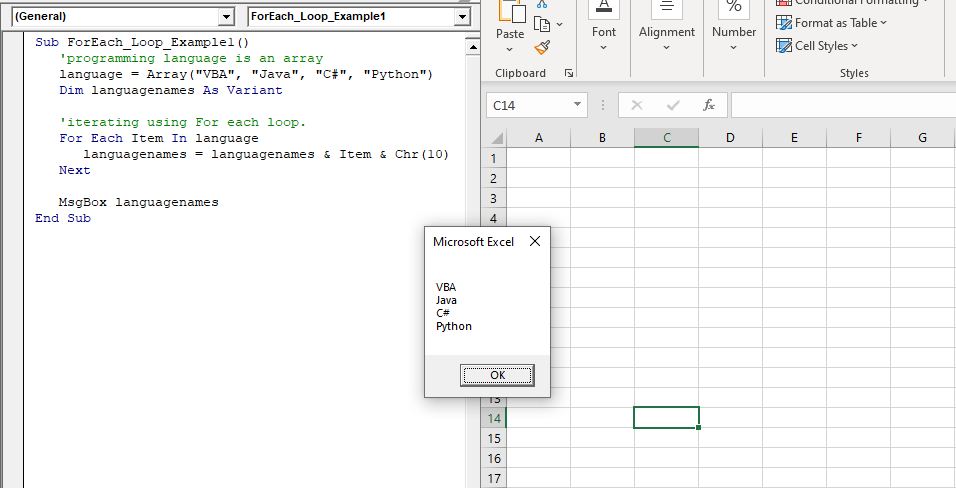
Example 1: Write a Macro in VBA by using For each loop to print each word of the array in a separate line.

Sub ForEach_Loop_Example1()
    'programming language is an array
    language = Array("VBA", "Java", "C#", "Python")
    Dim languagenames As Variant
    'iterating using For each loop.
    For Each Item In language 
       languagenames = languagenames & Item & Chr(10)
    Next   
    MsgBox language
 End Sub 

Output
VBA For Each Loop

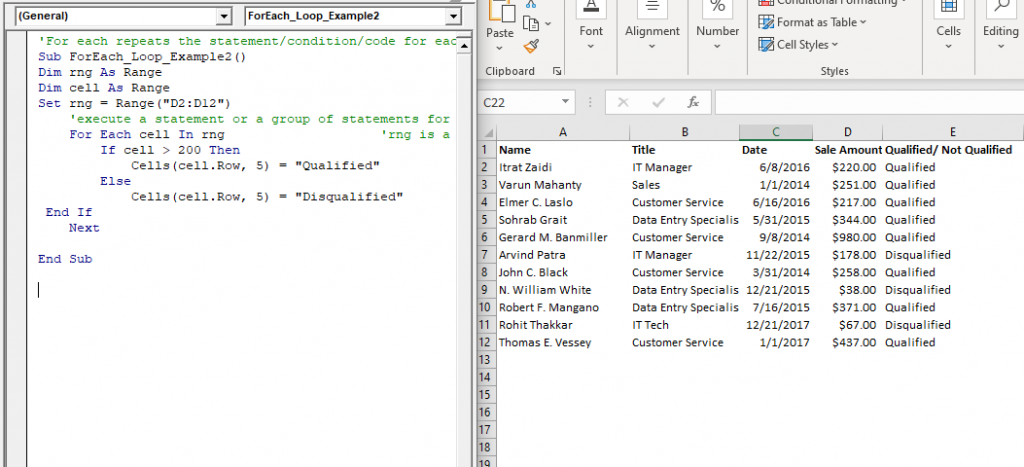
Example 2: Write a procedure or macro using For each that does the following task:

Get "Qualified" in column E if the value of column D is above 200 else it should return “Not Qualified”

Sub ForEach_Loop_Example2()
 Dim rng As Range
 Dim cell As Range
 Set rng = Range("D2:D12")
     'execute a statement or a group of statements for each element
     For Each cell In rng                    'rng is a Range collection and For-Each is moving into each cell of rng collection 
         If cell > 200 Then
             Cells(cell.Row, 5) = "Qualified"
         Else
             Cells(cell.Row, 5) = "Disqualified"       
  End If
     Next
 End Sub 

Output

Name Title Date Sale Amount Qualified/ Not Qualified
Itrat Zaidi IT Manager 6/8/2016 $220.00 Qualified
Varun Mahanty Sales 1/1/2014 $251.00 Qualified
Elmer C. Laslo Customer Service 6/16/2016 $217.00 Qualified
Sohrab Grait Data Entry Specialist 5/31/2015 $344.00 Qualified
Gerard M. Banmiller Customer Service 9/8/2014 $980.00 Qualified
Arvind Patra IT Manager 11/22/2015 $178.00 Disqualified
John C. Black Customer Service 3/31/2014 $258.00 Qualified
N. William White Data Entry Specialist 12/21/2015 $38.00 Disqualified
Robert F. Mangano Data Entry Specialist 7/16/2015 $371.00 Qualified
Rohit Thakkar IT Tech 12/21/2017 $67.00 Disqualified
Thomas E. Vessey Customer Service 1/1/2017 $437.00 Qualified
2

Nested For each Loop

You can nest For Each loop by putting one loop within another. When you nest loops, each loop must have a unique variable.

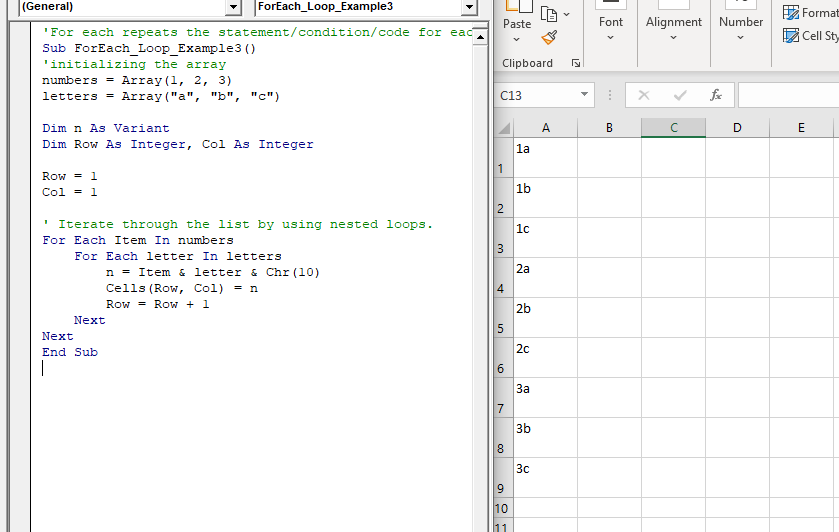
Example 3: Write a macro or procedure, by using nested for each loop, print the values of one array repeatedly with second array.

'For each repeats the statement/condition/code for each element in a collection
 Sub ForEach_Loop_Example3()
 'initializing the array
 numbers = Array(1, 2, 3)
 letters = Array("a", "b", "c") 
 Dim n As Variant
 Dim Row As Integer, Col As Integer
 Row = 1
 Col = 1
 ' Iterate through the list by using nested loops.
 For Each Item In numbers
     For Each letter In letters
         n = Item & letter & Chr(10) 
         Cells(Row, Col) = n
         Row = Row + 1
     Next
 Next
 End Sub 

Output

1a
 1b
 1c
 2a
 2b
 2c
 3a
 3b
 3c
3

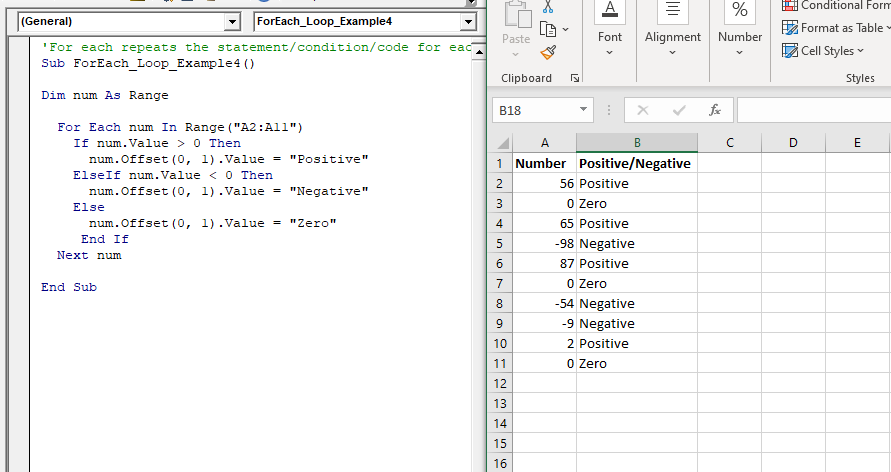
Example 4: Write a macro, to calculate the positive, negative or zero in a sheet.

'For each repeats the
statement/condition/code for each element in a collection
 Sub ForEach_Loop_Example4()
 Dim num As Range
   For Each num In Range("A2:A11")
     If num.Value > 0 Then
       num.Offset(0, 1).Value = "Positive" 
     ElseIf num.Value < 0 Then
       num.Offset(0, 1).Value = "Negative"
     Else
       num.Offset(0, 1).Value = "Zero"
      End If
   Next num
 End Sub 

Output

Number    Positive/Negative
 56    Positive
 0    Zero
 65    Positive
 -98    Negative
 87    Positive
 0    Zero
 -54    Negative
 -9    Negative
 2    Positive
 0    Zero
VBA For Each Loop 4

Related Topics

Excel VBA UBound Function

Excel VBA UBound Function: The UBound function in VBA returns the highest subscript for the specified dimension in the given array. Syntax UBound (ArrayName, [Dimension]) Parameter ArrayName (required) – This parameter represents an array for which...

1 minute read.

VBA Regex Pattern Validation

VBA Regex Pattern Validation The key purpose of using Regex in VBA was to validate the data and extract the same category of data. There are certain formats that are standard...

6 minutes read.

Excel VBA IsObject Function

VBA IsObject Function: The IsObject function in VBA returns a Boolean value showing whether the specified variable represents an Object variable type or not. Syntax IsObject (Expression) Parameter Expression (required)- This parameter represents the...

1 minute read.

Excel VBA CStr Function

VBA CStr Function: The CStr function in VBA converts an expression into a string data type. Syntax CStr (Expression) Parameter Expression (required) – This parameter represents the expression that you want to convert to a...

1 minute read.

Excel VBA DateAdd Function

The DateAdd function in VBA adds a time interval to a supplied date and/or time and returns the resultant date/time. Syntax Dateadd (Interval, Number, Date) Parameter Interval (required) – This parameter a string specifying the interval to be...

1 minute read.

Steps to Create a Chart in VBA

Steps to Create a Chart Charts are created either by directly working with the chart variable object that defines the chart data or by ChartObject method. In order to get to...

3 minutes read.

VBA runtime error 1004

What is 1004 error?  VBA 1004 Error, also known as object-defined or application-defined, is a runtime error in VBA, usually, if the specified range does not exist in the worksheet or if the Application...

6 minutes read.

Looping in VBA

Looping in VBA There are many situations where a programmer needs to execute a block of the repetitive code number of times. Writing the same statement will make the program tedious and monotonous....

3 minutes read.

Userform Events

What are Events? Anything you do in to trigger an excel file is an event (an action). Example: If you want a greeting message ‘Good Day’ whenever an excel file is...

7 minutes read.

Excel VBA IsDate Function

VBA IsDate Function: The IsDate function in VBA returns a Boolean value indicating whether the given expression is interpreted as a VBA Date or not. Syntax IsDate (Expression) Parameter Expression (required) – This parameter...

1 minute read.

Excel VBA Len Function

VBA Len Function: The Len function in VBA returns the number of characters in a supplied string or the number of bytes required to store a supplied variable. Syntax Len (Expression) Parameter Expression (required)-...

1 minute read.

Excel VBA CDate Function

VBA CDate Function: The CDate function in VBA converts an expression into a Date (or Time) data type. Syntax CDate (Expression) Parameter Expression (required) - This parameter represents the expression that that you want to...

1 minute read.

Excel VBA StrConv Function

The StrConv function in VBA converts a string into a specified format. Syntax StrConv (String, Conversion, [LocaleID]) Parameter String (required) – This parameter represents the string to be converted. Conversion (required) – This parameter specifies the type of conversion. It can...

1 minute read.

Excel VBA Sqr Function

VBA Sqr Function: The Sqr function in VBA returns the square root for the specified number. Syntax Sqr (Number) Parameter Number (required) – This parameter represents a positive numeric value that you want to calculate...

1 minute read.

Excel VBA IsNull Function

VBA IsNull Function: The IsNull function in VBA returns a Boolean, indicating whether a supplied expression is Null. Syntax IsNull (Expression) Parameter Expression (required)- This parameter represents the name of the argument that you want...

1 minute read.

Excel VBA MonthName Function

Excel VBA MonthName Function: The MonthName function in VBA returns a string with the month name for the specified month number. Syntax MonthName (Month, [Abbreviate]) Parameter Month (required) – This parameter represents an integer between...

1 minute read.

Debugging in Excel VBA

Debugging in VBA: Debugging is a technique used to fix errors in programming languages. In Excel VBA, we have different ways by which you can identify the error in the...

2 minutes read.

Excel VBA Time Function

Excel VBA Time Function: The Time function in VBA returns the current time. Syntax Time () Parameter NA Return This function returns the current time.  Example 1 Sub TimeFunction_Example1() ' returns the current time Dim time_val...

1 minute read.

Excel VBA Join Function

Excel VBA Join Function: The Join function in VBA is used to join an array of substrings and return them all as a single string. Syntax Join (SourceArray, [Delimiter]) Parameter SourceArray (required) – This parameter...

1 minute read.

Excel VBA IsMissing Function

VBA IsMissing Function: The IsMissing function in VBA checks if any parameter to a procedure is missing or not. It returns a Boolean value True if the specified parameter has not been...

1 minute read.