×

Excel VBA Trim Function

The Trim function in VBA removes the leading and trailing spaces from the specified string.

Syntax

Trim (String)

Parameter

String (required) – This parameter represents the string from which you want to remove the leading and trailing spaces.

Return

This function returns a string after removing the leading and trailing spaces from the given string

Example 1

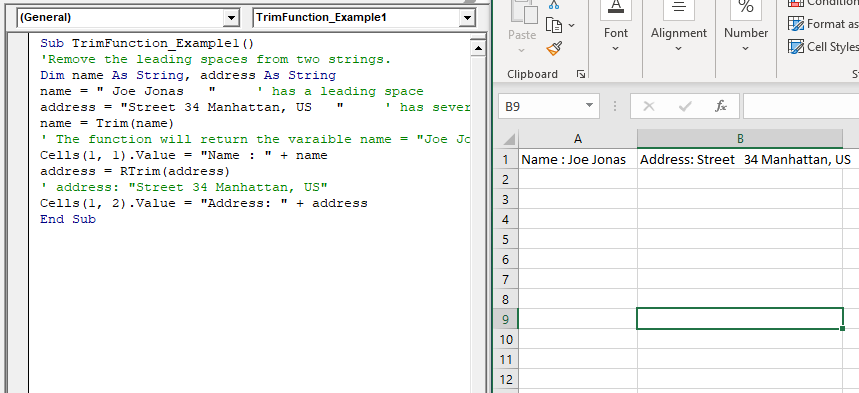
Sub TrimFunction_Example1()
 'Remove the leading spaces from two strings.
 Dim name As String, address As String
 name = " Joe Jonas   "     ' has a leading space
 address = "Street 34 Manhattan, US   "     ' has several leading spaces
 name = Trim(name) 
 ' The function will return the varaible name = "Joe Jonas"
 Cells(1, 1).Value = "Name : " + name
 address = RTrim(address)
 ' address: "Street 34 Manhattan, US"
 Cells(1, 2).Value = "Address: " + address
 End Sub 

Output

Name: Joe Jonas Address: Street   34 Manhattan, US
VBA Trim Function

Example 2

Sub TrimFunction_Example2()
 'Remove the leading spaces from two strings.
 Dim name As String, address As String
 IB = InputBox("Enter your first name")
 Lst_IB = InputBox("Enter your last name")
 'will the id after removing the spcaes and convering the string into lower case
 MsgBox ("Your email is: " + Trim(LCase(IB)) + Trim(LCase(Lst_IB)) + "@gmail.com")
 End Sub 

Output
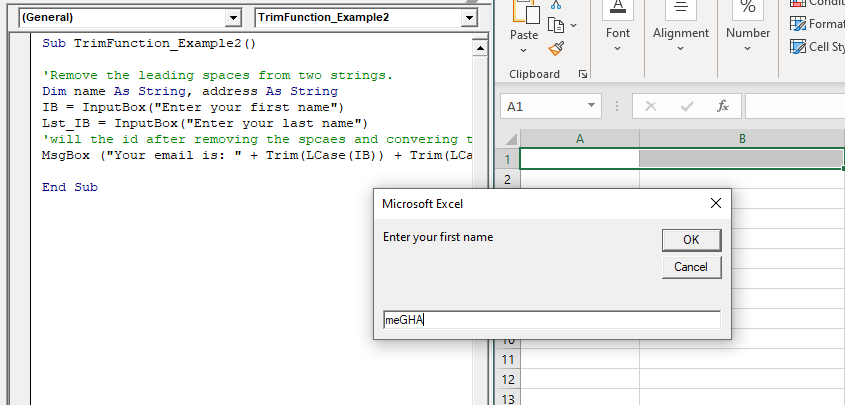
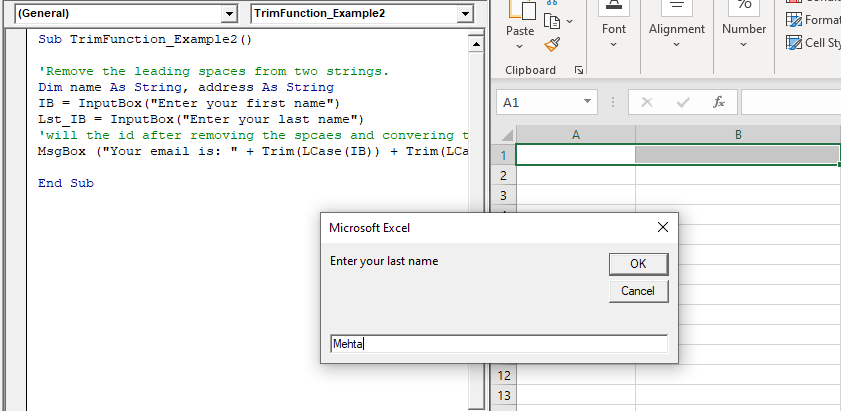
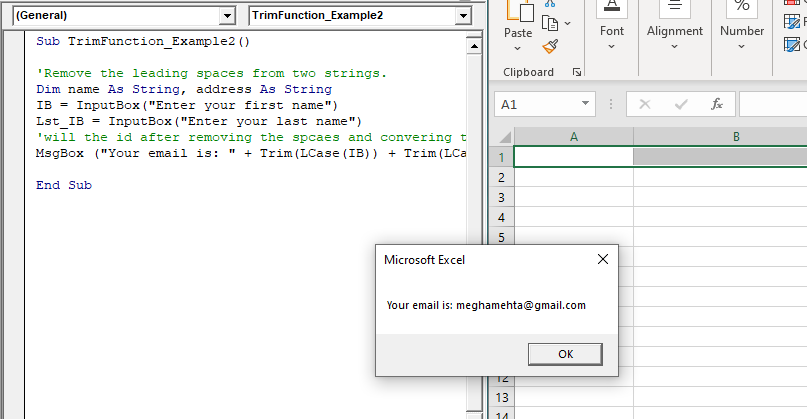
VBA Trim Function2
VBA Trim Function3
VBA Trim Function4

Related Topics

Declaring a Variable in VBA

Declaring a Variable A variable is broadly described as a storage location combined with a name and representing a specific value. Declaring a variable is instructing the computer to reserve space...

2 minutes read.

Excel VBA IsError Function

VBA IsError Function: The IsError function in VBA returns a Boolean value showing whether the specified Expression represents an error or not. Syntax IsError (Expression) Parameter Expression (required)- This parameter represents the variant that you...

1 minute read.

VBA Pivot Table

What is a Pivot Table? One of the most powerful features of Excel VBA is the Pivot Table. A pivot table is a VBA tool that is used to create summary...

3 minutes read.

Excel VBA IsNull Function

VBA IsNull Function: The IsNull function in VBA returns a Boolean, indicating whether a supplied expression is Null. Syntax IsNull (Expression) Parameter Expression (required)- This parameter represents the name of the argument that you want...

1 minute read.

VBA ActiveSheet

What is VBA Activesheet Property? The active sheet means the current worksheet which you are working on and viewing. The ActiveSheet object signifies the worksheet tab that is selected before running the VBA...

5 minutes read.

Excel Objects in VBA

What are Excel Objects? The Excel objects belong to the entities that make up an Excel Workbook, Worksheets, Columns, Rows, Cell Ranges, etc. Each object in Excel has loads of Properties that are...

6 minutes read.

VBA TimeSerial Function

The TimeSerial function in VBA returns a Time for the specified hour, minute, and second. Syntax TimeSerial (Hour, Minute, Second) Parameter Hour (required) – This parameter represents an integer (0 to 23), signifying the hour of the time. Minute...

2 minutes read.

Excel VBA FormatDateTime Function

VBA FormatDateTime Function: The FormatDateTime function in VBA returns the result as a string after applying a date and/or time format to the supplied expression. Syntax FormatDateTime (Expression, [NamedFormat]) Parameter Expression (specified) – This parameter...

2 minutes read.

Excel VBA IsDate Function

VBA IsDate Function: The IsDate function in VBA returns a Boolean value indicating whether the given expression is interpreted as a VBA Date or not. Syntax IsDate (Expression) Parameter Expression (required) – This parameter...

1 minute read.

Excel VBA FormatCurrency Function

VBA FormatCurrency Function: The FormatCurrency function in VBA is used to apply a currency format to a numeric expression and returns the result as a string. Syntax FormatCurrency (Expression, [NumDigitsAfterDecimal], [IncludeLeadingDigit], [UseParensForNegativeNumbers], [GroupDigits]) Parameter Expression (required)...

2 minutes read.

Excel VBA InStr Function

VBA InStr Function The InStr function in VBA searches for a substring inside the given string. It returns the position of a substring within a string, as an integer if the substring is found...

1 minute read.

Excel VBA FormatNumber Function

VBA FormatNumber Function: The FormatNumber function in VBA is used to apply a number format to a numeric expression, and it returns the result as a string. Syntax FormatNumber (Expression, [NumDigitsAfterDecimal], [IncludeLeadingDigit], [UseParensForNegativeNumbers], [GroupDigits]) Parameter Expression (required)...

2 minutes read.

Excel VBA Weekday Function

Excel VBA Weekday Function: The TimeValue function in VBA returns an integer (1 to 7), signifying the day of the week for the specified date. Syntax Weekday (Date, [FirstDayOfWeek]) Parameter Date (required) – This parameter...

2 minutes read.

Excel VBA InputBox

Input Box The InputBox function in VBA is used to prompt the users to enter values. The user can click either the OK button or can choose the CANCEL button. If the user clicks...

3 minutes read.

Excel VBA CVar Function

VBA CVar Function: The CVar function in VBA converts an expression into a Variant data type. Syntax CVar (Expression) Parameter Expression (required) – This parameter represents the expression that that you want to convert...

1 minute read.

Excel VBA INT Function

VBA INT Function: The INT function in VBA rounds the given supplied number down and returns an integer value. The positive numbers are rounded to zero, and the negative numbers are rounded away from zero. Syntax Int...

1 minute read.

Excel VBA Chr Function

VBA Chr Function: The Chr function in VBA returns the character equivalent to a supplied character code between 0 and 255. Syntax Chr (CharCode) Parameter CharCode (required) – This parameter represents the character code for...

1 minute read.

Miscellaneous Exercise of conditional statements and Loop

We have the already worked with syntax and examples of conditional statements and loops in the previous tutorials. In this tutorial, we will learn how to work with both together.  We will explain...

3 minutes read.

Excel VBA Exp Function

VBA Exp Function: The Exp function in VBA returns the value of the exponential function ex (mathematical constant ‘e’ raised to specified power) for the given value of x. Syntax Exp (Number) Parameter Number (required) –This parameter represents...

1 minute read.

Basics of Userform

A User Form is a built-in customized dialog box that fetches data from the user through a user-friendly dialog box or window that makes up part of an application's user interface. It...

9 minutes read.