×

Excel VBA DateSerial Function

The DateSerial function in VBA returns a Date from a supplied year, month, and day number.

Syntax

DateSerial (Year, Month, Day)

Parameter

Year (required) – This parameter represents an integer signifying the year.

Month (required) – This parameter represents an integer signifying the month. If the Integer values are less than 1 or greater than 12, the values are interpreted as:

  • -1 – November of the previous year
  • 0 – November of previous year
  • 13 – January of the following year
  • 14 – February of the following year

Day (required) – This parameter represents an integer signifying the day of the month. If the integer values less are than 1 or greater than the number of days in the current month are interpreted as follows:

  • -1 – It signifies the second to the last day of the previous month
  • 0 – It signifies the last day of the previous month.
  • Days in current month + 1 – It signifies the first day of the following month
  • Days in current month + 2 – It signifies the second day of the following month.

Return

This function returns a Date from a supplied year, month, and day number.

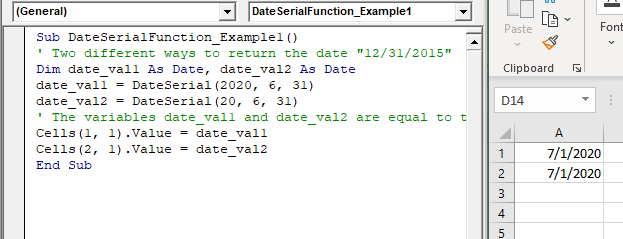
Example 1

Sub DateSerialFunction_Example1()
 ' Two different ways to return the date "12/31/2015"
 Dim date_val1 As Date, date_val2 As Date
 date_val1 = DateSerial(2020, 6, 31)
 date_val2 = DateSerial(20, 6, 31)
 ' The variables date_val1 and date_val2 are equal to the Date 12/31/2015. 
 Cells(1, 1).Value = date_val1
 Cells(2, 1).Value = date_val2
 End Sub 

Output

7/1/2020
7/1/2020
VBA DateSerial Function

Example 2

Sub DateSerialFunction_Example2()
 ' Demonstrating two different ways to return the date "12/31/2020"
 Dim date_val1 As Date, date_val2 As Date
 date_val1 = DateSerial(2020, 12, 31)
 date_val2 = DateSerial(2020, 13, 31)
 ' The variables date_val1 will return 12/31/2020
 ' The date_val2 are equal to the Date 1/31/2021. 
 Cells(1, 1).Value = date_val1
 Cells(2, 1).Value = date_val2
 End Sub 

Output

12/31/2020
1/31/2021

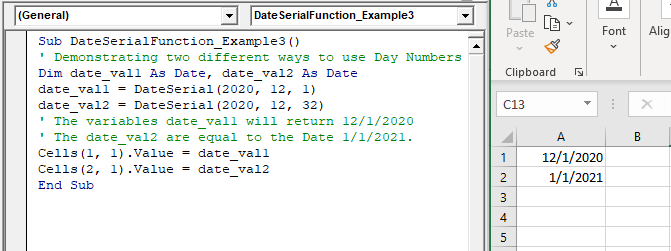
Example 3

Sub DateSerialFunction_Example3()
 ' Demonstrating two different ways to use Day Numbers That Are Less Than 1 Or Greater Than 31
 Dim date_val1 As Date, date_val2 As Date
 date_val1 = DateSerial(2020, 12, 1)
 date_val2 = DateSerial(2020, 12, 32)
 ' The variables date_val1 will return 12/1/2020 
 ' The date_val2 are equal to the Date 1/1/2021.
 Cells(1, 1).Value = date_val1
 Cells(2, 1).Value = date_val2
 End Sub 

Output

12/1/2020
1/1/2021
VBA DateSerial Function

Related Topics

Excel VBA Tutorial

What is VBA? Introduction to Excel VBA: Visual Basic for Applications (VBA) is a programming language developed by Microsoft to automate operations in applications, such as Excel, Word, PowerPoint, etc. It...

5 minutes read.

Excel VBA CDbl Function

VBA CDbl Function: The CDbl function in VBA converts an expression into a Double data type. Syntax CDbl (Expression) Parameter Expression (required) - This parameter represents the expression that that you want to convert to...

1 minute read.

Excel VBA LTrim Function

VBA LTrim Function: The LTrim function in VBA removes the leading spaces from a supplied text string. Syntax LTrim (String) Parameter String (required) - This parameter represents he text string that you want to remove...

1 minute read.

Excel VBA CDate Function

VBA CDate Function: The CDate function in VBA converts an expression into a Date (or Time) data type. Syntax CDate (Expression) Parameter Expression (required) - This parameter represents the expression that that you want to...

1 minute read.

VBA Type Mismatch Error

What is a Type Mismatch Error? VBA Type Mismatch Error is a run time error in excel, which often occurs when the data types contained in a VBA code are not matched...

3 minutes read.

Excel VBA IsError Function

VBA IsError Function: The IsError function in VBA returns a Boolean value showing whether the specified Expression represents an error or not. Syntax IsError (Expression) Parameter Expression (required)- This parameter represents the variant that you...

1 minute read.

Excel VBA Day Function

The function Day in VBA returns the day number (from 1 to 31) for the given date value. Syntax Day (Date) Parameter Date (required) – This parameter represents the date. Return This function returns the day...

1 minute read.

Excel VBA Hour Function

The hour function in VBA returns the hour element for the specified time. Syntax Hour (Time) Parameter Time (required) – This parameter represents the time. Return This function returns the hour element for the specified time. Example 1 Sub HourFunction_Example1() ...

1 minute read.

Excel VBA Conditional Statement

Conditional Statement in VBA Excel Conditional Statements in Excel VBA are one of the most powerful and useful features in programming, this will give you to perform comparisons to decide or...

2 minutes read.

Excel VBA LCase Function

VBA LCase Function: The LCase function in VBA converts the given String into lower case text. Syntax LCase (String) Parameter String (required)- This parameter represents the text string that you want to convert to...

1 minute read.

Excel VBA String Function

The String function in VBA creates a String, consisting of several repeated characters. Syntax String (Number, Character) Parameter Number (required) – This parameter represents the number of characters in the returned String. Character (required) – This parameter...

1 minute read.

Excel VBA DateValue Function

The DateValue function in VBA returns a VBA Date from the given String representation of a date wherein the time information is ignored. It is unable to interpret dates that include the...

1 minute read.

VBA Charts

What is a Chart? A chart is used to visually show numbers or data in a spreadsheet (or spread over multiple spreadsheets) so that the end-user can look at the chart...

3 minutes read.

Excel VBA: Select … Case Statement

Select … Case Statement When a group of statements is executed, depending upon the value of an Expression, then Switch Case is used.  If you have several conditions to check, then the If condition...

4 minutes read.

Steps to Create a Chart in VBA

Steps to Create a Chart Charts are created either by directly working with the chart variable object that defines the chart data or by ChartObject method. In order to get to...

3 minutes read.

Excel VBA FormatNumber Function

VBA FormatNumber Function: The FormatNumber function in VBA is used to apply a number format to a numeric expression, and it returns the result as a string. Syntax FormatNumber (Expression, [NumDigitsAfterDecimal], [IncludeLeadingDigit], [UseParensForNegativeNumbers], [GroupDigits]) Parameter Expression (required)...

2 minutes read.

Declaring a Variable in VBA

Declaring a Variable A variable is broadly described as a storage location combined with a name and representing a specific value. Declaring a variable is instructing the computer to reserve space...

2 minutes read.

Excel VBA RTrim Function

VBA RTrim Function: The Rtrim function in VBA removes the leading spaces from the text in the specified string. Syntax RTrim (String) Parameter String (required) – This parameter represents the string from which you want...

1 minute read.

Excel VBA Rnd Function

VBA Rnd Function: The Rnd function in VBA returns a random number that is greater than or equal to (>=) 0 and is less than (<) 1. Syntax Rnd ([Number]) Parameter Number (optional) –This...

1 minute read.

Excel VBA Format Function

VBA Format Function The format function in VBA applies a specified format to an expression and returns the result as a string. Syntax Format (Expression, [Format], [FirstDayOfWeek] , [FirstWeekOfYear] ) Parameter Expression (required)- This parameter represents the expression that you want to format. Format...

3 minutes read.