×

Excel VBA While wend Loop

WHILE wend loop is used when the user is not sure how many times they want to execute the VBA code within the program. With a WHILE loop, the loop body may not even execute once.

If the set of condition estimates to True, the statements or the code between the While and Wend statements is executed. After the Wend statement is executed, control is passed back up to the While statement, where the specified condition is checked again. When condition estimates to False, the program execution skips to the first statement following the Wend statement. You can nest While...Wend loops within each other.

Syntax

While (condition)
    [statements 1]
    [statements 2]
    ... 
    [statements n]
 Wend 
         'If condition evaluates to True, statements between the While and Wend statements is executed
         Worksheets("Sheet2").Cells(val, 1).Value = val
         val = val + 2
     'Closing the While loop
     Wend
 End Sub 

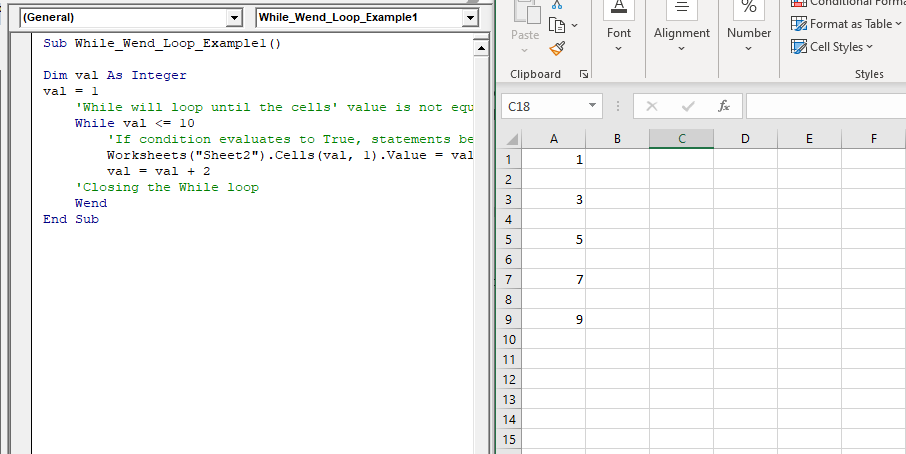
Example 1: Write a Macro in VBA using while wend loop to print the series of odd number between 1 to 10.

 Sub While_Wend_Loop_Example1()
 Dim val As Integer
 val = 1
     'While will loop until the cells' value is not equal to empty
     While val <= 10
         'If condition evaluates to True, statements between the While and Wend statements is executed
         Worksheets("Sheet2").Cells(val, 1).Value = val
         val = val + 2
     'Closing the While loop
     Wend
 End Sub 

Output
VBA While wend Loop

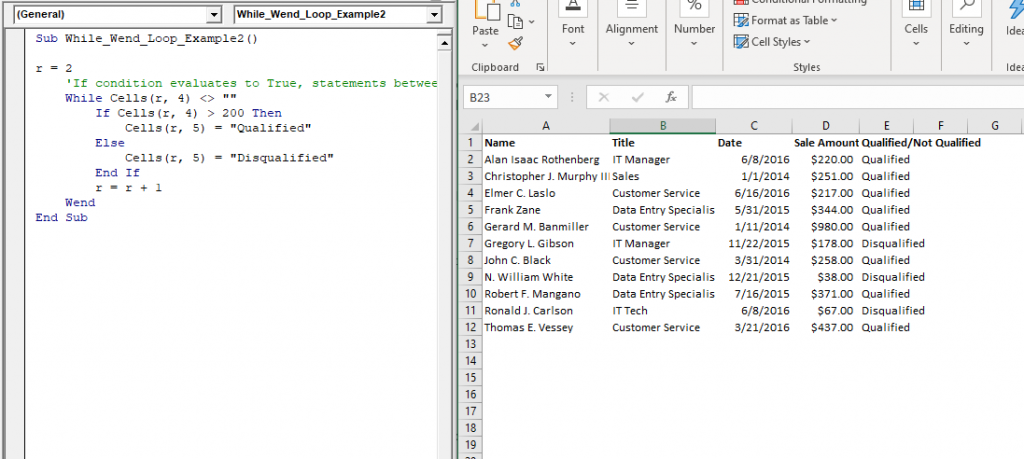
Example 2: Write a procedure or macro using While wend that does the following:

Get "Qualified" in column E if the value of column D is above 200

Sub While_Wend_Loop_Example2()
 r = 2
     'If condition evaluates to True, statements between the While and Wend statements is executed.
     While Cells(r, 4) <> ""
         If Cells(r, 4) > 200 Then
             Cells(r, 5) = "Qualified"
         Else 
             Cells(r, 5) = "Disqualified"
         End If
         r = r + 1
     Wend
 End Sub 

Output

Name Title Date Sale Amount Qualified/Not Qualified
Alan Isaac Rothenberg IT Manager 6/8/2016 $220.00 Qualified
Christopher J. Murphy III Sales 1/1/2014 $251.00 Qualified
Elmer C. Laslo Customer Service 6/16/2016 $217.00 Qualified
Frank Zane Data Entry Specialist 5/31/2015 $344.00 Qualified
Gerard M. Banmiller Customer Service 1/11/2014 $980.00 Qualified
Gregory L. Gibson IT Manager 11/22/2015 $178.00 Disqualified
John C. Black Customer Service 3/31/2014 $258.00 Qualified
N. William White Data Entry Specialist 12/21/2015 $38.00 Disqualified
Robert F. Mangano Data Entry Specialist 7/16/2015 $371.00 Qualified
Ronald J. Carlson IT Tech 6/8/2016 $67.00 Disqualified
Thomas E. Vessey Customer Service 3/21/2016 $437.00 Qualified
VBA While wend Loop2

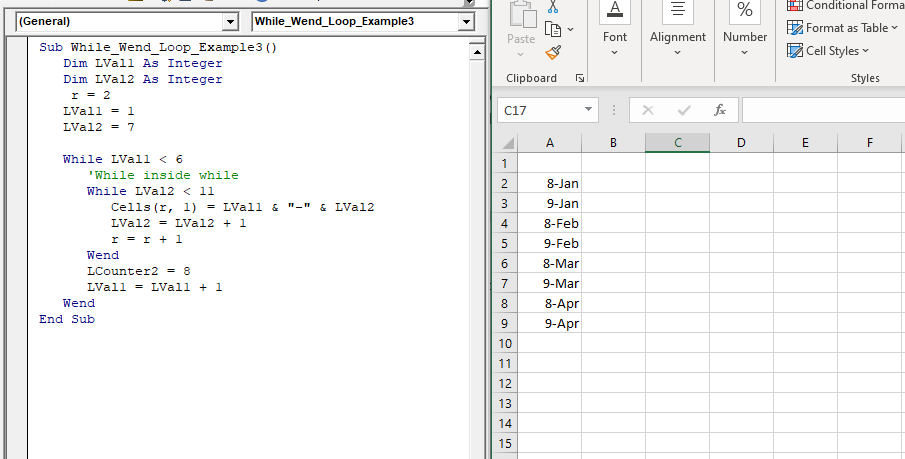
Example 3: Write a macro or procedure in VBA using nested while wend loop to print the dual dates of different months.

Sub While_Wend_Loop_Example3()
    Dim LVal1 As Integer
    Dim LVal2 As Integer
     r = 2
    LVal1 = 1
    LVal2 = 7 
    While LVal1 < 6
       'While inside while
       While LVal2 < 11
          Cells(r, 1) = LVal1 & "-" & LVal2
          LVal2 = LVal2 + 1
          r = r + 1 
       Wend
       LCounter2 = 8
       LVal1 = LVal1 + 1
    Wend
 End Sub 

Output
VBA While wend Loop3

Related Topics

Excel VBA Second Function

Excel VBA Second Function: The Second function in VBA returns the second element for the specified time.  Syntax Second (Time) Parameter Time (required) – This parameter represents the time. Return This function returns the second...

1 minute read.

Excel VBA CByte Function

VBA CByte Function: The CByte function in VBA converts an expression into a Byte data type. Syntax CByte (Expression) Parameter Expression (required) - This parameter represents the expression that that you want to convert to...

1 minute read.

Excel VBA Hex Function

VBA Hex Function: The Hex function in VBA converts the given number into hexadecimal notation and returns the result as a string. Syntax Hex (Number) Parameter Number (required) – This parameter represents the numeric value...

1 minute read.

Excel VBA: Do Until….Loop

DO UNTIL….Loop The “Do Until” Loop is same unlike DO WHILE statement just that it will keep on looping till the condition is not met. This loop is used to repeat a set...

4 minutes read.

Excel VBA CInt Function

VBA CInt Function: The VBA Cint function converts the specified expression into an Integer. Syntax Cint (Expression) Parameter Expression (required) – This parameter represents the expression that you want to convert to an Integer wherein...

1 minute read.

Excel VBA InputBox

Input Box The InputBox function in VBA is used to prompt the users to enter values. The user can click either the OK button or can choose the CANCEL button. If the user clicks...

3 minutes read.

VBA Object Required

What is Object Required Error? VBA Object Required is a run time error which occurs when the user does not define a valid object qualifier, or the assigned object doesn’t exist in the...

6 minutes read.

Excel VBA FormatDateTime Function

VBA FormatDateTime Function: The FormatDateTime function in VBA returns the result as a string after applying a date and/or time format to the supplied expression. Syntax FormatDateTime (Expression, [NamedFormat]) Parameter Expression (specified) – This parameter...

2 minutes read.

VBA ActiveSheet

What is VBA Activesheet Property? The active sheet means the current worksheet which you are working on and viewing. The ActiveSheet object signifies the worksheet tab that is selected before running the VBA...

5 minutes read.

Steps to Create a Chart in VBA

Steps to Create a Chart Charts are created either by directly working with the chart variable object that defines the chart data or by ChartObject method. In order to get to...

3 minutes read.

Excel VBA IsMissing Function

VBA IsMissing Function: The IsMissing function in VBA checks if any parameter to a procedure is missing or not. It returns a Boolean value True if the specified parameter has not been...

1 minute read.

VBA Not Equal Operator

What is VBA Not Equal Operator? VBA Not Equal binary operator (“<>”) is a logical function that is used to check if the specified values are not equal or not. This...

5 minutes read.

Excel VBA Replace Function

VBA Replace Function: The Replace function in VBA searches for a substring within the specified string and replaces its occurrences with a second substring. Syntax Replace (Expression, Find, Replace, [Start], [Count], [Compare]) Parameter Expression (required) – This parameter represents...

2 minutes read.

Basics of Userform

A User Form is a built-in customized dialog box that fetches data from the user through a user-friendly dialog box or window that makes up part of an application's user interface. It...

9 minutes read.

For Next loop in VBA

For Next Loop The ”For Next” loop is used for a fixed number of times. It works by implementing the loop for the specified number of times. In this, the user specifies how...

3 minutes read.

Excel VBA IsNumeric Function

VBA IsNumeric Function: The IsNumeric function in VBA returns a Boolean value showing whether the specified Expression contains a numeric value or not. Syntax IsNumeric (Expression) Parameter Expression (required)- This parameter represents the variant that...

1 minute read.

Excel VBA Round Function

VBA Round Function: The Round function in VBA rounds a number to a specified number of decimal places and returns the number. Syntax Round (Number, [NumDigitsAfterDecimal]) Parameter Number (required) –This parameter represents a numeric value one wants...

1 minute read.

Excel VBA LCase Function

VBA LCase Function: The LCase function in VBA converts the given String into lower case text. Syntax LCase (String) Parameter String (required)- This parameter represents the text string that you want to convert to...

1 minute read.

Scope in Visual Basics

Definition of Scope The scope of any programming language implies the area of code where the variables will be identified, accessed, and used. Every variable has a scope associated with it. The scope of...

4 minutes read.

Excel Objects in VBA

What are Excel Objects? The Excel objects belong to the entities that make up an Excel Workbook, Worksheets, Columns, Rows, Cell Ranges, etc. Each object in Excel has loads of Properties that are...

6 minutes read.