
×

Excel VBA CCur Function

The CCur function in VBA is used to convert an expression into a Currency data type. It can take a maximum of 15 digits to the left of the decimal place and a maximum of 4 digits to the right of the decimal place.

Syntax

CCur (Expression)

Parameter

Expression (required)- This parameter represents the expression that is converted to a Currency.

Return

This function returns a currency value ranging between -922,337,203,685,477.5808 and 922,337,203,685,477.5807.

Example 1

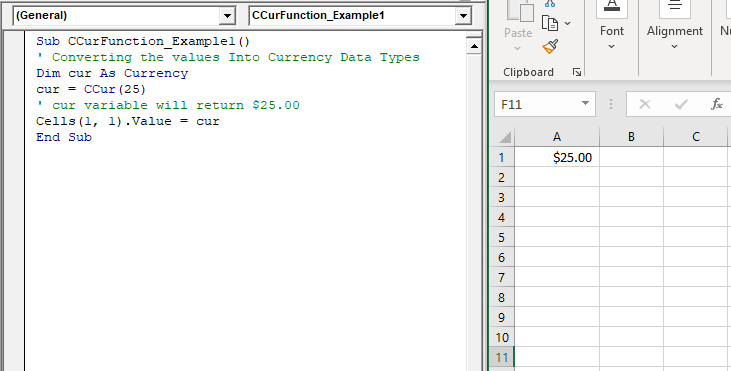
Sub CCurFunction_Example1()
 ' Converting the values Into Currency Data Types
 Dim cur As Currency
 cur = CCur(25)
 ' cur variable will return $25.00
 Cells(1, 1).Value = cur
 End Sub 

Output

$25.00
VBA CCur Function

Example 2

Sub CCurFunction_Example2()
 ' Converting the values Into Currency Data Types
 Dim cur As Currency
 'negative value
 cur = CCur(-25)
 ' cur variable will return ($25.00)
 Cells(1, 1).Value = cur
 End Sub 

Output

($25.00)

Example 3

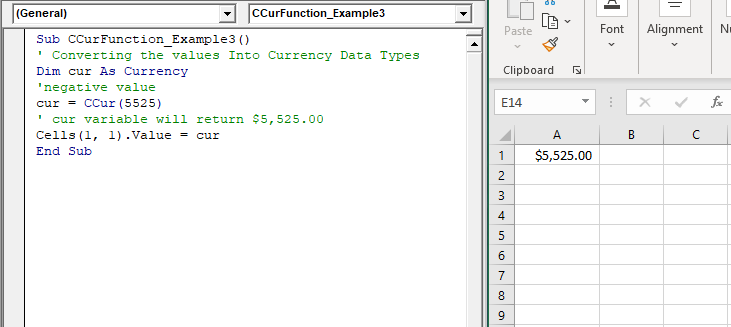
Sub CCurFunction_Example3()
 ' Converting the values Into Currency Data Types
 Dim cur As Currency
 'negative value
 cur = CCur(5525)
 ' cur variable will return $5,525.00
 Cells(1, 1).Value = cur
 End Sub 

Output

$5,525.00
VBA CCur Function

Related Topics

Scope in Visual Basics

Definition of Scope The scope of any programming language implies the area of code where the variables will be identified, accessed, and used. Every variable has a scope associated with it. The scope of...

4 minutes read.

Excel VBA Asc Function

VBA Asc Function: The Asc function in VBA returns an integer showing the character code for the first character of a given string. Syntax Asc (String) Parameter String (required) – This parameter represents the text...

1 minute read.

Excel VBA InStr Function

VBA InStr Function The InStr function in VBA searches for a substring inside the given string. It returns the position of a substring within a string, as an integer if the substring is found...

1 minute read.

Excel VBA: Select … Case Statement

Select … Case Statement When a group of statements is executed, depending upon the value of an Expression, then Switch Case is used.  If you have several conditions to check, then the If condition...

4 minutes read.

VBA Option Explicit

VBA Option Explicit The Option Explicit in VBA is used to declare the variables at the top of your macro code. It is the most secure and easy option to maintain your variables....

5 minutes read.

Excel VBA MessageBox

Message Box The MsgBox in Excel VBA is a dialog box used to inform the users of your program by showing a custom message or get some necessary inputs such as Yes/No or...

4 minutes read.

VBA Pivot Table

What is a Pivot Table? One of the most powerful features of Excel VBA is the Pivot Table. A pivot table is a VBA tool that is used to create summary...

3 minutes read.

Excel VBA Oct Function

VBA Oct Function: The Oct function in VBA converts the given number into octal notation and returns the result as a string. Syntax Oct (Number) Parameter Number (required) – This parameter represents the numeric value...

1 minute read.

ActiveX Controls

ActiveX Controls are one of the most used Excel Controls to automate applications with Excel VBA. It has the same controls, unlike Form Controls (Command Button, combo box, checkbox, etc.), but it...

3 minutes read.

Excel VBA Val Function

VBA Val Function: The Val function in VBA converts the given string into a numeric value. This function ignores spaces and continues to read the characters after space(s). It stops...

1 minute read.

Excel VBA Year Function

Excel VBA Year Function: The Year function in VBA returns the four-digit year for the specified date. Syntax Year (Date) Parameter Date (required) – This parameter represents the significant date. Return This function returns the four-digit year...

1 minute read.

Excel VBA User-Defined Functions

User-Defined Functions One of the advantages of VBA is that you can create your own functions using macros. These functions can be called and used as other functions in excel and use them. You can...

3 minutes read.

Excel VBA: IF THEN Statement

VBA Excel: IF THEN StatementThis conditional statement enables you to check one condition and on the basis of that then run one or multiple statements if the condition holds. If...

1 minute read.

Excel VBA Trim Function

The Trim function in VBA removes the leading and trailing spaces from the specified string. Syntax Trim (String) Parameter String (required) – This parameter represents the string from which you want to remove the leading and...

1 minute read.

Excel VBA FormatNumber Function

VBA FormatNumber Function: The FormatNumber function in VBA is used to apply a number format to a numeric expression, and it returns the result as a string. Syntax FormatNumber (Expression, [NumDigitsAfterDecimal], [IncludeLeadingDigit], [UseParensForNegativeNumbers], [GroupDigits]) Parameter Expression (required)...

2 minutes read.

If ElseIf ElseIf Statement or Nested If statement in VBA

VBA Excel: If … ElseIf … ElseIf Statement or Nested If statement This function enables you to check multiple conditions and, based on that, then run one of the statement blocks present. If...

2 minutes read.

Procedures in VBA

Procedures in VBA A procedure is a block of statements or units of computer code that performs some action. It is enclosed with a declaration statement, and its primary purpose is to carry out...

3 minutes read.

Excel VBA Split Function

Excel VBA Split Function: The Split function in VBA is used to split a string into several substrings and return a one-dimensional array of substrings. Syntax Split (Expression, [Delimiter], [Limit], [Compare]) Parameter Expression (required) – This parameter...

2 minutes read.

UserForm and its Properties Excel VBA

UserForm and its Properties Userform has certain properties that can be viewed as category wise (based on appearance, behavior, font) or in an alphabetic manner. The property window is used to set or...

11 minutes read.

Excel VBA LBound Function

Excel VBA LBound Function: The LBound function in VBA returns the lowest subscript for the specified dimension in the given array. Syntax LBound (ArrayName, [Dimension]) Parameter ArrayName (required) – This parameter represents an array for which...

1 minute read.