×

Excel VBA Choose Function

VBA Choose Function: The Choose function in VBA chooses function selects the corresponding value from a list of arguments depending as per the specified index.

Syntax

Choose (Index, [Choice-1], [Choice-2], ...)

Parameter

Index (required) – This parameter represents the index of the value that you want to return. It must be a positive integer value (greater than 0) and less than or equal to a number of specified choices.

Choose-1 (optional)…- This parameter represents a list of possible values to be returned.

Return

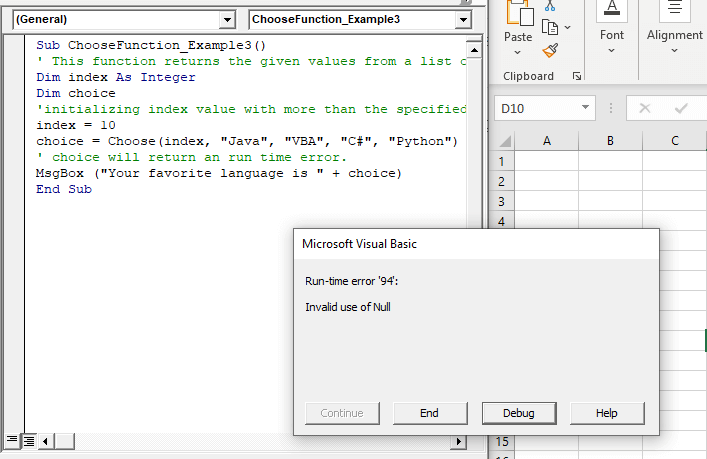
This function returns a value from the list of arguments depending upon the specified index. It returns Null if the index is less than or equal to 0 or is greater than the number of choices.

Example 1

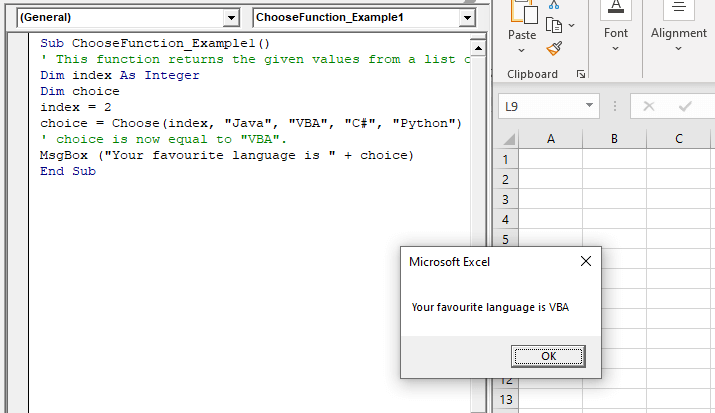
Sub ChooseFunction_Example1()
 ' This function returns the given values from a list of names.
 Dim index As Integer
 Dim choice
 index = 2
 choice = Choose (index, "Java", "VBA", "C#", "Python")
 ' choice is now equal to "VBA".
 MsgBox ("Your favorite language is " + choice)
 End Sub 

Output

Your favorite language is VBA
VBA Choose Function

Example 2

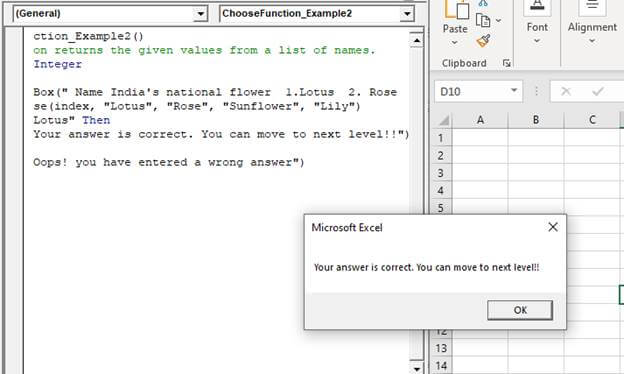
Sub ChooseFunction_Example2()
 ' This function returns the given values from a list of names.
 Dim index As Integer
 Dim choice
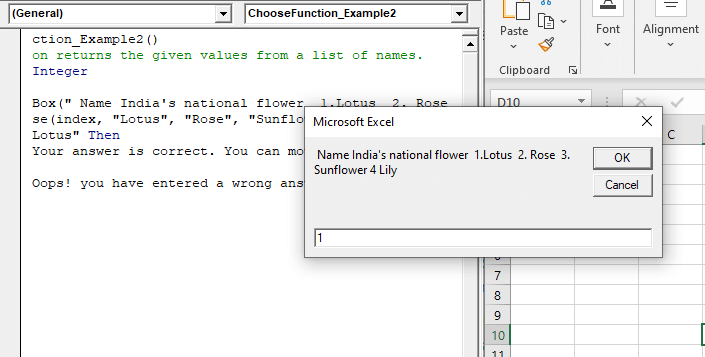
 index = InputBox(" Name India's national flower 1.Lotus  2. Rose  3. Sunflower 4 Lily ")
 choice = Choose(index, "Lotus", "Rose", "Sunflower", "Lily")
 If choice = "Lotus" Then
     MsgBox ("Your answer is correct. You can move to next level!!")
 Else
     MsgBox ("Oops! you have entered a wrong answer")
 End If
 End Sub 

Output
VBA Choose Function
VBA Choose Function

Example 3

Sub ChooseFunction_Example3()
 ' This function returns the given values from a list of names.
 Dim index As Integer
 Dim choice
 'initializing index value with more than the specified choices
 index = 10
 choice = Choose(index, "Java", "VBA", "C#", "Python")
 ' choice will return an run time error.
 MsgBox ("Your favorite language is " + choice)
 End Sub 

Output
VBA Choose Function

Related Topics

Excel VBA Error Handling

What is Errors and Types of Error? Errors are conditions that resist the flow of the program or enables a problem while running any programming. There are three types of errors in VBA...

5 minutes read.

Excel VBA IsDate Function

VBA IsDate Function: The IsDate function in VBA returns a Boolean value indicating whether the given expression is interpreted as a VBA Date or not. Syntax IsDate (Expression) Parameter Expression (required) – This parameter...

1 minute read.

VBA ActiveCell Property

What is the ActiveCell Property? The active cell signifies the active selected cell in the current worksheet. The Active property acts as a reference point and is used to move the cell cursor...

5 minutes read.

Excel VBA IsNumeric Function

VBA IsNumeric Function: The IsNumeric function in VBA returns a Boolean value showing whether the specified Expression contains a numeric value or not. Syntax IsNumeric (Expression) Parameter Expression (required)- This parameter represents the variant that...

1 minute read.

VBA Creating, Displaying, Uploading UserForms

UserForm is a customized interface and acts as a VBA container and can add various controls as per the required functionality, each of which has certain usage and related properties. You can...

4 minutes read.

VBA Global Variable

What is Global Variable? The Global Variables in VBA refers to the variables declared before the start of any macro. They are defined outside the functions and are used by all the functions or...

6 minutes read.

Excel VBA CLng Function

VBA CLng Function: The CLng function in VBA converts an expression into a Long data type. It returns a long value ranging between -2,147,483,648 and 2,147,483,647. Syntax CLng (Expression) Parameter Expression (required) – This...

1 minute read.

VBA Updating Pivot Table

VBA- Updating Pivot Table The pivot table is an important feature to explore, summarize, and interpret the bulk amount of data. It helps data evaluating, reviewing, as well as making useful...

3 minutes read.

Excel VBA Tutorial

What is VBA? Introduction to Excel VBA: Visual Basic for Applications (VBA) is a programming language developed by Microsoft to automate operations in applications, such as Excel, Word, PowerPoint, etc. It...

5 minutes read.

Excel VBA INT Function

VBA INT Function: The INT function in VBA rounds the given supplied number down and returns an integer value. The positive numbers are rounded to zero, and the negative numbers are rounded away from zero. Syntax Int...

1 minute read.

Excel VBA UBound Function

Excel VBA UBound Function: The UBound function in VBA returns the highest subscript for the specified dimension in the given array. Syntax UBound (ArrayName, [Dimension]) Parameter ArrayName (required) – This parameter represents an array for which...

1 minute read.

Excel VBA MessageBox

Message Box The MsgBox in Excel VBA is a dialog box used to inform the users of your program by showing a custom message or get some necessary inputs such as Yes/No or...

4 minutes read.

Excel VBA Array Function

VBA Array Function: The Array function in VBA generates an array containing the given set of values. Syntax Array (Arglist) Parameter Arglist (required) – This parameter the list of values that you want to make...

2 minutes read.

Excel VBA FormatNumber Function

VBA FormatNumber Function: The FormatNumber function in VBA is used to apply a number format to a numeric expression, and it returns the result as a string. Syntax FormatNumber (Expression, [NumDigitsAfterDecimal], [IncludeLeadingDigit], [UseParensForNegativeNumbers], [GroupDigits]) Parameter Expression (required)...

2 minutes read.

Excel VBA FormatDateTime Function

VBA FormatDateTime Function: The FormatDateTime function in VBA returns the result as a string after applying a date and/or time format to the supplied expression. Syntax FormatDateTime (Expression, [NamedFormat]) Parameter Expression (specified) – This parameter...

2 minutes read.

Excel VBA Second Function

Excel VBA Second Function: The Second function in VBA returns the second element for the specified time.  Syntax Second (Time) Parameter Time (required) – This parameter represents the time. Return This function returns the second...

1 minute read.

Scope in Visual Basics

Definition of Scope The scope of any programming language implies the area of code where the variables will be identified, accessed, and used. Every variable has a scope associated with it. The scope of...

4 minutes read.

Excel VBA MonthName Function

Excel VBA MonthName Function: The MonthName function in VBA returns a string with the month name for the specified month number. Syntax MonthName (Month, [Abbreviate]) Parameter Month (required) – This parameter represents an integer between...

1 minute read.

Excel VBA Array

Introduction to VBA Array An array is a type of variable that holds more than one piece of data. In VBA, you can refer to a specific variable (element) of an array by using...

5 minutes read.

Excel VBA CInt Function

VBA CInt Function: The VBA Cint function converts the specified expression into an Integer. Syntax Cint (Expression) Parameter Expression (required) – This parameter represents the expression that you want to convert to an Integer wherein...

1 minute read.