×

Excel VBA Split Function

Excel VBA Split Function: The Split function in VBA is used to split a string into several substrings and return a one-dimensional array of substrings.

Syntax

Split (Expression, [Delimiter], [Limit], [Compare])

Parameter

Expression (required) – This parameter represents a text string that you want to split.

Delimiter (optional) – This parameter specifies where the supplied Expression should be split. By default, it set to space “ “.

Limit (optional) – This parameter specifies the maximum number of substrings to be returned. By default, this parameter is set to -1.

Compare (optional) – This parameter represents the type of comparison that should be used for the substrings. The default value is set to vbBinaryCompare.

 It can have the following values:

vbBinaryCompare – It performs a binary comparison

vbTextCompare – It performs a text comparison

vbDatabaseCompare – It performs a database comparison

Return

This function returns a one-dimensional array of substrings after splitting a string into a number of substrings.

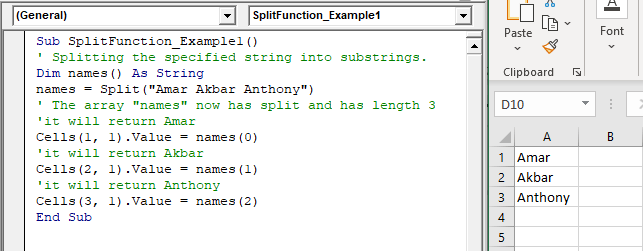
Example 1

Sub SplitFunction_Example1()
 ' Splitting the specified string into substrings.
 Dim names() As String
 names = Split("Amar Akbar Anthony")
 ' The array "names" now has split and has length 3 
 'it will return Amar
 Cells(1, 1).Value = names(0)
 'it will return Akbar
 Cells(2, 1).Value = names(1)
 'it will return Anthony
 Cells(3, 1).Value = names(2)
 End Sub 

Output

Amar
Akbar
Anthony
VBA Split Function

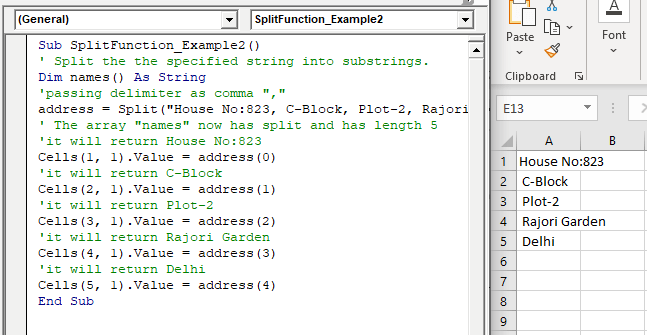
Example 2

Sub SplitFunction_Example2()
 ' Split the specified string into substrings.
 Dim names() As String
 'passing delimiter as comma ","
 address = Split("House No:823, C-Block, Plot-2, Rajouri Garden, Delhi", ",")
 ' The array "names" now has split and has length 5
 'it will return House No:823 
 Cells(1, 1).Value = address(0)
 'it will return C-Block
 Cells(2, 1).Value = address(1)
 'it will return Plot-2 
 Cells(3, 1).Value = address(2)
 'it will return Rajouri Garden
 Cells(4, 1).Value = address(3) 
 'it will return Delhi
 Cells(5, 1).Value = address(4)
 End Sub 

Output

House No:823
 C-Block
 Plot-2
 Rajori Garden
 Delhi
VBA Split Function

Related Topics

Looping in VBA

Looping in VBA There are many situations where a programmer needs to execute a block of the repetitive code number of times. Writing the same statement will make the program tedious and monotonous....

3 minutes read.

Excel VBA Val Function

VBA Val Function: The Val function in VBA converts the given string into a numeric value. This function ignores spaces and continues to read the characters after space(s). It stops...

1 minute read.

Excel VBA CInt Function

VBA CInt Function: The VBA Cint function converts the specified expression into an Integer. Syntax Cint (Expression) Parameter Expression (required) – This parameter represents the expression that you want to convert to an Integer wherein...

1 minute read.

VBA Pivot Table Grouping

VBA- Pivot Table Grouping For an instance, if in our pivot table, we have 11 different age groups from 20 to 30 -  but there might be a possibility that we...

2 minutes read.

Excel VBA IsMissing Function

VBA IsMissing Function: The IsMissing function in VBA checks if any parameter to a procedure is missing or not. It returns a Boolean value True if the specified parameter has not been...

1 minute read.

If ElseIf ElseIf Statement or Nested If statement in VBA

VBA Excel: If … ElseIf … ElseIf Statement or Nested If statement This function enables you to check multiple conditions and, based on that, then run one of the statement blocks present. If...

2 minutes read.

Declaring a Variable in VBA

Declaring a Variable A variable is broadly described as a storage location combined with a name and representing a specific value. Declaring a variable is instructing the computer to reserve space...

2 minutes read.

Excel VBA: IF THEN Statement

VBA Excel: IF THEN StatementThis conditional statement enables you to check one condition and on the basis of that then run one or multiple statements if the condition holds. If...

1 minute read.

Excel VBA IsError Function

VBA IsError Function: The IsError function in VBA returns a Boolean value showing whether the specified Expression represents an error or not. Syntax IsError (Expression) Parameter Expression (required)- This parameter represents the variant that you...

1 minute read.

Excel VBA Mid Function

VBA Mid Function: The Mid function in VBA returns a substring from within a supplied string. Syntax Mid (Str, Start, [Length]) Parameter Str (required) -This parameter represents a string from which you want to extract the substring. Start...

1 minute read.

Excel Objects in VBA

What are Excel Objects? The Excel objects belong to the entities that make up an Excel Workbook, Worksheets, Columns, Rows, Cell Ranges, etc. Each object in Excel has loads of Properties that are...

6 minutes read.

Excel VBA : With End-with Constructs

With End-with Constructs The With-End With construct enables the user to perform multiple operations on a single object. If you are going to perform several different actions on the same object and typing the same...

4 minutes read.

Excel VBA String Function

The String function in VBA creates a String, consisting of several repeated characters. Syntax String (Number, Character) Parameter Number (required) – This parameter represents the number of characters in the returned String. Character (required) – This parameter...

1 minute read.

VBA Not Equal Operator

What is VBA Not Equal Operator? VBA Not Equal binary operator (“<>”) is a logical function that is used to check if the specified values are not equal or not. This...

5 minutes read.

VBA Charts

What is a Chart? A chart is used to visually show numbers or data in a spreadsheet (or spread over multiple spreadsheets) so that the end-user can look at the chart...

3 minutes read.

VBA Regex

What is a Regex? Regex stands for Regular Expression is basically a pattern matching strings within another string. They are supported in many languages, including .net, C++, Python, etc. They are...

5 minutes read.

Excel VBA Left Function

VBA Left Function: The Left function in VBA returns a substring from the start of the specified string. Syntax Left (Str, Length) Parameter Str (required) – This parameter represents the string that you want to extract...

1 minute read.

Excel VBA Filter Function

VBA Filter Function: The Filter function in VBA returns a subset for the given string array, based on specified criteria. Syntax Filter (SourceArray, Match, [Include], [Compare]) Parameter SourceArray (required) – This parameter the array of Strings that you...

2 minutes read.

Excel VBA Second Function

Excel VBA Second Function: The Second function in VBA returns the second element for the specified time.  Syntax Second (Time) Parameter Time (required) – This parameter represents the time. Return This function returns the second...

1 minute read.

Excel VBA Time Function

Excel VBA Time Function: The Time function in VBA returns the current time. Syntax Time () Parameter NA Return This function returns the current time.  Example 1 Sub TimeFunction_Example1() ' returns the current time Dim time_val...

1 minute read.