
×

CodeIgniter Architecture

Here we will understand the architecture and working of the CodeIgniter application, which helps you to elaborate all steps in simple ways.
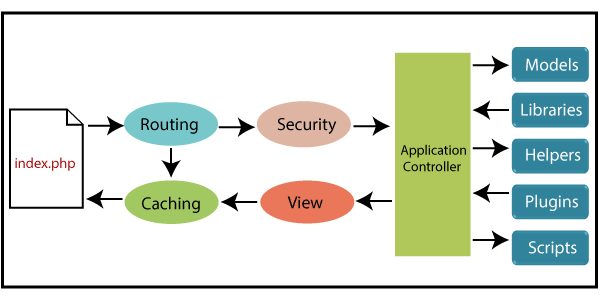
CodeIgniter Architecture

As the above image represents that whenever a request comes from the CodeIgniter application, firstly, it will go to the index.php file.

In the second step, the request passes via an index.php page to Routing for deciding whether the request passes to a cache file (step 3) or the step4 for security check.

If the user requested page is already in caching file, then the router doesn’t need to go step 3 for further updating, and the response will revert to the user.

And if the user requested page does not exist in the caching file, then the routing will pass the request to security (step 4) check.

After testing the security check, your requested page will go to the Application controller. And the Application Controller will load all the necessary files like Models, Libraries, Helpers, Plugins, and Scripts then pass to the view.

A View is used to fetch the data from the Application Controller that will represent to the user, and they pass the data to the caching file to the fastest access.

CodeIgniter MVC Framework

The CodeIgniter application is based on the MVC (Model – View – Controller) approach. MVC is a software, which distinct the application logic from the presentation view. Due to the separation of presentation view from the php scripting, it allows your web pages to minimize the script.
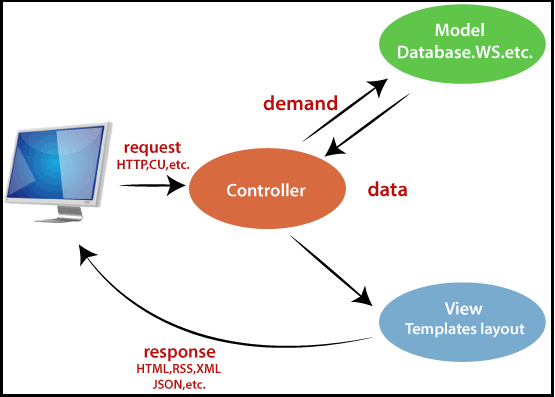
CodeIgniter Architecture2

Model

A model is used to interact with the database. When a user requested the particular data from the application, then the model has the responsibility to fetch the records from his database table. It also represents a data structure in which you can perform many operations like insert, update, delete, and retrieve.

Controller

As the name suggests, the controller, which means to control the working of the CodeIgniter application. It works as a mediator between the model and the view. So, it has the responsibility to takes the request from the user and handle that request by providing an appropriate result from the model. And it displays the appropriate records to the user by using the view component.

Note: 1. The Controller file name should be in the uppercase letter. Example – Main.php

2. The class name of the controller should be in the uppercase letter as the Controller File’s name.

View

A View is just like a web page. It contains the information shown to the user. A view can also be a part of a web page like header and footer. Also, you can represent the view page in RSS as well as a user interface.


Related Topics

CodeIgniter Architecture

Here we will understand the architecture and working of the CodeIgniter application, which helps you to elaborate all steps in simple ways. As the above image represents that whenever a request comes from the...

2 minutes read.

VBA ListBox

What is a ListBox? ListBox refers to a permanently displayed control (usually box-shaped) which contains a list of objects (or attribute, or elements) from which the user can select single or multiple attributes....

8 minutes read.

Excel VBA ABS Function

VBA ABS Function: The ABS function in VBA returns the absolute value of the specified number. Syntax Abs (Number) Parameter Number (required) – This parameter represents the number that you want the absolute value of. Return This...

1 minute read.

Excel VBA Join Function

Excel VBA Join Function: The Join function in VBA is used to join an array of substrings and return them all as a single string. Syntax Join (SourceArray, [Delimiter]) Parameter SourceArray (required) – This parameter...

1 minute read.

Excel VBA Filter Function

VBA Filter Function: The Filter function in VBA returns a subset for the given string array, based on specified criteria. Syntax Filter (SourceArray, Match, [Include], [Compare]) Parameter SourceArray (required) – This parameter the array of Strings that you...

2 minutes read.

Excel VBA Format Function

VBA Format Function The format function in VBA applies a specified format to an expression and returns the result as a string. Syntax Format (Expression, [Format], [FirstDayOfWeek] , [FirstWeekOfYear] ) Parameter Expression (required)- This parameter represents the expression that you want to format. Format...

3 minutes read.

Excel VBA Rnd Function

VBA Rnd Function: The Rnd function in VBA returns a random number that is greater than or equal to (>=) 0 and is less than (<) 1. Syntax Rnd ([Number]) Parameter Number (optional) –This...

1 minute read.

Excel VBA LBound Function

Excel VBA LBound Function: The LBound function in VBA returns the lowest subscript for the specified dimension in the given array. Syntax LBound (ArrayName, [Dimension]) Parameter ArrayName (required) – This parameter represents an array for which...

1 minute read.

Excel VBA Second Function

Excel VBA Second Function: The Second function in VBA returns the second element for the specified time.  Syntax Second (Time) Parameter Time (required) – This parameter represents the time. Return This function returns the second...

1 minute read.

Excel VBA Val Function

VBA Val Function: The Val function in VBA converts the given string into a numeric value. This function ignores spaces and continues to read the characters after space(s). It stops...

1 minute read.

Excel VBA Round Function

VBA Round Function: The Round function in VBA rounds a number to a specified number of decimal places and returns the number. Syntax Round (Number, [NumDigitsAfterDecimal]) Parameter Number (required) –This parameter represents a numeric value one wants...

1 minute read.

VBA Cell

What is VBA cell? Cells is one of the elements (workbook, worksheet, range) in Excel VBA, which refers to cells of the Excel worksheet.  In VBA, the cell is also a property...

5 minutes read.

Excel VBA Weekday Function

Excel VBA Weekday Function: The TimeValue function in VBA returns an integer (1 to 7), signifying the day of the week for the specified date. Syntax Weekday (Date, [FirstDayOfWeek]) Parameter Date (required) – This parameter...

2 minutes read.

Excel VBA DateAdd Function

The DateAdd function in VBA adds a time interval to a supplied date and/or time and returns the resultant date/time. Syntax Dateadd (Interval, Number, Date) Parameter Interval (required) – This parameter a string specifying the interval to be...

1 minute read.

Excel VBA Month Function

The Mont function in VBA returns the month number for the specified date. Syntax Month (Date) Parameter Time (required) – This parameter represents the date. Return This function returns the month number for the specified date. Example 1 Sub MonthFunction_Example1() ...

1 minute read.

Excel VBA CInt Function

VBA CInt Function: The VBA Cint function converts the specified expression into an Integer. Syntax Cint (Expression) Parameter Expression (required) – This parameter represents the expression that you want to convert to an Integer wherein...

1 minute read.

Excel VBA String Function

The String function in VBA creates a String, consisting of several repeated characters. Syntax String (Number, Character) Parameter Number (required) – This parameter represents the number of characters in the returned String. Character (required) – This parameter...

1 minute read.

Excel Objects in VBA

What are Excel Objects? The Excel objects belong to the entities that make up an Excel Workbook, Worksheets, Columns, Rows, Cell Ranges, etc. Each object in Excel has loads of Properties that are...

6 minutes read.

Excel VBA CBool Function

VBA CBool Function: The CBool function in VBA calculates an expression and returns the result as a Boolean data type. Syntax CBool (Expression) Parameter Expression (required) – This parameter represents the expression that that you want...

1 minute read.

VBA ActiveSheet

What is VBA Activesheet Property? The active sheet means the current worksheet which you are working on and viewing. The ActiveSheet object signifies the worksheet tab that is selected before running the VBA...

5 minutes read.