×

Excel VBA Format Function

VBA Format Function

The format function in VBA applies a specified format to an expression and returns the result as a string.

Syntax

Format (Expression, [Format], [FirstDayOfWeek] , [FirstWeekOfYear] )

Parameter

Expression (required)- This parameter represents the expression that you want to format.

Format (optional)- This parameter represents the format that is to be applied to the expression. The default value is General.

It can take the following values:

  • General Date: It shows a date as defined in your system's General Date setting.
  • Long Date: It shows a date as defined in your system's Long Date settings.
  • Medium Date: It shows a date as defined in your system's Medium Date settings.
  • Short Date: It shows a date as defined in your system's Short Date settings.
  • Long Time: It shows a time as defined in your system's Long Time settings.
  • Medium Time: It shows a time as defined in your system's Medium Time settings.
  • Short Time: It shows a time as defined in your system's Short Time settings.
  • General Number: It displays that same number as it is entered.
  • Currency: It displays a number with a currency symbol, using the thousand separator and decimal places
  • Euro: It shows a number as a currency, with the euro currency symbol.
  • Fixed: It shows at least one digit to the left of the decimal place
  • Standard: It displays the thousand separator and follows the standard system settings for the number of digits displayed at either side of the decimal place.
  • Percent: It shows a number multiplied by 100 and followed by the percent symbol 
  • Scientific: It shows a number using scientific notation.
  • Yes/No: It shows No if the number is equal to zero else it displays Yes.
  • True/False: It shows False if the number is equal to zero else it displays True.
  • On/Off: It shows Off if the number is equal to zero else it displays On.

FirstDayOfWeek (optional)- This parameter specifies the weekday that should be used as the first day of the week. If skipped, the default value is vbSunday.

It can take the following values:

  • vbUseSystemDayOfWeek: It takes the first day of the week as specified in your computer’s settings.
  • vbSunday (default value): It takes value as Sunday
  • vbMonday: It takes value as Monday
  • vbTuesday: It takes value as Tuesday
  • vbWednesday: It takes value as Wednesday
  • vbThursday: It takes value as Thursday
  • vbFriday: It takes value as Friday
  • vbSaturday: It takes value as Saturday

FirstWeekOfYear (optional)- This parameter represents the week that should be used as the first week of the year.

It can take the following values:

  • vbSystem: It takes the first week of the year as specified in your computer’s settings.
  • vbFirstJan1 (default value): It takes the week in which Jan 1st occurs
  • vbFirstFourDays: It takes the first week that contains at least four days in the new year
  • vbFirstFullWeek: It takes the first full week in the new year

Return

This function returns the formatted expression as a string.

Example 1

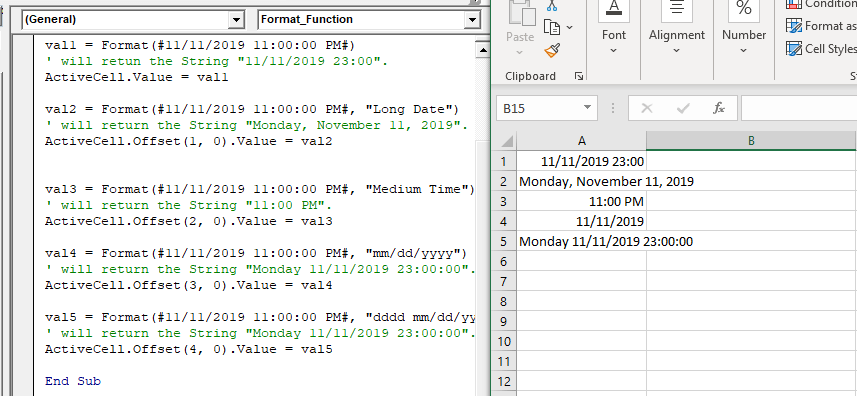
Sub Format_Function()
 Dim val1 As String
 Dim val2 As String
 Dim val3 As String
 Dim val4 As String
 Dim val5 As String 
 val1 = Format(#11/11/2019 11:00:00 PM#)
 ' will return the String "11/11/2019 23:00".
 ActiveCell.Value = val1
 val2 = Format(#11/11/2019 11:00:00 PM#, "Long Date")
 ' will return the String "Monday, November 11, 2019".
 ActiveCell.Offset(1, 0).Value = val2 
 val3 = Format(#11/11/2019 11:00:00 PM#, "Medium Time")
 ' will return the String "11:00 PM".
 ActiveCell.Offset(2, 0).Value = val3
 val4 = Format(#11/11/2019 11:00:00 PM#, "mm/dd/yyyy")
 ' will return the String "Monday 11/11/2019 23:00:00".
 ActiveCell.Offset(3, 0).Value = val4
 val5 = Format(#11/11/2019 11:00:00 PM#, "dddd mm/dd/yyyy hh:mm:ss")
 ' will return the String "Monday 11/11/2019 23:00:00".
 ActiveCell.Offset(4, 0).Value = val5
 End Sub 

Output

11/11/2019 23:00
Monday, November 11,2019
11:00 PM
11/11/2019
Monday 11/11/2019 23:00:00
Excel VBA Format Function

Example 2

Sub FormatFunction_Example2()
 Dim val1 As String
 Dim val2 As String, val3 As String
 Dim val4 As String, val5 As String
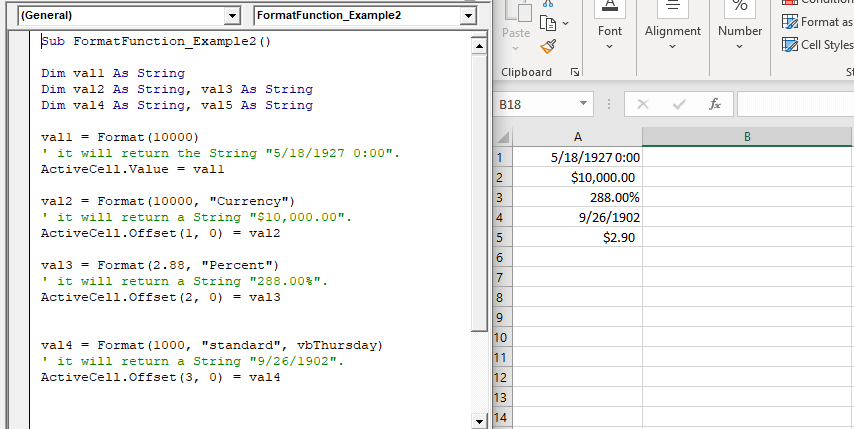
 val1 = Format(10000) 
 ' it will return the String "5/18/1927 0:00".
 ActiveCell.Value = val1
 val2 = Format(10000, "Currency")
 ' it will return a String "$10,000.00".
 ActiveCell.Offset(1, 0) = val2
 val3 = Format(2.88, "Percent") 
 ' it will return a String "288.00%".
 ActiveCell.Offset(2, 0) = val3
 val4 = Format(1000, "standard", vbThursday)
 ' it will return a String "9/26/1902".
 ActiveCell.Offset(3, 0) = val4
 val5 = Format(2.88, "0.0")
 ' str5 is now equal to the String "2.9".
 ActiveCell.Offset(4, 0) = val5
 End Sub 

Output

5/18/1927 0:00
$10,000.00
288.00%
9/26/1902
$2.90
Excel VBA Format Function

Example 3

Sub FormatFunction_Example3()
 Dim val1 As String
 Dim val2 As String
 val1 = Format("Joe Jonas", ">")
 'will return the String "JOE JONAS".
 ActiveCell.Value = val1
 val2 = Format("97110777", "@@-@@-@@-@")
 'return the String "97-11-07-77". 
 ActiveCell.Offset(1, 0) = val2
 End Sub 

Output

JOE JONAS
97-11-07-77

Related Topics

Excel VBA String Function

The String function in VBA creates a String, consisting of several repeated characters. Syntax String (Number, Character) Parameter Number (required) – This parameter represents the number of characters in the returned String. Character (required) – This parameter...

1 minute read.

VBA runtime error 1004

What is 1004 error?  VBA 1004 Error, also known as object-defined or application-defined, is a runtime error in VBA, usually, if the specified range does not exist in the worksheet or if the Application...

6 minutes read.

Excel VBA Log Function

VBA Log Function: The Log function in VBA returns the natural logarithm for the specified number. Syntax Log (Number) Parameter Number (required) –This parameter represents a positive numeric value that you want to find the...

1 minute read.

Excel VBA WeekdayName Function

Excel VBA WeekdayName Function: The WeekdayName function in VBA returns a string containing the weekday name, for the specified integer representation of a weekday. Syntax WeekdayName (Weekday, [Abbreviate], [FirstDayOfWeek]) Parameter Weekday (required) – This parameter represents...

2 minutes read.

Excel VBA Replace Function

VBA Replace Function: The Replace function in VBA searches for a substring within the specified string and replaces its occurrences with a second substring. Syntax Replace (Expression, Find, Replace, [Start], [Count], [Compare]) Parameter Expression (required) – This parameter represents...

2 minutes read.

Excel VBA Error Function

VBA Error Function: The Error function in VBA returns the error message corresponding to a supplied error code. Syntax Error ([ErrorNumber]) Parameter ErrorNumber (optional) – This parameter represents the required error number. By default, the...

1 minute read.

Excel VBA Now Function

Excel VBA Now Function: The Now function in VBA returns the current date and time.  Syntax Now () Parameter NA Return This function returns the current date and time.  Example 1 Sub NowFunction_Example1() 'It will return...

1 minute read.

Excel VBA CByte Function

VBA CByte Function: The CByte function in VBA converts an expression into a Byte data type. Syntax CByte (Expression) Parameter Expression (required) - This parameter represents the expression that that you want to convert to...

1 minute read.

VBA UBound

VBA UBound  The UBound or Upper Bound function in VBA is used to specify the length of an array and returns the highest subscript for a dimension for the specified array. It is...

3 minutes read.

Excel VBA LBound Function

Excel VBA LBound Function: The LBound function in VBA returns the lowest subscript for the specified dimension in the given array. Syntax LBound (ArrayName, [Dimension]) Parameter ArrayName (required) – This parameter represents an array for which...

1 minute read.

Steps to Create a Pivot Table

Steps to Create a Pivot Table: Pivot Tables can be easily automated through VBA coding. To create a Pivot Table in VBA, follow the below step by step procedure to...

4 minutes read.

Excel VBA CBool Function

VBA CBool Function: The CBool function in VBA calculates an expression and returns the result as a Boolean data type. Syntax CBool (Expression) Parameter Expression (required) – This parameter represents the expression that that you want...

1 minute read.

VBA Dim

What is Dim? DIM or Dimension or Declare in Memory is a keyword that is used in VBA to declare a variable with the different data types (Integer, String, variable, Boolean, Double, etc.)...

7 minutes read.

Excel VBA GoTo Statement

GoTo Statement he GoTo statement branches unconditionally to a specified line in a procedure. It is used to transfer the program control to a new statement, which is headed by a label. It sends...

2 minutes read.

Excel VBA Hex Function

VBA Hex Function: The Hex function in VBA converts the given number into hexadecimal notation and returns the result as a string. Syntax Hex (Number) Parameter Number (required) – This parameter represents the numeric value...

1 minute read.

Scope in Visual Basics

Definition of Scope The scope of any programming language implies the area of code where the variables will be identified, accessed, and used. Every variable has a scope associated with it. The scope of...

4 minutes read.

Excel VBA Asc Function

VBA Asc Function: The Asc function in VBA returns an integer showing the character code for the first character of a given string. Syntax Asc (String) Parameter String (required) – This parameter represents the text...

1 minute read.

Procedures in VBA

Procedures in VBA A procedure is a block of statements or units of computer code that performs some action. It is enclosed with a declaration statement, and its primary purpose is to carry out...

3 minutes read.

Excel VBA UBound Function

Excel VBA UBound Function: The UBound function in VBA returns the highest subscript for the specified dimension in the given array. Syntax UBound (ArrayName, [Dimension]) Parameter ArrayName (required) – This parameter represents an array for which...

1 minute read.

CodeIgniter Architecture

Here we will understand the architecture and working of the CodeIgniter application, which helps you to elaborate all steps in simple ways. As the above image represents that whenever a request comes from the...

2 minutes read.