CodeIgniter Benchmarking Class
The CodeIgniter contains the Benchmarking class that is used to calculate the time difference between two points or the memory usage of the passed statements in the application. By default, the Benchmarking class is already loaded in the CodeIgniter application, so you don’t need to load in the controller file. It can be used in any class, such as the controller, view, and model.
Functions of the Benchmarking Class
- mark(): The mark() function contains the variable name to mark the starting and ending point in the benchmark class.
- elapsed_time() : It is used to calculate the execution time difference between two marked points.
Syntax
elapsed_time ( [ $point1 = ’’ [, $point2 =
‘ ‘ [, $decimals = 3 ] ] ]);
Parameters:
$point1 (string): It defines the start marked point.
$point2 (string): It defines the end marked point.
$decimals (int): It takes a numeric value to show decimal places for precision.
<?php
    $this->benchmark->mark('start_point');
    // write your code within the start and end point
    $this->benchmark->mark('end_point');
    echo $this->benchmark->elapsed_time ('start_point', ' end_point');
 ?>
Example: Create a Learn.php file in application/controller folder and write the following program:
Learn.php
<?php
 class Learn extends CI_Controller {
 public function marked() // it is the public function that call on the URL
 {
  echo "<title> Tutorial and example </title>";
 $this->benchmark->mark('start_point');
 for  ($i=0; $i<=500; $i++)
  echo $i."\t";
 $this->benchmark->mark('end_point');
 echo "<br>";
 $data = $this->benchmark->elapsed_time('start_point', 'end_point');
 echo "Total elapsed time by two end points is : ".$data;
 }
 }
 ?>
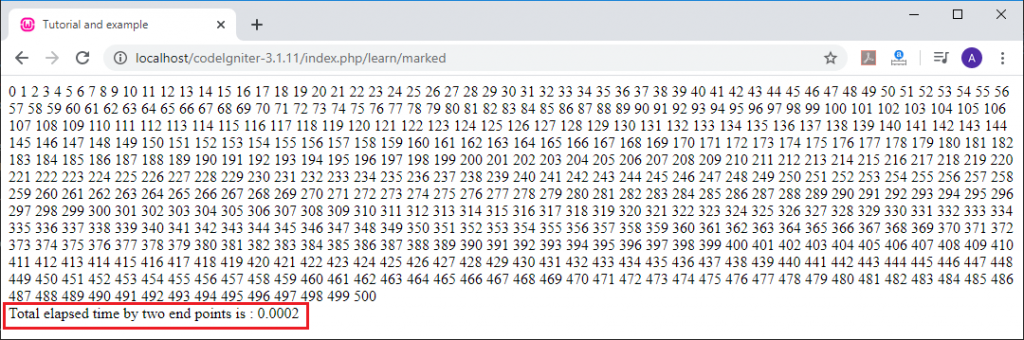
When you execute the above program in the localhost by invoking the URL localhost/CodeIgniter-3.1.11/index.php/learn/marked function, it shows the output, as shown below.
- memory_usage() : It is used to return the total space consumed by any application. You can use this function in any file to check the consumed space in the application.
Syntax
$this->benchmark ->memory_usage();
Example: Create a Learn.php file in application/controller folder and write the following program:
Learn.php
<?php
 class Learn extends CI_Controller {
 public function marked() // it is the public function that call on the URL
 {
  echo "<title> Tutorial and example </title>";
 $this->benchmark->mark('start_point');
 for  ($i=0; $i<=500; $i++)
  echo $i."\t";
 $this->benchmark->mark('end_point');
 echo "<br>";
 $data = $this->benchmark->elapsed_time('start_point', 'end_point');
 echo "Total elapsed time by two end points is : ". $data;
 $this->load->view('Learn/memory');
 }
 }
 ?>
After creating the Learn.php controller file, now create a memory.php file in the application/views/Learn/ folder and write the following code in the view file.
<?php
 $id =  $this->benchmark->memory_usage();
 echo "<br><h2> Memory Usage </h2>".$id;
 ?>
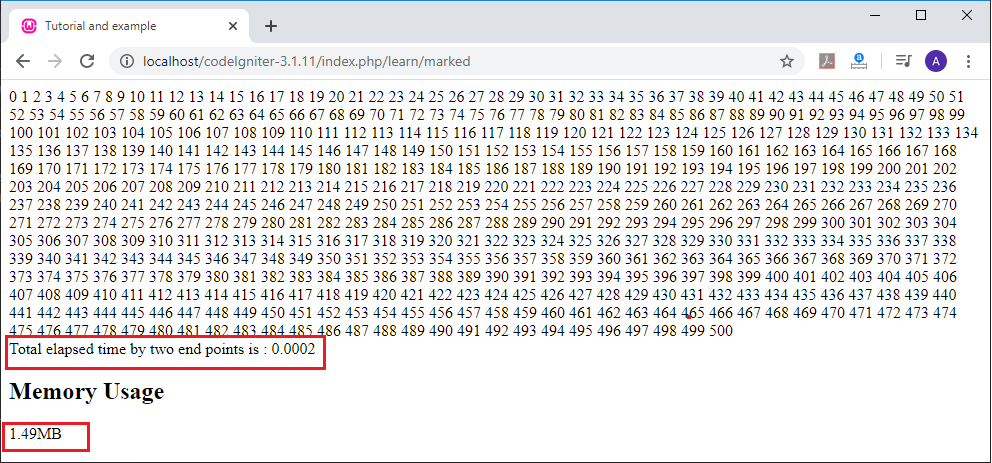
When you execute the above program in the localhost by invoking the URL localhost/CodeIgniter-3.1.11/index.php/learn/marked function, it returns the output, as shown below.
Cache Driver
CodeIgniter provides a cache driver that is used to access the web page from the server quickly. It also allows working with file-based caching, for which it requires a specific server requirement, and if the server requirements are not met with file-based caching, it throws an exception.
Load a Cache driver
Before using the cache driver, you must load it in the controller file by following the method:
$this->load->driver( ‘cache’ );
Functions of the caching Driver
These are the following functions of the caching driver, as shown below:
- save(): It is used to save a data item to the cache-store. And if the file is not saved in the defined cache store, it returns a FALSE value.
Syntax
save ($id, $data[, $ttl = 120 [, $raw = False ] ] );
Parameters:
$id: It represents the name of the cache file in the cache-store.
$data: It defines the data you want to save in the cache file.
$ttl: It stands for Time to Live, which means how long your data must remain in the cache.
$raw: It passes a Boolean value to store raw data in a save() function.
Example: Create a Learn.php file in application/controller folder and write the following program:
Learn.php
<?php
 class Learn extends CI_Controller {
 public function savefile()
     {
         echo "<title> Tutorial and example </title>";
         $this->load->driver('cache', array('adapter' => 'apc', 'backup' => 'file'));
         $data = 'This is the first example of creating a cache files in the application/cache';
         // Save $data into the cache for 5 minutes
         $this->cache->save('cachefiles', $data, 300);  /* cachefiles is the name of cache file in cache folder */
         echo "<h2> cache file has been created </h2>";
     }
 }
 ?>
When you execute the above program in the localhost by invoking the URL localhost/CodeIgniter-3.1.11/index.php/Learn/savefile function, it returns the output, as shown below.

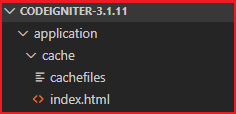
Then it creates a file named cachefiles in the application's cache folder, as shown below.
- get(): It is used to fetch the data from the cache file. And if the data do not exist, it returns a FALSE.
Syntax
get ($id);
$id: It represents the cache filename, which is used to fetch data from the cache-store.
Example: Create a Learn.php file in application/controller folder and write the following program:
Learn.php
<?php
 class Learn extends CI_Controller {
 public function fetchfile()
 {
    echo "<title> Tutorial and example </title>";
     $this->load->driver('cache', array('adapter' => 'apc', 'backup' => 'file'));
  if ( ! $data = $this->cache->get('cachefiles'))
 {
 }
 echo $data;
 }
 }
 ?>
When you execute the above program in localhost by invoking the URL localhost/CodeIgniter-3.1.11/index.php/learn/fetchfile, it returns the output, as shown below.

- delete(): A delete cache function is used to delete a specific cache file from the cache-store. And if it is unable to delete the file, it returns a FALSE value.
Syntax
delete ($id);
Example: Create a Learn.php file in application/controller folder and write the following program:
Learn.php
<?php
 class Learn extends CI_Controller {
 public function deletefile()
 {
       $this->load->driver('cache', array('adapter' => 'apc', 'backup' => 'file'));
               $data = $this->cache->delete('cachefiles'); // It takes file name to be deleted
               if($data== true) {
                           echo "Your file has been successfully deleted";
                 }
 }
 }
  ?>
When you execute the above program in the localhost by invoking the URL localhost/CodeIgniter-3.1.11/index.php/Learn/deletefile, it returns the output, as shown below.

- increment(): It is used for the atomic increment of the raw stored data value in the cache.
Syntax
increment ($id [, $offset = 5 ]);
Parameters:
$id (string): It represents the cache id that stored in the cache files.
$offset (int): This takes a numeric value for the atomic increment of a raw stored cache value.
Example: Create a Learn.php file in application/controller folder and write the following program:
Learn.php
<?php
 class Learn extends CI_Controller {
 public function increment_value()
             {
        echo "<title> Tutorial and example </title>";
        $this->load->driver('cache', array('adapter' => 'apc', 'backup' => 'file'));
         echo $this->cache->increment ( 'Hello World' );
         echo"<br>";
    echo $this->cache->increment( 'tutorialandeaxmple', 10);
             }
 }
  ?>
When you execute the above program in the localhost by invoking the URL localhost/CodeIgniter-3.1.11/index.php/Learn/increment_value, it returns the output, as shown below.

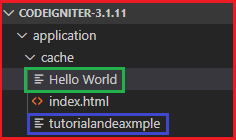
After that, it creates a cache file named "Hello World" and "Tutorialandexample" in the cache folder to store the raw data.
- decrement() : It is used for atomic decrementation of the raw stored data value.
Syntax
decrement ($id [, $offset = 5 ]);
Parameters:
$id (string): It represents the raw cache id that stored in the cache files.
$offset (int): This takes a numeric value for the atomic decrement of a raw stored cache value.
Example: Create a Learn.php file in application/controller folder and write the following program:
Learn.php
<?php
 class Learn extends CI_Controller {
 public function decrement_value()
             {
        echo "<title> Tutorial and example </title>";
        $this->load->driver('cache', array('adapter' => 'apc', 'backup' => 'file'));
         echo $this->cache->decrement ( 'Hello World' );
         echo"<br>";
    echo $this->cache->decrement( 'tutorialandeaxmple', 10);
             }
 }
  ?>
When you execute the above program in localhost by invoking the URL localhost/CodeIgniter-3.1.11/index.php/learn/decrement_value, it returns the output, as shown below.

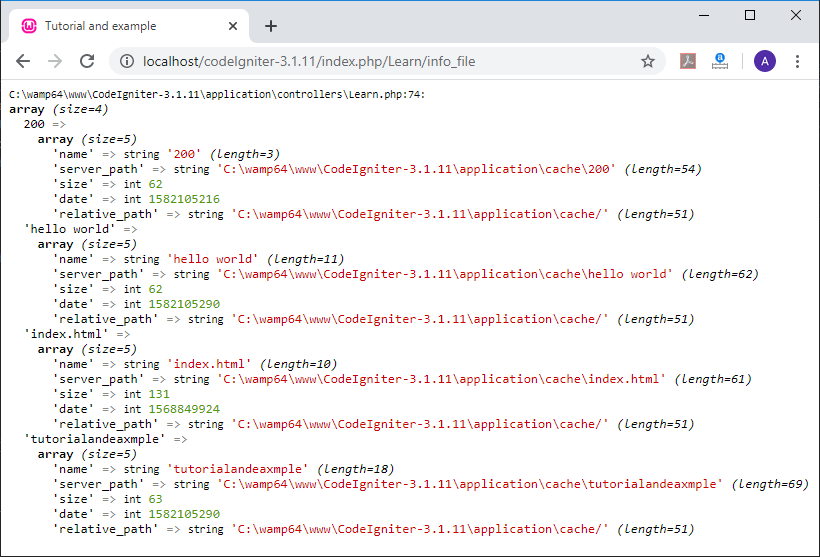
- cache_info(): It is used to return all the basic information of the cache files stored in your Codeigniter application.
Syntax
cache_info();
Example: Create a Learn.php file in application/controller folder and write the following program:
Learn.php
<?php
 class Learn extends CI_Controller {
 public function info_file()
    {
     echo "<title> Tutorial and example </title>";
         $this->load->driver('cache', array('adapter' => 'apc', 'backup' => 'file'));
   var_dump ($this-> cache-> cache_info()); // it shows all the information about the file
     }
 }
 ?>
When you execute the above program in the localhost by invoking the URL localhost/CodeIgniter-3.1.11/index.php/Learn/info_file, it returns the output, as shown below.
- clean(): As the name defines, this function is used to clean all the cache data from the cache files, and if it fails to clear all cache files, it returns a FALSE value.
Syntax
clean();
Example: Create a Learn.php file in application/controller folder and write the following program:
Learn.php
<?php
 class Learn extends CI_Controller {
 public function clean_file()
    {
    echo "<title> Tutorial and example </title>";
         $this->load->driver('cache', array('adapter' => 'apc', 'backup' => 'file'));
     $this->cache->clean();         // clean the cache file from the cache folder
     echo "Your file has been removed from cache folder";
     }
 }
 ?>
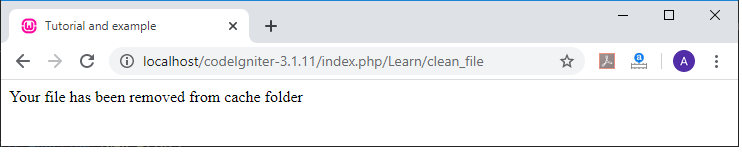
When you execute the above program in the localhost by invoking the URL localhost/CodeIgniter-3.1.11/index.php/Learn/clean_file, it returns the output, as shown below.
- get_metadata(): It is used to get detailed information of a particular item in the cache file.
Syntax
get_metadata ($id);
Example: Create a Learn.php file in application/controller folder and write the following program:
Learn.php
<?php
 class Learn extends CI_Controller {
 public function getMetadata()
    {
     echo "<title> Tutorial and example </title>";
         $this->load->driver('cache', array('adapter' => 'apc', 'backup' => 'file'));
         var_dump($this->cache->get_metadata ('cachefiles')); // it takes file name
     }
 }
 ?>
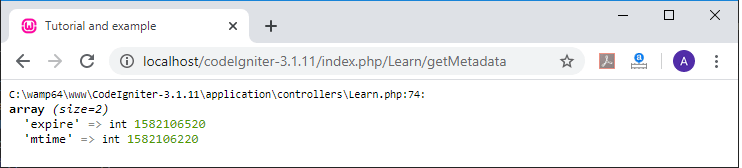
When you execute the above program in the localhost by invoking the URL localhost/CodeIgniter-3.1.11/index.php/Learn/getMetadata, it returns the output, as shown below.