
×

VBA TimeSerial Function

The TimeSerial function in VBA returns a Time for the specified hour, minute, and second.

Syntax

TimeSerial (Hour, Minute, Second)

Parameter

Hour (required) – This parameter represents an integer (0 to 23), signifying the hour of the time.

Minute (required) – This parameter represents an integer (0 to 59), signifying the minute of the time. If it is less than 0 or greater than 59, this value is subtracted from, or added to, the specified number of hours.

Second (required) – This parameter represents an integer (0 to 59) representing the second of the time. If it is less than 0 or greater than 59, this value is subtracted from, or added to, the specified number of minutes.

Return

This function returns a Time for the given hour, minute, and second.

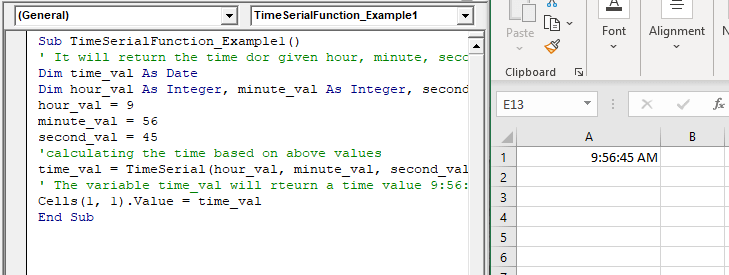
Example 1

Sub TimeSerialFunction_Example1()
 ' It will return the time dor given hour, minute, second
 Dim time_val As Date
 Dim hour_val As Integer, minute_val As Integer, second_val As Integer
 hour_val = 9 
 minute_val = 56
 second_val = 45
 'calculating the time based on above values
 time_val = TimeSerial(hour_val, minute_val, second_val) 
 ' The variable time_val will rteurn a time value 9:56:45 AM.
 Cells(1, 1).Value = time_val
 End Sub 

Output

9:56:45 AM
VBA TimeSerial Function

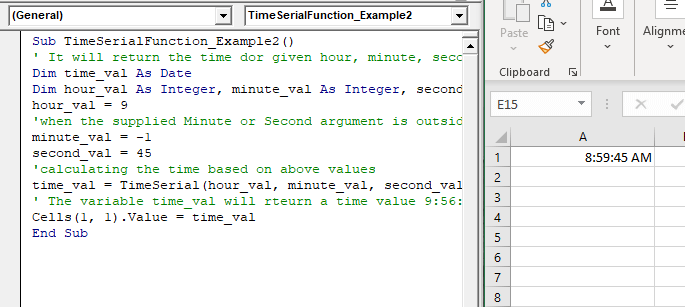
Example 2

Sub TimeSerialFunction_Example2()
 ' It will return the time dor given hour, minute, second
 Dim time_val As Date
 Dim hour_val As Integer, minute_val As Integer, second_val As Integer
 hour_val = 9
 'when the supplied Minute or Second argument is outside the range 0 - 59. 
 minute_val = -1
 second_val = 45
 'calculating the time based on above values
 time_val = TimeSerial(hour_val, minute_val, second_val)
 ' The variable time_val will rteurn a time value 9:56:45 AM.
 Cells(1, 1).Value = time_val
 End Sub 

Output

8:59:45 AM
VBA TimeSerial Function

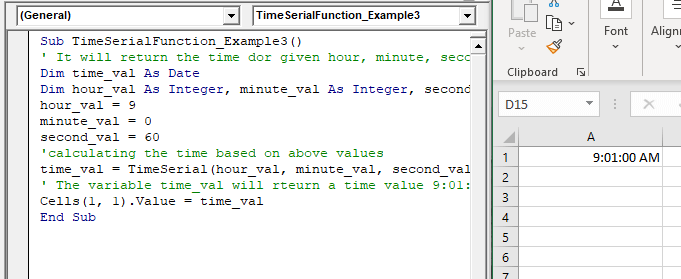
Example 3

Sub TimeSerialFunction_Example3()
 ' It will return the time dor given hour, minute, second
 Dim time_val As Date
 Dim hour_val As Integer, minute_val As Integer, second_val As Integer
 hour_val = 9
 minute_val = 0 
 second_val = 60
 'calculating the time based on above values
 time_val = TimeSerial(hour_val, minute_val, second_val) 
 ' The variable time_val will rteurn a time value 9:01:00 AM.
 Cells(1, 1).Value = time_val
 End Sub 

Output

9:01:00 AM
VBA TimeSerial Function

Related Topics

Excel VBA IsMissing Function

VBA IsMissing Function: The IsMissing function in VBA checks if any parameter to a procedure is missing or not. It returns a Boolean value True if the specified parameter has not been...

1 minute read.

Excel VBA : With End-with Constructs

With End-with Constructs The With-End With construct enables the user to perform multiple operations on a single object. If you are going to perform several different actions on the same object and typing the same...

4 minutes read.

Excel VBA Array

Introduction to VBA Array An array is a type of variable that holds more than one piece of data. In VBA, you can refer to a specific variable (element) of an array by using...

5 minutes read.

VBA Regex Pattern Validation

VBA Regex Pattern Validation The key purpose of using Regex in VBA was to validate the data and extract the same category of data. There are certain formats that are standard...

6 minutes read.

Excel VBA Mid Function

VBA Mid Function: The Mid function in VBA returns a substring from within a supplied string. Syntax Mid (Str, Start, [Length]) Parameter Str (required) -This parameter represents a string from which you want to extract the substring. Start...

1 minute read.

Excel VBA Val Function

VBA Val Function: The Val function in VBA converts the given string into a numeric value. This function ignores spaces and continues to read the characters after space(s). It stops...

1 minute read.

Excel VBA Year Function

Excel VBA Year Function: The Year function in VBA returns the four-digit year for the specified date. Syntax Year (Date) Parameter Date (required) – This parameter represents the significant date. Return This function returns the four-digit year...

1 minute read.

Excel VBA UCase Function

The UCase function in VBA converts a String into upper case text. Syntax UCase (String) Parameter String (required) – This parameter represents the string that you want to convert to upper case. Return This function returns a string...

1 minute read.

Excel VBA InStrRev Function

VBA InStrRev Function: The InStrRev function in Excel VBA returns an integer representing the position of a substring within the specified string if the substring is fount else it returns...

2 minutes read.

Excel VBA Right Function

VBA Right Function: The Right function in VBA returns a substring from the end of the given string. Syntax Right (Str, Length) Parameter Str (required) – This parameter represents the string from which you want to...

1 minute read.

Excel VBA Asc Function

VBA Asc Function: The Asc function in VBA returns an integer showing the character code for the first character of a given string. Syntax Asc (String) Parameter String (required) – This parameter represents the text...

1 minute read.

Excel VBA Format Function

VBA Format Function The format function in VBA applies a specified format to an expression and returns the result as a string. Syntax Format (Expression, [Format], [FirstDayOfWeek] , [FirstWeekOfYear] ) Parameter Expression (required)- This parameter represents the expression that you want to format. Format...

3 minutes read.

Excel VBA IsDate Function

VBA IsDate Function: The IsDate function in VBA returns a Boolean value indicating whether the given expression is interpreted as a VBA Date or not. Syntax IsDate (Expression) Parameter Expression (required) – This parameter...

1 minute read.

VBA Option Explicit

VBA Option Explicit The Option Explicit in VBA is used to declare the variables at the top of your macro code. It is the most secure and easy option to maintain your variables....

5 minutes read.

Excel VBA Rnd Function

VBA Rnd Function: The Rnd function in VBA returns a random number that is greater than or equal to (>=) 0 and is less than (<) 1. Syntax Rnd ([Number]) Parameter Number (optional) –This...

1 minute read.

Excel VBA UBound Function

Excel VBA UBound Function: The UBound function in VBA returns the highest subscript for the specified dimension in the given array. Syntax UBound (ArrayName, [Dimension]) Parameter ArrayName (required) – This parameter represents an array for which...

1 minute read.

Excel VBA Error Function

VBA Error Function: The Error function in VBA returns the error message corresponding to a supplied error code. Syntax Error ([ErrorNumber]) Parameter ErrorNumber (optional) – This parameter represents the required error number. By default, the...

1 minute read.

Excel VBA Conditional Statement

Conditional Statement in VBA Excel Conditional Statements in Excel VBA are one of the most powerful and useful features in programming, this will give you to perform comparisons to decide or...

2 minutes read.

Excel VBA CLng Function

VBA CLng Function: The CLng function in VBA converts an expression into a Long data type. It returns a long value ranging between -2,147,483,648 and 2,147,483,647. Syntax CLng (Expression) Parameter Expression (required) – This...

1 minute read.

Excel VBA CInt Function

VBA CInt Function: The VBA Cint function converts the specified expression into an Integer. Syntax Cint (Expression) Parameter Expression (required) – This parameter represents the expression that you want to convert to an Integer wherein...

1 minute read.