×

Looping in VBA

Looping in VBA

There are many situations where a programmer needs to execute a block of the repetitive code number of times. Writing the same statement will make the program tedious and monotonous. Hence, to reduce the statements, looping is introduced. A loopin Excel VBA enables you to loop through a range of cells with just a few code lines. Thus, it allows the programmer to execute a statement or group of statements multiple times.

 Loops are used to repeat a block of the statement as many times as required until a given condition remains true or a specific point (or value) is reached, after which the next section of code is executed. A loop allows the programmer to write a few lines of code and accomplish an output (just by repetition or looping).

The various loops in VBA are as follows:

  1. for loop

The for loop is used to execute a sequence of statements multiple times and shortens the code to manage the loop variable.

  • for…each loop

The for…each loop is used to execute if there is at least one element in the group and reiterated for each element in a group.

  • while…wend loop

This loop tests the condition before executing the loop body.

  • do..while loops

The do..While will keep on looping or executing the block of code  till the specified condition is true.

  • do..until loops

This loop is used to repeat a set of statements if the condition is false. The condition may be checked at the beginning of the loop or at the end of Do Until loop.

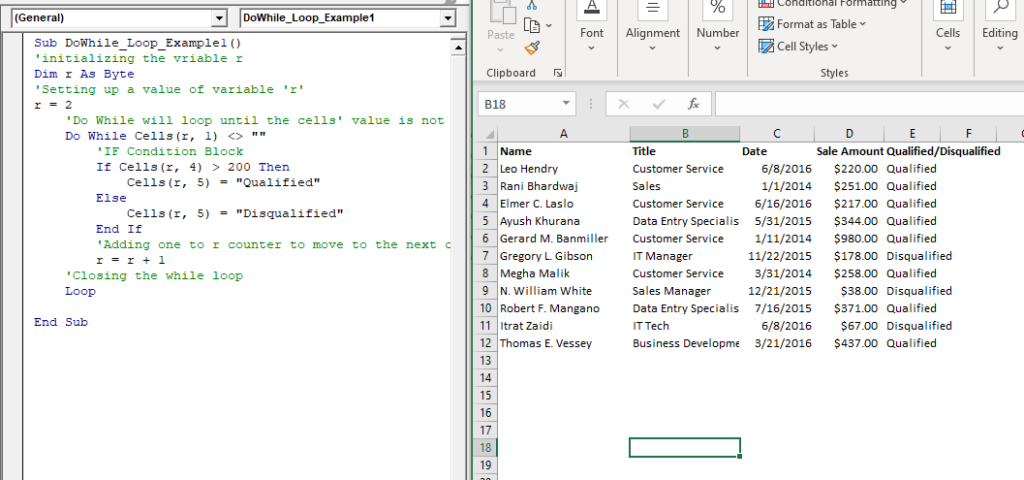
Example 1: Write a procedure or macro using Do Loop that does the following:

            Get "Qualified" in column E if the value of column D is above 200

Sub DoWhile_Loop_Example1()
 'initializing the variable r
 Dim r As Byte
 'Setting up a value of variable 'r'
 r = 2
     'Do While will loop until the cells' value is not equal to empty
     Do While Cells(r, 1) <> ""
         'IF Condition Block
         If Cells(r, 4) > 200 Then
             Cells(r, 5) = "Qualified" 
         Else
             Cells(r, 5) = "Disqualified"
         End If
         'Adding one to r counter to move to the next cell
         r = r + 1
     'Closing the while loop
     Loop
 End Sub 

Output

Name Title Date Sale Amount Qualified/Disqualified
Leo Hendry Customer Service 6/8/2016 $220.00 Qualified
Rani Bhardwaj Sales 1/1/2014 $251.00 Qualified
Elmer C. Laslo Customer Service 6/16/2016 $217.00 Qualified
Ayush Khurana Data Entry Specialist 5/31/2015 $344.00 Qualified
Gerard M. Banmiller Customer Service 1/11/2014 $980.00 Qualified
Gregory L. Gibson IT Manager 11/22/2015 $178.00 Disqualified
Megha Malik Customer Service 3/31/2014 $258.00 Qualified
N. William White Sales Manager 12/21/2015 $38.00 Disqualified
Robert F. Mangano Data Entry Specialist 7/16/2015 $371.00 Qualified
Itrat Zaidi IT Tech 6/8/2016 $67.00 Disqualified
Thomas E. Vessey Business Development Executive 3/21/2016 $437.00 Qualified
Looping in VBA

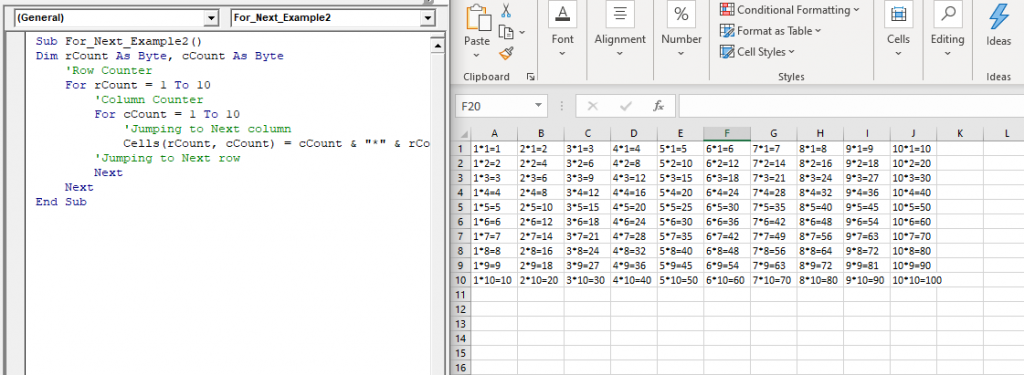
Example 2: Write a Macro using For Next loop in VBA to print the tables from 1 to 10

Sub For_Next_Example2()
 Dim rCount As Byte, cCount As Byte
     'Row Counter
     For rCount = 1 To 10
         'Column Counter
         For cCount = 1 To 10
             'Jumping to Next column 
             Cells(rCount, cCount) = cCount & "*" & rCount & "=" & rCount * cCount
         'Jumping to Next row
         Next
     Next
 End Sub 
             Cells(rCount, cCount) = cCount & "*" & rCount & "=" & rCount * cCount
         'Jumping to Next row
         Next
     Next
 End Sub 

Output

1*1=1 2*1=2 3*1=3 4*1=4 5*1=5 6*1=6 7*1=7 8*1=8 9*1=9 10*1=10
1*2=2 2*2=4 3*2=6 4*2=8 5*2=10 6*2=12 7*2=14 8*2=16 9*2=18 10*2=20
1*3=3 2*3=6 3*3=9 4*3=12 5*3=15 6*3=18 7*3=21 8*3=24 9*3=27 10*3=30
1*4=4 2*4=8 3*4=12 4*4=16 5*4=20 6*4=24 7*4=28 8*4=32 9*4=36 10*4=40
1*5=5 2*5=10 3*5=15 4*5=20 5*5=25 6*5=30 7*5=35 8*5=40 9*5=45 10*5=50
1*6=6 2*6=12 3*6=18 4*6=24 5*6=30 6*6=36 7*6=42 8*6=48 9*6=54 10*6=60
1*7=7 2*7=14 3*7=21 4*7=28 5*7=35 6*7=42 7*7=49 8*7=56 9*7=63 10*7=70
1*8=8 2*8=16 3*8=24 4*8=32 5*8=40 6*8=48 7*8=56 8*8=64 9*8=72 10*8=80
1*9=9 2*9=18 3*9=27 4*9=36 5*9=45 6*9=54 7*9=63 8*9=72 9*9=81 10*9=90
1*10=10 2*10=20 3*10=30 4*10=40 5*10=50 6*10=60 7*10=70 8*10=80 9*10=90 10*10=100
Looping in VBA2

Related Topics

Excel VBA Left Function

VBA Left Function: The Left function in VBA returns a substring from the start of the specified string. Syntax Left (Str, Length) Parameter Str (required) – This parameter represents the string that you want to extract...

1 minute read.

Excel VBA For Each Loop

A For Each loop executes a statement or a group of statements for each element in an array or collection. It repeats the statement/condition/code for each element in a collection. For Each Loops loop through every...

4 minutes read.

Excel VBA Weekday Function

Excel VBA Weekday Function: The TimeValue function in VBA returns an integer (1 to 7), signifying the day of the week for the specified date. Syntax Weekday (Date, [FirstDayOfWeek]) Parameter Date (required) – This parameter...

2 minutes read.

Excel VBA CInt Function

VBA CInt Function: The VBA Cint function converts the specified expression into an Integer. Syntax Cint (Expression) Parameter Expression (required) – This parameter represents the expression that you want to convert to an Integer wherein...

1 minute read.

Finding Last Row or Column in Excel VBA

Finding Last Row or Column in VBA Finding the last used row, column, or cell is one very commonly used task when we write macros and VBA applications.  Like other codes...

5 minutes read.

Excel VBA Rnd Function

VBA Rnd Function: The Rnd function in VBA returns a random number that is greater than or equal to (>=) 0 and is less than (<) 1. Syntax Rnd ([Number]) Parameter Number (optional) –This...

1 minute read.

Excel VBA StrComp Function

VBA StrComp Function: The StrComp function in VBA compares two strings and returns an integer value displaying the result of the comparison. Syntax StrComp (String1, String2, [Compare]) Parameter String1 (required)- This parameter represents the first string to...

2 minutes read.

Excel VBA Error Function

VBA Error Function: The Error function in VBA returns the error message corresponding to a supplied error code. Syntax Error ([ErrorNumber]) Parameter ErrorNumber (optional) – This parameter represents the required error number. By default, the...

1 minute read.

Steps to Create a Chart in VBA

Steps to Create a Chart Charts are created either by directly working with the chart variable object that defines the chart data or by ChartObject method. In order to get to...

3 minutes read.

Excel VBA User-Defined Functions

User-Defined Functions One of the advantages of VBA is that you can create your own functions using macros. These functions can be called and used as other functions in excel and use them. You can...

3 minutes read.

Steps to Create a Pivot Table

Steps to Create a Pivot Table: Pivot Tables can be easily automated through VBA coding. To create a Pivot Table in VBA, follow the below step by step procedure to...

4 minutes read.

Excel Objects in VBA

What are Excel Objects? The Excel objects belong to the entities that make up an Excel Workbook, Worksheets, Columns, Rows, Cell Ranges, etc. Each object in Excel has loads of Properties that are...

6 minutes read.

Excel VBA String Function

The String function in VBA creates a String, consisting of several repeated characters. Syntax String (Number, Character) Parameter Number (required) – This parameter represents the number of characters in the returned String. Character (required) – This parameter...

1 minute read.

Excel VBA DateSerial Function

The DateSerial function in VBA returns a Date from a supplied year, month, and day number. Syntax DateSerial (Year, Month, Day) Parameter Year (required) – This parameter represents an integer signifying the year. Month (required) – This parameter...

2 minutes read.

Excel VBA IsEmpty Function

VBA IsEmpty Function: The IsEmpty function in VBA returns a Boolean value showing whether the specified Expression is Empty (variant has not been declared) or not. Syntax IsEmpty (Expression) Parameter Expression (required)- This parameter...

1 minute read.

Excel VBA: IF…..THEN …ELSE Statement

VBA : IF…..THEN …ELSE Statement: This function enables you to check one condition and, based on that, then run one of the two statement blocks present. If the ‘IF’ condition...

2 minutes read.

VBA runtime error 1004

What is 1004 error?  VBA 1004 Error, also known as object-defined or application-defined, is a runtime error in VBA, usually, if the specified range does not exist in the worksheet or if the Application...

6 minutes read.

VBA ListBox

What is a ListBox? ListBox refers to a permanently displayed control (usually box-shaped) which contains a list of objects (or attribute, or elements) from which the user can select single or multiple attributes....

8 minutes read.

Excel VBA CDate Function

VBA CDate Function: The CDate function in VBA converts an expression into a Date (or Time) data type. Syntax CDate (Expression) Parameter Expression (required) - This parameter represents the expression that that you want to...

1 minute read.

Excel VBA FormatPercent Function

VBA FormatPercent Function: The FormatPercent function in VBA is used to apply a percent format to a numeric expression, and it returns the result as a string. Syntax FormatPercent (Expression, [NumDigitsAfterDecimal], [IncludeLeadingDigit], [UseParensForNegativeNumbers], [GroupDigits]) Parameter Expression (required)...

2 minutes read.