
×

Procedures in VBA

Procedures in VBA

A procedure is a block of statements or units of computer code that performs some action. It is enclosed with a declaration statement, and its primary purpose is to carry out a particular task or action. VBA supports two types of procedures: Sub procedures and Function procedures.

Sub Procedure

The Sub procedure consists of a series of statements and can be executed in several ways. Here’s an example of a simple Sub procedure called Test: This procedure calculates a simple sum and then displays the result in a message box.

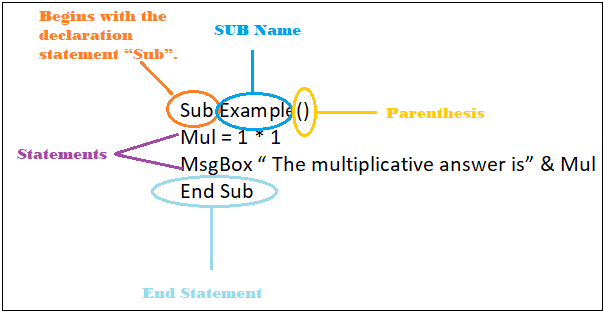
VBA Sub procedure names must follow specific rules. The Four elements which are required to declare VBA Sub procedure are as follows:

  1. Sub Statement: The Sub keyword is used to declare the beginning of the VBA Sub procedure. 
  2. Name: It represents the name of the VBA Sub procedure. The first character must be a letter rest can be letters, numbers, or certain punctuation characters (excluding #, $, %, &, @, ^, *, ! and spaces). The maximum number of characters a name can have is 255.
  3. Parentheses: Parentheses are used to declare the arguments from other procedures where the arguments must be separated by comma (,). Although it’s optional i.e., you can even declare a VBA without any arguments just by putting empty parenthesis {}.
  4. Statements: Sub procedure has a block of statements that is enclosed by the declaration and End declaration statements
  5. End Sub Keyword: An End Sub keyword is used to exit the VBA Sub procedure in which the statements are included.

Program:

Sub Example()
Mul = 1 * 1
MsgBox “ The multiplicative answer is” & Mul
End Sub 
Procedures in VBA Excel

Function procedures

A Function procedure returns a single value (or possibly an array). A Function can be called from another VBA procedure or used in a worksheet formula. A VBA function returns a value by allocating a value to its name in one or more statements of the procedure. A Function procedure is similar to a Sub procedure, with only one difference that a function can also return a value.

VBA Function procedure names must follow specific rules. The Four elements which are required to declare VBA Function procedure are as follows:

  1. Function Statement: The Function keyword is used to declare the beginning of the VBA Function procedure. 
  2. Name: It represents the name of the VBA Function procedure. The first character must be a letter rest can be letters, numbers, or certain punctuation characters (excluding #, $, %, &, @, ^, *, ! and spaces). The maximum number of characters a name can have is 255.
  3. Parentheses: Parentheses are used to declare the arguments from other procedures where the arguments must be separated by comma (,). Although it’s optional i.e., you can even declare a VBA Function without any arguments just by putting empty parenthesis {}.
  4. Statements: Function procedure has a block of statements that is enclosed by the declaration and End declaration statements
  5. End Function Keyword: An End Function keyword is used to exit the VBA Function procedure in which the statements are included.

Program:

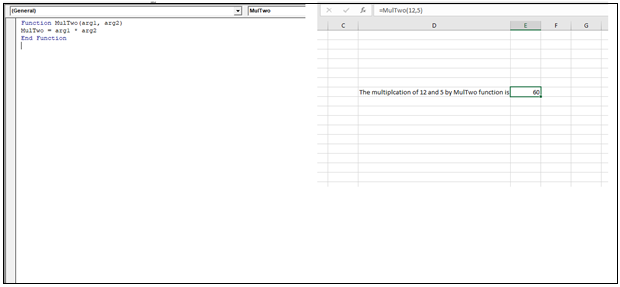
Function MulTwo (arg1, arg2) 
MulTwo= arg1 * arg2
End Function 
Function procedures

Related Topics

For Next loop in VBA

For Next Loop The ”For Next” loop is used for a fixed number of times. It works by implementing the loop for the specified number of times. In this, the user specifies how...

3 minutes read.

Excel VBA Len Function

VBA Len Function: The Len function in VBA returns the number of characters in a supplied string or the number of bytes required to store a supplied variable. Syntax Len (Expression) Parameter Expression (required)-...

1 minute read.

VBA Updating Pivot Table

VBA- Updating Pivot Table The pivot table is an important feature to explore, summarize, and interpret the bulk amount of data. It helps data evaluating, reviewing, as well as making useful...

3 minutes read.

VBA Cell

What is VBA cell? Cells is one of the elements (workbook, worksheet, range) in Excel VBA, which refers to cells of the Excel worksheet.  In VBA, the cell is also a property...

5 minutes read.

Excel VBA LBound Function

Excel VBA LBound Function: The LBound function in VBA returns the lowest subscript for the specified dimension in the given array. Syntax LBound (ArrayName, [Dimension]) Parameter ArrayName (required) – This parameter represents an array for which...

1 minute read.

Excel VBA IsObject Function

VBA IsObject Function: The IsObject function in VBA returns a Boolean value showing whether the specified variable represents an Object variable type or not. Syntax IsObject (Expression) Parameter Expression (required)- This parameter represents the...

1 minute read.

Excel VBA: Do Until….Loop

DO UNTIL….Loop The “Do Until” Loop is same unlike DO WHILE statement just that it will keep on looping till the condition is not met. This loop is used to repeat a set...

4 minutes read.

Excel VBA Minute Function

The Minute function in VBA returns the minute component for the specified time. Syntax Minute (Time) Parameter Time (required) – This parameter represents the time. Return This function returns the minute component for the specified time. Example 1 Sub MinteFunction_Example1() ...

1 minute read.

Excel VBA MessageBox

Message Box The MsgBox in Excel VBA is a dialog box used to inform the users of your program by showing a custom message or get some necessary inputs such as Yes/No or...

4 minutes read.

Excel VBA LTrim Function

VBA LTrim Function: The LTrim function in VBA removes the leading spaces from a supplied text string. Syntax LTrim (String) Parameter String (required) - This parameter represents he text string that you want to remove...

1 minute read.

Excel VBA StrComp Function

VBA StrComp Function: The StrComp function in VBA compares two strings and returns an integer value displaying the result of the comparison. Syntax StrComp (String1, String2, [Compare]) Parameter String1 (required)- This parameter represents the first string to...

2 minutes read.

Excel VBA DateSerial Function

The DateSerial function in VBA returns a Date from a supplied year, month, and day number. Syntax DateSerial (Year, Month, Day) Parameter Year (required) – This parameter represents an integer signifying the year. Month (required) – This parameter...

2 minutes read.

Excel VBA Array

Introduction to VBA Array An array is a type of variable that holds more than one piece of data. In VBA, you can refer to a specific variable (element) of an array by using...

5 minutes read.

Excel VBA Format Function

VBA Format Function The format function in VBA applies a specified format to an expression and returns the result as a string. Syntax Format (Expression, [Format], [FirstDayOfWeek] , [FirstWeekOfYear] ) Parameter Expression (required)- This parameter represents the expression that you want to format. Format...

3 minutes read.

Excel VBA Atn Function

VBA Atn Function: The Atn function in VBA returns the arctangent between quadrant -?/2 and +?/2 for the specified number, in radians. Syntax Atn (Number) Parameter Number (required) – This parameter represents the number that...

1 minute read.

Excel VBA IsNull Function

VBA IsNull Function: The IsNull function in VBA returns a Boolean, indicating whether a supplied expression is Null. Syntax IsNull (Expression) Parameter Expression (required)- This parameter represents the name of the argument that you want...

1 minute read.

VBA Type Mismatch Error

What is a Type Mismatch Error? VBA Type Mismatch Error is a run time error in excel, which often occurs when the data types contained in a VBA code are not matched...

3 minutes read.

Finding Last Row or Column in Excel VBA

Finding Last Row or Column in VBA Finding the last used row, column, or cell is one very commonly used task when we write macros and VBA applications.  Like other codes...

5 minutes read.

Excel VBA IsArray Function

VBA IsArray Function: The IsArray function in VBA returns a Boolean, showing whether the given variable is an Array or not. Syntax IsArray (VarName) Parameter VarName (required)- This parameter represents the variable that you want...

1 minute read.

Excel VBA CDec Function

VBA CDec Function: The CDec function in VBA converts an expression into a Decimal data type. Syntax CDec (Expression) Parameter Expression (required) – This parameter represents the expression that you want to convert to a...

1 minute read.