
×

Excel VBA: Select … Case Statement

Select … Case Statement

When a group of statements is executed, depending upon the value of an Expression, then Switch Case is used. 

If you have several conditions to check, then the If condition will go through each of the conditions separately. Hence, the job becomes a bit tedious. The alternative of IF is jumping off to the statement that applies to the state of a condition is Select Case. Each value is called a Case. Using the Select Case condition, you can choose from two or more options.

The Select CASE statement executes the code for the first condition that is found to be TRUE. If none of the conditions are met, then the Else clause in the CASE statement will be implemented. The Else clause is optional. If the Else clause is omitted and no condition is found to be true, then the CASE statement will do nothing.

Syntax

Select Case <Expression>
    Case <Expression1>
                 <Statement1>
    Case <Expression2>
                 <Statement2>
 …..
    Case <ExpressionN>
              <StatementN>
 [ Case Else 
       result_else ]
 End Select  

Example 1: Let’s suppose we have a country name in cell A2, which can be either UK, US, or India, and depending on which country we have, we will place the value of its capital in cell B2. The program will look like following

Sub Select_Case_Example1()
     Select Case Worksheets("Sheet1").Cells(2, 1).Value
         'Will check if the cell A2 value is Uk
         'If returns true, it will return London in B2
         Case Is = "UK"
         Worksheets("Sheet1").Cells(2, 2).Value = "London"
         'Will check if the cell A2 value is US
         'If returns true, it will return Washington D.C in B2
         Case Is = "US" 
         Worksheets("Sheet1").Cells(2, 2).Value = "Washington D.C"
         'Will check if the cell A2 value is India
         'If returns true, it will return New Delhi in B2
         Case Is = "India"
         Worksheets("Sheet1").Cells(2, 2).Value = "New Delhi"
     End Select
 End Sub 

Output

Select Case Statement VBA

Example 2: By using the Select Case condition, write a macro, and implement the following condition

  1. If the cell value is less than 100 return North.
  2. If it’s less than 200, it should return South,
  3. For value less than 300, return East
  4. Else it should return West
Sub Select_Case_Example2()
     Select Case Worksheets("Sheet1").Cells(2, 1).Value
         Case Is < 100
             Worksheets("Sheet1").Cells(2, 2).Value = "North"
         Case Is < 200
             Worksheets("Sheet1").Cells(2, 2).Value = "South"
         Case Is < 300
             Worksheets("Sheet1").Cells(2, 2).Value = "East"
         Case Else 
             Worksheets("Sheet1").Cells(2, 2).Value = "West"
    End Select
 End Sub 

Output

Select Case Statement2

Example 3: Write a macro to check the divisibility of numbers using Select Case conditions.

Sub Select_Case_Example3()
    Dim Var As Integer
    MyVar = 5
    Select Case MyVar
       Case 2
          MsgBox "The Number is a multiple of 2."
       Case 3
          MsgBox "The Number is a multiple of 3."
       Case 5 
          MsgBox "The Number is a multiple of 5."
       Case Else
          MsgBox "Unknown Number"
    End Select
 End Sub 

Output
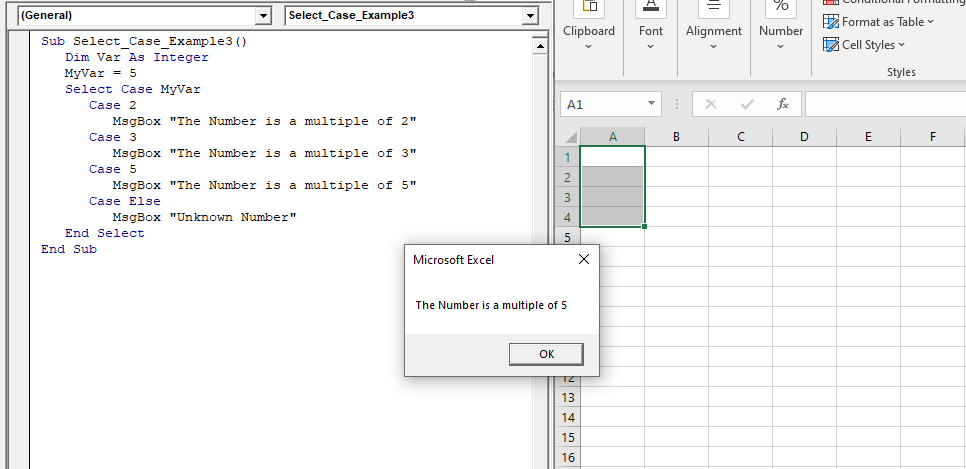
Select … Case Statement

Related Topics

Excel VBA InStrRev Function

VBA InStrRev Function: The InStrRev function in Excel VBA returns an integer representing the position of a substring within the specified string if the substring is fount else it returns...

2 minutes read.

Excel VBA CDbl Function

VBA CDbl Function: The CDbl function in VBA converts an expression into a Double data type. Syntax CDbl (Expression) Parameter Expression (required) - This parameter represents the expression that that you want to convert to...

1 minute read.

Excel VBA IsError Function

VBA IsError Function: The IsError function in VBA returns a Boolean value showing whether the specified Expression represents an error or not. Syntax IsError (Expression) Parameter Expression (required)- This parameter represents the variant that you...

1 minute read.

Excel VBA : With End-with Constructs

With End-with Constructs The With-End With construct enables the user to perform multiple operations on a single object. If you are going to perform several different actions on the same object and typing the same...

4 minutes read.

Excel VBA FormatDateTime Function

VBA FormatDateTime Function: The FormatDateTime function in VBA returns the result as a string after applying a date and/or time format to the supplied expression. Syntax FormatDateTime (Expression, [NamedFormat]) Parameter Expression (specified) – This parameter...

2 minutes read.

Excel VBA CByte Function

VBA CByte Function: The CByte function in VBA converts an expression into a Byte data type. Syntax CByte (Expression) Parameter Expression (required) - This parameter represents the expression that that you want to convert to...

1 minute read.

Excel VBA ABS Function

VBA ABS Function: The ABS function in VBA returns the absolute value of the specified number. Syntax Abs (Number) Parameter Number (required) – This parameter represents the number that you want the absolute value of. Return This...

1 minute read.

Excel VBA Time Function

Excel VBA Time Function: The Time function in VBA returns the current time. Syntax Time () Parameter NA Return This function returns the current time.  Example 1 Sub TimeFunction_Example1() ' returns the current time Dim time_val...

1 minute read.

Excel VBA Minute Function

The Minute function in VBA returns the minute component for the specified time. Syntax Minute (Time) Parameter Time (required) – This parameter represents the time. Return This function returns the minute component for the specified time. Example 1 Sub MinteFunction_Example1() ...

1 minute read.

Debugging in Excel VBA

Debugging in VBA: Debugging is a technique used to fix errors in programming languages. In Excel VBA, we have different ways by which you can identify the error in the...

2 minutes read.

Excel VBA Format Function

VBA Format Function The format function in VBA applies a specified format to an expression and returns the result as a string. Syntax Format (Expression, [Format], [FirstDayOfWeek] , [FirstWeekOfYear] ) Parameter Expression (required)- This parameter represents the expression that you want to format. Format...

3 minutes read.

Excel VBA Functions

What is a function? A function is also called a procedure, but it is not a sub procedure, it’s a function procedure. You have already been using some function in Excel,...

7 minutes read.

VBA Cell

What is VBA cell? Cells is one of the elements (workbook, worksheet, range) in Excel VBA, which refers to cells of the Excel worksheet.  In VBA, the cell is also a property...

5 minutes read.

Excel VBA CLng Function

VBA CLng Function: The CLng function in VBA converts an expression into a Long data type. It returns a long value ranging between -2,147,483,648 and 2,147,483,647. Syntax CLng (Expression) Parameter Expression (required) – This...

1 minute read.

Excel VBA IsDate Function

VBA IsDate Function: The IsDate function in VBA returns a Boolean value indicating whether the given expression is interpreted as a VBA Date or not. Syntax IsDate (Expression) Parameter Expression (required) – This parameter...

1 minute read.

Excel VBA DateSerial Function

The DateSerial function in VBA returns a Date from a supplied year, month, and day number. Syntax DateSerial (Year, Month, Day) Parameter Year (required) – This parameter represents an integer signifying the year. Month (required) – This parameter...

2 minutes read.

Steps to Create a Pivot Table

Steps to Create a Pivot Table: Pivot Tables can be easily automated through VBA coding. To create a Pivot Table in VBA, follow the below step by step procedure to...

4 minutes read.

Excel VBA LTrim Function

VBA LTrim Function: The LTrim function in VBA removes the leading spaces from a supplied text string. Syntax LTrim (String) Parameter String (required) - This parameter represents he text string that you want to remove...

1 minute read.

Excel VBA InStr Function

VBA InStr Function The InStr function in VBA searches for a substring inside the given string. It returns the position of a substring within a string, as an integer if the substring is found...

1 minute read.

VBA Global Variable

What is Global Variable? The Global Variables in VBA refers to the variables declared before the start of any macro. They are defined outside the functions and are used by all the functions or...

6 minutes read.