
×

Excel VBA StrConv Function

The StrConv function in VBA converts a string into a specified format.

Syntax

StrConv (String, Conversion, [LocaleID])

Parameter

String (required) – This parameter represents the string to be converted.

Conversion (required) – This parameter specifies the type of conversion.

It can have any of the following values:

  • vbUpperCase
  • vbLowerCase
  • vbProperCase
  • vbWide
  • vbNarrow
  • vbKatakana
  • vbHiragana
  • vbUnicode
  • vbFromUnicode

LocaleID (optional) – This parameter specified the LocaleID. It uses the system LocaleID as the default value.

Return

This function returns a string after converting it to a specified format.

Example 1

Sub StrConv_Example1()
 'Converting the String "Hello VBA" to upper case with StrConv function.
 Dim str As String
 Dim text As String
 text = "Hello VBA"
 str = StrConv(text, vbUpperCase) 
 'Converting the String "Hello VBA" to upper case with StrConv function.
 Dim str As String
 Dim text As String
 text = "Hello VBA"
 str = StrConv(text, vbUpperCase)
 ' The variable will return "HELLO VBA".
 Cells(1, 1).Value = str
 End Sub 

Output

HELLO VBA
VBA StrConv Function

Example 2

Sub StrConv_Example1()
 'Coverting the String "Hello VBA" to lower case with StrConv function.
 Dim str As String
 Dim text As String
 text = "Hello VBA"
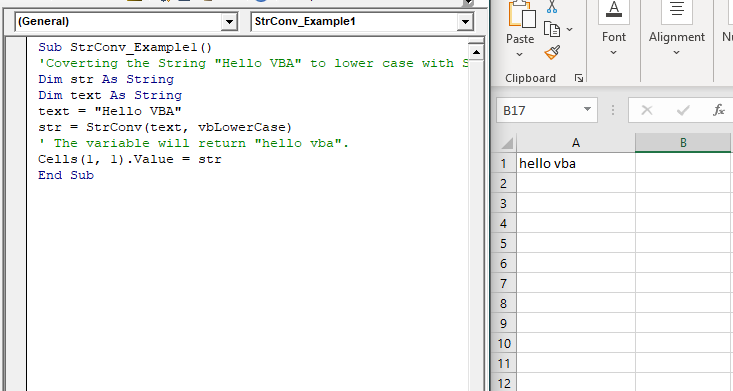
 str = StrConv(text, vbLowerCase)
 ' The variable will return "hello vba". 
 Cells(1, 1).Value = str
 End Sub 

Output

Hello vba
VBA StrConv Function2

Example 3

Sub StrConv_Example1()
 'Coverting the String "Hello VBA" to proper case with StrConv function.
 Dim str As String
 Dim text As String
 text = "Hello VBA"
 str = StrConv(text, vbProperCase)
 ' The variable will return "Hello Vba".
 Cells(1, 1).Value = str
 End Sub 

Output

Hello Vba
VBA StrConv Function3

Related Topics

Excel VBA For Each Loop

A For Each loop executes a statement or a group of statements for each element in an array or collection. It repeats the statement/condition/code for each element in a collection. For Each Loops loop through every...

4 minutes read.

Excel VBA DateValue Function

The DateValue function in VBA returns a VBA Date from the given String representation of a date wherein the time information is ignored. It is unable to interpret dates that include the...

1 minute read.

Excel VBA CLng Function

VBA CLng Function: The CLng function in VBA converts an expression into a Long data type. It returns a long value ranging between -2,147,483,648 and 2,147,483,647. Syntax CLng (Expression) Parameter Expression (required) – This...

1 minute read.

Excel VBA While wend Loop

WHILE wend loop is used when the user is not sure how many times they want to execute the VBA code within the program. With a WHILE loop, the loop body may...

3 minutes read.

Excel VBA Left Function

VBA Left Function: The Left function in VBA returns a substring from the start of the specified string. Syntax Left (Str, Length) Parameter Str (required) – This parameter represents the string that you want to extract...

1 minute read.

Excel VBA Mid Function

VBA Mid Function: The Mid function in VBA returns a substring from within a supplied string. Syntax Mid (Str, Start, [Length]) Parameter Str (required) -This parameter represents a string from which you want to extract the substring. Start...

1 minute read.

Excel VBA Oct Function

VBA Oct Function: The Oct function in VBA converts the given number into octal notation and returns the result as a string. Syntax Oct (Number) Parameter Number (required) – This parameter represents the numeric value...

1 minute read.

Finding Last Row or Column in Excel VBA

Finding Last Row or Column in VBA Finding the last used row, column, or cell is one very commonly used task when we write macros and VBA applications.  Like other codes...

5 minutes read.

Declaring a Variable in VBA

Declaring a Variable A variable is broadly described as a storage location combined with a name and representing a specific value. Declaring a variable is instructing the computer to reserve space...

2 minutes read.

Excel VBA Split Function

Excel VBA Split Function: The Split function in VBA is used to split a string into several substrings and return a one-dimensional array of substrings. Syntax Split (Expression, [Delimiter], [Limit], [Compare]) Parameter Expression (required) – This parameter...

2 minutes read.

Excel VBA IsMissing Function

VBA IsMissing Function: The IsMissing function in VBA checks if any parameter to a procedure is missing or not. It returns a Boolean value True if the specified parameter has not been...

1 minute read.

Excel VBA Timer Function

Excel VBA Timer Function: The Timer function in VBA returns a Single data type, evaluating the number of seconds that have elapsed since midnight of the current day. Syntax Timer () Parameter NA Return This...

1 minute read.

VBA Global Variable

What is Global Variable? The Global Variables in VBA refers to the variables declared before the start of any macro. They are defined outside the functions and are used by all the functions or...

6 minutes read.

Excel VBA Time Function

Excel VBA Time Function: The Time function in VBA returns the current time. Syntax Time () Parameter NA Return This function returns the current time.  Example 1 Sub TimeFunction_Example1() ' returns the current time Dim time_val...

1 minute read.

Excel VBA Space Function

VBA Space Function: The Space function in VBA creates a String consisting of a specified number of spaces. Syntax Space (Number) Parameter Number (required) - This parameter represents the number of spaces. Return This function returns a...

1 minute read.

VBA TimeSerial Function

The TimeSerial function in VBA returns a Time for the specified hour, minute, and second. Syntax TimeSerial (Hour, Minute, Second) Parameter Hour (required) – This parameter represents an integer (0 to 23), signifying the hour of the time. Minute...

2 minutes read.

Excel VBA String Function

The String function in VBA creates a String, consisting of several repeated characters. Syntax String (Number, Character) Parameter Number (required) – This parameter represents the number of characters in the returned String. Character (required) – This parameter...

1 minute read.

Basics of Userform

A User Form is a built-in customized dialog box that fetches data from the user through a user-friendly dialog box or window that makes up part of an application's user interface. It...

9 minutes read.

If ElseIf ElseIf Statement or Nested If statement in VBA

VBA Excel: If … ElseIf … ElseIf Statement or Nested If statement This function enables you to check multiple conditions and, based on that, then run one of the statement blocks present. If...

2 minutes read.

VBA Cell

What is VBA cell? Cells is one of the elements (workbook, worksheet, range) in Excel VBA, which refers to cells of the Excel worksheet.  In VBA, the cell is also a property...

5 minutes read.