
×

VBA Pivot Table Grouping

VBA- Pivot Table Grouping

For an instance, if in our pivot table, we have 11 different age groups from 20 to 30 -  but there might be a possibility that we had 30 different age groups say from 20 to 50 – this will effectively increase the size of the pivot table and will make it difficult for us to make any inference from the data. Pivot Tables have a very helpful feature known as Grouping, where buckets can be created, and data can be shown for those buckets rather than each age/item.

The grouping method is used for numeric values and dates.

  1. Grouping Date Values by Group Method
  2. Grouping Date values By Weeks/ Months/ Year
  3. Grouping numeric Items by Group Method

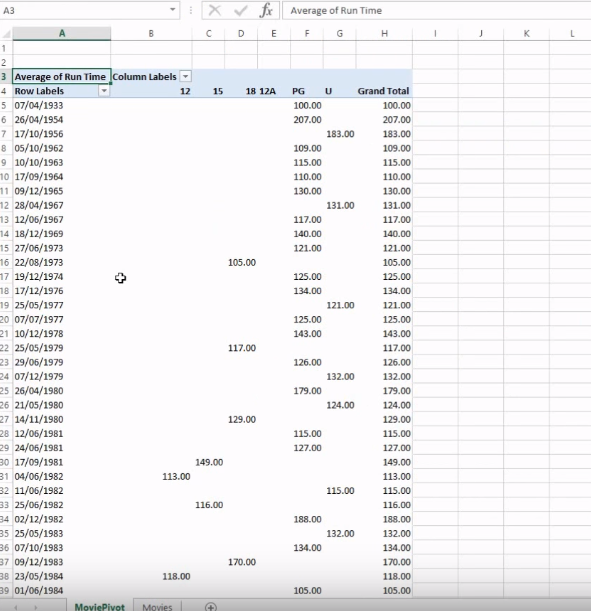
In the below excel sheet, we can observe that the date values in the first column. We can modify the date values by grouping them together based on the year. Individual dates are making the sheet size bigger thus, decreasing the readability and increasing the time.
VBA Pivot Table Grouping

The only solution to the above problem is grouping. If we group the dates based on its year, the sheet will become shorter. So, you can do this manually by right-clicking on the date cell and choosing a group. You will get a dialog box provided with a range of different options to group your data. So, it allows you to select a start date and an end date and then an increment of time or multiple increments.

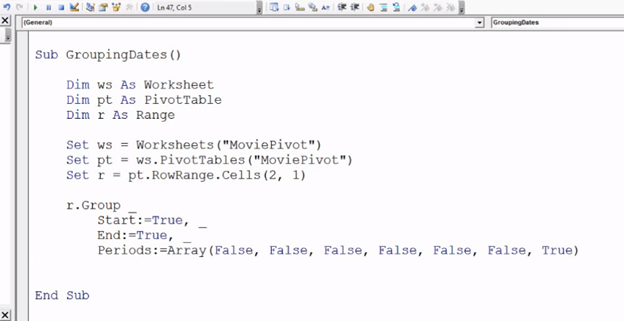
We can achieve the same result through VBA as well by writing a few lines of code.

Program:

Sub PivotTable_Grouping()
Dim r As Range
Dim ws As Worksheet
Dim PT As PivotTable
'setting the worksheet
Set ws = Worksheets("Pivot")
Set PT = ws.PivotTables("Pivot")
'set range of dates to be grouped
Set r = PT.RowRange.Cells(2, 1)
r.Group _
    Start:=True, End:=True, _
    Periods:=Array(False, False, False, False, False, False)
End Sub
VBA Pivot Table Grouping

Explanation: Firstly, we will create a worksheet, and we will refer to the worksheet to the Excel sheet. Then we will declare our Pivot table and refer it as well wit the worksheet. We will give set a reference to the date value by Range variable and will refer it to a Row range for Cells (2,1). It will select the complete row range values. Now, the task left is to group as per year. So we will fill the values including start as True, End as True and in Periods (we can group by different units and increments of time) we will pass an array of seven Boolean values (True/False) that indicate whether or not I’m grouping by that particular increment of time. The last array refers to Years so we will set six FALSE followed by a True.

Output:

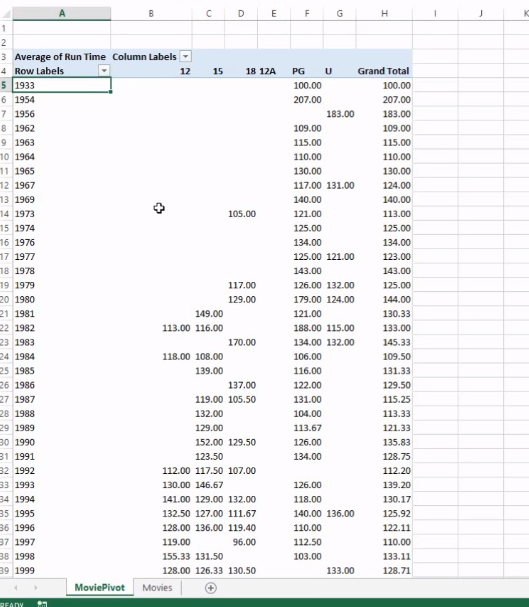
In the below sheet, you will find the dates have been grouped by year and it has become much shorter.
VBA Pivot Table Grouping

Related Topics

Excel VBA FormatDateTime Function

VBA FormatDateTime Function: The FormatDateTime function in VBA returns the result as a string after applying a date and/or time format to the supplied expression. Syntax FormatDateTime (Expression, [NamedFormat]) Parameter Expression (specified) – This parameter...

2 minutes read.

Excel VBA Rnd Function

VBA Rnd Function: The Rnd function in VBA returns a random number that is greater than or equal to (>=) 0 and is less than (<) 1. Syntax Rnd ([Number]) Parameter Number (optional) –This...

1 minute read.

Excel VBA INT Function

VBA INT Function: The INT function in VBA rounds the given supplied number down and returns an integer value. The positive numbers are rounded to zero, and the negative numbers are rounded away from zero. Syntax Int...

1 minute read.

Excel VBA- Pivot Table Fields

VBA- Pivot Table Fields: The Pivot Fields collection contains all the fields from the data source, including any calculated fields. The main aspect of adding a field is its Position...

4 minutes read.

Excel VBA CByte Function

VBA CByte Function: The CByte function in VBA converts an expression into a Byte data type. Syntax CByte (Expression) Parameter Expression (required) - This parameter represents the expression that that you want to convert to...

1 minute read.

Excel VBA InStrRev Function

VBA InStrRev Function: The InStrRev function in Excel VBA returns an integer representing the position of a substring within the specified string if the substring is fount else it returns...

2 minutes read.

Excel VBA Array

Introduction to VBA Array An array is a type of variable that holds more than one piece of data. In VBA, you can refer to a specific variable (element) of an array by using...

5 minutes read.

Excel VBA Atn Function

VBA Atn Function: The Atn function in VBA returns the arctangent between quadrant -?/2 and +?/2 for the specified number, in radians. Syntax Atn (Number) Parameter Number (required) – This parameter represents the number that...

1 minute read.

Excel VBA UCase Function

The UCase function in VBA converts a String into upper case text. Syntax UCase (String) Parameter String (required) – This parameter represents the string that you want to convert to upper case. Return This function returns a string...

1 minute read.

If ElseIf ElseIf Statement or Nested If statement in VBA

VBA Excel: If … ElseIf … ElseIf Statement or Nested If statement This function enables you to check multiple conditions and, based on that, then run one of the statement blocks present. If...

2 minutes read.

Looping in VBA

Looping in VBA There are many situations where a programmer needs to execute a block of the repetitive code number of times. Writing the same statement will make the program tedious and monotonous....

3 minutes read.

Excel VBA Join Function

Excel VBA Join Function: The Join function in VBA is used to join an array of substrings and return them all as a single string. Syntax Join (SourceArray, [Delimiter]) Parameter SourceArray (required) – This parameter...

1 minute read.

Excel VBA StrComp Function

VBA StrComp Function: The StrComp function in VBA compares two strings and returns an integer value displaying the result of the comparison. Syntax StrComp (String1, String2, [Compare]) Parameter String1 (required)- This parameter represents the first string to...

2 minutes read.

VBA Find Function

VBA Find Function The Excel VBA FIND function finds any information in your Excel. It can be used on a Range object on the worksheet. It works the same, unlike the Excel Find &...

6 minutes read.

Excel VBA Hour Function

The hour function in VBA returns the hour element for the specified time. Syntax Hour (Time) Parameter Time (required) – This parameter represents the time. Return This function returns the hour element for the specified time. Example 1 Sub HourFunction_Example1() ...

1 minute read.

VBA Dim

What is Dim? DIM or Dimension or Declare in Memory is a keyword that is used in VBA to declare a variable with the different data types (Integer, String, variable, Boolean, Double, etc.)...

7 minutes read.

Steps to Create a Chart in VBA

Steps to Create a Chart Charts are created either by directly working with the chart variable object that defines the chart data or by ChartObject method. In order to get to...

3 minutes read.

VBA runtime error 1004

What is 1004 error?  VBA 1004 Error, also known as object-defined or application-defined, is a runtime error in VBA, usually, if the specified range does not exist in the worksheet or if the Application...

6 minutes read.

VBA Object Required

What is Object Required Error? VBA Object Required is a run time error which occurs when the user does not define a valid object qualifier, or the assigned object doesn’t exist in the...

6 minutes read.

UserForm and its Properties Excel VBA

UserForm and its Properties Userform has certain properties that can be viewed as category wise (based on appearance, behavior, font) or in an alphabetic manner. The property window is used to set or...

11 minutes read.