
×

Excel VBA InputBox

Input Box

The InputBox function in VBA is used to prompt the users to enter values. The user can click either the OK button or can choose the CANCEL button. If the user clicks the OK button (After entering the values) or presses ENTER on the keyboard, this function will return the specific text in the text box. Else, if the user presses the Cancel button or the box is empty, by default, the InputBox function will return an empty string ("").

Syntax

InputBox(prompt[,title] [,default] [,xpos] [,ypos] [,helpfile,context])

Parameter

  • Prompt (required) – This parameter represents a string value shown as a message in the dialog box. The maximum number of characters that can be entered is approximately 1024. If the specified message is more than a line, then the lines can be separated using a carriage return character (Chr(13)) or a linefeed character (Chr(10)) between each line.
  • Title (optional) – This parameter represents a String expression shown in the title bar of the dialog box. If you don’t specify anything, by default it will show the name of the application.
  • Default (optional) – It represents a default text that the user would like to be displayed.
  • XPos (optional) – This parameter represents the position of the X-axis (the distance from the left side of the screen horizontally). If XPos is not specified, by default, the input box is horizontally centered.
  • YPos (optional) – This parameter represents the position of the Y-axis (the distance from the left side of the screen vertically). If YPos is not specified, by default, the input box is vertically centered.
  • Helpfile (optional) – This parameter represents a string expression that identifies the helpfile to provide context-sensitive Help for the dialog box.
  • Context (optional) - This parameter represents a numeric expression that defines the Help context number assigned by the Help author to the appropriate Help topic. If the context is specified, helpfile should also be specified.

Example 1

Sub InputBox_Exercise()
 'prompt a box so the users can enter values
 IB = InputBox("Enter your name here!", "Identity", "John Smith")
 'printing the value at Range A1
 Range("A1") = IB
 End Sub 

Output

Press F5 to run the VBA code.
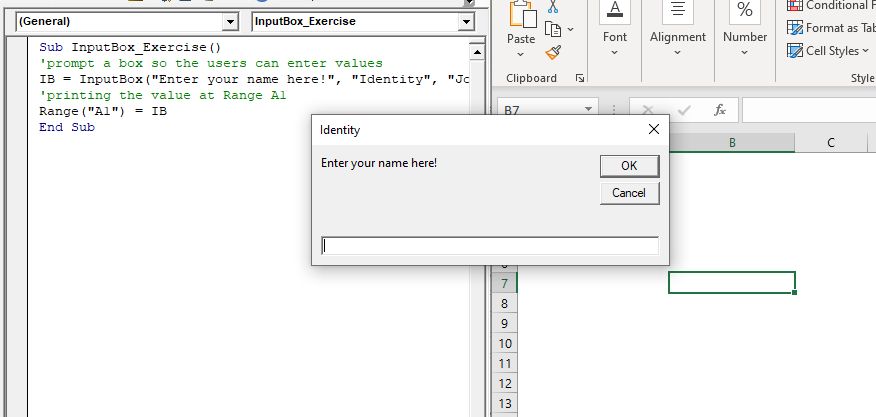
Press F5 to run the VBA code

Type the text in the prompt box and click on ok.
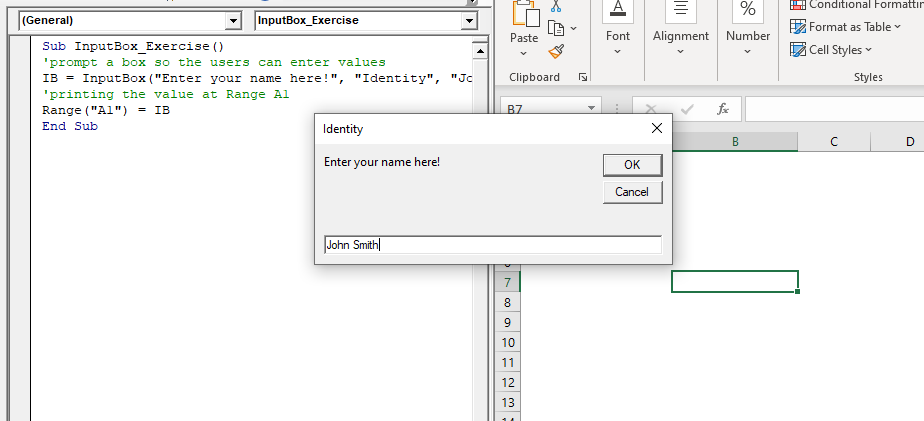
Type the text in the prompt box

You will notice, the name has been displayed in the excel sheet at A1 cell.
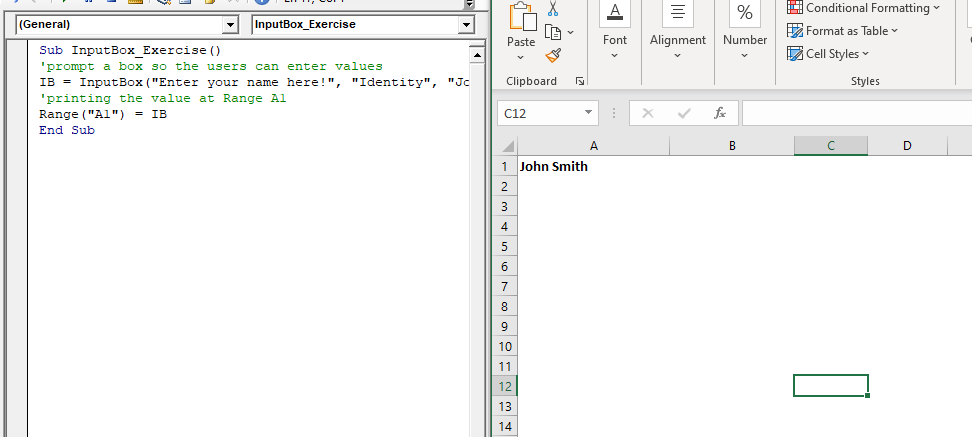
name has been displayed in the excel sheet at A1 cell

Example 2: Write a macro demonstrating the use of Inputbox and MessageBox collectively.

Sub Session_Msgbox_InputBox()
 Dim CR As Byte
 CR = ActiveCell.Row
 col = 2
 'taking the name from the user
 IB = InputBox("Enter your name here!", "Identity", "John Smith")
 'passing the name in the msgbox and asking the user 
 'whether he wants to add 100 or not
 Add_Sales = MsgBox("Hello " + IB + "! Do you want to add 100 to the current sales?", vbYesNo)
     'if user press No, then we will terminate the program
     If Range("A" & CR).Value = Empty Then Exit Sub
     'if user press yes then we will add 100
     If Add_Sales = vbYes Then
         Set rng = Range("D2:D12") 
         For Each cell In rng
             Range("E" & col) = cell.Value + 100
             col = col + 1
             'MsgBox "100 has been added to the current row's sales amount"
         Next
     End If
 End Sub 

Output

Press F5 to run the output. The InputBox will pop up as shown below.
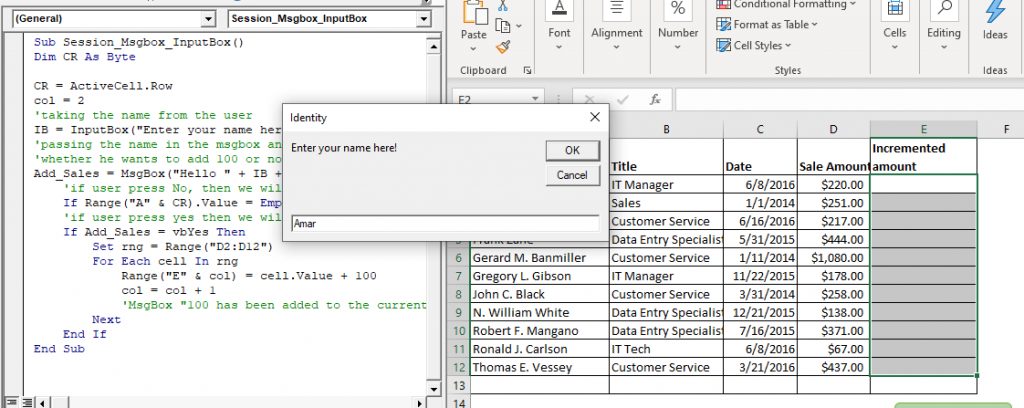
InputBox will pop up as shown

Type your name and click on ok. The MsgBox will pop up as shown below.
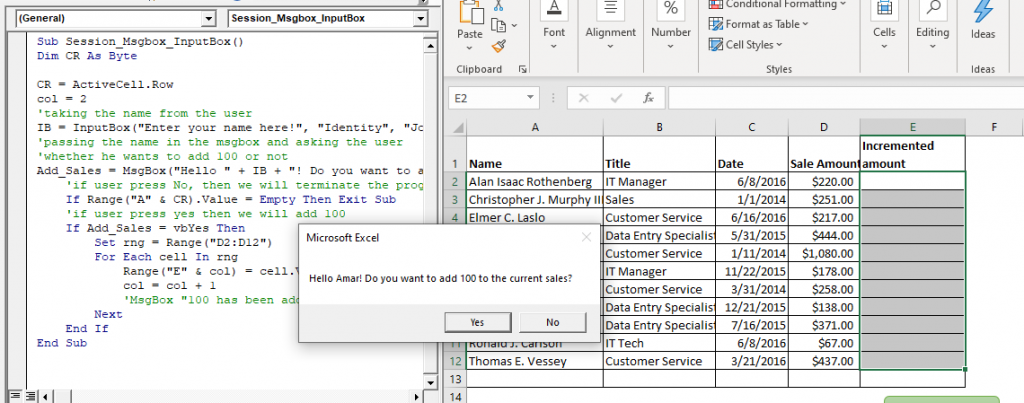
values have been displayed in the excel sheet

Click on yes. You will notice, the values have been displayed in the excel sheet.
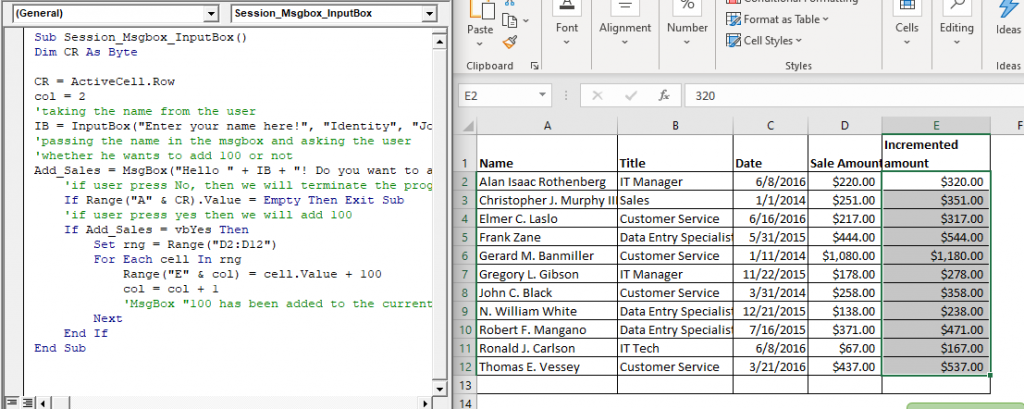
values have been displayed in the excel sheet


Related Topics

Excel VBA: IF THEN Statement

VBA Excel: IF THEN StatementThis conditional statement enables you to check one condition and on the basis of that then run one or multiple statements if the condition holds. If...

1 minute read.

Excel VBA Join Function

Excel VBA Join Function: The Join function in VBA is used to join an array of substrings and return them all as a single string. Syntax Join (SourceArray, [Delimiter]) Parameter SourceArray (required) – This parameter...

1 minute read.

Excel VBA Space Function

VBA Space Function: The Space function in VBA creates a String consisting of a specified number of spaces. Syntax Space (Number) Parameter Number (required) - This parameter represents the number of spaces. Return This function returns a...

1 minute read.

Excel VBA CVar Function

VBA CVar Function: The CVar function in VBA converts an expression into a Variant data type. Syntax CVar (Expression) Parameter Expression (required) – This parameter represents the expression that that you want to convert...

1 minute read.

VBA Color Index Property

What is Color Index Property? The Excel VBA Color Index is used to change the color for the cell or range of cells or text (located under the Font section). It sets the color...

5 minutes read.

Declaring a Variable in VBA

Declaring a Variable A variable is broadly described as a storage location combined with a name and representing a specific value. Declaring a variable is instructing the computer to reserve space...

2 minutes read.

Userform Events

What are Events? Anything you do in to trigger an excel file is an event (an action). Example: If you want a greeting message ‘Good Day’ whenever an excel file is...

7 minutes read.

Excel VBA DateDiff Function

The DateDiff function in VBA returns a Long data value representing the number of intervals between two specified dates/times where the type of interval is supplied by the user. Syntax DateDiff (Interval, Date1, Date2, [FirstDayOfWeek], [FirstWeekOfYear]) Parameter Interval (required)...

2 minutes read.

VBA Global Variable

What is Global Variable? The Global Variables in VBA refers to the variables declared before the start of any macro. They are defined outside the functions and are used by all the functions or...

6 minutes read.

Excel VBA: Select … Case Statement

Select … Case Statement When a group of statements is executed, depending upon the value of an Expression, then Switch Case is used.  If you have several conditions to check, then the If condition...

4 minutes read.

Excel VBA CVErr Function

VBA CVErr Function: The CVErr function in VBA returns an Error data type, involving with a user-specified error code. Syntax CVErr (Expression) Parameter Expression (required)- This parameter represents the required error code. Return This function returns an...

1 minute read.

Excel VBA FormatCurrency Function

VBA FormatCurrency Function: The FormatCurrency function in VBA is used to apply a currency format to a numeric expression and returns the result as a string. Syntax FormatCurrency (Expression, [NumDigitsAfterDecimal], [IncludeLeadingDigit], [UseParensForNegativeNumbers], [GroupDigits]) Parameter Expression (required)...

2 minutes read.

Excel VBA Right Function

VBA Right Function: The Right function in VBA returns a substring from the end of the given string. Syntax Right (Str, Length) Parameter Str (required) – This parameter represents the string from which you want to...

1 minute read.

VBA Pivot Table Grouping

VBA- Pivot Table Grouping For an instance, if in our pivot table, we have 11 different age groups from 20 to 30 -  but there might be a possibility that we...

2 minutes read.

VBA Regex Pattern Validation

VBA Regex Pattern Validation The key purpose of using Regex in VBA was to validate the data and extract the same category of data. There are certain formats that are standard...

6 minutes read.

Excel VBA Str Function

VBA Str Function: The Str function in VBA converts the given number into a string representation of that number. Syntax Str (Number) Parameter Number (required) – This parameter represents the numeric value that you want...

1 minute read.

Excel VBA CByte Function

VBA CByte Function: The CByte function in VBA converts an expression into a Byte data type. Syntax CByte (Expression) Parameter Expression (required) - This parameter represents the expression that that you want to convert to...

1 minute read.

Excel VBA Asc Function

VBA Asc Function: The Asc function in VBA returns an integer showing the character code for the first character of a given string. Syntax Asc (String) Parameter String (required) – This parameter represents the text...

1 minute read.

Excel VBA StrReverse Function

The StrReverse function returns a String after reversing the given String. Syntax StrReverse (Expression) Parameter Expression (required) – This parameter represents the String that you want to reverse. Return This function returns a String after reversing the given String. Example...

1 minute read.

Miscellaneous Exercise of conditional statements and Loop

We have the already worked with syntax and examples of conditional statements and loops in the previous tutorials. In this tutorial, we will learn how to work with both together.  We will explain...

3 minutes read.