
C++ Try-Catch
Every useful program will eventually encounter unexpected outcomes. By entering data that are incorrect, users might create mistakes. Sometimes the program's creator didn't consider all of the options or was unaware of forthcoming developments in the libraries.
C++ provides a try-catch construct that is designed to handle unexpected errors like these, regardless of the reason. Let's start with exceptions to learn how try-catch works in C++.
Exceptions in C++:
When executing the C++ code, various different problems may occur like programming errors or the errors because of incorrect input or many more other kinds of errors.
C++ will basically stand still and will show an error message when any kind of error will occur. C++ will produce an exception, which is the technical phrase for throwing an error.
In C++, what is Exception Handling?
In C++, Exception handling allows you to deal with unexpected events such as runtime failures. As a result, if an unexpected event happens, control of the program is passed to special functions known as handlers.
You put a piece of code underneath exception inspection to catch the exceptions. The code is contained inside the try-catch block.
An exception will be triggered if an unusual scenario happens inside that portion of code. The program will then be taken over by the exception handler.
If no unexpected circumstances arise, the code will run normally. The handlers will indeed be forgotten about.
Applying exception handlers into your application has no performance impact; if no exceptions are triggered, the handlers will never be called. Leaving exception handlers out of your code makes it more vulnerable.
Exception handling is one notable distinction between the C and C++ programming languages, despite their numerous similarities. In C, exception handlers and its ability to respond to them do not exist, therefore programmers are obliged to arrange exceptions out from their code instead of being capable of reacting to them as they occur.
Why do we use Exception Handling?
The following are some of the reasons why you should use Exception Handling in C++:
- You'll keep your error-handling code distinct from the rest of your code. It would further be feasible for user to read/maintain the programming code.
- Exceptions could be handled by the functions if they want. Even though a function throws a large number of exceptions, this will only handle a portion of them. Uncaught exceptions will be handled by the caller.
Keywords for Exception Handling:
The three keywords that govern exception handling in C++ are:
Throw- When a program runs into a difficulty, it will throw an exception. The throw keyword assists the program in throwing action.
Catch- An exception handler is used by a program to catch an exception. It's added to the area of a program where you'll be dealing with the issue. The catch keyword is used to do this.
Try- The try block indicates the piece of code for which exceptions will be raised. One or more catch blocks should be placed after it.
Assume a code block throws an exception. A method employing try and catch keywords will catch the exception. Code that may raise an exception should be included in a try/catch block. Protected code is the term for this type of code.
Syntax:
The syntax for try/catch is as follows:
try {
   // code(protected)
} catch( Exceptions_Name excptn1 ) {
   // catch-block
} catch( Exceptions_Name excptn2 ) {
   // catch-block
} catch( Exceptions_Name excptnN ) {
   // catch-block
}
We can have several catch statements even if we only have one try statement.
The identifier of an exception to be captured is Exceptions_Name.
The exceptions are referred to by the identifiers excptn1, excptn2 and excptnN, which you create.
Example A:
#include<iostream>
#include<vector>
using namespace std;


int main() {
	vector<int> vect;
	vect.push_back(0);
	vect.push_back(1);
	// accessing third element, which is non-existence
	try
	{
		vect.at(2);
	}
	catch (exception& exc)
	{
		cout << "Exception has occurred!" << endl;
	}
	return 0;
}
Output:
Exception has occurred!
Explanation:
We defined a vector named vect to store an integer value. Then added elements 0 and 1 to the vector vect. We used a try statement in order to catch an exception and the data inside the body will be protected. Then we tried accessing the element which was at index 2 but could not as there was no element existing at that index value. Then the catch keyword catches the exception and stores it in the variable exc and prints the required output.
Example B:
#include <iostream>
using namespace std;
double zeroDiv(int a, int b) {


	if (b == 0) {
		throw "The Division was done by Zero!";
	}
	return (a / b);
}


int main() {
	int i = 17;
	int j = 0;
	double k = 0;


	try {
		k = zeroDivision(i, j);
		cout << k << endl;
	}
	catch (const char* msg) {
		cerr << msg << endl;
	}
	return 0;
}
Output:
The Division was done by Zero!
Explanation:
We created a function zeroDiv which further will intake two integer values a and b and will return the double value in variable c. Then an if statement was defined to check if the b variable in 0 or not and if it is 0 then return a specific message. Then in the main() function we defined variables i, j and k and provided their values. The try keyword was used to catch an exception and the code inside that was protected. Then with the keyword catch, the exception will be caught and the error message will be stored in the newly created variable msg. After executing the code successfully, the output required will be displayed.
Inconsistency between the exception defined and the exception thrown:
- If a catch block defines a type of exception that differs from the kind of exception produced by the try block, the exception remains uncaught, and the catch block is skipped.
- The uncaught exception is then sent down the call stack to the following procedure. If the following function has a matching catch block, the exception is caught; otherwise, it is pushed down towards the next function.
- The cycle repeats till a thrown exception enters the main() function (where it all began). The call stack bursts and the application dies suddenly if there is no corresponding catch block inside the main() method.
Standard Exceptions in C++:
The <exception> class in C++ includes a collection of standard exceptions. The following are examples:
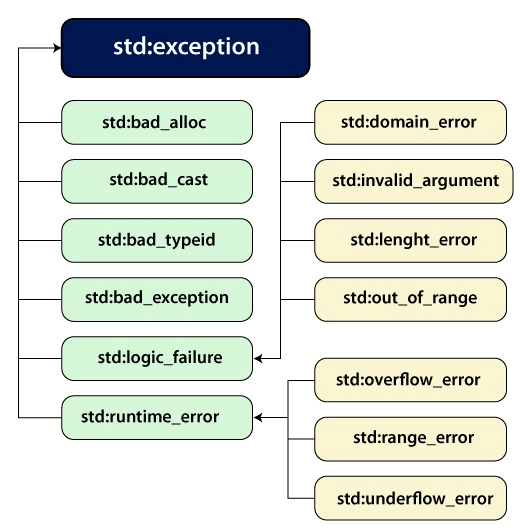
Fig. Standard Exceptions
std::exception
This is the parent class of all standardized C++ exceptions and is an exception.
std::bad_alloc
A new keyword throws this exception.
std::bad_cast
Dynamic cast throws an exception in this case.
std::bad_exception
In C++ applications, this is a helpful technique for managing unexpected exceptions.
std::bad_typeid
typeid throws an exception.
std::logic_error
Reading code should be able to identify this exception.
std::domain_error
This error will be shown when any kind of incorrect mathematical domain will be used.
std::invalid_argument
When incorrect parameters are used, an exception is raised.
std::length_error
After constructing a large std:string, an error was fired
std::out_of_range
Method has been thrown.
std::runtime_error
An exception that can't be found by looking at the code.
std::overflow_error
This error is issued when a mathematical overflow occurs.
std::range_error
When you try to save an out-of-range value, an exception is raised.
std::underflow_error
When there is a mathematical underflow, an exception is thrown.
User-Defined C++ Exceptions:
We may construct objects which can be thrown as exceptions using the C++ std::exception class. The <exception> header contains the definition of this class. The function what() is provided by the class and is a virtual member function.
This method returns a char * character sequence that is null-terminated. To get an exception description, we can rewrite it in derived classes.
Example:
#include <iostream>
#include <exception>
using namespace std;


class newExcptn : public excptn
{
	virtual const char* what() const throw()
	{
		return "newExcptn occurred";
	}
} newexc;


int main() {


	try {
		throw newexc;
		}
	catch (exception& exc) {
		cout << exc.what() << '\n';
	}
	return 0;
}
Output:
newExcptn occurred
Explanation:
We created a new class newExcptn which inherits the C++ exception class. What() virtual member function which was defined in the header file of exception, will be overwritten by our new exception. The newexc is the variable used to catch the new exception and once it is caught the newExcptn will get executed. Then in the main() function, the try keyword will be used to try and catch the exception and the code written inside that will be protected. If the exception will be caught then the newexc will be thrown using the keyword throw. The catch keyword will be used to catch the exception and that caught exception’s error message will be stored in the exc variable and the error message will be printed as output.
Conclusion:
- You can manage runtime faults via exception handling in C++.
- Exception handling allows you to deal with any unforeseen situations that arise in your software.
- When an unexpected event happens, control of the program is passed to handlers.
- A chunk of code is placed underneath the try-catch block to capture an exception.
- The throw keyword allows the program to throw exceptions, which helps it deal with the situation.
- The try keyword is mainly used to specify the piece of code in which the exceptions will be raised.
- To specify our exceptions, we may replace the what() method in the exception header file.