
Functions in C++ with Types and Examples
A function is a collection of statements that work together to complete a certain goal. It could consist of statements that execute repetitive operations or statements that conduct specialized jobs such as printing, scanning, etc. One application of functions is to optimize the code by splitting it down into smaller components called "functions."
Another benefit of utilizing functions is that we don't have to write the same program over and over. We just need to write a function once and then call it as needed, rather than writing the same set of lines over and over again.
Types of Functions in C++
As illustrated below, there are two types of functions in C++.
- Built-in Functions
- User-defined Functions
Built-in Functions
Library functions are another name for built-in functions. These are all functions given by C++, and we do not need to write them ourselves. These routines can be used directly in our code. These functions are included in the C++ header files. For example, "<cmath>" and "<string>" are the header files with built-in math and string functions, respectively.
Example
Let's look at an example of how to use built-in functions in the C++ programming language.
#include <iostream>
#include <string>


using namespace std;


int main(){
	string str_name1;
cout << "Enter the input string:";
getline	 (std::cin, str_name1);
cout << "String Recorded is: " << str_name1 << "!\n";
int size_str_name1 = str_name1.size();
cout<<"Size of the given string is : "<<size_str_name1<<endl;
}
Output:
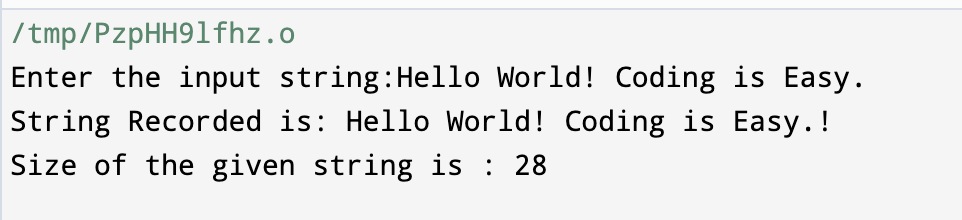
The headers "<iostream>" and "<string>" are used here. The "<iostream>" library defines the data formats and various input and output functions. String functions such as getline and size are included in the "<string>" header.
User-Defined Functions
C++ users can also develop their own functions. These are also called "custom functions." We can define functions at any point in the code and then invoke them from anywhere in the code. Functions are similar to variables in that they must be defined prior to use.
Syntax:
Syntax for User-Defined Functions in the C++ programming language.
return_type  funct_name(para_1, para_2, para_3,…. para_n){
	/* Statement-1 */
	Funct_Body;
	/* Statement-2 */
}
As seen above, each and every function has:
- return_type: It is a value that a function uses to return to its calling function upon completing a task.
- funct_name: It is an identifier that is used to define a function.
- List of parameters in the function: In the above syntax, this is denoted by para_1, para_2,... para_n. When a function is called, then these arguments are supplied back to it. The argument list is optional, which means that we can have functions with no parameters also.
- Funct_Body: It is a collection of statements that perform a given activity.
Declaration of Function
A function declaration informs its compiler about the function's return type, number of parameters, and data types. The declaration, which includes the names of the function's arguments, is optional. A function prototype is another name for a function declaration.
Some Examples on the Declaration of Functions:
int subtract(float, float);
The preceding declaration is for the function "subtract," which accepts two float inputs and returns an int value.
int swap(float, float);
This indicates that the swap() function takes only two float parameters and returns int value, therefore the return type is integer (int).
void funct_display();
The function funct_display() does not accept any parameters and returns no type.
A function definition includes everything that the function declaration does, as well as the content of the function surrounded in braces {}. Furthermore, it should contain named parameters. When the function is invoked or called, program control is passed to the function definition, allowing the function code to be executed. When the function's execution is complete, control returns to the place where it was invoked.
Syntax and Declaration:
The definition of the swap function declaration is as follows:
void swap(float x, float y){
	y = x + y;
	x = y – x;
	y = y – x;
}
It's worth noting that a function's declaration and definition can coexist. There is no need to make a separate declaration if we declare a function before invoking it.
Example
Let's look at some detailed code to see how a function works.
#include <iostream>
using namespace std;
void swap(float x, float y)
{	/* Here x and y are known as formal parameters */
   	y = x + y;
   	x = y - x;
   	y = y - x;
cout<<"\nAfter swapping: ";
cout<<"x = "<<x;
cout<<"\ty = "<<y;
return;
}
int main()
{
float x,y;
cout<<"Enter the two numbers to be swapped: "; cin>>x>>y;


cout<<"x = "<<x;
cout<<"\ty = "<<y;
swap(x,y);           /* Here x and y are known as actual parameters */
}
Output:
Calling a Function in the C++ programming language:
Whenever we have a function in our code, we must either call it or invoke it, based on the requirements. When the function is either invoked or called, it will execute a set of statements to produce the desired outcomes.
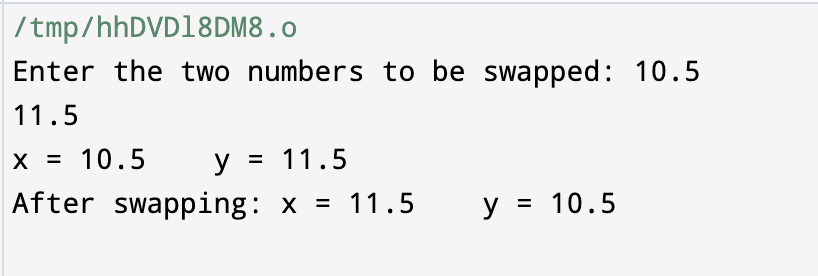
The function is accessible from any point in the program. If the program uses more than one function, it can be invoked either from the main() function itself or from any other function available. The "calling function" is a function that calls any other function in the program. The swap() function is invoked in the main() function in the preceding example of number switching. As a result, the main() function is now called the "calling function."
Actual and Formal Parameters in the C++ Programming Language:
These function parameters are specified in the definition of the function as a list of parameters after the function name. When we call the function, we must supply the actual (real) values of these arguments so that the function can complete its assigned task.
"Formal parameters" are the parameters that are specified in the function definition itself.
"Actual (or real) parameters" are the parameters that are inside the function call; they are known as actual values.
We have provided comments for both formal and actual (real) parameters in the preceding example of number swapping.
The values of two integers are read and provided to the swap() function inside the calling function, which is the main() function. These are the "actual arguments."
The meanings of these arguments can be found in the first section of the function declaration. These are called "formal constraints." It should be noted that the formal and actual (real) arguments should be of the same kind. The formal and real parameters should be in the same sequence.
Return Statement in the C++ programming language:
When the function has completed its duty, it has to return the outcome to the caller function. We'll need the function's return type for this. The function can only return a specific value to the function that called it. The function's return type is stated in the functional prototype.
Example
Let us consider an example of a demonstration of return statements on the addition of two numbers.
#include <iostream>
using namespace std;
int add(int x, int y){
return (x+y);
}
int main(){
int x, y, res;
cout<<"Enter the values of two numbers which has to be added:"; cin>>a>>b;
res = sum(x,y);
cout<<"\nAddition of the two numbers is : "<<res;
}
Output:

The function add() in the above instance takes two integer inputs and returns an int data type. We read two int numbers from the input terminal and pass them to the add() function in the main() function. Because the return type is an integer, we have a "res" variable on the left hand side (LHS) and a function call on the right hand side (RHS).
This demonstrates how the function's return value is being used.
Void Functions in the C++ programming language:
We have noticed that the basic syntax of a function involves the definition of a return type. But if we have a function that doesn't return any results, how should we define the return type? The solution is that we use the unusable type "void" to specify that the function returns no value.
Syntax and demonstration
In this instance, the function is known as a "void function," and its prototype is as follows:
void funct_name(para_1, para_2,….para_3);
For clarity, it is recommended to insert the word "return" at the conclusion of the void function.
Passing arguments to functions in the C++ programming language
We know that the formal parameters accept actual (real) parameters that convey values to a function. This is known as "parameter passing."
There are several ways to pass arguments in the C++ programming language. They are:
- Pass by Value
- Pass by Reference
- Pass by Pointer
1) Pass by Value
In the last program to swap two numbers, we saw that we simply read two integers, "x" and "y," in the main() function and passed them to the swap() function. This is known as the "value pass approach." The "pass by value" approach of parameter passing techniques transfers copies of actual parameter values to formal parameters. As a result, the actual (real) and formal parameters are kept in separate memory locations. As a result, modifications implemented to formal arguments within the function have no effect outside the function.
Example
Let's take a look at the following example, which demonstrates the "pass by value" approach:
#include <iostream>
using namespace std;
void Swap(int x, int y) { //here x and y are formal parameters
                y = x + y;
                x = y - x;
                y = y - x;
cout<<"\nAfter Swapping the numbers in the Swap() function:\n ";
cout<<"x = "<<x;
cout<<"\ty = "<<y;
return;
}
int main(){
int x,y;
cout<<"Enter the values of two numbers which has to be swapped: "; cin>>x>>y;
cout<<"x = "<<x;
cout<<"\ty = "<<y;
swap(x,y);
cout<<"\nAfter Swapping the numbers in the main() function:\n ";
cout<<"x = "<<x;
cout<<"\ty = "<<y;
  }
Output:
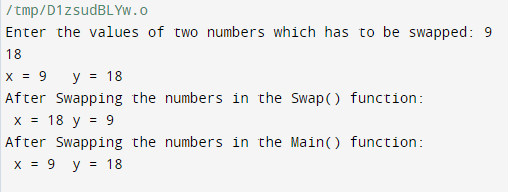
We simply adjusted the previous code to display the formal and actual argument values before the function call and after the function call.
As can be seen from the above output console, we initially pass numbers x = 9 and y = 18. These are called "actual parameters." Then, after swapping within the swap() method, we notice that the numbers are swapped, with x = 18 and y = 9.
However, following the Swap() function, the values of x and y in the main() function remain 9 and 18, respectively. This is due to the actual parameters, which are being supplied to the function, which contains a copy of the variable data. As a result, even though the formal arguments were swapped in the Swap() function, they were not returned.
However, the "pass by value" approach is the most basic and extensively used, but we can only use it in circumstances when we do not need the function to change the variable value when invoking it due to the limitations listed above.
2) Pass by Reference
Another approach used in the C++ programming language to send arguments to functions is "pass by reference." Instead of sending copies of actual arguments, we pass references to actual (real) arguments with this approach.
In the above context, references are nothing more than variable aliases, or another name assigned to a variable. As a result, variables and their references have the same memory location.
We employ these actual parameter references in the "pass by reference" approach, and as a consequence, changes made to these formal arguments in the function block are returned back to the calling function.
Example
Let's take a look at the following example, which demonstrates the "pass by reference" approach:
#include <iostream>
#include <string>
using namespace std;
 void Swap(int &x, int &y){
int tempo = x;
x = y;
y = tempo;
 }
 int main(){
int x,y;
cout<<" Enter the values of two numbers which has to be swapped: "; cin>>x>>y;
 	cout<<"x = "<<x;
cout<<"\ty = "<<y;
swap(x,y);
cout<<"\n After Swapping the numbers in the main() function:\n ";
   	cout<<"x = "<<x;
   	cout<<"\ty = "<<y;
 }
Output:
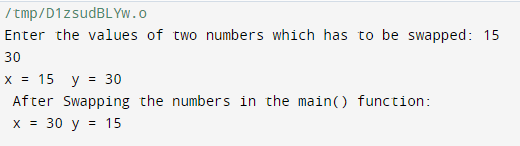
The given example uses the "pass by reference" approach. We can see that the actual (real) parameters are passed exactly as they are. However, we add an "&" character before the formal parameters to indicate that we are utilizing a reference for this specific parameter.
As a result, changes that are made to the formal parameters in the Swap() function are reflected in the main function, and then swapped values are obtained.
3) Pass by Pointer
We can also send parameters to functions in the C++ programming language by utilizing pointer variables. This "pass by pointer" approach yields the same effects as the "pass by reference" approach.
This indicates that both the formal and actual arguments have the same memory locations, and changes made to one function are replicated in the calling function.
The only difference is that in a "pass by reference" approach, we deal with parameters that are references or aliases, but in a "pass by pointer" approach, we utilize pointer variables to pass these parameters.
Pointer variables are different from references in that they point to a specific variable, and, unlike references, we may be able to change the variable to which they point.
Example
Let's take a look at the following example, which demonstrates the "pass by pointer" approach:
#include <iostream>
#include <string>
using namespace std;
void Swap(int *x, int *y){
 	int tempo = *x;
   	*x = *y;
   	*y = tempo;
}
int main(){
   	int x,y;
   	cout<<" Enter the values of two numbers which has to be swapped: "; cin>>x>>y;
   	cout<<"x = "<<x;
   	cout<<"\ty = "<<y;
   	swap(x,y);
   	cout<<"\n After Swapping the numbers in the main() function:\n ";
   	cout<<"x = "<<x;
   	cout<<"\ty = "<<y;
}
Output:
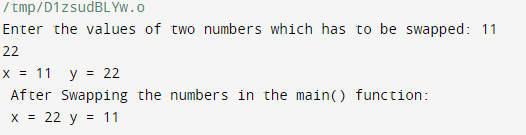
As a result, as previously stated, there is no change in the program's output. The only variation is in how the arguments are passed. We can see that the formal arguments are the pointer variables in this case.