
×

C++ program to read string using cin.getline()

C++ program to read string using cin.getline()

C++ getline() is a standard library feature for reading a string or a line from an input source. A getline() function gets characters from the input stream and adds them to the given string object until it determines that the character is delimiting. If any, the value stored in string object str shall be replaced with the current string when doing so. The function getline() can be reproduced in two ways:

  • Syntax:
istream& getline (istream& is, string& str, char delim);

Parameters:

Delim: This is the delimitation character that tells the function to stop reading further input after the character is reached.

Str: It is a string object, and the input is stored within this object after reading from the stream.

Is: It is an istream class object, and tells the stream function from where to read the input.

Return Value: This function returns the same input stream as the parameter which is accepted.

  • Syntax:
istream& getline (istream& is, string& str);

The second statement is closely parallel to that of the first. The only difference is that this latter doesn't recognize any delimitation character.

Parameters:

Is: is an istream type object and informs the stream function where the data should be read from.

Str: It is a string entity, and after reading from the source, the input is stored within that object.

Return Value: This function will return a certain input stream as the parameter which is accepted.

Name, address, about a person and print in different lines will be read in this program, the name will contain spaces and dots, the address will contain space, commas, and other special characters, as well as mixed characters, will be included in this program. Using the cin.getline() function, we can read all data, and print using cout.

cin.getline() example in C++

/*C++ program to read string using cin.getline().*/
#include  <iostream>
using namespace std;
//macro definitions for maximum length of variables
#define MAX_NAME_LENGTH     100
#define MAX_ADDRESS_LENGTH  200
#define MAX_ABOUT_LENGTH    400
using namespace std;
int main()
{
    char name[MAX_NAME_LENGTH],address[MAX_ADDRESS_LENGTH],about[MAX_ABOUT_LENGTH];
    cout << "Enter Your name: ";
    cin.getline(name,MAX_NAME_LENGTH);
    cout << "Enter Your address: ";
    cin.getline(address,MAX_ADDRESS_LENGTH);
    cout << "Enter about yourself (press # to complete): ";
    cin.getline(about,MAX_ABOUT_LENGTH,'#');    //# is a delimiter
    cout << "\nEntered details are:";
    cout << "Name: "  << name << endl;
    cout << "Address: " << address << endl;
    cout << "About: " << about << endl;
    return 0;
}

Output:
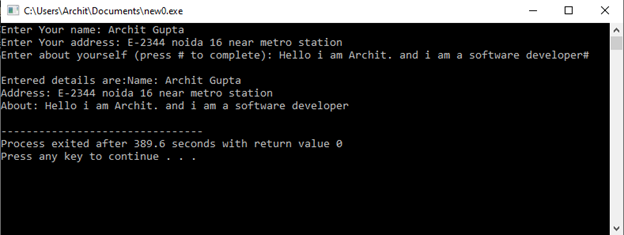
C++ program to read string using cin.getline()

Example 2: We can use the function getline() to split a sentence according to a character. Let's look at an example to see how that can be done.

// C++ program to understand the use of getline() function
#include <bits/stdc++.h>
using namespace std;
int main()
{
    string P, K;
    getline(cin, P);
    stringstream N(P);
    while (getline(N, K, ' ')) {
        cout << K << endl;
    }
    return 0;
}

Output:
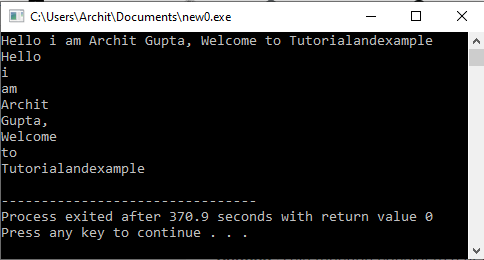
C++ program to read string using cin.getline()

Caution: This function considers a new line or ('\n') character to be valid input for this function as the delimitation character and new line character.

Example2:

// C++ program to demonstrate
// anomaly of delimitation of
// getline() function
#include <iostream>
#include <string>
using namespace std;
int main()
{
    string name;
    int id;
    // Taking id as input
    cout << "Enter your id: \n";
    cin >> id;
    // Takes the empty character as input
    cout << "Enter your name: \n";
    getline(cin, name);
    // Prints id
    cout << "Enter Your id : " << id << "\n";
    // Prints nothing in name field
    // as "\n" is considered a valid string
    cout << "Hi, " << name
         << " welcome to Tutorialandexample !\n";
    // Again Taking string as input
    getline(cin, name);
    cout << "Hi " << name
         << " welcome to Tutorialandexample !\n";
    return 0;
}

Output:
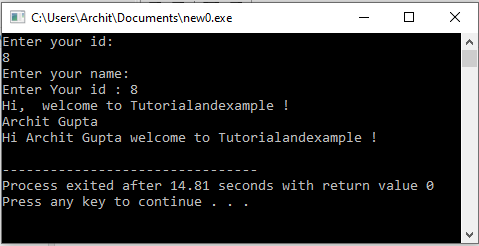
C++ program to read string using cin.getline()

Related Topics

Similarities between C++ and Java

People who are preparing for software engineering roles must have come across either one of these languages because as all the companies do not accept python for hiring a fresher...

3 minutes read.

Print Table Using While Loop in C++

Multiplication Table In mathematics, a table is created by multiplying a certain number by all of the counting numbers, i.e., 1, 2, 3, 4, 5, 6, and so on. It is...

4 minutes read.

Print Table Using Do while Loop in C++

Multiplication Table In mathematics, a table is created by multiplying a certain number by all of the counting numbers, i.e., 1, 2, 3, 4, 5, 6, and so on. It is...

4 minutes read.

Constexpr in C++

Constexpr is a keyword in C++ that is used to declare variables or functions as compile-time constants. This means that the value of a constexpr variable or the return value...

3 minutes read.

gmtime() function in C/C++

C++ language is used to make high-performance applications that can work efficiently. It is one of the world's most popular languages. It is an object-oriented and high-level programming language, which...

4 minutes read.

How to Sort an Array in C++

What is Sorting? Sorting is a process of arranging elements in sequential order, either numerically or alphabetically. The sorting of a numerical array can be accomplished using a variety of algorithms,...

4 minutes read.

Differences Between C Structures and C++ Structures

The below table clearly describes the differences between C and C++ programming languages Structures concepts where the core principle concepts like static members, data handling, pointers, access modifiers, the importance...

3 minutes read.

Inheritance in C++ vs Java

Just like we inherit traits from our parents, object-oriented programming has a concept called inheritance. In terms of object-oriented programming, a class's traits and behaviours, or its data and methods,...

4 minutes read.

C++ Continue

In C++, the continue statement is a useful tool for avoiding specific scenarios without breaking the loop. It is employed inside loops to move directly to the following iteration and...

4 minutes read.

Structure Sorting (By Multiple Rules) in C++

To understand the concept of Structure Sorting (By Multiple Rules) in C++, it is recommended to know the Structures concept in the C++ programming language. Here the scenario is pretty...

3 minutes read.

Multiple Inheritance

C++ Multiple Inheritance Multiple inheritance is such an inheritance in which a derived class inherits properties of more than one base class.     C++ Multiple Inheritance Example In this example, two base classes Square and...

2 minutes read.

C++ | C Plus Plus While loop

In this article, we will discuss the C++ while loop with its syntax, use, key features, key points, pseudo code, and examples. What is the While Loop? The “while loop” is a...

4 minutes read.

Maps in C++

Maps: Maps in C++ are the containers associated with key and mapped values. By keys and mapped values, we mean that the maps are used to store elements formed by the...

4 minutes read.

How to enter a name in C++

A name is a string or array of characters or letters. The string is one of the most helpful data types offered by the C++ library. A string helps the...

4 minutes read.

C++ Program to move all zeros to the end of the array

Write a program to move all the zeros in the arr[] to the end. The order of the non-zero elements should not be altered and all the zeros should be...

3 minutes read.

Nullptr in C++

What is Nullptr in C++? A null pointer value is represented by the term nullptr. Use a null pointer value to indicate that a native pointer type, inner pointer, or object...

3 minutes read.

Use of Inheritance in C++

What is inheritance in c++? Inheritance is fundamental in object-oriented programming (OOP) languages like C++. It allows a programmer to create a new class (called a derived class) that inherits the...

4 minutes read.

Type conversion in C++

Type conversion is the process of changing the type of variables in a program. The ultimate goal of type conversions is to allow variables of a single data type operate with...

7 minutes read.

Tensorflow in C++

With cppflow, you can execute TensorFlow models in C++ without Bazel, TensorFlow installation, or TensorFlow compilation. Tensor manipulation, eager execution, and running stored models straight from C++ are all possible. Knowing...

7 minutes read.

How to declare a 2D array dynamically in C++

In this article, we will learn how to declare the dynamic array in C++. We also learn the initialization of a 2D array using a pointer in C++. Here, we...

3 minutes read.