
C++ storage classes
Storage Classes are used to characterize a variable's or function's characteristics. These characteristics include scope, visibility, and life-time, which allow us to track the presence of a variable over the course of a program's execution. The following syntax is used to indicate the storage class for a variable:
Syntax:
storage_class-name variable_data_type variable_name;
C++ has five different storage classes:
- Auto
- Register
- Extern
- Static
- Mutable
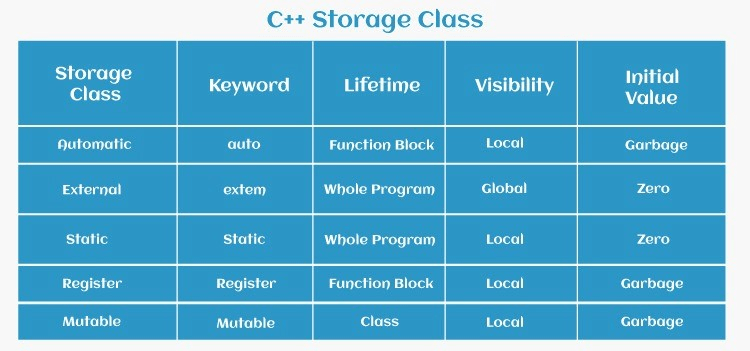
Auto Storage Class:
The auto keyword allows for type inference, which allows for the automated determination of the data type of an expression in a programming language. This saves time by eliminating the need to type down information that the compiler already has. Because all types are inferred in the compiler phase alone, the compilation time increases somewhat but has no effect on the program's execution time. This functionality also applies to non-type template arguments and functions. Since C++14, the return type of a function may be derived from its return statements. Since C++17, the type of non-type template parameters is derived from the argument.
Example-
{
   int date;
   auto int date;
}
In the example above, two variables ie. date with the same storage class are defined; nevertheless, auto may only be used within functions, i.e., local variables.
Register Storage Class:
Local variables that should be saved in a register rather than RAM are defined using the register storage class. This indicates that the variable's maximum size is equal to the register size (typically one word) and that it cannot be used with the unary '&' operator (as it does not have a memory location).
Example –
{
   register int distance;
}
Here in this example, we have used keyword register to save the int variable date in it.
We use the register only for variables that require immediate access, such as counters. It's also worth noting that just because 'register' is defined doesn't ensure the variable will be put in a register. It signifies that, depending on hardware and implementation constraints, it MIGHT be saved in a register.
Static Storage Class:
The static storage class tells the compiler to keep a local variable alive for the duration of the programme, rather than creating and deleting it every time it enters and exits scope. As a result, making local variables static ensures that their values are preserved across function calls.
The static modifier may be used on global variables as well. When you do this, the scope of that variable is limited to the file in which it is defined.
When the static keyword is used to a class data member in C++, only one copy of that member is shared by all objects in that class.
Example –
#include <iostream>
using namespace std;
// Function having static variables
int staticFunc()
{
	cout << "For static vars: ";
	static int counting = 0;
	counting++;
	return counting;
}


// Function having non-static variables
int nonStaticFunc()
{
	cout << "For Non-Static vars: ";


	int counting = 0;
	counting++;
	return counting;
}


int main()
{


	// Calling static parts
	cout << staticFunc() << "\n";
	cout << staticFunc() << "\n";
	;


	// Calling non-static parts


	cout << nonStaticFunc() << "\n";
	;
	cout << nonStaticFunc() << "\n";
	;
	return 0;
}
Output:
For static vars: 1
For static vars: 2
For non-static vars: 1
For non-static vars: 1
In this example, we created a function staticFunc() having static variables. In that we applied a loop to count the no. of times it’s executed. Then we did the same for the non-static variables using the function called nonStaticFunc(). Then we initialised the main code and called the staticFunc() to print its values first and then the nonStaticFunc(). Thus we got the required output.
Extern Storage Class:
It's used to refer to a global variable that's viewable across all programme files. When you use 'extern,' the variable cannot be initialised since all it does is refer the variable name to a previously determined storage address.
When you have many files and you specify a global variable or function that will be used in other files as well, you'll utilise extern to offer a reference to the specified variable or function in another file. Simply said, extern is used in another code to define a global variable or function.
When two or more files share the same global variables or functions, the extern modifier is most usually used, as detailed below.
Example -
#include <iostream>
using namespace std;


// declared variable that is to be made extern
//initial value initialized to z
int z;
void externClass()
{


	cout << "Showing extern class\n";


	// briefing compiler that var
	// z is extern var and has been
	// defined elsewhere
	extern int z;


	// printing 'z'
	cout << "The Value of var 'z'"
		<< "that is declared as extern: " << z << "\n";


	// value of extern var z modifying now
	x = 5;


	// printing modified values
	cout
		<< "Modified value of 'z'"
		<< " that is declared as extern: \n"
		<< z;
}


int main()
{
	externClass();


	return 0;
}
Output:
Showing extern class
The Value of var 'z' that is declared as extern: 0
Modified value of 'z' that is declared as extern: 5
In this example, we first declared a variable that is to be made external and initialized the int value to z. We created a function externClass() to show the external class present. Using extern keyword we briefed the compiler that the variable z is external variable and has been defined somewhere else and not in that class. First printed the value of external variable z and then modified its value and printed that. Finally executed the function in the int main and got the desired output.
Mutable Storage Class:
Only class objects are affected by the mutable specifier, which will be explored later in this article. It allows an object member to override the constant member function. That is, a constant member function can modify a mutable member.
#include <iostream>
using std::cout;


class Testing {
public:
int a;
mutable int b;
Test() { a = 4; b = 10; }
};
int main()
{
	const Testing t1;
	t1.b = 20;
	cout << t1.b;
	return 0;
}
Output:
20
In this Example, we created a class named Testing in public form and gave variables a and b and used b as mutable variable using keyword mutable. Then used the Testing class in main to generate the given value of mutable variable.