Array program in C++
What is an Array?
An array is a set of identically typed elements that are organized into contiguous memory locations and each element can be independently accessed using an index.
We can also say that “an array is a collection of similar types of data.” These similar data can be anything, for example, the Name of 10 players, the Percentage of 50 students, or the Salary of 100 colleagues.
It is a linear data structure that stores elements or data in the contiguous memory location.
Different types of Array programs in C++:
In this article, we are going to discuss programs on Array with different scenarios.
1. Program to take input from the user and store them in an Array:
Code:
#include <iostream>
using namespace std;


int main() {


  int num[6];
  int i,j;


  cout << "Enter your any desired 6 numbers: " << endl;


 // With this loop, we take the input from the user and store it in an array
  for ( i = 0; i < 6; i++) {
    cin >> num[i];
  }


  cout << "This is your desired numbers: ";


  //  With this loop, we print array elements
  for (j = 0; j < 6; j++) {
    cout << num[j] << "  ";
  }


  return 0;
}
Explanation:
- The #include directive instructs the preprocessor to include the contents of the iostream file in the program. It includes declarations for the identifier cout, cin, insertion operator (<<), and extraction operator (>>).
- The scope of the identifiers used in a program is defined by the namespace. We must include the using directive in order to use the identifiers defined in the namespace scope.
- In the main() function, we have declared an array “num," which has an "int" data type, and the size of the array is 6.
- We have declared two variables, "i" and "j," which have an "int" data type.
- Here, we used cout; cout is the object of an ostream class. The Iostream header file contains its definition. It serves as a means of displaying the output on the monitor, which is the usual output device.
- Inserting a new line character, we used endl Command.
- For taking the input from the user and storing it in every array index, we used "for loop".
- In this loop, we initialized “i" with 0, and we have the condition that “i" must be less than 6. When this condition is satisfied, we enter the loop body where we take the input from the user with the help of cin; cin is the object of an istream class that takes inputs from the user.
- This loop will break when the "i" variable reaches 6; then, we enter in the another "for loop" body.
- In this loop, we initialized "j" with 0. And we have a condition that "j" must be less than 6. When this condition is satisfied, we enter the loop body where we print the elements of array num[j] on the monitor with the help of the cout object.
- This loop ends when the "j" variable reaches to 6.
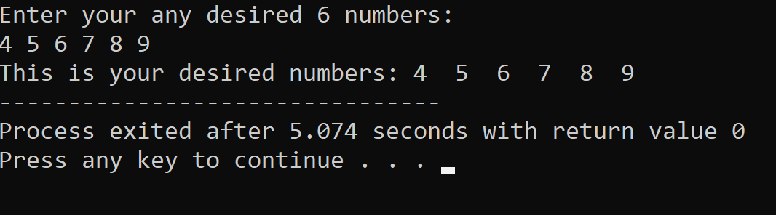
Program Output:
2. A Program to find the sum and average of Array elements using for loop:
Program:
#include <iostream>
using namespace std;

int main() {
    int i, j, num, avg[50];
    float average;
    int sum=0;
    cout << "Please enter the total number of elements:"<<endl;
    cin >> num;

    cout << "Please Enter " << num << " elements for array"<<endl;
    // with this loop, we take input from the user for all elements of an array
    for(j = 0; j < num; j++) {
        cin >> avg[i];
    }


    // with this loop, we add all the elements of the array
    for(i = 0; i < num; i++) {
        sum += avg[j];
    }
    cout<<"Sum of array elements = "<<sum<<endl;
    average = (float)sum / num;
    cout << "Average of array elements = " << average;

    return 0;
}
Explanation:
- The #include directive instructs the preprocessor to include the contents of the iostream file in the program. It includes declarations for the identifier cout, cin, insertion operator (<<), and extraction operator (>>).
- The scope of the identifiers used in a program is defined by the namespace. We must include the using directive in order to use the identifiers defined in the namespace scope.
- In the main() function, we have declared an array “avg," which has an "int" data type, and the size of the array is 50.
- We have declared five variables, "i”, “j”, "num", and "sum," which have an "int" data type, and one variable, "average," which has a "float" data type.
- We initialized “sum” with 0.
- Here, we use cout, cout is the object of an ostream class. The Iostream header file contains its definition. It serves as a means of displaying the output on the monitor, which is the usual output device.
- Inserting a new line character, we use here endl Command.
- Using cin, we gather input through the "num” variable from the user to determine the overall number of elements. cin is the object of an istream class that takes inputs from the user.
- Then we used “for loop” to take input for all array elements.
- In this loop, we initialized "i" with 0, and we have the condition that "i" must be less than the "num" variable, when this condition is satisfied, we enter in the body of the loop where we use cin object for taking the inputs from the user for all elements of array "avg[i]”.
- This loop breaks when the "i" variable equals to the "num” variable.
- Then we entered another "For loop", with this loop, we sum all the array elements.
- In this loop, we initialized "j" with 0, and we have a condition that "j" must be less than to the "num ” variable. When this condition is satisfied, we enter in the loop body where we have an action statement that sum = sum + avg[j].
- After the termination of this loop, "sum" will contain the sum of all array elements.
- To get the average, we divided the "sum" from the "num”.
- Then we get the result of sum and average of all elements of an array.
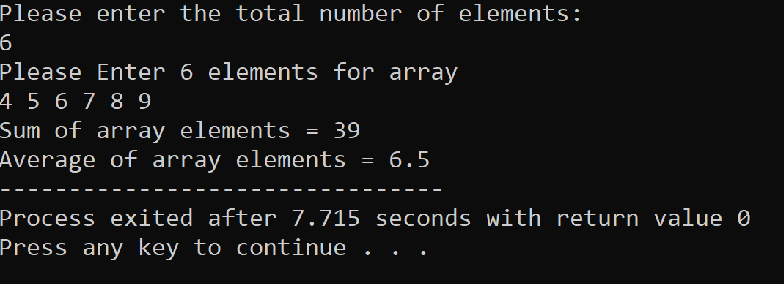
Program Output:
3. A Program to find and print the largest Element in an Array:
Program:
#include <iostream>
using namespace std;


int main() {


  int i,j, num;
  int large[100];


  cout << "Please enter the total number of elements: "<<endl;
  cin >> num;


 // with this loop, store the number in an array
  for(i = 0; i < num; i++) {
    cout << "Enter element " << i + 1 << " : ";
    cin >> large[i];
  }


  // with this loop, we find the largest number of array
  for(j = 1;j < num; j++) {


    if(large[0] < large[j])
      large[0] = large[j];
  }
  cout<< endl;
  cout  << "Largest element in array = " << large[0];


  return 0;
}
Explanation:
- In the main() function, we have declared an array "large," which has an "int" data type, and the size of the array is 100.
- We have declared three more variables, "i", "j," and "num," which have an "int" data type.
- Here, we used cout, cout is the object of an ostream class. The Iostream header file contains its definition. It serves as a means of displaying the output on the monitor, which is the usual output device.
- Inserting a new line character, we used endl Command.
- Using cin, we gathered input through the "num” variable from the user to determine the overall number of elements. cin is the object of an istream class that takes inputs from the user.
- To store the number in every element of the array, we used "for loop".
- In this loop, we initialized “i" with 0, and we have a condition that "i” must be less than to the “num" variable, when this condition is satisfied, we enter in the body of the loop where we have two statements.
- In the First statement, we used the cout object for displaying the “enter elements ” of the array.
- In the second statement, we took input from the user in the array large[i] with the help of the cin object.
- This loop breaks when the "i" variable is equal to the "num” variable.
- Then we enter in another "for loop", from this loop, we get to know the largest number in an array.
- In this loop, we initialized "j" with 0, and we have a condition that "j" must be less than to the "num" variable. When this condition is satisfied, we enter in the loop body where we have an "if condition" that the array large[0] is less than the array large[i].
- To find the largest element in an array, first of all, we checked the first two elements of the array, and the largest of these two elements would be stored in large[0].
- Then we checked the first and third elements of the array, and the largest of these two will store in large[0].
- The first and last elements are checked, and then the procedure repeats.
- The largest array element will now be in the large[0] position.
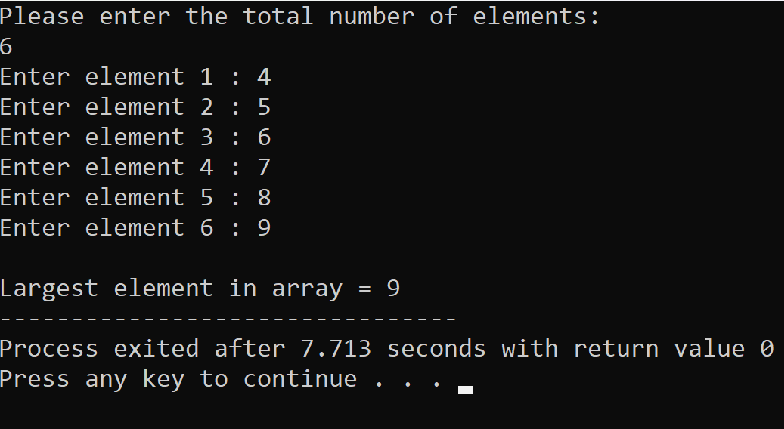
Program output:
- A Program to determine the grade of students based on their marks:
Program:
#include<iostream>
using namespace std;
int main()
{
  int pointer[5], i;
    float average;
    float sum=0;


        cout<<" Enter the subjects Marks of Student "<<endl;

        cout<<endl<<" Marks of Production Subject : ";
        cin>>pointer[0];
        cout<<endl<<" Marks of Marketing Subject : ";
        cin>>pointer[1];
        cout<<endl<<" Marks of Analyst Subject: ";
        cin>>pointer[2];
        cout<<endl<<" Marks of Programming Subject : ";
        cin>>pointer[3];
        cout<<endl<<" Marks of Data Mining Subject : ";
        cin>>pointer[4];


        // using for loop to add all the subject marks
         for(i=0;i<5;i++)
        {
                sum=sum+pointer[i];
        }
        cout<<endl;
        cout<<" Total Marks of Student = "<<sum<<endl;
        average=sum/5;
        cout<<" Average of the total marks is = "<<average<<endl;
        cout<<" Grade is  = ";


        if(average>80)
        {
                cout<<"A+";
        }
        else if(average>60 && average<=80)
        {
                cout<<"A";
        }
        else if(average>40 && average<=60)
        {
                cout<<"B";
        }
        else
        {
                cout<<"C";
        }
        return 0;
}
Explanation:
- In the main() function, we have declared an array "pointer," which has an "int" data type, and the size of the array is 5.
- We have declared three variables "i”, “average”, and “sum”.
- Variable “i” has the “int” data type, and variables "average" and "sum" have the "float” data type.
- We initialized “sum” with 0.
- Here, we used cout, cout is the object of an ostream class. The Iostream header file contains its definition. It serves as a means of displaying the output on the monitor, which is the usual output device.
- Inserting a new line character, we used endl Command.
- Using cin, we gathered input through the "pointer[]” array from the user to determine the subject marks of students. cin is the object of an istream class that takes inputs from the user.
- We used "for loop" for the addition of all subject marks, which are stored in the index of an array.
- In the loop, we initialized “i" with 0, and we have a condition that "i" must be less than 5. When this condition is satisfied, we enter in the body of the loop, where we do an arithmetic operation that is sum = sum+average[i].
- This loop breaks when the value of “i" equals 5. And we get the sum of all the subjects marks after the loop break.
- For average, we have to divide the "sum" by 5.
- For determining the grade, we used if-else ladder.
- If we get an average greater than 80, then our grade will be "A+".
- If we get an average between 60 to 80, then our grade will be "A".
- If we get an average between 40 to 60, then our grade will be "B".
- If we get an average of less than 40, then our grade will be "C".
Program Output:
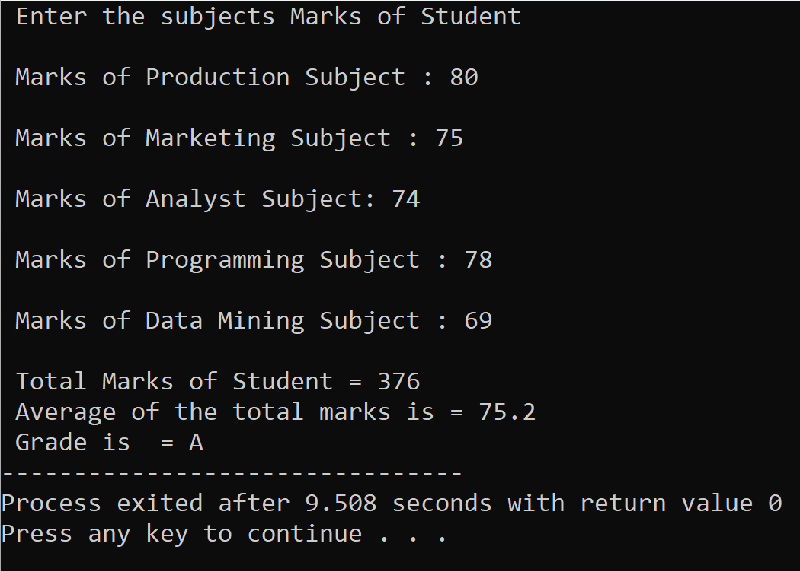
- A Program to print a two-dimensional array:
Program:
#include<iostream>
using namespace std;
int main()
{
        int arr[3][3];
        int row, column, i, j;
        cout<<endl<<" Enter the number of Rows for Array  : ";
        cin>>row;
        cout<<endl<<" Enter the number of Columns for Array  : ";
        cin>>column;
        cout<<endl<<" Enter "<<row<<"*"<<column<<" size of matrix : "<<endl;
        for(i=0; i<row; i++)
        {
                for(j=0; j<column; j++)
                {
                        cout<<" ";
                        cin>>arr[i][j];
                }
        }
        cout<<endl<<" Two Dimensional Array is : "<<endl;
        for(i=0; i<row; i++)
        {
                for(j=0; j<column; j++)
                {
                        cout<<" "<<arr[i][j]<<" ";
                }
                cout<<endl;
        }
        return 0;
}
Explanation:
- In the main() function, we have declared a two-dimensional array named “arr" that has 3 rows and 3 columns which makes a 3*3 matrix.
- We have four variables, "row", "column", "i", and "j," which have an int data type.
- With the help of the cout object, we will display a message on the screen that "enter the number of columns and rows".
- With the help of the cin object, we will take input from a user for the number of rows and columns.
- endl command is used for inserting a new line.
- First, we utilized the first-for loop to collect user input for the matrix's parts. Additionally, we used the cout object in the second for loop to display our matrix on the screen.
- In the first loop, we initialized “I” with 0, and we have a condition that "i” must be less than to the "row" when this condition is satisfied, then, we enter the body of this loop, where we have another for a loop.
- This loop is used for the exploration of each column of the matrix, for this we initialized "j" with 0, and we have a condition that "j" must be less than to the "column" when this condition is satisfied, we will enter in the body of this loop where we use cin object for taking the input of each element of the matrix.
- After storing the value of each element of the matrix in the array "arr[i][j]", we now have to display it on the screen, for this, we will again use for loop.
- In this for loop, we initialized “i" with 0, and we have a condition that “i" must be less than to "row" when this condition is satisfied, we will enter the body of this loop where we have another for a loop.
- This loop is used for the exploration of each column of the matrix, for this we initialize "j" with 0, and we have a condition that "j" must be less than to the "column" when this condition is satisfied, we will enter in the body of this loop where we use cout object for display each element of the matrix which is present in the array "arr[i][j]”.
Program Output:
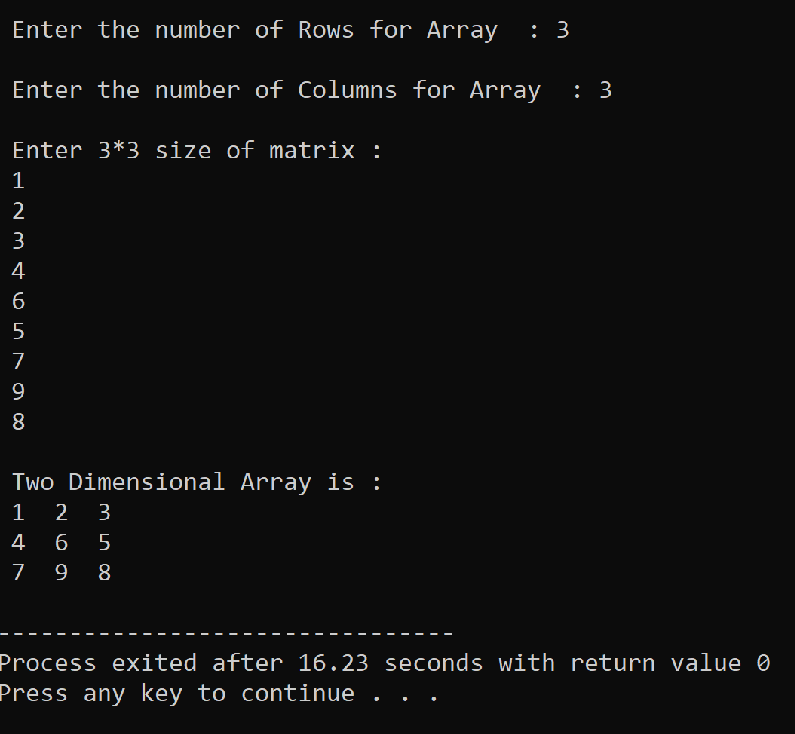
- A Program to print the addition of two matrices:
Program:
#include <iostream>
using namespace std;

int main(){

    int first[20][20], second[20][20], sum[20][20];
    int row, column, i, j;

    cout <<"Enter the number of Rows and Columns of Matrix"<<endl;
    cin >> row >> column;

    cout <<"Enter the element of first Matrix of size "<<row<<" X "<<column<<endl;

    //  Using this loop, we will take input for the first matrix
    for(i = 0; i < row; i++){
        for(j = 0; j < column; j++){
            cin >> first[i][j];
        }
    }
    // Using this loop, we will take input for the second matrix
    cout <<endl<<"Enter the element of second Matrix of size "<<row<<" X "<<column<<endl;
    for(i = 0; i < row; i++){
        for(j = 0; j < column; j++){
            cin >> second[i][j];
        }
    }
    // using this loop, we will add the first and second matrix
    for(i = 0; i < row; i++){
        for(j = 0; j < column; j++){
            sum[i][j] = first[i][j] + second[i][j];
        }
    }

    cout <<"Sum of first and second matrix: "<<endl;
    for(i = 0; i < row; i++){
        for(j = 0; j < column; j++){
            cout << sum[i][j] << " ";
        }
        cout << endl;
    }

    return 0;
}
Explanation:
- In the main() function, we have declared three Two dimensional arrays with the name "first", "second," and "sum," respectively, which has the size of 20 rows and 20 column means they have the capacity to make 20*20 size of the matrix.
- We have declared four variables, "row", "column", "i”, and “j” which have “int” data type.
- With the help of the cout object, we will display a message on the screen that "enter the number of rows and columns".
- With the help of the cin object, we will take input from the user for the number of rows and columns.
- endl command is used for inserting a new line.
- First, we will take the input from the user for the first matrix, for this, we use the outer for loop and inner for loop.
- The outer for loop will decide the matrix's rows, while the inner for loop will decide the matrix's column.
- In the outer for loop, we initialize “i" with 0, and we have a condition that “i" must be less than to the "row" when this condition is satisfied, then, we will enter the body of this loop where we have an inner for loop.
- In the inner for loop, we initialize “j" with 0. We have a condition that "j" must be less than to the "column" when this condition is satisfied, then we will enter in the body of this loop, where we will get input for the array "first[i][j]" from the user using the cin object.
- After that, we will enter in another for loop.
- Using this loop, we will take input for the Second matrix, for this, we use the outer for loop and inner for loop.
- In the outer for loop, we initialize “i" with 0, and we have a condition that “i" must be less than to the "row" when this condition is satisfied, then, we will enter the body of this loop where we have an inner for loop.
- In the inner for loop, we initialize "j" with 0. We have a condition that "j" must be less than to the "column" when this condition is satisfied, then we will enter in the body of this loop, where we will get input for the array "second[i][j]" from the user using the cin object.
- After that, we will use another for loop, by using this loop, we will add the first[i][j] array and second[i][j] array, and the result will be stored in the sum[i][j] array.
- For displaying the sum matrix, we will use one more for a loop.For this, we will use outer for loop and inner for loop.
- In the inner loop body, we have a cout object for displaying the elements of array sum[i][j].
Program Output:
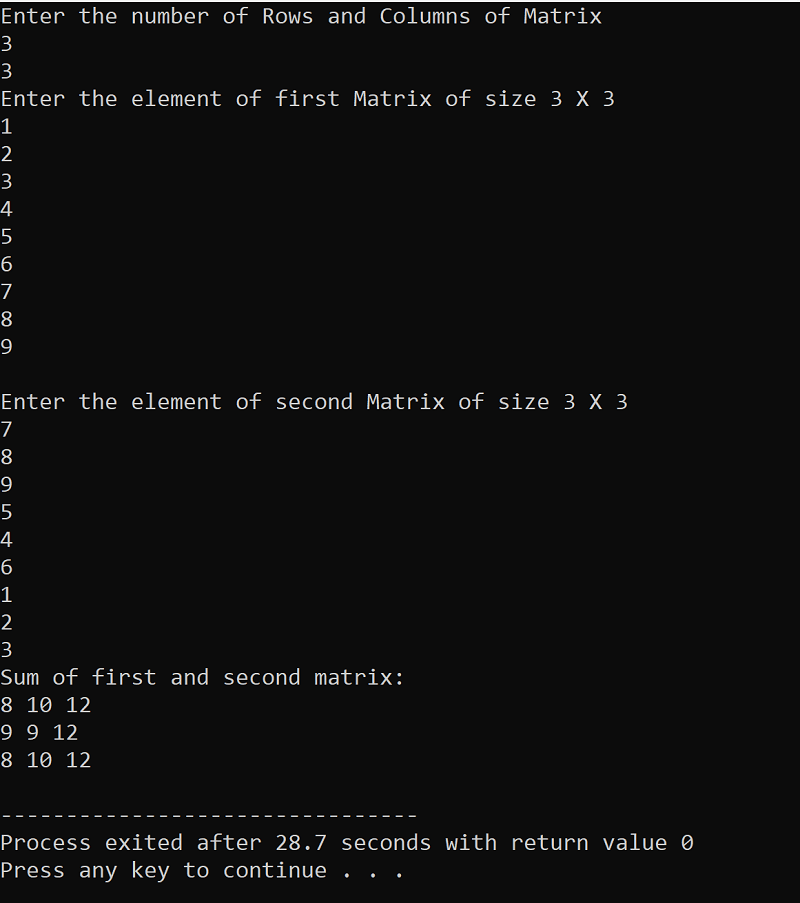
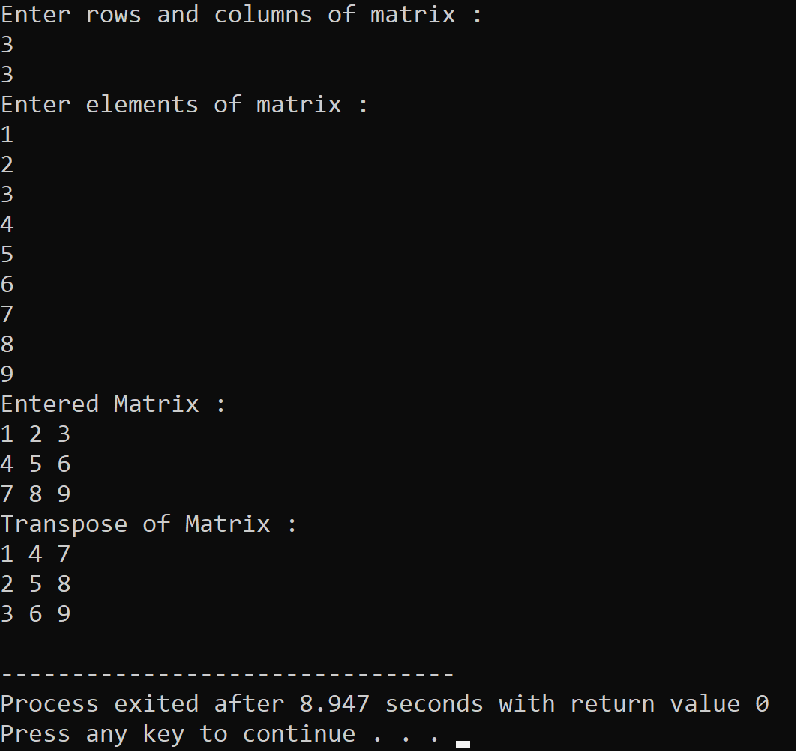
- Program to display to transpose of a matrix:
Program:
#include<iostream>
using namespace std;
int main ()
{
    int arr[10][10], row, column, i, j;
    cout << "Enter the number of  rows and columns of matrix : "<<endl;
    cin >> row >> column;

    cout << "Enter elements of matrix : ";
    for (i = 0; i < row; i++)
        for (j = 0; j < column; j++)
            cin >> arr[i][j];

    cout << "This is the Entered Matrix : "<<endl;
    for (i = 0; i < row; i++)
    {
        for (j = 0; j < column; j++)
            cout << arr[i][j] << " ";
        cout << endl;
    }
    cout << "Transpose of Matrix :  "<<endl;
    for (i = 0; i < column; i++)
    {
        for (j = 0; j < row; j++)
            cout << arr[j][i] << " ";
        cout << endl;
    }
    return 0;
}
Explanation:
- In the main() function, we have declared a two-dimensional array named “arr," which has 10 rows and 10 columns, and the data type of this array is “int”.
- We have declared four variables “row”, “column”, “i", and “j” which have data type “int”.
- With the help of the cout object, we will display a message on the screen that "enter the number of rows and columns".
- With the help of the cin object, we will take input from the user for the number of rows and columns.
- endl command is used for inserting a new line.
- First of all, we took input from the user for the elements of array “arr[i][j]”, for this, we used the outer for loop and inner for loop.
- In the outer for loop, we initialized “i" with 0, and we have a condition that “i" must be less than to the "row" when this condition is satisfied, then, we will enter the body of this loop where we have an inner for loop.
- In the inner for loop, we initialize "j" with 0. We have a condition that "j" must be less than to the "column" whend this condition is satisfied, then we will enter in the body of this loop, where we will get input for the array "arr[i][j]" from the user using the cin object.
- After storing the value of each element of the matrix in the array "arr[i][j]", we now have to display it on the screen, for this, we will again use for loop.
- In this for loop, we initialize “i" with 0, and we have a condition that "i" must be less than to "row" when this condition is satisfied, we will enter the body of this loop where we have another for loop.
- This loop is used for the exploration of each column of the matrix, for this we initialize "j" with 0, and we have a condition that "j" must be less than to the "column" when this condition is satisfied, we will enter in the body of this loop where we use cout object for display each element of the matrix which is present in the array "arr[i][j]”.
- After that, we transpose the matrix, for this, we will interchange the "row" and "column," which means "row" will become "column" and vice versa.
- So we will again use the for loop.
- In the outer for loop, we initialized “i" with 0, and we have a condition that “i” must be less than to the “column" when this condition is satisfied, then, we will enter the body of this loop where we have an inner for loop.
- In the inner for loop, we initialized "j" with 0. We have a condition that "j" must be less than to the "row" when this condition is satisfied, then we will enter the body of this loop where we used cout object for displaying the element of transpose matrix “arr[j][i]”.
Program Output: