×

C++ Program: Matrix Multiplication

Matrix Multiplication in C++

What is a Matrix?

A matrix is a set of numbers in the form of rows and columns forming a rectangular array. It includes numbers, which are often called entries or elements. Matrix has wide application in the field of engineering and mathematics and is solely intended to solve various business logical problems comprising its applications.

A matrix typically looks like an array where there are N rows and M columns. It also consists of symbols and expressions.

Matrix multiplication has been defined by a set of rules for multiplying. There are although various ways of representing matrix. Below is a pictorial representation of a usual matrix.
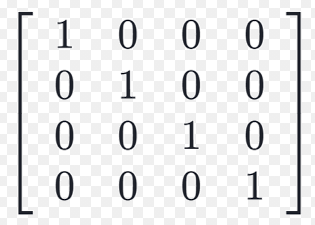
Matrix Multiplication in C++

Before proceeding to check how matrix multiplication is carried out in C++, we need prior knowledge of multi-dimensional arrays or say 2-D arrays. A matrix in general, is a multi-dimensional array in C++.

There a multi-dimensional array is of the form

 int arr[rows][columns]

Where rows and columns are integer values that can be initialized or can be taken input.

Let us now look at different approaches of carrying out matrix multiplication in C++.

Example:

#include <bits/stdc++.h>
 using namespace std;
 #define N 4
 void MatrixMultiply(int matrix1[][N],
               int matrix2[][N],
               int result[][N])
 {
     int i, j, k;
     for (i = 0; i < N; i++) {
         for (j = 0; j < N; j++) {
             result[i][j] = 0;
             for (k = 0; k < N; k++)
                 result[i][j] += matrix1[i][k] * matrix2[k][j];
         }
     }
 }
 int main()
 {
     int i, j;
     int result[N][N]; // To store result
     int matrix1[N][N] = { { 1, 1, 1, 1 },
                        { 2, 2, 2, 2 },
                        { 3, 3, 3, 3 },
                        { 4, 4, 4, 4 } };
     int matrix2[N][N] = { { 1, 1, 1, 1 },
                        { 2, 2, 2, 2 },
                        { 3, 3, 3, 3 },
                        { 4, 4, 4, 4 } };
 MatrixMultiply(matrix1, matrix2, result);
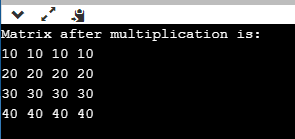
 cout << "Matrix after multiplication is:  \n";
     for (i = 0; i < N; i++) {
         for (j = 0; j < N; j++)
             cout << result[i][j] << " ";
         cout << "\n";
 }
 return 0;
 } 

Output:

Matrix Multiplication in C++

Explanation:

In the above code, we have defined a function 'MatrixMultiply' which takes as arguments 'matrix1', 'matrix2', and 'result' to carry out multiplication. The following algorithm is used for the process:

Start

  1. Declare function MatrixMultiply with arguments matrix1,  matrix2, and result.
  2. In the function, iterate thorough the elements using two loops for rows and columns.
  3. Declare the variable result as result=matrix1*matrix2
  4. In the driver code, initialize the matrix1 and matrix2 with their respective values in rows and columns.
  5. Call the function MatrixMultiply in the driver code which multiplies both the matrices.
  6. Print the result in matrix form as console output.

Stop

Logic:

The logic is to iterate through nested loops. If both the matrices are initially defined, we can multiply them using the formula of rows and columns where a1 *b1 and b2*a2 and so on. This brings out the result in the form of another matrix consisting of values which are the results of the multiplication of both the matrices.

Decimal to Binary Conversion in C++

We have come across the term Binary which is the elementary language through which computers communicate with each other. We can use whole numbers and natural numbers to represent our values. But a compiler converts the number to binary to facilitate the computer to understand our input. This is where decimal to binary conversion comes into play.

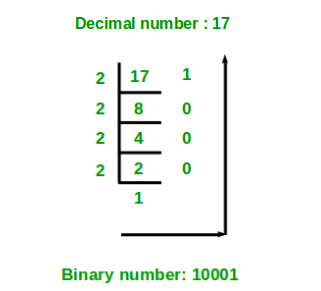
Binary numbers form the basis of communication in a computer system. Let us know how a decimal number is converted into a binary value through the image below:
Matrix Multiplication in C++

Here, we first find out the LCM of a number, and the remainder is written if it is not a perfect multiple of the number. The obtained value on the right side i.e. the remainder is read from bottom to top which gives us the binary number of 17.

Let us now look at the approaches and logical explanations of doing the same using C++.

Example 1: Using functions

#include <bits/stdc++.h>
 using namespace std;
 void DecimalToBinary(int number)
 {
     int binaryNumber[32];
     int i = 0;
     while (number > 0) {
         binaryNumber[i] = number % 2;
         number = number / 2;
         i++;
     }
     for (int j = i - 1; j >= 0; j--)
         cout << binaryNumber[j];
 }
 int main()
 {
     int number;
     cout<<"Enter number to get binary value: ";
     cin>>number;
     DecimalToBinary(number);
     return 0;
 } 

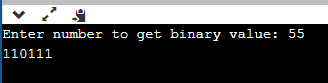
Output:

Matrix Multiplication in C++

Explanation:

In the above code, we have defined a function 'Decimal to binary' and the variable 'number'. The process can be explained through the following algorithmic explanation:

  1. Store the number when it is divided by 2 in the array.
  • Number needs to be divided by 2
  • Run a loop until the number is less than zero
  • print the remainder in the reverse order.

Example 2: Using recursion

#include <bits/stdc++.h>
 using namespace std;
 void DeciToBin(int number)
 {
     if (number == 0) {
         cout << "0";
         return;
     }
     DeciToBin(number / 2);
     cout << number % 2;
 }
 int main()
 {
     int number;
     cout<<"Enter number to get the binary value: ";
     cin>>number;
     DeciToBin(number);
     return 0;
 } 

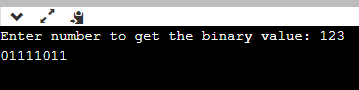
Output:

Matrix Multiplication in C++

Explanation:

The above is quite similar to the previous program where we defined a function having the argument as a number which is to be taken as an input by the user. Here, we have similarly used a recursive approach where the function is repeating itself until the given condition is reached.

The recursive approach reduces the code complexity and enhances code-readability. Later, in the driver code, the function automatically call itself as soon as it gets the argument.

Although, the recursive provides better code readability and understanding the time complexity is increased when we use recursion in a code. Since the function keeps calling itself, it keeps repeating until the end condition is reached thereby increasing time consumption as compared to other native approaches.


Related Topics

C++ Identifier

In a program, C++ identifiers relate to the names of variables, functions, arrays, and other user-defined data types that the programmer has developed. They are a prerequisite for learning any...

4 minutes read.

Name Mangling and extern in C++

Name Mangling and Function Overloading: Function overloading is a feature offered by C++. As long as each function accepts various parameters, we can use this to write many functions with the...

4 minutes read.

Hybrid Inheritance

C++ Hybrid Inheritance When more than one type of inheritance is combined in single inheritance is called as hybrid inheritance. C++ Hybrid Inheritance Example #include<iostream>   using namespace std;   class Student{       protected:           int rollno;       public:           void getRoll(int a){               rollno=a;           }           void putRoll(void){               cout <<"Roll No: "<< rollno<<endl;           }   };   class Test : public Student{       protected:           float subject1, subject2;       public:           void getMarks(float x, float y){               subject1=x;               subject2=y;           }           void putMarks(void){               cout<< "Marks gain: "<<endl <<"Subject1 =  "<<subject1<<endl<<"Subject2 = "<<subject2 <<endl;           }   };   class Sport{       protected:           float score;       public:           void getScore(float s){               score=s;           }           void putScore(void){               cout<<"Sports score: "<<score<<endl;           }   };   class Result : public Test, public Sport{       float total;       public:           void display(void);   };   void Result:: display(void){       total=subject1+subject2+score;       putRoll();       putMarks();       putScore();       cout<<"Total Score: "<<total<<endl;   }   int main(){       Result stu;       stu.getRoll(10);       stu.getMarks(40,50);       stu.getScore(60);       stu.display();       return 0;   } Output: Roll No: 10 Marks gain: Subject1 = 40 Subject2 = 50 Sports score: 60 Total...

1 minute read.

Advantage and disadvantage friend function C++

Friend Function: - A friend function in C++ is a function that can access the private, protected, and public members of a class. In C++, a friend function is a function that...

2 minutes read.

C++ Reading file

In file handling, read() function is used to read data from the file into the program. The read() uses ifstream library to read data from a file. Syntax file-stream-class   file-stream-object;   file-stream-object.read((char *)&var , sizeof (var)); <h3">Example ofstream  outfile;         outfile . read((char*)&emp,sizeof(emp)); C++ File Handling read() Function Example Reading the content of existing...

2 minutes read.

How to Sort an Array in C++

What is Sorting? Sorting is a process of arranging elements in sequential order, either numerically or alphabetically. The sorting of a numerical array can be accomplished using a variety of algorithms,...

4 minutes read.

How to Reverse a String in C++ using For Loop

For Loop: We may loop through a certain section of C++ code repeatedly using the for loop. A for loop is carried out if the test expression yields a true result. The...

4 minutes read.

Returning Multiple Values from a Function using Tuple and Pair in C++

We may come across many situations where after the driver code's execution is performed in a code block, the return should be either multiple values or a single value possibly...

4 minutes read.

Approach in C++

Object oriented programming languages like Java or C++ use a bottom-up approach that identifies each object first.  In the bottom-up approach, we create a small problem first, and try to...

6 minutes read.

Converting string into integer in C++

When programming in C++, we'll frequently need to change one data type to another. When we use C++ to create apps, we must transform data from one type to another. When...

7 minutes read.

For Loop Examples in C++

For Loop A for loop is a repetitive control structure that allows you to create a loop to execute a specific number of times efficiently. The syntax of for loop In C++, a...

6 minutes read.

Hello World Program in C++

The steps for “Hello World” C++ program are as follows: Write a C++ code given below in an editor. Save the file with .cpp Compile the code using C++ compiler or using online...

3 minutes read.

C++ Static

What is the Static keyword? In C++, the keyword static is used to give an element some particular properties. Static elements are only given storage in the static storage region once...

4 minutes read.

C++ Keywords

In this article, we will discuss keywords in C++ with their several features and functions. What are Keywords in C++? In C++, a keyword is a reserved word that has a predefined...

4 minutes read.

Decimal to Hexadecimal in C++

We need to write a program in C++ that converts a decimal number into an equal hexadecimal number given a decimal value as input i.e. convert a number having a...

2 minutes read.

Virtual Functions and Runtime Polymorphism in C++

In this tutorial, we will explore more on virtual functions and runtime polymorphism in the most useful language C++. A virtual function is a member function with the keyword virtual used...

6 minutes read.

Assertions in C/C++

Assertions are the statements used to check presumptions which is made by the programmers. Example: Assertion is used to verify whether the malloc returned by the pointer is NULL or not. For...

4 minutes read.

Vector resize() in C++

Vector resize() in C++ Vectors are called dynamic arrays and can automatically adjust their size when a component is added or deleted. This container is used for storage. The function modifies the...

3 minutes read.

Returning a Function Pointer from a Function in C/C++

Pointers to functions can be used in the C programming language just like standard data pointers such as "int *," "char *," etc. The following is a basic example of a...

3 minutes read.

Palindrome using Do-while loop in C++

What is Palindrome? A palindrome is a word, number, phrase, or other sequence of letters that reads the same backward as forward, such as 101 or MOM. Like other programming languages, C++...

5 minutes read.