
Classes and Objects in C++
When it comes to object-oriented programming, objects are the basic building blocks. Memory is taken up by objects, which contain data and methods or functions that operate on it. On the other hand, Class in a program acts as a blueprint for the object. An object is created for the class, and then we can use the object name to access the class or class member functions. The class generally does not take up any space in the memory.
What is a Class in C++?
Class acts as a blueprint for the object. A class is defined using the keyword class and followed by the name of the class. Following are some keypoints for the class:
- Statements are written inside the class.
- The class does not consume any memory.
- In class, we use public or private keywords to mention the statements' visibility.
- Members of the class that follow the keyword public have the same access attributes. Private and protected members of a class can also be specified, but those can only be accessed within the particular class.
Syntax of a Class
Defining a class:
class className {
   // some data
   // some functions
};
Example:
class Room {
    public:
        double length;
        double breadth;
        double height;


        double calculateArea(){
            return length * breadth;
        }


        double calculateVolume(){
            return length * breadth * height;
        }


};Explanation:
In the above code, we have declared a class with the name Room, with class members as length, breadth, and height of float data type. We have created a class using the class keyword, but it will not work unless an object is created for the class. When we run the code no output will be displayed as the class acts as only a template or blueprint.
C++ Objects
The object is created for the class. Using the object, we run the function members in the class. The class definition provides the blueprint for objects, so objects are created from the classes. Objects of class are declared exactly as variables are.
The syntax for the objects:
className objectVariableName;Example: Now, let's create an object for the above program
 //class is created using the class keyword.
class Room {
    public:
        double length;
        double breadth;
        double height;


        double calculateArea(){
            return length * breadth;
        }


        double calculateVolume(){
            return length * breadth * height;
        }


};


void sampleFunction() {
    // create objects for the class
    Room room1, room2;
}


int main(){
    // create objects for the class
    Room room3, room4;
}
Explanation:
There will be no output for the above code because we have created an object for the class but need to send values to print. In the above code, we have created an object for the class we created in the 1st example. In the two functions, we have created the object for the class room. We have created two objects for the single class.
Now let's send some value to the class using the objects:
#include <iostream>
using namespace std;


//class is created using the class keyword.
class Room {


   public:
    double length;
    double breadth;
    double height;


    double calculateArea() {
        return length * breadth;
    }


    double calculateVolume() {
        return length * breadth * height;
    }
};


int main() {


    // create objects for Room class
    Room room1;


    // assign values to data members in the class
    room1.length = 23.4;
    room1.breadth = 34.6;
    room1.height = 45.6;


    // The area and volutme of the room can be calculated and displayed
    cout << "Area of Room =  " << room1.calculateArea() << endl;
    cout << "Volume of Room =  " << room1.calculateVolume() << endl;


    return 0;
}Output:
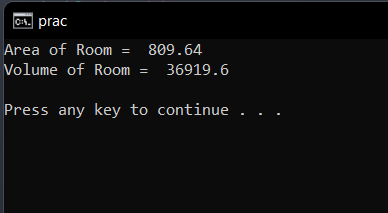
Explanation:
In the above code, we have created a class named Room, which calculates the room size. In the main function, we have created an object for the class. In the main function, we have passed the values in the class. When the values are passed into the class, the class returns the area calculated into the main function using the return statement.
Example:
#include <iostream>
using namespace std;
//class is created using the class keyword.
class Student {
	public:
			int id;
			string name;
};
int main() {
		Student s1; //creating an object of Student class
		s1.id = 305; //assigned the value of id using object
		s1.name = "example.com";; //assigned the value of name using object
		cout<<s1.id<<endl;
		cout<<s1.name<<endl;
		return 0;
}
Output:
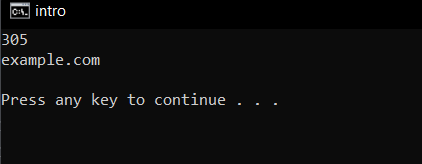
Explanation:
In the above example, we have created a class with the name student. In the main class, we created an object for the class, and then, using the object name, we assigned values to the variables.