
Function overloading in C++
Function overloading in C++
As we know that C++ works on the OOP Concepts, that are abstraction, encapsulation, and data hiding, it also uses the other important feature of OOP, which is Polymorphism. The term polymorphism refers to “one name which is having many forms” and the different behaviour of an instance depends upon the situation.
Basically, C++ implements polymorphism with the help of overloaded function and overloaded operators. The term overloaded here means a name can have two or more distinct meanings. Thereby the overloading function means a function which can have more than one distinct meaning. Likewise, overloading operator means, when an operator can have more than one distinct meaning for any operator is known as overloaded function. But today our focus is on function overloading in C++.
The function overloading helps us in designing the family of the functions that can perform essentially the same thing but using the different argument lists. The overloaded functions are selected for invoking by matching arguments both type (of arguments) and number of arguments and this information is only known to the compiler at the compile time and, thereby the compiler become eligible for selecting the appropriate function for the particular call at the compile time itself. This is called early-binding or the static binding or static-linking. Alternatively, it is also called compiler-time polymorphism as the required function gets determined only at compiler-time.
Note: - The term static binding or Early binding means when the arguments of methods are resolved during compilation stage, it is called static binding or early binding of arguments to the function.
Function Overloading
When the several function declarations are specified for a single function name in the scope, the (function) name is said to be overloaded.
C++ allows the functions to have the same name and can be distinguished by their number and type of arguments.
In other words, we can also say that the function overloading means a function name having several definitions that are differentiable by the number or types of their arguments is called overloading of function.
Referring to this, we have an example given below: two functions are different for C++: -
 Float divide (int a, int b);
 Float divide (float x, float y);
Which is, divide() taking two int arguments is different from divide() taking two float arguments.
This is called as function overloading in C++.
Need for Function overloading: -
The objects have characteristics and associated behaviour. A bird object (say a crow) can see which is its behaviour. But its behaviour may differ in different situations. For example, if the message, “see through daylight” is passed to it, the crow will accomplish this task that is the crow will be able to see through daylight. But if the message, “see through darkness” is passed to it, the crow will not be able to see it in any cost. That is the same behaviour of the same object may be differ in different situations. Then why can’t this will happen with function or with functions of a class? The class that implements OOP concepts in practice. Thereby in order to simulate real-word objects in programming, it becomes very necessary to have function overloading.
Now here a question arises that, when we can define different functions for the different situation, then why we are repeating the same function name again and again in the program, Right? So, the answer to this question is yes, we are allowed to use different functions for different situations and a snippet code for this condition is down below: -
 :
 void see_day            //function for seeing through the daylight
 {           cout<< “Can see though the daylight\n” ;
 }
 void see_night( )        //Function for seeing through night.
 {           cout<< “Cannot see through darkness \n ;
 }
Here we have multiple definitions, we need to ourself decide upon which function should be executed. For instance: -
 Char choice ;
 Cout << “ See through the Daylight or Night ? (D/N)” ;
 Cin >> choice ;                         // Decide which function needs to execute here
 If (choice == ‘D’)
                         See _day( ) ;
             Else if (choice == ‘N’) ;
                         see_night( ) ;
             else
 cout<< “\n wrong choice \n ;
 :
Now after through this example let me ask you a very simple question, It would not be nice and easy if the compiler automatically decides which function should be executed and which function should not be executed, Isn't it easy for us? Yes, will be very easy and comfortable for us but other then this, it will not only reduce the code by reducing the number of if-else statements, but also makes the code execute faster as so many comparisons are eliminated from the code. You must know here that only the compiler decides about when functions are overloaded.
Note: - The Function overloading in C++ not only implements the polymorphism in action but also helps in reducing the number of comparisons in a program and thereby makes the program run faster.
Let us understand the Function overloading with an illustration: -
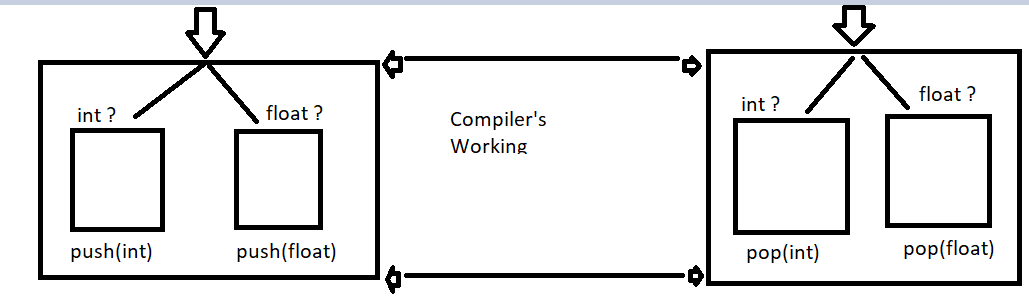
This is how Function Overloading works.
Declaration of function overloading in C++
Basically, in C++ the key to function overloading is a function’s argument list which is also refer as the function signature. It is the signature, not the function type which helps in enabling function overloading in C++.
Note: - The function’s argument list is number and type of arguments are called the function’s signature.
When two functions are having the same type and number of arguments in the same order, that is when we call them the same signature. (Even if they are using the distinct variable names then it does not count). To better understand it let’s take an example, where two function have same signatures: -
 Void squar (int a, float b) ;           //function 1
 Void squar (int x, float y) ;         //same signature as same as of function 1
C++ lets us to overload A function name provided, the functions with same name are having different signatures. Although signature can differ in the number of arguments or in the type of argument or both can happen in the same time. For overload, the function name all we need to do is that we need to declare and define all the functions with the same name but with the different signatures. To understand it properly let’s take an example where code fragments overloads a function name penqr( ).
 Viod prnsqr (int i) ;               //overload for integer #1
 Viod prnsqr (char c) ;              //overloaded for characters #2
 Viod prnsqr (float f) ;             //overloaded for floats #3
 Void prnsqr (double d) ;            //overloaded for double floats #4
So, here in this above code, we have declared overloading functions, but we must define them separately, as it is given below for the above code: -
 Viod prnsqr (int i)
 {cout<< “integer “ << i <<” ‘s square is” <<i*i<<” \n” ;
 }
 Viod prnsqr (char c) ;
 {cout << C <<” is a character” <<” Thus no square for it” << “ \n ;
 }
 Viod prnsqr (float f)
 {cout << “Float” << f << “ ‘s square is “ << f*f<<” \n “ ;
 }
 Void prnsqr (double d)
 {cout<< “ Double float “ << d <<” ‘s square is” << d <<” \n” ;
 }
As in the above example we have seen that there is not too much difficulty in declaring overloaded functions. We can just declare them as other functions. But there is one thing to keep in mind that the arguments are sufficiently different to allow the functions to be differentiated in use.
The arguments type is the part of function’s extended name in C++. For example, the name of above specified functions might be prnsqr( ) but if we talk about their extended names then they are different. Like prnsqr(int), prnsqr(char), prnsqr(float), and prnsqr(double) are the extended names.
When the function name is declared more than once in a program, then the compiler will interpret the second and subsequent declarations as mentioned below: -
- If the signatures of subsequent functions match the previous functions than the second function is treated as a re-declaration of the first.
- If the signatures of the two functions match exactly. But, the return types differ, the second declaration will be treated as an erroneous re-declaration of the first and is flagged at compile time as an error on the screen. For instance: -
 float square (float f) ;
 double square (float x) ;         // this will be an error
Here in this example, the functions with the same signature and with the same name but different return types are not allowed in C++ by OOP. We have used different return types, but only if the signature is also different. The example to this would be:
 float square (float f) ;                 // different signatures here hence
 double square (double d) ;              // this is allowed
- If the signature of the two functions differs either in the number or type of their arguments, the two functions are considered to be as overloaded.
Signed-ness (e.g., int versus unsigned int) and const-ness are also sufficiently different to tell us the function apart that is, functions with the arguments with such differences are considered as different function.
Note: - You must keep this in mind that, use the function overloading only when a function required to work for alternative argument types and there is definitely a way of optimizing the function for the argument type.
Restrictions on overloaded Function
The functions overloading comes with some limitations/restrictions in C++ and those are as follow: -
- Any two functions in a set of overload functions must have different argument list.
- Member functions cannot be overloaded solely on the basis of one being static and the other being non-static.
- Overloading functions with argument list of the same types, based on the return type alone is an error. (Refer to the point (ii) Of the previous section)
- Typedef declarations does not define new types; they just introduce synonyms for existing types. They do not affect the overloading mechanism. To understand consider the code mention below: -
 typedef char8 PSTR ;
 void Print ( char* szToPrint ) ;
 void Print ( PSTR szToPrint ) ;
In these two functions, we have identical arguments list. PSTR is a synonym for char*. In the member scope, this code generates an error.
- Enumerated types are distinct types and can be used to distinguish between the overloading functions.
- The types “array of” and “pointer to” are considered identical for the purposes of distinguishing between overloaded functions. This is only true for singly dimensioned arrays. That means this following overloaded function conflict and going to generate an error message.
 void Print ( char * szToPrint ) ;
 void Print ( char szToPrint [ ] ) ;
and for the multiple dimensioned arrays, the second and all succeeding dimension are considered as the part of the type. That means, they are used in distinguishing between overloading functions and the example to this would be: -
 void Print ( char szToPrint [ ] ) ;
 void Print ( char szToPrint [ ] [3] ) ;
 void Print ( char szToPrint [ ] [8] [35] ) ;
These are some restrictions on overloaded function in C++ that comes with OOP.