
Maps in C++
Maps:
Maps in C++ are the containers associated with key and mapped values. By keys and mapped values, we mean that the maps are used to store elements formed by the combination of the keys and mapped values.
In other words, maps are functions found in the Standard Template Library (STL) that store key-value pairs that are unique. It can also be inserted or deleted but the value cannot be altered although values associated with the keys can be modified.
Let's look at maps to see how they are created.
typedef pair<const Key, T> value_type;
Here,
Key is the type of key and value is the type of value that needs to be assigned.
Note: The keys and values are always inserted as pairs. We simply cannot just enter a key or a value individually.
Syntax of map function:
template<class Key,class T,class Compare = std::less<Key>,class Allocator = std::allocator<std::pair<const Key, T> >> class map;
The above member functions can be grouped with the following definitions.
| Member Functions | Definitions |
| key_type | Key |
| mapped_type | Map |
| value_type | Pair<const Key, T> |
| size_type | Unsigned integer(std::size_T) |
| key_compare | For comparing |
| allocator_type | allocator |
| pointer | Const pointer |
| const iterator | Const<iterator> |
| reverse_iterator | Reverse_iterator<iterator> |
| const reverse_iterator | Reverse_iterator<const_iterator> |
Let us now look at the programming examples for maps.
Example 1:
#include<bits/stdc++.h>using namespace std;int main (){map<char,int> first;first['K']=100;first['L']=200;first['M']=300;first['N']=400;map<char, int>::iterator i;for(i=first.begin(); i!=first.end(); ++i){cout << it->first << " => " << it->second << '\n';}return 0;}
Output:
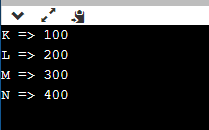
Explanation:
In the above code depiction, we initialized the map function with the members of type character and integer since we are assigning character values with an integer. The function map consists of an iterator I, which iterates from start to end using the functions associated with begin() and end(). It later increments the value by 1. The output is is printed on the console.
Example 2:
#include<bits/stdc++.h>int main(){std::map<std::string, int> planets;planets.insert(std::make_pair("Jupiter", 6));planets.insert(std::make_pair("Titan", 7));planets["Sun"] = 0;planets["Saturn"] = 5;std::map<std::string, int>::iterator it = planets.begin();while(it != planets.end()){std::cout<<it->first<<" :: "<<it->second<<std::endl;it++;}if(planets.insert(std::make_pair("Saturn", 5)).second == false){std::cout<<"Element with key 'Saturn' already exists"<<std::endl;}if(planets.find("Sun") != planets.end())std::cout<<"word 'Sun' found"<<std::endl;if(planets.find("Pluto") == planets.end())std::cout<<"word 'Pluto' not present"<<std::endl;return 0;}
Output:
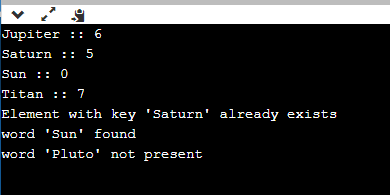
Explanation:
The above code is implemented just to showcase how maps work with strings. Here, we assigned our map function having arguments in the form of strings and also have key values of integers. Since we have already come across the fact that maps accept mapped values and keys in pairs, therefore each code is assigned to some values respective of their definition in the map function.
The function returns the values assigned with the respective functions that have their values already assigned. It returns false if they already exist or not present within the pair of occurrences.
Additional functions associated with Maps in STL
- begin() : Return first element to the iterator in maps.
- end(): Return last element to the iterator in maps.
- size(): gives the size of the elements present.
- empty(): checks whether map is empty.
- pair insert(key_value,map_value): used for adding value.
- erase(): removes the elements which the iterators points.
- clear(): cleans or removes all the elements from the maps.
- operator[]: returns element with the key given.
- at: retrieves the given element associated with key.
- cbegin(): returns constant iterator pointing first element.
- cend(): return constant iterator point last element.
- crbegin(): return constant reverse iterator pointing first element.
- crend(): return constant reverse iterator pointing last element.
- rbegin(): return reverse iterator pointing first element.
- rend(): return reverse iterator pointing last element.
Advantages of using Maps in C++
The advantages of using Maps in C++ are:
- Lookup time
- Well ordered
- Insertion
Let’s discuss the above advantages in detail.
Lookup time:
If keys are known to fall in a narrow integer range, then an array (or preferably a vector) is ideal but using maps reduces the effort of fetching time to 0(1) complexity. A map lets you maintain reasonable lookup performance (O(log(n))). But only takes up 2 spots to store the memory. A map allow us to maintain lookup in O(log(n)) complexity and also allow us to use any type of operator through arguments using templates. Also, it allows us to compare different keys. Thus, to lookup on maps of strings will let us map the values like -
map[“jJavaTpoint”]=5;
Well ordered:
Keys in maps are stored in proper order allowing us to iterate over all the items from beginning to end, in sorted key order. Although it can be done using dynamic arrays called vectors, but maps allow having arbitrary key types without defined ordering.
Insertion
Inserting any element in array/vector requires shifting all the elements to the left. In the case of dynamic arrays, we may need to resize the vector which consumes the entire memory for the array. Therefore, the time complexity is increased. A map has reasonable insertion time (O(log(n))).