
×

C++ array to function

Arrays in C++ :

Instead of defining distinct variables for each item, arrays are used to hold numerous values in a single variable.

An array can be declared by specifying the variable type, then the array and then the square brackets that would store the number of elements in the array.

Syntax:

var_type array[no_of_elements]

Example –

String colors[3] = {“red”, “blue”, “green”}

The above example shows an array of colors having 3 colors namely red, blue and green.

Functions in C++ :

A function is a code block that only executes when it is invoked.

The Parameters are data that may be sent into a function.

Functions are used to accomplish certain tasks and are essential for code reuse: Once the code is defined, it may be reused numerous times.

Syntax:

void func(){
	//the piece of code that is to be executed
}

Example –

void func(){
	cout << “This is executed”
}
int main(){
	func(); // function called
	Return 0;
}

Output:

This is executed

In this example, we created a function called func(), which when called in main gave us the required output that it is executed.

Passing Arrays to Function in C++ :

Arrays can be passed as arguments to functions in C++. We can also return arrays from functions.

Make sure you understand C++ Arrays and C++ Functions before learning about providing arrays as a function argument.

Syntax :

returnType functName(datatype arr[size]){
	// code block
}

Example –

int sum(int score[4]) {
	// code block
}

In this Example, the method sum has been supplied an int type array named score(). The array has a size of 4.
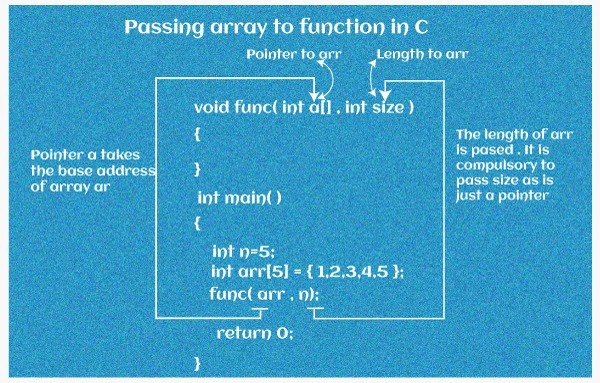
C++ Array to Function

1D Array to a Function:

In the C++ language, a one-dimensional array is the most basic type of array. A one-dimensional array is simple to define, initialise, and modify. A one-dimensional array can be used as a function argument and so on.

Example -

// C++ Program to show score of 4 students


#include <iostream>
using namespace std;


// declaring function to show score
//1d array taken as parameter
void show(int s[4]) {
    cout << "Showing marks: " << endl;


    // showing elements of the array    
    for (int k = 0; k < 4; ++k) {
        cout << "Person " << k + 1 << ": " << s[k] << endl;
    }
}


int main() {


    // call and initialize array
    int score[4] = {77,98,91,69};
    
    // call show func
    // pass array as arg
    show(score);


    return 0;
}

Output :

Showing score:
Person 1: 77
Person 2: 98
Person 3: 91
Person 4: 69

In this example,

1. Only the name of the array is used when calling a function with an array as a parameter.

show(score);

The memory location of the first member of array score[4] is represented by the parameter score.

2. However, take note of the show() function's argument.

void show(int s[4])

In this case, we utilise the whole array declaration in the function argument, including the square brackets [].

3. The int s[4] function argument is converted to int* s;. This corresponds to the same address as the array score. This indicates that we're actually modifying the original array score when we manipulate s[4] in the method body.

This is how C++ handles sending an array to a function to save memory and time.

Multi-dimensional Array to Function :

Multidimensional arrays may be simply defined as an array of arrays in C/C++. Tabular format is used to store data in multidimensional arrays (in row-major order).

Multidimensional arrays can also be sent as an argument to the function. As an example

Example –

// C++ Program to display the elements of two
// dimensional array by passing it to a function


#include <iostream>
using namespace std;


// define func 
// pass 2D array as parameter
void show(int no[][2]) {
    cout << "Showing Values: " << endl;
    for (int k = 0; k < 3; ++k) {
        for (int l = 0; l < 2; ++l) {
            cout << "number[" << k << "][" << l << "]: " << no[k][l] << endl;
        }
    }
}


int main() {


    // initializing the 2D array
    int number[3][2] = {
        {1, 2},
        {3, 4},
        {5, 6}
    };


    // call the func
    // pass 2D array as arg
    show(number);


    return 0;
}

Output:

Showing Values:
number[0][0]: 1
number[0][1]: 2
number[1][0]: 3
number[1][1]: 4
number[2][0]: 5
number[2][1]: 6

In this example, we've defined a function called show() in the previous program. The function accepts a two-dimensional array as an input, int no[][2], and outputs the array's elements.

We merely supply the name of the two-dimensional array as the function parameter display when invoking the function (number).

The number of rows in the array does not have to be specified. The number of columns, on the other hand, should always be stated. We used int no[][2] for this reason.

As a function parameter, we may also send arrays with more than two dimensions.


Related Topics

How to initialize a dynamic array in C++

Regular arrays or static arrays have a predetermined size or fixed size. Change in the size of regular arrays is not possible. The memory size for static arrays determines at compile...

4 minutes read.

C++ Writing to file

In file handling, write() function is used to write data into the file. The write() uses ofstream or fstream library to write into the file. Syntax file-stream-class   file-stream-object;   file-stream-object.write((char *)&var , sizeof (var)); The write() takes two arguments. The first argument is the address of variable var...

2 minutes read.

Difference between Exit and Return

Define Exit() At the point when a client needs to leave a program from this capability is utilized. A void return type capability calls all capabilities enrolled at the exit and ends...

3 minutes read.

Array of Vectors in C++ STL

Prerequisites: C++ STL Arrays and C++ STL Vector. A group of items kept in consecutive memory region is known as an array. It is to group similar objects of the same...

4 minutes read.

Single Handling in C++

Introduction: Single handling in C++ refers to a technique for processing multiple events or requests with a single function or handler rather than creating separate functions for each task. This allows...

5 minutes read.

C++ Do while loop

In this article, we will discuss the C++ Do-While loop with its syntax, working, key features, algorithm, and examples. Do-While Loop: The do-while loop constitutes a specific style of looping construct in...

5 minutes read.

Features of OOPS in C++

What is OOPs? The main reason programmers prefer C ++ language over C is because of the support of object-oriented programing in C++. As the name suggests, object-oriented programming or OOPs...

3 minutes read.

Private Inheritance in C++

Private inheritance is an inheritance in object-oriented programming (OOP) languages where a subclass derives from a superclass. Still, the derived class does not inherit the public and protected members of...

7 minutes read.

Principles of Object-Oriented Programming in C++

What is Object-Oriented Programming? Object-oriented programming is about creating obejcts that represent the real-world entity . In object-oriented programming, objects are created for the class. One of the main objectives of...

5 minutes read.

C++ Fork

A new process known as a "child process" is created with the fork system function and runs concurrently with the process that invoked fork() (parent process). Both processes will carry...

4 minutes read.

Inheritance and Friendship in C++

In this tutorial, we will look into what Inheritance and Friendship in C++ are, as well as the differences between the two. What is Inheritance in C++: In C++, inheritance is an...

2 minutes read.

Singleton Design Pattern in C++

Singleton is similar to the global variable. Singleton helps to have only one object of its kind and provides only single access. One of the key features of the singleton...

2 minutes read.

C++ Comments

Comment/Remark A Comment or a Remark is text that is ignored by the compiler yet is beneficial to programmers. Code is usually annotated with comments for future reference. They are treated...

3 minutes read.

C++ File Handling

File handling is a mechanism that manipulates the data stored in files. File handling store output data from the program to external file and read file data to the program. There...

3 minutes read.

Vector resize() in C++

Vector resize() in C++ Vectors are called dynamic arrays and can automatically adjust their size when a component is added or deleted. This container is used for storage. The function modifies the...

3 minutes read.

User-defined literals in C++

Introduction to User-Defined Literals: User-defined literals, introduced in C++11, are a way to extend the C++ language to allow users to define their literal suffixes and the corresponding behavior. These suffixes...

7 minutes read.

RTTI (Run-Time Type Information) in C++

In C++, RTTI or Run-Time Type Information reveals information about the data type of an object at runtime and only works with classes that have at least one virtual function....

3 minutes read.

swap() function in C++

Swap() function: swap() function in C++: swap() function is a pre-define function in c++ present in STL( Standard template library ). It is used to swap two numbers. It takes two mandatory...

6 minutes read.

Program that produces different results in C and C++

Introduction: There are many such programs that compile run both in C and C++ but give different outcomes when compiled by the C and C++ compilers. There are a variety of such...

6 minutes read.

Free vs delete() in C++

Free vs delete() in C++ In this section, we will learn about the free() function and also create a C ++ program of the delete operator. What is free() Function in C++? In...

4 minutes read.