
How to create an app in Django

Create an application in Django

Django is famous for its unique and fully managed application structure. For each functionality, an application can be created as a completely independent module. This article will take you through how to create a basic application and add functionalities using that application.

For example, if we are creating a Blog, Separate modules should be designed for Comments, Posts, Login/Logout, etc. In Django, these modules we called an apps. There is a different app for each

Benefits of using Django apps

  •  Django app can be used with various projects.
  • We has loosely coupled i.e. almost free(independent) components
  • Many developers can work on different segments
  • Debugging and code organisation is easy. Django has excellent debugger to

Pre-installed app

Django stores some pre-installed apps for users. 

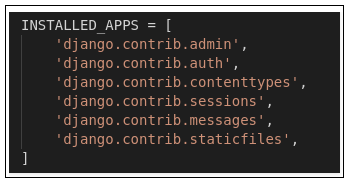
To see pre-installed apps, we have to navigate projectName -> settings.py

  • In your settings.py file, you will find INSTALLED_APPS. Apps listed in INSTALLED_APPS are provided by Django for developers comfort.
Building an app Django

To create Django project we need to go to directory containing manage.py and from there enter the command

python manage.py startapp projectAp

To consider the app in project we need to specify your project name in INSTALLED_APPS list as follows in settings.py

INSTALLED_APPS = [

    'django.contrib.admin',
     'django.contrib.auth', 
     'django.contrib.contenttypes', 
         'django.contrib.sessions',  
         'django.contrib.messages', 
        'django.contrib.staticfiles', 
        'projectApp'
 ] 

So, we have finally created an app, but to render the app using URLs, we need to include the app in our main project so that URLs redirected to that app can be provided. Let us explore it.


from django.contrib import admin 
 from django.urls import path, 
 include 
 urlpatterns = [  
     path('admin/', admin.site.urls), 
     # Enter the app name in following syntax for this to work 
     path('', include("projectApp.urls")),  
]


 Note:-The main feature of Django it is independent


Related Topics

Django – Sending E-mails

Django – Sending E-mails Django comes with a light engine that is ready and simple to use to send emails. Similar to Python, you just need to import a smtplib. You just need to import django.core.mail in Django. Edit the project settings.py file to start sending emails and set  all the following options: EMAIL_HOST – server with smtp.EMAIL_HOST_USER – smtp server login key.EMAIL_HOST_PASSWORD ? Password credential for the smtp server.EMAIL_PORT – server port smtp.EMAIL_USE_TLS or _SSL – if it is secure connection then set True. Simple E-mail Sending To submit a simple e-mail, let's create it a "simpleEmail" view. from django.core.mail import...

3 minutes read.

Life Cycle of Django

Life Cycle of Django Request - Response life cycle in Django  Thebasic principle of http protocol is the client sends a request to the server based on the request data, and the server sends...

3 minutes read.

Django CSRF

Django is a high-level python based web framework. Django is open source and free to use for all. Django provides many features to web developers like scalability, security, rapid development,...

4 minutes read.

Django Filters

Django is a high-level python based web framework. Django is mostly used as a backend engine for websites. Nowadays, every website communicates to a database to fetch all the information...

3 minutes read.

Django Image Upload

Django is a python based web framework that uses Model View Template as its architecture. Django provides really quick web development with its functionalities. While we are building a website,...

3 minutes read.

Django Framework

Django is a popular high-level open-source web development Python framework based on follows Model View Template (MVT) architecture that allows rapid development. It. It provides common functionality like Admin Interface,...

3 minutes read.

Features of Django

Features of Django Offers High Security:- Django is super secure. To prove the feature, we can always take examples of lots of websites which are present worldwide and possess huge traffic. Django is secure because it covers the...

3 minutes read.

Django Authentication

Django is an open-source free to use web framework which is based on Python. Django uses Model-View-Template as its architecture. The final version of Django was released in 2008. Django...

4 minutes read.

Django ORM

Django is a Python web framework that enables easy and quick web development. Django has a handy and powerful feature called Django Object Relational Mapper, also known as Django ORM,...

3 minutes read.

Django CMS vs WordPress

Both Django CMS and WordPress belong "Self-Hosted Blogging" or "Content Management System (CMS)" category, that is used to manage digital content. Bloggers usually use these platforms. Django CMS Django is one of...

4 minutes read.

Django Logging

Every application developed has some bugs and errors. It is the responsibility of the developers to maintain the application by making it bug-free and error-free. To debug the application code...

5 minutes read.

Django Tutorial

Django Introduction It is a web application framework written in a python programming language. It based on the MVT( Model View Templet) design pattern. It takes a short time to build an application...

2 minutes read.

How to connect Django with Mysql

Any web application contains some data that comes from the input of the end-users. Thus, the database is required to handle those data. Several databases could be used to connect...

3 minutes read.

Django and React

This article will discuss the overview of Django and React, their advantages, applications, and most importantly, how to implement react in Django. What is Django? Django is a free and open-source web...

6 minutes read.

Django Pagination

Django is an open-source free to use python based web framework. Django provides many inbuilt tools for web developers to provide rapid web development. One of these tools is pagination....

4 minutes read.

Creating View in Django

Creating View in Django    Django views are a key component of the frameworkbased applications.We are using Python function or class at their simplest, which takes up a web query and returns a web response.Views are used to get objects from the server, change objects if needed, render types, return HTML, and much more. Class Based View and Function based Django has two types of views: views based on functions (FBVs) and views based on class (CBVs).Initially, Django began with only FBVs, but then introduced CBVs as a way to model features so we didn't have to write boilerplate (i.e. the same software) code again and again.CBVs would be a way to increase efficiency, so you don't have to write as much code as you can. CBVs are classes of Python at their heart. Django ships with a range of "model" CBVs with pre-configured features that can be reused and often expanded.Then helpful names are given to these classes that explain what kind of functionality they provide.These are often referred to as "universal views" because they provide solutions to specific needs. The classes have a journal View function, or "view" for short, is simply a Python program that uses a web query and returns a web response. This response may include the HTML content of a web page, or a redirect, or a 404 error, or an XML file, or an image, etc. Example: You use a view to create a web page, remember that you need to connect a view to a URL to see it as a web page. Simple View We will create a simple view in myapplication to say “Welocome to django application” See the following view – from django.http import HttpResponse ...

4 minutes read.

Best Django courses

In this tutorial, we will see various courses in python Django available on the internet. Django has become popular these days, so courses on it are also increasing day by...

7 minutes read.

Django REST Framework

Django REST Framework (DRF)is an open-source, powerful, and flexible toolkit used to build RESTful web APIs. It is built upon the Django framework. DRF increases the development speed. Django and...

4 minutes read.

Django vs Laravel

Django Overview Django is a Python Programming Open Source framework for web development. It was released in 2008 and was developed by two web developers named Adrian Holovaty and Simon Willison....

4 minutes read.

How to Uninstall Django from cmd

Python is an interactive and more accessible language than any other programming language. The python programming language uses a variety of libraries to perform the operations in a faster way....

3 minutes read.