×

If ElseIf ElseIf Statement or Nested If statement in VBA

VBA Excel: If … ElseIf … ElseIf Statement or Nested If statement

This function enables you to check multiple conditions and, based on that, then run one of the statement blocks present. If the ‘IF’ condition is TRUE, IF statement and condition will run if it is FALSE, then the program will check the ‘ELSEIF’ condition. If it is also false, i.e., not applicable, then the following ‘ELSEIF’ will work. If all return False, at last, the else statement will come in the loop. This statement will always have a closing ‘END IF’ statement else, VBA will give an error.

Syntax

If <Condition1> Then
     <Statements1>
 ,
 ElseIf <Condition2> Then
     <Statement2>
 , 
 ElseIf <Condition3> Then
     <Statement3>
 ,
 ElseIf <Condition4> Then
     <Statement4>
 .
 .
 .
 . 
 Else
     <StatementN>
 ,
 End If 

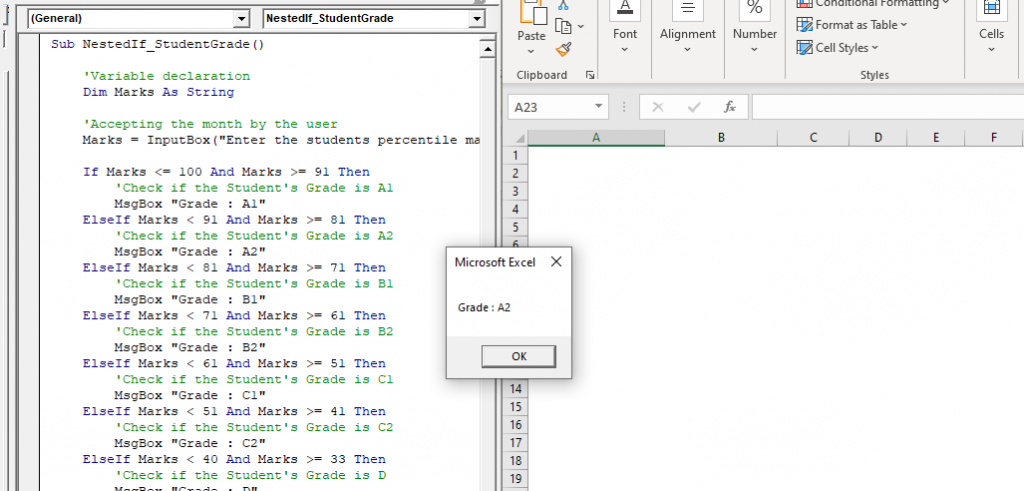
Example 1: Create a Macro using nested IF, to find out the Grade distribution for a student, if he scores 91 or above, categorize him under A1, if he scores in between 80 and 91, categorize him under A2, for Similarly if he scores between 70 to 81, categorize him under B1 if he scores between 60 to 71 it's B2, for 50 to 61 grade is C1, for 40 to 51 grade is C2, marks is between 32 to 41 grade is D1, and at last if it’s below 33 the student has failed.

Sub Nested_If_Example1()    
     'Variable declaration
     Dim Marks As String
     'Accepting the month by the user
     Marks = InputBox("Enter the students percentile marks:", "Marks")
     If Marks <= 100 And Marks >= 91 Then
         'Check if the Student's Grade is A1
         MsgBox "Grade : A1" 
     ElseIf Marks < 91 And Marks >= 81 Then
         'Check if the Student's Grade is A2
         MsgBox "Grade : A2"
     ElseIf Marks < 81 And Marks >= 71 Then
         'Check if the Student's Grade is B1
         MsgBox "Grade : B1" 
     ElseIf Marks < 71 And Marks >= 61 Then
         'Check if the Student's Grade is B2
         MsgBox "Grade : B2"
     ElseIf Marks < 61 And Marks >= 51 Then
         'Check if the Student's Grade is C1
         MsgBox "Grade : C1" 
     ElseIf Marks < 51 And Marks >= 41 Then
         'Check if the Student's Grade is C2
         MsgBox "Grade : C2"
     ElseIf Marks < 40 And Marks >= 33 Then
         'Check if the Student's Grade is D
         MsgBox "Grade : D"
     Else 
         'Check if the student has failed
         MsgBox "Grade : Fail"
     End If
 End Sub 

Output

Nested If statement
If ElseIf  ElseIf Statement

Example 2: Write a macro to demonstrate the four quarters in a year.

Sub Nested_If_Example2()
     'Variable declaration
     Dim Month As String
     'Accepting the month by the user
     Month = InputBox("Enter the Month:", "Month")
     If Month = "January" Or Month = "February" Or Month = "March" Then
         'Checking if the month falls under the first quarter.
         MsgBox "I Quarter." 
     ElseIf Month = "April" Or Month = "May" Or Month = "June" Then
         'Checking if the month falls under the second quarter.
         MsgBox "II Quarter."
     ElseIf Month = "July" Or Month = "August" Or Month = "September" Then
         'Checking if the month falls under the third quarter.
         MsgBox "III Quarter." 
     ElseIf Month = "October" Or Month = "November" Or Month = "December" Then
         'Checking if the month falls under the fourth quarter.
         MsgBox "IV Quarter."
     Else
         MsgBox "Please enter a valid month."
     End If
 End Sub 

Output

macro to demonstrate the four quarters in a year.
macro to demonstrate the four quarters in a year


Related Topics

Excel VBA- Pivot Table Fields

VBA- Pivot Table Fields: The Pivot Fields collection contains all the fields from the data source, including any calculated fields. The main aspect of adding a field is its Position...

4 minutes read.

Excel VBA AutoFilter

One of the reasons for Excel VBA’s popularity is its capability to filter and analyze data from huge database with the help of a method known as AutoFilter. This method permits a...

4 minutes read.

Excel VBA RTrim Function

VBA RTrim Function: The Rtrim function in VBA removes the leading spaces from the text in the specified string. Syntax RTrim (String) Parameter String (required) – This parameter represents the string from which you want...

1 minute read.

Excel VBA Now Function

Excel VBA Now Function: The Now function in VBA returns the current date and time.  Syntax Now () Parameter NA Return This function returns the current date and time.  Example 1 Sub NowFunction_Example1() 'It will return...

1 minute read.

Excel VBA Trim Function

The Trim function in VBA removes the leading and trailing spaces from the specified string. Syntax Trim (String) Parameter String (required) – This parameter represents the string from which you want to remove the leading and...

1 minute read.

UserForm and its Properties Excel VBA

UserForm and its Properties Userform has certain properties that can be viewed as category wise (based on appearance, behavior, font) or in an alphabetic manner. The property window is used to set or...

11 minutes read.

Excel VBA FormatDateTime Function

VBA FormatDateTime Function: The FormatDateTime function in VBA returns the result as a string after applying a date and/or time format to the supplied expression. Syntax FormatDateTime (Expression, [NamedFormat]) Parameter Expression (specified) – This parameter...

2 minutes read.

Excel VBA LBound Function

Excel VBA LBound Function: The LBound function in VBA returns the lowest subscript for the specified dimension in the given array. Syntax LBound (ArrayName, [Dimension]) Parameter ArrayName (required) – This parameter represents an array for which...

1 minute read.

Excel VBA Array Function

VBA Array Function: The Array function in VBA generates an array containing the given set of values. Syntax Array (Arglist) Parameter Arglist (required) – This parameter the list of values that you want to make...

2 minutes read.

Excel VBA StrReverse Function

The StrReverse function returns a String after reversing the given String. Syntax StrReverse (Expression) Parameter Expression (required) – This parameter represents the String that you want to reverse. Return This function returns a String after reversing the given String. Example...

1 minute read.

Excel VBA Hex Function

VBA Hex Function: The Hex function in VBA converts the given number into hexadecimal notation and returns the result as a string. Syntax Hex (Number) Parameter Number (required) – This parameter represents the numeric value...

1 minute read.

VBA ActiveSheet

What is VBA Activesheet Property? The active sheet means the current worksheet which you are working on and viewing. The ActiveSheet object signifies the worksheet tab that is selected before running the VBA...

5 minutes read.

VBA Screen Updating

What is VBA Screen Updating property? Screen Updating is a VBA property which is used to display the output generation while running the code. If this property is enabled, we could see...

6 minutes read.

Excel VBA Join Function

Excel VBA Join Function: The Join function in VBA is used to join an array of substrings and return them all as a single string. Syntax Join (SourceArray, [Delimiter]) Parameter SourceArray (required) – This parameter...

1 minute read.

Userform Events

What are Events? Anything you do in to trigger an excel file is an event (an action). Example: If you want a greeting message ‘Good Day’ whenever an excel file is...

7 minutes read.

Finding Last Row or Column in Excel VBA

Finding Last Row or Column in VBA Finding the last used row, column, or cell is one very commonly used task when we write macros and VBA applications.  Like other codes...

5 minutes read.

Scope in Visual Basics

Definition of Scope The scope of any programming language implies the area of code where the variables will be identified, accessed, and used. Every variable has a scope associated with it. The scope of...

4 minutes read.

Excel VBA Str Function

VBA Str Function: The Str function in VBA converts the given number into a string representation of that number. Syntax Str (Number) Parameter Number (required) – This parameter represents the numeric value that you want...

1 minute read.

Excel VBA LCase Function

VBA LCase Function: The LCase function in VBA converts the given String into lower case text. Syntax LCase (String) Parameter String (required)- This parameter represents the text string that you want to convert to...

1 minute read.

VBA Updating Pivot Table

VBA- Updating Pivot Table The pivot table is an important feature to explore, summarize, and interpret the bulk amount of data. It helps data evaluating, reviewing, as well as making useful...

3 minutes read.