
×

Ionic Actionsheet

Ionic Actionsheet

The Action sheet is a dialog box that displays a group of options. It is shown on the top of the application content and must be dismissed manually before the user can resume interaction with the application. The action sheets slide up from the bottom side of the device screen and display a set of options that can confirm or cancel the action. Sometimes the action sheet can be used as an alternative to lists. However, it should not be used to navigate.

Destructive options become clear in iOS mode. There are several ways to dismiss the action sheet, including touching the bottom or pressing the escape key on the desktop. The Action Sheet always appears on top of any other component of the page and should be ignored to interact with the underlying content. When it is triggered, the rest of the page darkens to give more attention to the options in the action sheet.

The function property of a button can be either destructive or canceled. Buttons that have no role property will have the platform's default look. Buttons with the cancel role will always load as the bottom key, no matter where they are on the list. All other buttons will be shown in the order in which they have been added to the buttons list.

Example: This example explains how you can use the ionic action sheet in the ionic application.

Home.page.html

It is used to design your home page, and it also used to contain HTML elements such as button components, etc.

ActionSheets ShowActionSheet

Home.page.scss

action-sheet-home-page { 
  .ion-md-share { 
  color: rgb(38, 241, 11); 
  } 
  .ion-md-arrow-dropright-circle { 
  color: rgb(240, 34, 137); 
  } 
  .ion-md-heart-outline { 
  color: rgba(31, 133, 60, 0.904);  
  } 
  .action-sheet-cancel ion-icon, 
  .action-sheet-destructive ion-icon { 
  color: #e61010; 
  } 
 }  

Home.page.ts

home.page.ts is the main page of the ionic application, and it is used to provide the user interface. Here, you can create the menu, which contains many elements such as destructive, archive, share, delete, create, cancel, etc.

import { Component } from '@angular/core'; 
 import {ActionSheetController } from '@ionic/angular'; 
 @Component({ 
  selector: 'app-home', 
  templateUrl: 'home.page.html', 
  styleUrls: ['home.page.scss'], 
 }) 
 export class HomePage {  
  constructor( 
  public actionsheetCtrl: ActionSheetController 
  ) { } 
  async openMenu() { 
  const actionSheet = await this.actionsheetCtrl.create({ 
  header: 'Update Album', 
  buttons: [ 
  { 
  text: 'Destructive', 
  role: 'destructive', 
  handler: () => { 
  console.log('Destructive clicked'); 
  } 
  },{ 
  text: 'Create', 
  handler: () => {
  console.log('Create clicked');
  }
  },{
  text: 'Play',
  handler: () => {
  console.log('Play clicked');
  } 
  },{
  text: 'Favorite',
  handler: () => {
  console.log('Favorite clicked');
  }
  },{
  text: 'Cancel',
  role: 'cancel', 
  handler: () => {
  console.log('Cancel clicked');
  }
  }
  ]
  });
  await actionSheet.present(); 
  }
 } 

Output: After executing this code, you will get the output, as shown below.
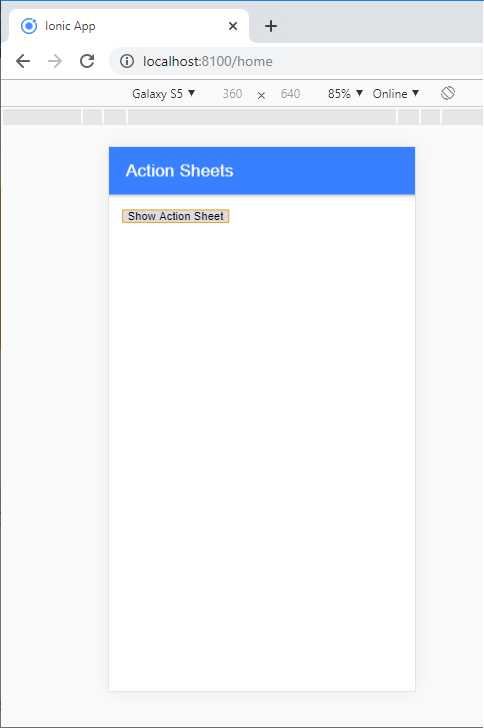
After executing this code

When you click on the show action sheet button, then it shows the below screen. When the button is clicked, the action sheet slide up from the bottom side, and the remainder of the page darkens to give more focus on the options of the action sheet.
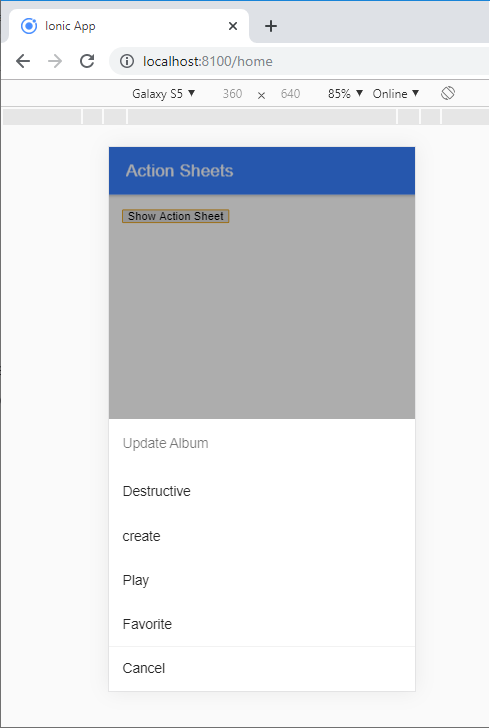
When you click on the show action sheet button

Ionic Actionsheet Controller

The Action sheet controllers programmatically control the action sheet element. You can create or dismiss the action sheets from the action sheet controller.

There are some other useful parameters in the $ionicActionSheet.show() method. The following table shows all the parameters of the action sheet.

Properties Type Description
Buttons Object It makes the button object with a text field.
cancelText String Text for the cancel button.
titleText String Title for the action sheet.
destructiveText String Text for the destructive button.
buttonClicked Function It calls when one of the buttons tapped. The index is used to keep track of which button is tapped. The action sheet will close when the return is true.
Cancel Function This function called when the cancel button, backdrop, or hardware back button is pressed.
destructiveButtonClicked Function Called when the destructive button pressed. The action sheet will be closed when the return is true.
cancelOnStageChange Function If this is true by default, it will cancel the action sheet when the navigation state is changed.

Related Topics

Ionic framework Installation

Installation of Ionic Before proceeding with the ionic application, you'll need to install node.js and NPM (Node Package Manager), the code editor, and Ionic CLI. Installation of node.js and NPM These are the primary...

5 minutes read.

Ionic Geolocation

In today’s time, the mobile location plays an essential role in the mobile application. The Ionic Cordova geolocation plugin provides information about the location of the device, like as latitude and longitude. The...

5 minutes read.

Ionic Camera

Hybrid mobile applications can make very quickly, but sometimes it becomes a challenge to get the features that access the hardware such as GPS, storage, file storage, cameras, and networks. Cordova offers plugins...

4 minutes read.

Ionic Date Time

Ionic Date Time The DateTime component is used to display an interface that makes it simple for users to select dates and times. Tapping on <ion-datetime> will display a slider up from the...

4 minutes read.

Ionic Grid

The Ionic grid is a very powerful mobile-first flexbox system for building the custom layouts. It is a CSS feature supported by all devices that ionic supports. The Ionic grid is composed of...

11 minutes read.

Ionic Slides

The ionic slides component is the multi-section container. You can swipe or drag any segment between them. This contains any number of slides components. Slides help it easy to make galleries, tutorials, and...

2 minutes read.

Ionic Alert

Ionic Alert An Alert is a dialog box that presents the users with important information, or it stores the data from the user by using the inputs. Alerts are a great way to provide...

5 minutes read.

Ionic List

Ionic List The ionic list is created of several rows of items that can contain text, buttons, thumbnails, keys, icons, and more. Lists are one of the essential components in any web or...

4 minutes read.

Ionic vs React Native

Ionic Vs React Native Ionic and React Native are both common framework which is used to develop mobile applications. Here, you will know about the popular differences between the ionic and the React Native. Ionic Ionic...

3 minutes read.

Ionic Infinite Scroll

The infinite scroll permits you to perform an action when the user scrolls a particular content from the bottom or top of the page. When you display the large collection of data...

3 minutes read.

Ionic Navigation and Routing

The latest version (ionic 4) of the ionic framework, no longer limited to the angular. In Ionic 4, you can create an ionic project in different front-end frameworks such as Vue.js, React.js, and...

6 minutes read.

Ionic Toggle

The toggle is the same as the HTML checkbox entry, but it looks different and easier to use on a touchscreen device. It is an input component that holds the boolean value. Toggle...

2 minutes read.

Ionic Toolbar

A toolbar is a general toolbar that can be used in an application such as a header, sub-header, footer, or even a sub-footer. Because the ion-toolbar is flexbox-dependent, no matter how many toolbars...

3 minutes read.

Ionic Radio

Ionic Radio The radio button is the type of input component that has a Boolean value. The Ionic radio button has a different pattern on every platform, as well as other Ionic components....

2 minutes read.

Ionic Modal

Ionic modal is displayed as a temporary UI that slides into the screen. The ionic modal is a dialog box that is displayed at the top of the app’s content, and it...

5 minutes read.

Ionic Contents

Ionic Contents The content component provides an easy-to-use content area with some useful ways to control the scrollable region. There should be only one content in one view. Content, along with several other Ionic...

2 minutes read.

Ionic progress bar

The ionic progress bar element is a horizontal progress bar used to visualize the progression of operation and activity. You can use the <ion-progress-bar> component to create a progress bar in the ionic...

4 minutes read.

Difference between Ionic 4 and Ionic 3

The ionic framework is an open-source platform that is used to develop mobile applications. It is also used to build android applications, desktop applications, iOS, and web applications using web technologies like HTML,...

5 minutes read.

Ionic Splash Screen

The Apache Cordova plugin helps to displays and hides a splash screen during the application launch. The Ionic Splash Screen is similar to a home page on a website. The ionic splash...

2 minutes read.

History of Ionic

It is a complete open-source platform for hybrid mobile application development created by Ben Sperry, Max Lynch, and Adam Bradley of Drifty Co. in 2013. The first alpha version of the framework was...

2 minutes read.