
×

Ionic Infinite Scroll

The infinite scroll permits you to perform an action when the user scrolls a particular content from the bottom or top of the page. When you display the large collection of data at once, then the infinite scroll is very useful.

You must require a way to display a large amount of data in a mobile application. In that case, the infinite scroll helps to display the content. For example, if you load the various items on the page, then you scroll the content and reach close to the bottom. The expression (ionInfinite) = “loadData($event)” set in the <ion-infinite-scroll> components are called when the user reaches close to the specified distance. When the expression has finished its all tasks, then it should call the complete() method on the infinite scroll instance.

You can use the <ion-infinite-scroll> component to create the infinite scroll in the ionic application. You can understand the ionic infinite scroll more clearly when you scroll the Twitter, Facebook, and Instagram news feed. The current page always loads the new news feeds on that current page, and you will see the loading spinner on the bottom of the view.

Ionic Infinite Scroll Content

The ion-infinite-scroll-content component is the child component of the <ion-infinite-scroll> component. It shows the infinite scroll spinner that looks good based on the platform, and it also changes the display based on the state of infinite scrolls. Infinite scroll provides the properties for scrolling, such as loadingSpinner and loadingText.

Note: The ion-infinite-scroll-content component is not supported in the ReactJS.

Example: This example explains how you can use the infinite scroll component in the ionic application.

Home.page.html

This file calls the event to show the infinite scroll content in the application. The [disabled] = “numTimesLeft <= 0” expression is used to stop the content scrolling. Here, you can also use the loading spinner and loading message, which shows the data when the method is called. You can use the loading spinner and loading text inside the <ion-infinite-scroll-content> component.

<ion-header>  
   <ion-toolbar color="primary">  
     <ion-title>Infinite Scroll Example</ion-title>  
   </ion-toolbar>  
 </ion-header>   
 <ion-content class="ion-padding" color="light">   
  <h1>Infinite Scroll</h1>
   <ion-list>  
     <ion-item *ngFor="let item of items"> {{item}} </ion-item>  
   </ion-list>  
   <ion-infinite-scroll threshold="110px" (ionInfinite)="loadData($event)" [disabled]="numTimesLeft <= 0">  
     <ion-infinite-scroll-content  
       loadingSpinner="circles"  
       loadingText="Loading Data.....">  
     </ion-infinite-scroll-content>  
   </ion-infinite-scroll>   
 </ion-content>   

Home.page.ts

In the Home.page.ts file, you can use the for-loop function to add the dummy items on a loading page. There are two methods used in this file. The loadData() method is called when the item list is reached at the bottom, and the complete() method is called to stop the loader, when the event is completed. Here, you can also set the setTimeout() method for loading the process to display the loading data.

import { Component} from
'@angular/core';  
 @Component({  
   selector: 'app-home',  
   templateUrl: 'home.page.html',  
   styleUrls: ['home.page.scss'],  
 })   
 export class HomePage {  
   items = [];  
   numTimesLeft = 4;  
   constructor() {   
     this.addMoreItems();  
   }  
   loadData(event) {  
     setTimeout(() => {  
       console.log('Done');  
       this.addMoreItems();   
       this.numTimesLeft -= 1;  
       event.target.complete();  
     }, 400);  
   }   
   addMoreItems() {  
     for (let i = 1; i < 12; i++) {  
       this.items.push(i);   
     }  
   }  
 }   

Output: After executing this code, you will get the output, as shown below:
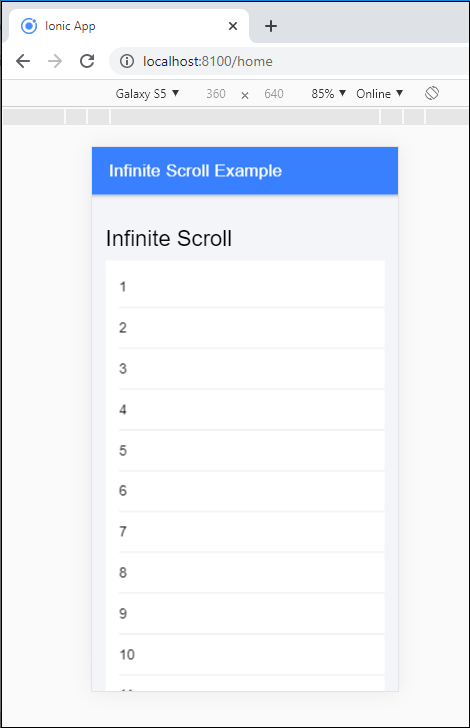
Ionic Infinite Scroll

When you reached the bottom of the page, then it starts loading process, and it displays more data at the page when you scroll. The output shows below:
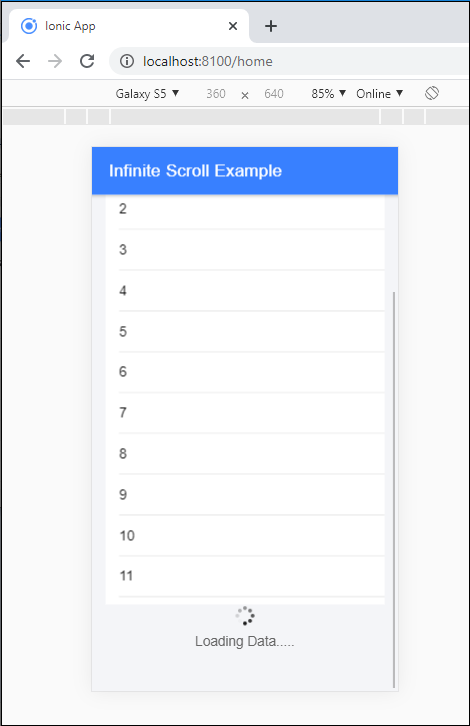
Ionic Infinite Scroll2

Related Topics

Ionic Splash Screen

The Apache Cordova plugin helps to displays and hides a splash screen during the application launch. The Ionic Splash Screen is similar to a home page on a website. The ionic splash...

2 minutes read.

Ionic Tabs

The ionic tabs mostly used for mobile navigation. It means that tabs are placed at the top of the display on android devices, while at the bottom on IOS. It does not provide...

2 minutes read.

Ionic Cards

Ionic Cards: Ionic cards are a standard part of the user interface that acts as an entry point for more specific information. These are the best components for displaying information...

4 minutes read.

Ionic Segment

A segment is a collection of buttons, sometimes which are known as segmented controls. The segment buttons are displayed at horizontal rows. These segment buttons can be shown in a toolbar or the...

2 minutes read.

Ionic Reorder

The Ionic offers the <ion-reorder> component to reordering features. Ionic reorder component adds the Drag and Drop feature to list items, in which the user can change the order of the items. Reorder...

3 minutes read.

Ionic Buttons

Ionic Buttons There are different types of buttons in the Ionic framework. These buttons are subtly animated, enhancing the user experience when using the application. Buttons are a fundamental way of interacting and navigating...

4 minutes read.

Ionic Select

The Ion Selection component is similar to the HTML <select> element. However, the Ionic Selection component makes it easy for users to categorize and choose the preferred option or other options. You must...

3 minutes read.

Ionic Editors

Editors are software programs that permit the users to create and edit the text files. In the development field, editors are usually used to create the source code editors that includes many specific...

3 minutes read.

Ionic Input

Ionic Input Inputs are necessary to collect and process user inputs securely. To be easy for users to communicate, they must follow the process and communication guidelines for each platform. It is a...

3 minutes read.

Ionic Geolocation

In today’s time, the mobile location plays an essential role in the mobile application. The Ionic Cordova geolocation plugin provides information about the location of the device, like as latitude and longitude. The...

5 minutes read.

Ionic Range

The Range slider lets users choose from a range of values by moving the slider knob. You can accept two knobs, but by default, one-knob controls the range value. Range labels You can put down on...

2 minutes read.

Ionic Toggle

The toggle is the same as the HTML checkbox entry, but it looks different and easier to use on a touchscreen device. It is an input component that holds the boolean value. Toggle...

2 minutes read.

History of Ionic

It is a complete open-source platform for hybrid mobile application development created by Ben Sperry, Max Lynch, and Adam Bradley of Drifty Co. in 2013. The first alpha version of the framework was...

2 minutes read.

Ionic Tutorial for Beginners

What is Ionic? Ionic is an open-source framework that is used for the development of mobile applications. It is also used to build android applications, iOS, applications, desktop applications, and web applications using web...

4 minutes read.

Ionic Grid

The Ionic grid is a very powerful mobile-first flexbox system for building the custom layouts. It is a CSS feature supported by all devices that ionic supports. The Ionic grid is composed of...

11 minutes read.

Ionic Alert

Ionic Alert An Alert is a dialog box that presents the users with important information, or it stores the data from the user by using the inputs. Alerts are a great way to provide...

5 minutes read.

Ionic Date Time

Ionic Date Time The DateTime component is used to display an interface that makes it simple for users to select dates and times. Tapping on <ion-datetime> will display a slider up from the...

4 minutes read.

Ionic Radio

Ionic Radio The radio button is the type of input component that has a Boolean value. The Ionic radio button has a different pattern on every platform, as well as other Ionic components....

2 minutes read.

Ionic Colors

Ionic Colors Before we start with the actual elements available in the Ionic frame, let's understand a little bit how Ionic uses colors for different elements. Ionic Color Classes Ionic framework is a set of nine predefined...

3 minutes read.

Ionic-fab Button

Ionic-fab Button The Ionic FABs (Floating Action Buttons) are standard material design compounds. It is a container element that contains one or more fab buttons. They are required to be placed in a fixed position,...

2 minutes read.