
×

Ionic Reorder

The Ionic offers the <ion-reorder> component to reordering features. Ionic reorder component adds the Drag and Drop feature to list items, in which the user can change the order of the items. Reorder can be used within the <ion-list> and <ion-item-group> to offer a visual drag and drop interface in the item list. The <ion-reader> is the anchor component used to drag and drop the items within the <ion-reorder-group> component.

When the user drags and drops the list of the items to the new position, then the ionItemReorder event is dispatched. The handler for the ion-reorder should be implemented, which calls the complete() method. The ionItemReorder event contains a different property that includes all the valid information about the reorder operation. It consists of the form and to indexes. In the case of reordering, the item moves from an index to a new index.

There are many functionalities of such sorting or reorder found in many places such as Song Ques, Todo list items, etc.

Example: This example explains how you can use the reorder component in the ionic application. It allows the user to drag and drop the items to a new position. Here, you are going to update the list items by calling the complete() method.

Home.page.html

This file contains the list items inside the <ion-reorder-group> component, which have an iteration of items array using angular *ngFor directive. In the <Ion-reorder-group> component, you have to set the disabled property at false, which enables the drag and drop feature in the ionic application. The ionItemReorder is that event, which enables them to complete the reordering of the items.

<ion-header>  
   <ion-toolbar color="primary">  
     <ion-title>Ionic Reorder Example</ion-title>  
   </ion-toolbar>  
 </ion-header>
 <ion-content class="ion-padding" color="light">  
   <ion-list>   
     <ion-reorder-group (ionItemReorder)="onRenderItems($event)" disabled="false">  
       <ion-item *ngFor="let item of listItems">  
         <ion-label>  
           {{item}}  
         </ion-label>  
         <ion-reorder></ion-reorder>  
       </ion-item>  
     </ion-reorder-group>  
   </ion-list>  
   <ion-list class="ion-text-center">  
     <ion-button (click)="getList()">Get Updated new List</ion-button>  
   </ion-list>  
 </ion-content>   

Home.page.ts

This file contains the implementation of the onRenderItems($event). It contains the index list from to the item dragged. By using the splice() method, you can remove and drag the item from top to bottom and bottom to up an array and assigns it to the variable draggedItem. Also that, it calls the complete() method to complete the reorder operation.

import { Component } from
'@angular/core';    
 @Component({  
   selector: 'app-home',  
   templateUrl: 'home.page.html',  
   styleUrls: ['home.page.scss'],  
 })  
 export class HomePage {  
   listItems: any;  
   constructor() {  
     this.listItems = [  
       'Java',   
       'Python',  
       'Node.js',  
       'Android',  
       'React.js',  
       'HTML',
       'PHP', 
       'C++'  
     ];  
   } 
   onRenderItems(event) {  
     console.log(`Move item from ${event.detail.from} to ${event.detail.to}`);   
     const draggedItem = this.listItems.splice(event.detail.from, 1)[0];  
     this.listItems.splice(event.detail.to, 0, draggedItem);   
     event.detail.complete();  
   }  
   getList() {  
     console.table(this.listItems);   
   }  
 }   

Output: After executing this code, you will get the output, as shown below:
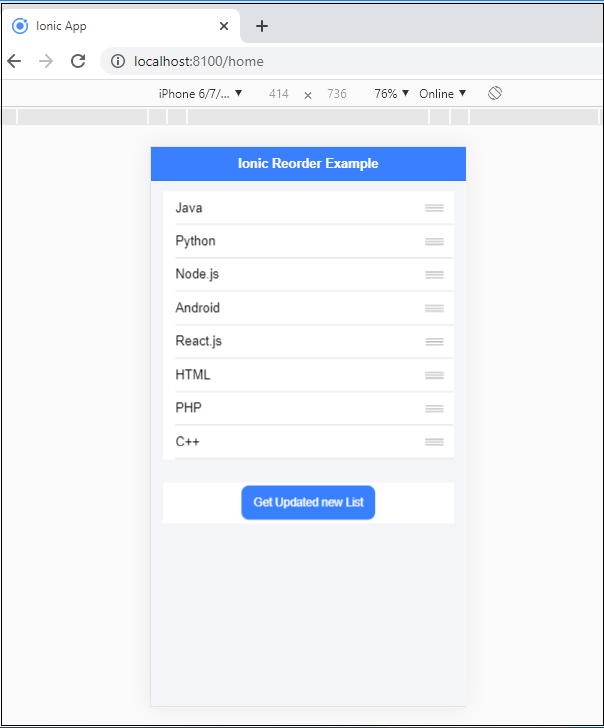
Ionic Reorder

When you dragged any item from the list and dropped it to the new position, which is shown below:
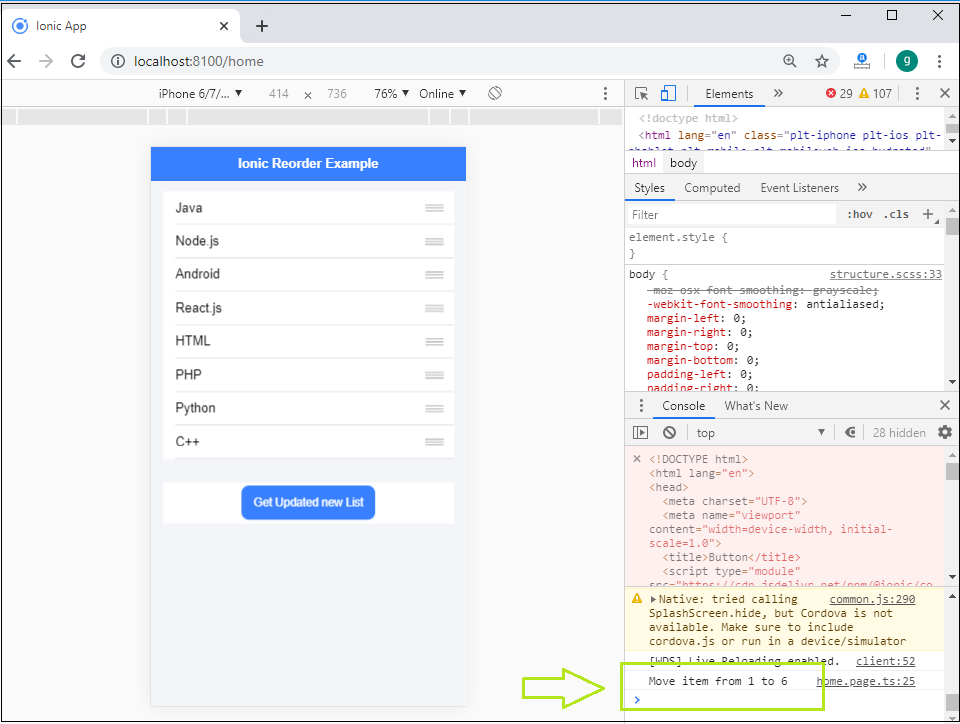
Ionic Reorder2

Related Topics

Ionic Actionsheet

Ionic Actionsheet The Action sheet is a dialog box that displays a group of options. It is shown on the top of the application content and must be dismissed manually before the user can resume...

3 minutes read.

Ionic Navigation and Routing

The latest version (ionic 4) of the ionic framework, no longer limited to the angular. In Ionic 4, you can create an ionic project in different front-end frameworks such as Vue.js, React.js, and...

6 minutes read.

Ionic Contents

Ionic Contents The content component provides an easy-to-use content area with some useful ways to control the scrollable region. There should be only one content in one view. Content, along with several other Ionic...

2 minutes read.

Ionic Slides

The ionic slides component is the multi-section container. You can swipe or drag any segment between them. This contains any number of slides components. Slides help it easy to make galleries, tutorials, and...

2 minutes read.

Ionic-fab Button

Ionic-fab Button The Ionic FABs (Floating Action Buttons) are standard material design compounds. It is a container element that contains one or more fab buttons. They are required to be placed in a fixed position,...

2 minutes read.

Ionic Select

The Ion Selection component is similar to the HTML <select> element. However, the Ionic Selection component makes it easy for users to categorize and choose the preferred option or other options. You must...

3 minutes read.

Ionic Reorder

The Ionic offers the <ion-reorder> component to reordering features. Ionic reorder component adds the Drag and Drop feature to list items, in which the user can change the order of the items. Reorder...

3 minutes read.

Ionic progress bar

The ionic progress bar element is a horizontal progress bar used to visualize the progression of operation and activity. You can use the <ion-progress-bar> component to create a progress bar in the ionic...

4 minutes read.

Ionic Radio

Ionic Radio The radio button is the type of input component that has a Boolean value. The Ionic radio button has a different pattern on every platform, as well as other Ionic components....

2 minutes read.

Ionic Cards

Ionic Cards: Ionic cards are a standard part of the user interface that acts as an entry point for more specific information. These are the best components for displaying information...

4 minutes read.

Ionic Chip

Ionic chip displays the complex entities in small entities in small blocks, such as the contacts. Ionic chip has several types of elements like avatars, thumbnails, text, and icons. It is a bubble-like...

3 minutes read.

Ionic Geolocation

In today’s time, the mobile location plays an essential role in the mobile application. The Ionic Cordova geolocation plugin provides information about the location of the device, like as latitude and longitude. The...

5 minutes read.

History of Ionic

It is a complete open-source platform for hybrid mobile application development created by Ben Sperry, Max Lynch, and Adam Bradley of Drifty Co. in 2013. The first alpha version of the framework was...

2 minutes read.

Features of Ionic Framework

The Ionic Framework is based on the AngularJS framework that permits a programmer to use a combination of many other programming languages, like HTML5, CSS, and JavaScript. Some of the...

4 minutes read.

Ionic Refresher

Refresher means updating the currently showing page so that the user can see the latest view. It is also known as re-loading in web technology. It provides a pull- to-refresh feature on a...

4 minutes read.

Ionic framework Installation

Installation of Ionic Before proceeding with the ionic application, you'll need to install node.js and NPM (Node Package Manager), the code editor, and Ionic CLI. Installation of node.js and NPM These are the primary...

5 minutes read.

Ionic Range

The Range slider lets users choose from a range of values by moving the slider knob. You can accept two knobs, but by default, one-knob controls the range value. Range labels You can put down on...

2 minutes read.

Ionic Popover

The Ionic popover is a small dialog box that displays at the top of the screen. It can be used for anything, but it is usually used for a button, an action,...

4 minutes read.

Ionic Segment

A segment is a collection of buttons, sometimes which are known as segmented controls. The segment buttons are displayed at horizontal rows. These segment buttons can be shown in a toolbar or the...

2 minutes read.

Ionic Camera

Hybrid mobile applications can make very quickly, but sometimes it becomes a challenge to get the features that access the hardware such as GPS, storage, file storage, cameras, and networks. Cordova offers plugins...

4 minutes read.