
×

History of Ionic

It is a complete open-source platform for hybrid mobile application development created by Ben Sperry, Max Lynch, and Adam Bradley of Drifty Co. in 2013. The first alpha version of the framework was released in November 2013, and the beta version (1.0) released in March 2014. The Latest release of Ionic is Ionic 4. Ionic 4 allows the user to select different frameworks other than Angular components such as Web, React.js, and Vue.js.

Ionic History
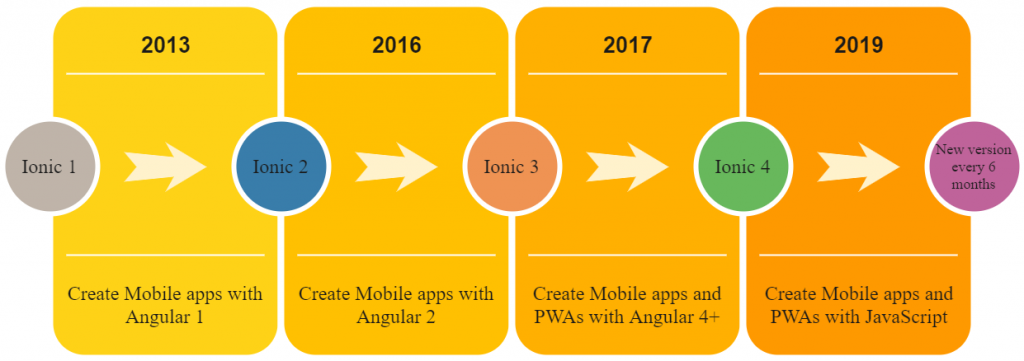
History of Ionic

Ionic 1: Ionic 1 was developed to create mobile apps with Angular 1. The Ionic 1 was released at the end of 2013. In the starting, it did not used a web component.

Ionic 2: Ionic 2 was the improving version of Ionic 1. It was introduced in the year 2016. It was also used to create mobile apps with Angular 2. Angular 2 is the improved version of Angular, which is entirely different from Angular 1. It provides only the Angular component, not the web component.

Ionic 3: Ionic 3 was introduced in the year 2017. It is continuing with the previous Angular by adding some new features. It is a new version of Angular. It does not allow a native mobile app to be developed, but it allows to use of vue.js or react.js framework.

Ionic 4: Ionic 4 is introduced in the year 2019. The Ionic 4 components are currently being ported to web components. You can use web components wherever they are supported, i.e., in all major modern web browsers. You can use Ionic 4 with any framework such as JavaScript, Angular, React, Vue.js, jQuery, and Stencil to build native mobile applications and Progressive Web Apps ( PWAs ).

Every latest version of the Ionic Framework will be released in every six months with some improvements. These latest versions do not change your whole concept, which you had previously learned in the Ionic.


Related Topics

Ionic vs React Native

Ionic Vs React Native Ionic and React Native are both common framework which is used to develop mobile applications. Here, you will know about the popular differences between the ionic and the React Native. Ionic Ionic...

3 minutes read.

Ionic Loading

The ionic loader is an overlay that can be used to indicate activity, the user interaction while blocking. The ionic loader shows on the top of the app content, and it can...

5 minutes read.

Ionic Colors

Ionic Colors Before we start with the actual elements available in the Ionic frame, let's understand a little bit how Ionic uses colors for different elements. Ionic Color Classes Ionic framework is a set of nine predefined...

3 minutes read.

Ionic Toolbar

A toolbar is a general toolbar that can be used in an application such as a header, sub-header, footer, or even a sub-footer. Because the ion-toolbar is flexbox-dependent, no matter how many toolbars...

3 minutes read.

Ionic Select

The Ion Selection component is similar to the HTML <select> element. However, the Ionic Selection component makes it easy for users to categorize and choose the preferred option or other options. You must...

3 minutes read.

Ionic-fab Button

Ionic-fab Button The Ionic FABs (Floating Action Buttons) are standard material design compounds. It is a container element that contains one or more fab buttons. They are required to be placed in a fixed position,...

2 minutes read.

Ionic Modal

Ionic modal is displayed as a temporary UI that slides into the screen. The ionic modal is a dialog box that is displayed at the top of the app’s content, and it...

5 minutes read.

Ionic Tutorial for Beginners

What is Ionic? Ionic is an open-source framework that is used for the development of mobile applications. It is also used to build android applications, iOS, applications, desktop applications, and web applications using web...

4 minutes read.

Ionic vs PhoneGap

Ionic Vs PhoneGap Ionic and PhoneGap are both used to develop the mobile application. Both Frameworks are used in large enterprises by the developers. Here, we are going to compare the important differences between ionic...

3 minutes read.

Ionic Reorder

The Ionic offers the <ion-reorder> component to reordering features. Ionic reorder component adds the Drag and Drop feature to list items, in which the user can change the order of the items. Reorder...

3 minutes read.

Ionic List

Ionic List The ionic list is created of several rows of items that can contain text, buttons, thumbnails, keys, icons, and more. Lists are one of the essential components in any web or...

4 minutes read.

Ionic Splash Screen

The Apache Cordova plugin helps to displays and hides a splash screen during the application launch. The Ionic Splash Screen is similar to a home page on a website. The ionic splash...

2 minutes read.

Ionic Actionsheet

Ionic Actionsheet The Action sheet is a dialog box that displays a group of options. It is shown on the top of the application content and must be dismissed manually before the user can resume...

3 minutes read.

Ionic Radio

Ionic Radio The radio button is the type of input component that has a Boolean value. The Ionic radio button has a different pattern on every platform, as well as other Ionic components....

2 minutes read.

Ionic framework Installation

Installation of Ionic Before proceeding with the ionic application, you'll need to install node.js and NPM (Node Package Manager), the code editor, and Ionic CLI. Installation of node.js and NPM These are the primary...

5 minutes read.

Ionic Input

Ionic Input Inputs are necessary to collect and process user inputs securely. To be easy for users to communicate, they must follow the process and communication guidelines for each platform. It is a...

3 minutes read.

Ionic Slides

The ionic slides component is the multi-section container. You can swipe or drag any segment between them. This contains any number of slides components. Slides help it easy to make galleries, tutorials, and...

2 minutes read.

Ionic Popover

The Ionic popover is a small dialog box that displays at the top of the screen. It can be used for anything, but it is usually used for a button, an action,...

4 minutes read.

Ionic Cards

Ionic Cards: Ionic cards are a standard part of the user interface that acts as an entry point for more specific information. These are the best components for displaying information...

4 minutes read.

Ionic Range

The Range slider lets users choose from a range of values by moving the slider knob. You can accept two knobs, but by default, one-knob controls the range value. Range labels You can put down on...

2 minutes read.