
Ionic Loading
The ionic loader is an overlay that can be used to indicate activity, the user interaction while blocking. The ionic loader shows on the top of the app content, and it can be dismissed by the app to resume when the user interacts with the application. By default, it displays a spinner based on the setting mode. Dynamic content can be passed and shows with the loading spinner. It can include an optional backdrop, which can be hidden by the setting ShowBackdrop: false upon the creation.
The ionic loading has two methods, i.e., Create and Dismiss
Create
The Loading controller can create loading indicators. By loading controller’s create() method, it can be customized by passing loading options. Any other optional HTML can be passed in the content property, and the spinner also is defined in the spinner property. If the value or argument is not passed to a spinner, the loading indicator will use the spinner specified by the platform. To set the spinner name in the ionic application, you are required to set the value of loadingspinner in your app’s configuration. To disable the spinner, you can set the loadspinner: ‘hide’ in the app’s configuration or specify spinner: ‘hide’ in the loading options.
Dismiss
This Dismiss method is used to hide the loader. The loading indicator can be dismissed automatically after a specific amount of time by passing the duration of the loading options. The loading indicator will display during the page changes by default, but it can hide by the setting dismissOnPageChange for true value. The loading indicator dismisses after its creation, and then you need to call the dismiss () method on the loading instance. It can also call the onDidDismiss function to act after the loading indicator is dismissed.
Example: This example explains how you can use the dismiss() or create() method in the ionic loader.
showHideLoader() {
     this.loadingCtrl.create({
       message: 'This Loader Will Auto Hide in four Seconds',
       duration: 4000
     }).then((res) => {
       res.present();
     res.onDidDismiss().then((dis) => {
       console.log('Loading dismissed! after four Seconds');
     });
   });
 }
In some cases, you may require a different show and hide methods like as in the server API call. You can see all the methods in the given example.
 showLoader()
{
     this.loaderToShow = this.loadingCtrl.create({
       message: 'Loader will Not Hide'
     }).then((res) => {
       res.present();
       res.onDidDismiss().then((dis) => {
         console.log('Loading dismissed!');
       });
     });
     this.hideLoader();
   }
   hideLoader() {
     setTimeout(() => {
       this.loadingCtrl.dismiss();
     }, 5000);
   }
 }
There are some loading options parameters that are as follows:
| Options | Type | Description |
| spinner | string | It is used to change the default spinner style. |
| Content | string | It is used to load HTML content as a loading indicator. |
| cssClass | string | Additional classes to apply for custom styles. When the multiple classes are provided, they should be separated by spaces. |
| showBackdrop | boolean | If it is true, the backdrop will be shown behind the loading indicator. |
| BackdropDismiss | boolean | If it is true, the loading indicator will be dismissed when the backdrop clicked. |
| Duration | number | It is used to give the time duration in a millisecond to auto-hide the loader. |
| Message | String | It is used to optimal text content to show in the loading indicator. |
Example: This example explains how you can use the loading component in the ionic application.
Home.page.html
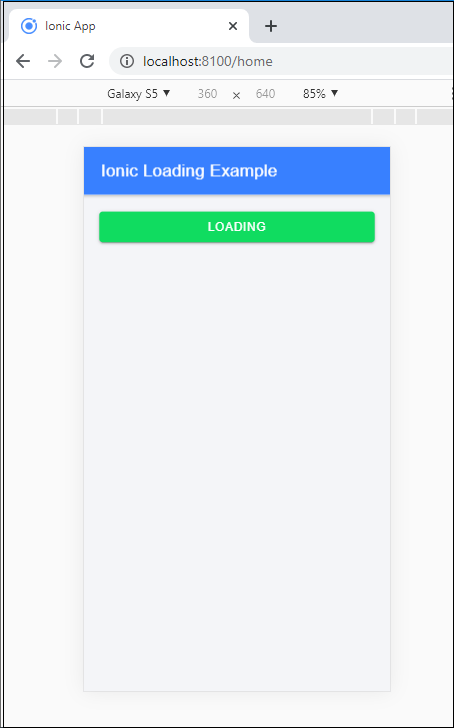
This file is providing the user interface, and here you create the events to represent the loading controller. For doing this, you are required to create a button inside the <ion-content> component, when the user clicks on that button in response, you will display the loading controller.
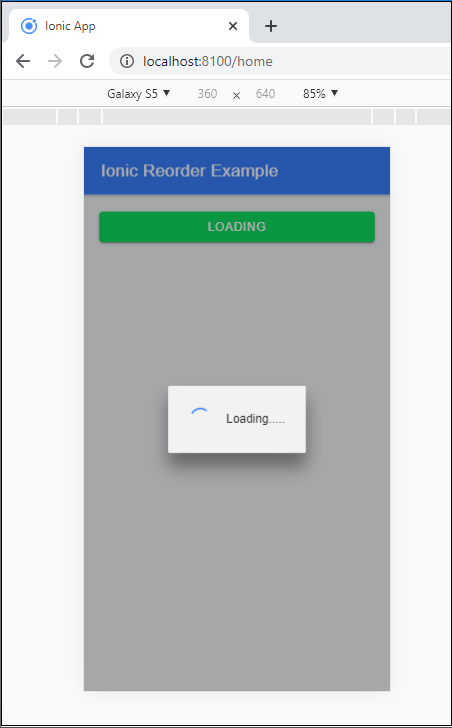
When the user clicks on the button, it will call the showLoading() function. This function provides a code to display the loading controller's time limit. When the time completes, which was set by the user, then the loading controller will be dismissed.
<ion-header>
   <ion-toolbar color="primary">
     <ion-title>Ionic Loading Example</ion-title>
   </ion-toolbar>
 </ion-header>
 <ion-content class="ion-padding" color="light">
   <ion-button expand="block" color="success" (click)="showLoading()">Loading</ion-button>
 </ion-content>
Home.page.ts
If you want to use a loading component, then you have to import the loading controller. To call the loading controller, you are required to create a constructor inside the class. Create a showLoading() function to show the loading controller to the user.
To dismiss the loading controller, you need to create a dismiss() function. If you want to set the time duration for dismissing the loading controller, then you have to create the setTimeout() function.
import { Component } from
'@angular/core';
 import { LoadingController } from '@ionic/angular';
 @Component({
   selector: 'app-home',
   templateUrl: 'home.page.html',
   styleUrls: ['home.page.scss'],
 })
 export class HomePage {
   loaderToShow: any;
   constructor(public loadingCtrl: LoadingController) {}
 showLoading() {
   this.loadingCtrl.create({
     message: 'Loading.....'
     }).then((loading) => {
      loading.present();{
     }
      setTimeout(() => {
        loading.dismiss();
      }, 4000 );
     });
   }
 }
Output: After executing this code, you will get the output, which is shown below:
When you click on the loading button, it will start showing the loading indications, as shown below:
By using the await and async, you can write the show and hide function in another way. The following code explains how you can use it in another way.
By using Async and Await:
export class HomePage {
   loaderToShow: any;
   constructor(public loadingCtrl: LoadingController) {}
   async showLoading() {
     const loading = await this.loadingCtrl.create({
     message: 'Loading.....'
     });
     loading.present();
     setTimeout(() => {
       loading.dismiss();
     }, 8000 );
  }
 }