
JavaFX Architecture
JavaFX architecture consists of many built-in components such as JavaFX public API, Scene Graph, Quantum Toolkit, Prism, Glass windowing toolkit, web view, media engines. These components help to develop rich GUI applications with advanced properties.
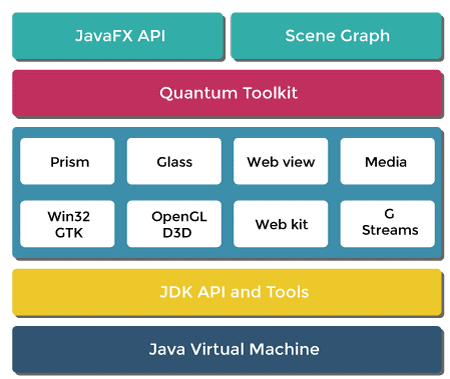
1. JavaFX public API:
It consists of all the classes and interfaces required to run the JavaFX applications. It is the topmost layer in the architecture. Some of the packages are:
- javafx.application:
All the application life cycle methods are provided by this package.
- javafx.animation:
Transitions and animations are performed by using this package.
- javafx.collections:
This package provides collections and utilities required for JavaFX
- javafx.event:
This package provides classes that work with event handling
- javafx.fxml:
The classes which provide a hierarchy of mark-up are available in this package
- javafx.scene:
This package provides support for scene graph javafx API
- javafx.geometry:
This package provides all the classes required for 2D geometry
- javafx.util:
All the utilities classes are present in this package
2. Scene Graph:
While constructing the javafx application we always start with scene graph API. All the graphical elements of the user interface are the nodes of this tree. Event handling is also done with this scene graph. Each node of the scene graph has its own id, volume, and style. The node in the scene graph has only one parent. It can have zero or more children. The implementation that we perform on the scene graph is applied to nodes in it. Various packages like javafx.scene.media, javafx.scene.paint, javafx.scene.layout, javafx.scene.input, javafx.scene.shape allows to create and generate various transformations and animation in JavaFX applications. Each node in Scene Graph have:
A] Geometrical Objects: It includes all the 2D and 3D shapes such as rectangle, circle, and polygon.
B] UI Controls: Various UI components such as the text area, checkbox button comes under UI controls.
C] Containers: Border, grid, flow pane are some layout pane available in the JavaFX containers.
3. Graphics Engine:
Graphics support for the scene graph is provided by the Graphics Engine. Two-dimensional, as well as Three-dimensional graphics, is supported by this component. When hardware-accelerated rendering is not available it provides software rendering.
4. Quantum Toolkit:
Quantum Toolkit combines prism and glass windowing toolkit and then it will be made available to upper layers in the stack. Prism and glass windowing toolkit is made available together to javafx using this.
5. Prism:
Hardware-accelerated graphics pipeline having the high performance is provided to JavaFX applications is made available using a prism. It provides 2D as well as 3D graphics rendering. It uses different ways on different platforms such as OpenGL on Mac, Linux, and DirectX on Windows 7. When the hardware acceleration is not possible, it provides java 2D. When hardware acceleration is not possible it supports software render path. When prism functionality is used with the GPU it supports smoother graphics.
6. Glass windowing Toolkit:
It is also known as GWT. Glass Windowing Toolkit is the last level of the JavaFX stack. It is platform-dependent and interfaces between JavaFX and the native Operating System. All the services of the Operating System such as handling the windows, event queues, timers are the responsibility of the Glass Windowing Toolkit. It provides the connection between our JavaFX application and Operating System for further communication.
7. Web View:
HTML content can be embedded in the JavaFX application. This facility is made available using the Web View component of JavaFX. The Web kit is used by Web View which supports the use of HTML5, CSS, JavaScript, DOM, and SVG. Using Web View we can use various HTML components in the JavaFX application with some CSS style applied to it for advanced Graphics User Interface (GUI).
8. Media Engine:
All the audio-video playback and media files in the JavaFX application. The Media Engine used in the JavaFX application is dependent upon G Streamer. All the classes and interfaces required for media function in JavaFX are provided by javafx.scene.media. Various audio format such as MP3, WAV, AIFF, and video format like FLC is supported by JavaFX Media Engine. JavaFX media package provides the functionality with the help of the three components:
A] Media Object: Media file is represented using Media Object.
B] Media Player: Media content is played using Media Player
C] Media View: In order to display media, Media view is used.